# Doubleclick creatives
Most of the times doubleclick ad creatives are without click\_url placeholder, example:
---
```javascript
```
In such case in the end of the JS tag you need to **click={click\_url}**, example:
```javascript
```
Also, it's very important to remove **$** before the **GDPR** macros, as they break them witch causes any tracking to break as well (Also **{GDPR\_CONSENT\_755}** macro has to be changed to {**GDPR\_CONSENT}**).
After these changed always validate if the redirections happens correctly:
1. Get [Redirect path](https://chromewebstore.google.com/detail/redirect-path/aomidfkchockcldhbkggjokdkkebmdll) extension for your browser.
2. Launch a test campaign with the updated tag on [https://display.eskimi-creatives.com/](https://display.eskimi-creatives.com/) (Eskimi Standar exchange, only for Display And IBV).
3. Catch the ad live and click on it.
4. After the redirections open the Redirect Path extension and check the redirection path:[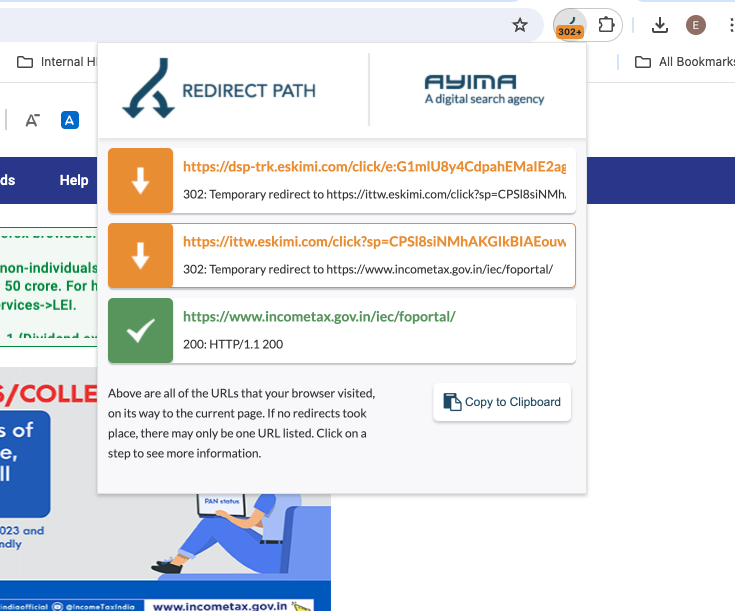](https://manual.eskimi.com/uploads/images/gallery/2024-07/dlegznXILxlan5mi-image.png)
5. If it goes through Eskimi server, it's working as expected.
6. Double check the tests campaigns report to see if the clicks are really being collected.