# Additional Creative Formats

# Static Banners (standard display)

#### **What is banner (standard display)?**

Display ads attract the users of a site, social network, or other digital channels to perform a particular action. They are often composed of image, textual, or video ads that stimulate the customer to click on them and reach a landing page where they can take the desired action (such as buy your product).

Display ads also work well for retargeting campaigns, where advertisements are shown to viewers who’ve already viewed a particular site. The purpose is to “retarget” them and stimulate them to revisit the site to perform an action.

---

#### **Requirements**

Banner size - maximum size of the banner is 150 kb

Format - .png, .jpg/.gif

---

#### **Most popular sizes**

**Mobile (dimensions in pixels)**

320x480, 300x250, 300x600, 250x250, 200x200, 300x100, 468x60, 320x50, 300x50

**Desktop (dimensions in pixels)**

300x250, 728x90, 250x250, 300x600, 160x600, 120x600, 336x280, 970x90, 970x250

---

#### **Uploading banner**

**Step 1:** Log in to your DSP account, go to Creative Sets, and on the new page click "Add creative set".

**Step 2:** On the next page indicate the creative set's Title and select the "Banner" format.

**Uploading banner creatives**

First, choose the type of your banner:

- <span class="wysiwyg-color-blue">Upload banners</span> - these are simple images that you can upload from your computer to DSP.
- <span class="wysiwyg-color-blue">Remote banners<span class="wysiwyg-color-black"> - these are banners that you can upload from an outside server (eg. http://creative.get.me/abc.jpg?timestamp={timestamp} ) Remote banners must comply with ad exchange policies and technical requirements, and they're supposed to have a timestamp at the end of their address.</span></span>
- <span class="wysiwyg-color-blue">Javascript tag</span> - these are HTML rich media format banners. Note that these ad servers must support https, comply with ad exchange policies, and technical requirements.

After selecting the desired creative format, click "Continue". And you will be greeted with the upload screen. Indicate the Title of the creative, and select the file you want to upload. After that click "Save".

#### **Examples**

[![image-1611926408394.png](https://manual.eskimi.com/uploads/images/gallery/2021-01/scaled-1680-/image-1611926408394.png) ](https://manual.eskimi.com/uploads/images/gallery/2021-01/image-1611926408394.png)![image-1611926430624.png](https://manual.eskimi.com/uploads/images/gallery/2021-01/scaled-1680-/image-1611926430624.png)

<span class="s1">320x480 300x250</span>

[![image-1611926443861.png](https://manual.eskimi.com/uploads/images/gallery/2021-01/scaled-1680-/image-1611926443861.png) ](https://manual.eskimi.com/uploads/images/gallery/2021-01/image-1611926443861.png)[![image-1611926519624.png](https://manual.eskimi.com/uploads/images/gallery/2021-01/scaled-1680-/image-1611926519624.png)](https://manual.eskimi.com/uploads/images/gallery/2021-01/image-1611926519624.png)

<span class="s1">300x600 250x250</span>

[![image-1611926542220.png](https://manual.eskimi.com/uploads/images/gallery/2021-01/scaled-1680-/image-1611926542220.png) ](https://manual.eskimi.com/uploads/images/gallery/2021-01/image-1611926542220.png)[![image-1611926561831.png](https://manual.eskimi.com/uploads/images/gallery/2021-01/scaled-1680-/image-1611926561831.png)](https://manual.eskimi.com/uploads/images/gallery/2021-01/image-1611926561831.png)

200x200 300x100

[![image-1611926650033.png](https://manual.eskimi.com/uploads/images/gallery/2021-01/scaled-1680-/image-1611926650033.png)](https://manual.eskimi.com/uploads/images/gallery/2021-01/image-1611926650033.png)

<span class="s1">728x90</span>

[![image-1611926578201.png](https://manual.eskimi.com/uploads/images/gallery/2021-01/scaled-1680-/image-1611926578201.png) ](https://manual.eskimi.com/uploads/images/gallery/2021-01/image-1611926578201.png)[![image-1611926613172.png](https://manual.eskimi.com/uploads/images/gallery/2021-01/scaled-1680-/image-1611926613172.png)](https://manual.eskimi.com/uploads/images/gallery/2021-01/image-1611926613172.png)

<span class="s1">468x60 320x50</span>

[![image-1611926630117.png](https://manual.eskimi.com/uploads/images/gallery/2021-01/scaled-1680-/image-1611926630117.png)](https://manual.eskimi.com/uploads/images/gallery/2021-01/image-1611926630117.png)

300x50

# Lead In Banner

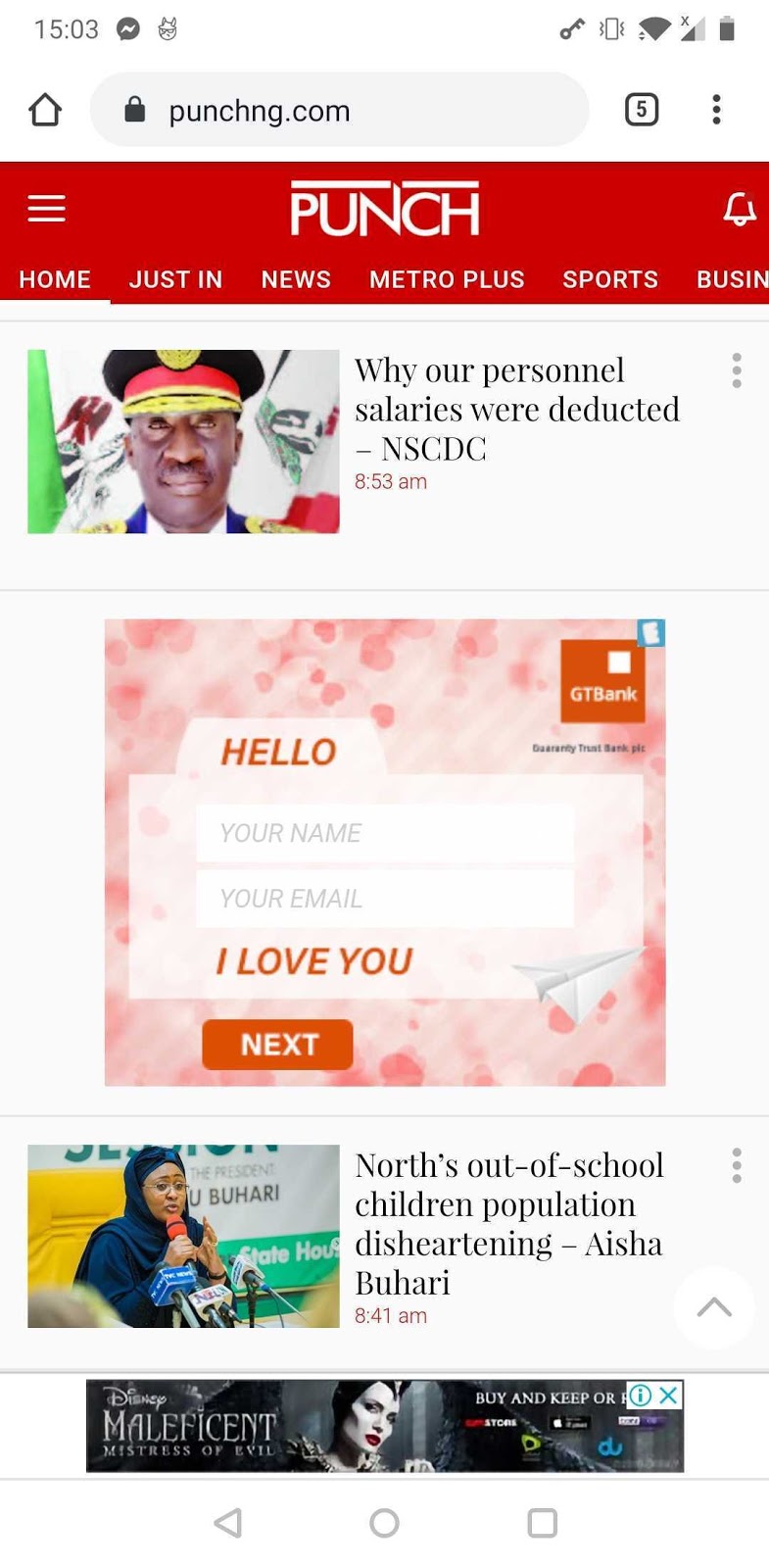
**Leads-in-banner** is a solution where leads form is embedded into the display ad which can be served both on the web and apps. Users can fill the leads form directly through the banner while their answers are collected into **Eskimi database**.

---

#### **Requirements**<button class="sc-jUpvKA ezvfWN"><svg focusable="false" height="24" role="presentation" viewbox="0 0 24 24" width="24"></svg></button>

The client should share a .psd file, leads form that should be embedded into the creatives. Keep in mind that **creative development should be billed** as well with the advertising. The development should be discussed with the Rich Media team.

Leads-in-banner conversion tracking can be done through even tagging. Request development to add **Filled event** on a button which should indicate that the leads form is filled.

**Media buying will still be done in CPM** while currently CPA planning cannot be done due to the low amount of data. CPM price should be planned similar to HTML banner or slightly higher as not all exchanges will be selected.

**Some answers can be placed as a button** - to execute a survey.

---

#### **Exchanges**<button class="sc-jUpvKA ezvfWN"><svg focusable="false" height="24" role="presentation" viewbox="0 0 24 24" width="24"></svg></button>

It is possible to run leads-in-banner on bellow exchanges. We have written confirmation from all of them.

<div id="bkmrk-open-rtb-deals-doubl"><div><div data-layout="default"><div><table data-number-column="false"><colgroup><col></col><col></col></colgroup><tbody><tr><th class="ak-renderer-tableHeader-sortable-column" colspan="1" data-colwidth="340" rowspan="1">**Open RTB**

<figure class="ak-renderer-tableHeader-sorting-icon ak-renderer-tableHeader-sorting-icon__no-order"><div><figure class="sc-drlKqa dwxNLo"><div>  
</div></figure></div></figure></th><th class="ak-renderer-tableHeader-sortable-column" colspan="1" data-colwidth="340" rowspan="1">**Deals**

<figure class="ak-renderer-tableHeader-sorting-icon ak-renderer-tableHeader-sorting-icon__no-order"><div><figure class="sc-drlKqa dwxNLo"><div>  
</div></figure></div></figure></th></tr><tr><td colspan="1" data-colwidth="340" rowspan="1">DoubleClick

</td><td colspan="1" data-colwidth="340" rowspan="1">Algorix

</td></tr><tr><td colspan="1" data-colwidth="340" rowspan="1">OpenX

</td><td colspan="1" data-colwidth="340" rowspan="1">Inmobi

</td></tr><tr><td colspan="1" data-colwidth="340" rowspan="1">BidSwitch

</td><td colspan="1" data-colwidth="340" rowspan="1">Gamma

</td></tr><tr><td colspan="1" data-colwidth="340" rowspan="1">Rubicon

</td><td colspan="1" data-colwidth="340" rowspan="1"></td></tr><tr><td colspan="1" data-colwidth="340" rowspan="1">Mopub

</td><td colspan="1" data-colwidth="340" rowspan="1"></td></tr></tbody></table>

---

</div></div></div></div>#### **Example of Data Based** <button class="sc-jUpvKA ezvfWN"><svg focusable="false" height="24" role="presentation" viewbox="0 0 24 24" width="24"></svg></button>

This is how leads are collected into our database. However, data can be transferred to clients' data based **through API**. The client must have an API.

<div id="bkmrk--2"><div data-layout="wide" data-node-type="mediaSingle" data-width="100"><div data-collection="contentId-1387888770" data-context-id="1387888770" data-file-mime-type="image/jpeg" data-file-name="Capture.JPG" data-file-size="95405" data-height="163" data-id="8128b8a3-fffe-4863-b0df-edf04d8d6d80" data-node-type="media" data-type="file" data-width="2803"><div data-testid="media-card-view"><div data-test-media-name="Capture.JPG" data-test-progress="1" data-test-status="complete" data-testid="media-file-card-view">[![Capture.JPG](https://manual.eskimi.com/uploads/images/gallery/2021-03/scaled-1680-/xfacapture.JPG)](https://manual.eskimi.com/uploads/images/gallery/2021-03/xfacapture.JPG)</div>---

</div></div></div></div>#### **Value Proposition**<button class="sc-jUpvKA ezvfWN"><svg focusable="false" height="24" role="presentation" viewbox="0 0 24 24" width="24"></svg></button>

  
**Reduce drop-offs:** As users are not leaving their browsing environment they are more likely to fill the form rather than visit the website.

**Conversions**: Increase conversions that can be collected without the users to leave their browsing environment.

**Mobile**: Pre-populated forms means people can submit their contact information with ease, even on the small screen.

**API integration**: Data can be transferred to the clients' database through API.

---

#### **Scale**<button class="sc-jUpvKA ezvfWN"><svg focusable="false" height="24" role="presentation" viewbox="0 0 24 24" width="24"></svg></button>

**Brands**: Offer leads in banner solutions that are oriented to leads - real-estate, banks and etc.

**Execution**: Create unique, out of the box creative solutions that would be beneficial for upselling.

**Events**: Use this solution to collect contacts during various events such as Valentine's day.

**SSP + OpenRTB:** Combine this solution with SSP for better visibility.

---

#### **API documentation**

```c-mrkdwn__pre
Survey statistics API
Endpoint
https://stats.eskimi.com/apis/{api_client}/
Parameters (GET)
api_key (string) - api key provided by Eskimi. Example: 1234567890abcdef
survey (int) - survey ID provided by Eskimi. Example: 12345
type (int) - data type (required). Example: 2
  1 - general statistics
  2 - questions/answers list
  3 - questions/answers statistics
  4 - answers log
format (string) - data output format (optional, default csv). Example: json
  csv - csv
  csvdownload - csv file download
  json - json
  table - text table
  tablepre - text table (html preformatted)
P&G API details
api_client - pg
api_key - Gynu2M425v9pPYVwjtjq7U6ekTLZr4XP
Sample requests
https://stats.eskimi.com/apis/pg/?api_key=Gynu2M425v9pPYVwjtjq7U6ekTLZr4XP&survey=10048&type=1&format=tablepre
https://stats.eskimi.com/apis/pg/?api_key=Gynu2M425v9pPYVwjtjq7U6ekTLZr4XP&survey=10048&type=2&format=tablepre
https://stats.eskimi.com/apis/pg/?api_key=Gynu2M425v9pPYVwjtjq7U6ekTLZr4XP&survey=10048&type=3&format=tablepre
https://stats.eskimi.com/apis/pg/?api_key=Gynu2M425v9pPYVwjtjq7U6ekTLZr4XP&survey=10048&type=4&format=tablepre
```

---

#### **Example:**<button class="sc-jUpvKA ezvfWN"><svg focusable="false" height="24" role="presentation" viewbox="0 0 24 24" width="24"></svg></button>

<div id="bkmrk--0"><div data-layout="align-start" data-node-type="mediaSingle" data-width="31"><div data-collection="contentId-1387888770" data-context-id="1387888770" data-file-mime-type="image/jpeg" data-file-name="YzREIDhY4BLJzj7k27TSSlYHeJPz2TLkPiOn4A7V0crgZlPzX3Gk5DOgXoUuLoqZdBjahM3NBRAcXQvjC52SGM8RJVWxuK-qZaXCYqVbcPRyt3xVLHxBWCvlqh_ruqkzv-DEo9VQo9M" data-file-size="165544" data-height="1600" data-id="d69a6a47-0e65-4881-bf99-2538e218b062" data-node-type="media" data-type="file" data-width="785"><div data-testid="media-card-view"><div data-test-media-name="YzREIDhY4BLJzj7k27TSSlYHeJPz2TLkPiOn4A7V0crgZlPzX3Gk5DOgXoUuLoqZdBjahM3NBRAcXQvjC52SGM8RJVWxuK-qZaXCYqVbcPRyt3xVLHxBWCvlqh_ruqkzv-DEo9VQo9M" data-test-progress="1" data-test-status="complete" data-testid="media-file-card-view">[![YzREIDhY4BLJzj7k27TSSlYHeJPz2TLkPiOn4A7V0crgZlPzX3Gk5DOgXoUuLoqZdBjahM3NBRAcXQvjC52SGM8RJVWxuK-qZaXCYqVbcPRyt3xVLHxBWCvlqh_ruqkzv-DEo9VQo9M.jpg](https://manual.eskimi.com/uploads/images/gallery/2021-03/scaled-1680-/yzreidhy4bljzj7k27tsslyhejpz2tlkpion4a7v0crgzlpzx3gk5dogxouuloqzdbjahm3nbracxqvjc52sgm8rjvwxuk-qzaxcyqvbcpryt3xvlhxbwcvlqh-ruqkzv-deo9vqo9m.jpg)](https://manual.eskimi.com/uploads/images/gallery/2021-03/yzreidhy4bljzj7k27tsslyhejpz2tlkpion4a7v0crgzlpzx3gk5dogxouuloqzdbjahm3nbracxqvjc52sgm8rjvwxuk-qzaxcyqvbcpryt3xvlhxbwcvlqh-ruqkzv-deo9)</div><div data-test-media-name="YzREIDhY4BLJzj7k27TSSlYHeJPz2TLkPiOn4A7V0crgZlPzX3Gk5DOgXoUuLoqZdBjahM3NBRAcXQvjC52SGM8RJVWxuK-qZaXCYqVbcPRyt3xVLHxBWCvlqh_ruqkzv-DEo9VQo9M" data-test-progress="1" data-test-status="complete" data-testid="media-file-card-view">  
</div></div></div></div></div>

# Interscroller banner

**Interscroller** – this banner will be inserted in the content (text) and will appear in the internal pages, not the home screens. It scrolls together with the screen scrolling as the natural part of the text.

**<u>Features and requirements</u>**:

- **Mobile** is highly recommended. The banner is significantly less effective on the desktop.
- **Banner has 2 sizes:**
    - **Small 300x250**. Supported and in usage at the moment.
    - **Big 500x800**. Gives the impression that the banner is a screen takeover type. Will be released later in 2020.
- The banner image should be **.png** (preferable for the higher quality) or .jpg. And include text and CTA button on it.
- The **key message** or **CTA button** should be provided in the middle of the banner – to be seen during the whole scroll. Please see the samples below:

[![image-1610541409714.png](https://manual.eskimi.com/uploads/images/gallery/2021-01/scaled-1680-/image-1610541409714.png)](https://manual.eskimi.com/uploads/images/gallery/2021-01/image-1610541409714.png)

[![image-1610541424991.png](https://manual.eskimi.com/uploads/images/gallery/2021-01/scaled-1680-/image-1610541424991.png)](https://manual.eskimi.com/uploads/images/gallery/2021-01/image-1610541424991.png)

[![image-1610541591422.png](https://manual.eskimi.com/uploads/images/gallery/2021-01/scaled-1680-/image-1610541591422.png)](https://manual.eskimi.com/uploads/images/gallery/2021-01/image-1610541591422.png)

- Interscroller banner sample (check only on **MOBILE**): [https://business.eskimi.com/interscroller-demo/](https://business.eskimi.com/interscroller-demo/).