| Area | What you can do |
|---|---|
| Campaigns | Create and update banner, native and video campaigns; start, stop and delete them; read their status; change budget pacing (Even or None) without touching any other setting. |
| Optimisation | Read campaign optimisation data, and start or stop delivery by exchange, creative, operating system, browser, operator, site or app, placement or package — the same actions as the Optimisation table in the DSP. Each option must be enabled for the advertiser. |
| Packages | Create, list, rename and delete apps/sites or placement packages, and add or replace their domains (up to 50,000 per request). |
| Creatives | Create, update, list and delete creative sets and creatives; upload banner and native assets. |
| Audiences | Create, update and delete behavioural and DMP audiences; list audience interests. |
| Brand safety | Create and list brand safety keyword sets. |
| Reports | Campaign reports and their splits (sites, exchanges, creatives, operating systems, operators, browsers, placements, age, gender and more), video reports, device ID reports, and period totals including deduplicated reach. |
| Reference data | The IDs that campaign settings use: countries and states, operators, devices, exchanges, sites, ad placements, age groups, genders and private marketplaces. |
| Invoices | Invoice details and the invoice PDF. |
The full list of endpoints, parameters and examples is in the API documentation: [https://dsp-api.eskimi.com/docs/api/v1/](https://dsp-api.eskimi.com/docs/api/v1/)
### How Access Tokens Work Every API call needs an access token. The token tells the API who is calling and what that account may do. [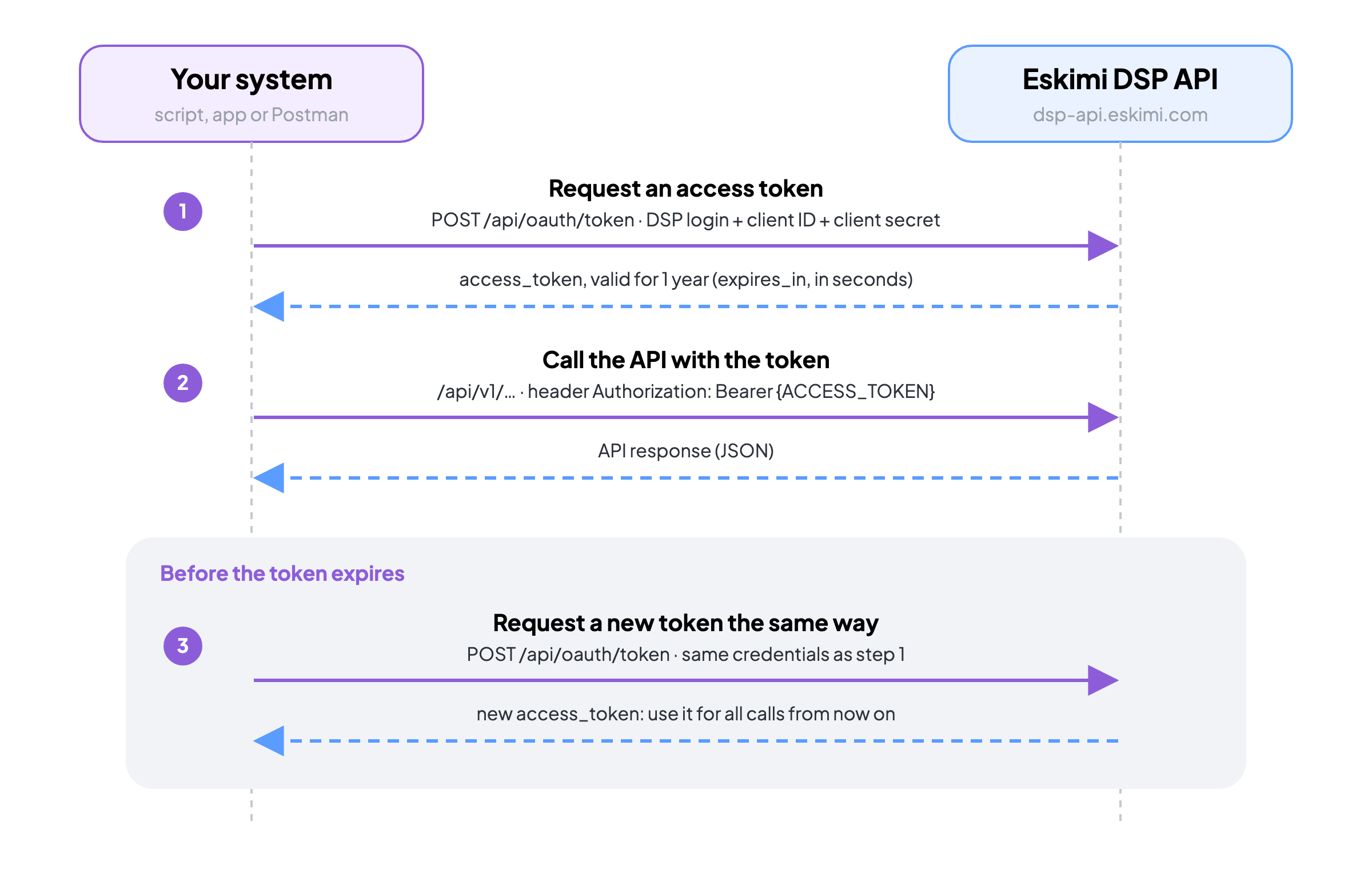](https://manual.eskimi.com/uploads/images/gallery/2026-10/aFDLMjFvr5msGILK-token-flow.png) 1. Get an access token: generate it in the DSP, or request it with an HTTP call. Both ways are described in [How to Use the API](https://manual.eskimi.com/books/api/page/how-to-use-the-api). 2. Send the token in the `Authorization` header of every call: `Authorization: Bearer {ACCESS_TOKEN}` 3. A token is valid for one year. When you request it with an HTTP call, the response states its lifetime in seconds (`expires_in`). Before it expires, request a new token the same way and use the new one from then on.The token belongs to your user and works for every advertiser your user has access to. Choose the advertiser with the `advertiserId` parameter in each request.
### Working With the API A few conventions apply to every endpoint: - Send requests to `https://dsp-api.eskimi.com/api/v1/`. The access token comes from `https://dsp-api.eskimi.com/api/oauth/token`. - Write dates as `YYYY-MM-DD`, for example `2026-10-23`. - Lists come in pages. Use `page` and `per_page`: 15 items per page by default, 100 at most. - Every ID a campaign setting needs (country, operator, device, exchange, site and so on) comes from the reference data endpoints. Look the ID up first, then use it in the campaign. - When you update a campaign, send all of its settings, not only the ones you change. Settings left out of an update request can be reset. To change only budget pacing, use the pacing endpoint, which leaves every other setting as it is. ### Common Errors| Code | What it means | What to do |
|---|---|---|
| 400 | The request data is invalid, or the action is not possible for this campaign. | Read the error message in the response; it names the field or the reason. |
| 401 | The access token is missing or has expired. | Check the `Authorization` header. If the token is older than a year, request a new one. |
| 403 | Your user has no access to this advertiser. | Ask an admin of your account to give your user access to the advertiser. |
| 422 | A value is outside what the endpoint accepts. | Check the allowed values for that field in the API documentation. |
For step-by-step campaign set-up through the API, see [How to Launch a Campaign with the API](https://manual.eskimi.com/books/api/page/how-to-launch-a-campaign-with-the-api). Quick answers to common questions are in [FAQ: Eskimi DSP API](https://manual.eskimi.com/books/api/page/faq-eskimi-dsp-api).
### Summary The API covers campaigns, optimisation, packages, creatives, audiences, brand safety, reports and invoices. Get a token once, send it with every call, and renew it before it expires. For a ready-made set of requests, see [API Postman Template](https://manual.eskimi.com/books/api/page/api-postman-template).