Steps of using API
Using API one can get analytics of Eskimi platform as well as do other operations like creating campaigns etc. In this article the steps of using API is described.
Create API Client Secret from Eskimi profile:
-
- In the dashboard UI page, in the top right corner click the three dot icon.
- Click on "API Clients".
- In API Clients UI page, in the top right corner click "Add Client".
- Enter the Client name (The name does not matter, it won't be used for the access token), and click on "Generate" for Client Secret.
- Save the changes and the API client will be created that will be used for getting Access Token.

Once you have created API Client you can create Access Token for it.
Create Access Token
There are 2 ways on creating Access Token:
1. Create Access Token through Eskimi DSP:
-
-
- After saving press the three dot icon on the right of the desired Client.
- Click on "Edit".
- Now you should be able to click "Generate Client Token" button.
- Enter your account password for security reasons and click "Confirm Identity & Generate"
- Client's Token will be generated and click "Copy" to save and use it later.
- Click Save
-
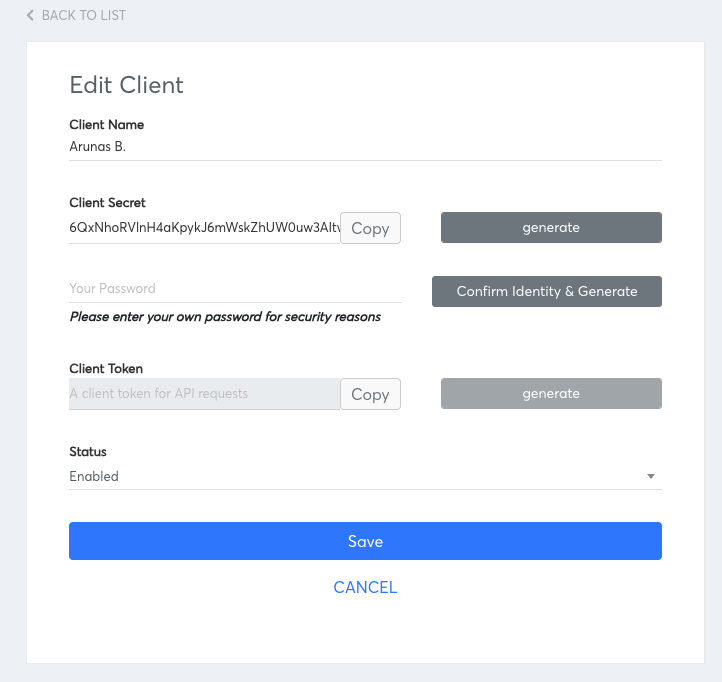
Token expiration term: 1 year.
2. Create Access Token through HTTP Request
- Get access token. For getting access token the documentation is provided here: https://dsp-api.eskimi.com/docs/api/auth/
{
  "grant_type": "eskimi_dsp",
  "username": "dsp_username",
  "password": "Password",
  "client_id": client_id,
  "client_secret": "client_secret"
}
A request example for reporting endpoints:
curl 'https://dsp-api.eskimi.com/api/v1/report/campaigns/get?advertiserId=1&byDate=1&byCampaign=1&dateFrom=2026-01-01&dateTo=2026-01-30' \
-H 'authorization: Bearer {ACCESS_TOKEN}'
From your parent account, you can access your child account data via API.
- After getting the access token API can be used using the access token. The API documentation: https://dsp-api.eskimi.com/docs/api/v1/
- Please watch the video to understand the process better:
API Limitations:
- Video campaigns can be created via API. However, video creatives must first be uploaded in the DSP UI, as the API does not currently support video or VAST asset uploads.
- Not all reporting splits are available in the reporting API endpoints, you can see all available splits here.
- Total reach can be retrieved via API and should match the DSP reporting. Please note that daily
reachvalues from split endpoints should not be summed. -
Reports can return spend in USD or the advertiser’s local currency, depending on the
spentBasedparameter.