# Behavior Targeting (User Interest Audience)

#### **What is Behavioral Targeting?**

**Behavioral Targeting (User Interest Audience)** allows advertisers to reach users based on their **interests and engagement** with specific content categories such as **sports, entertainment, finance, and more**.

Eskimi DSP collects data from **IAB-classified websites and apps**, aggregating it daily through **Data Management Platforms (DMPs)**. This ensures advertisers can target users **actively engaging** with selected verticals.

---

#### **How to create a Geolocation Audience:    
Step 1: Accessing the Audience Management Feature**

1. **Log in** to your **Eskimi DSP** account.
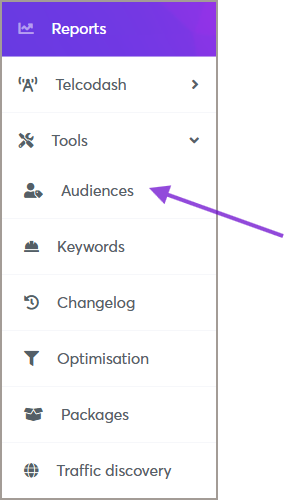
2. Navigate to the **Tools** menu (left side of the dashboard).
3. Click on **Audiences** to access the audience management page.

[![image.png](https://manual.eskimi.com/uploads/images/gallery/2025-09/scaled-1680-/xvOhPTIRkdoP2Lux-image.png)](https://manual.eskimi.com/uploads/images/gallery/2025-09/xvOhPTIRkdoP2Lux-image.png)
---

#### **Step 2: Creating a New Behavioral Audience**

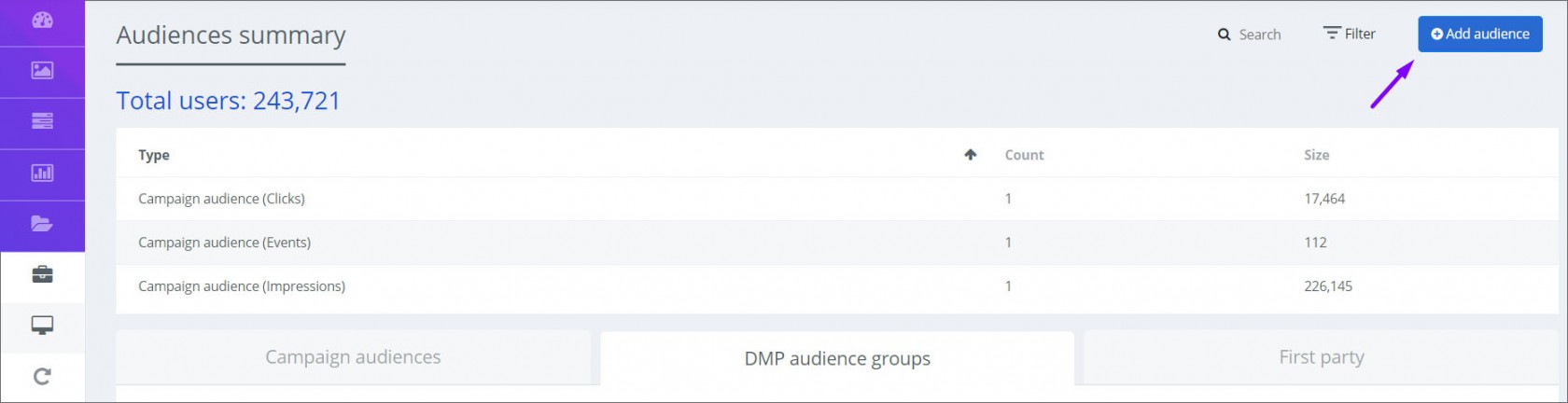
1. On the **Audiences** page, click the **Add Audience** button (top right corner).  
    [![app 2  ps.jpg](https://manual.eskimi.com/uploads/images/gallery/2021-01/scaled-1680-/app-2-ps.jpg)](https://manual.eskimi.com/uploads/images/gallery/2021-01/app-2-ps.jpg)
2. A new window will appear—fill in the required information:
    
    
    - **Audience Name**: Enter a descriptive name for your audience.
    - **Type**: Select **Behavioral (User Interests)** as the audience type.
    - **Country**: Choose the country you want to target.
    - **Verticals**: Select the interest categories that match your campaign goals.  
        [![Screenshot 2025-03-30 at 18.00.01.jpg](https://manual.eskimi.com/uploads/images/gallery/2025-03/scaled-1680-/yErk7HMAd5jFZBYE-screenshot-2025-03-30-at-18-00-01.jpg)](https://manual.eskimi.com/uploads/images/gallery/2025-03/yErk7HMAd5jFZBYE-screenshot-2025-03-30-at-18-00-01.jpg)
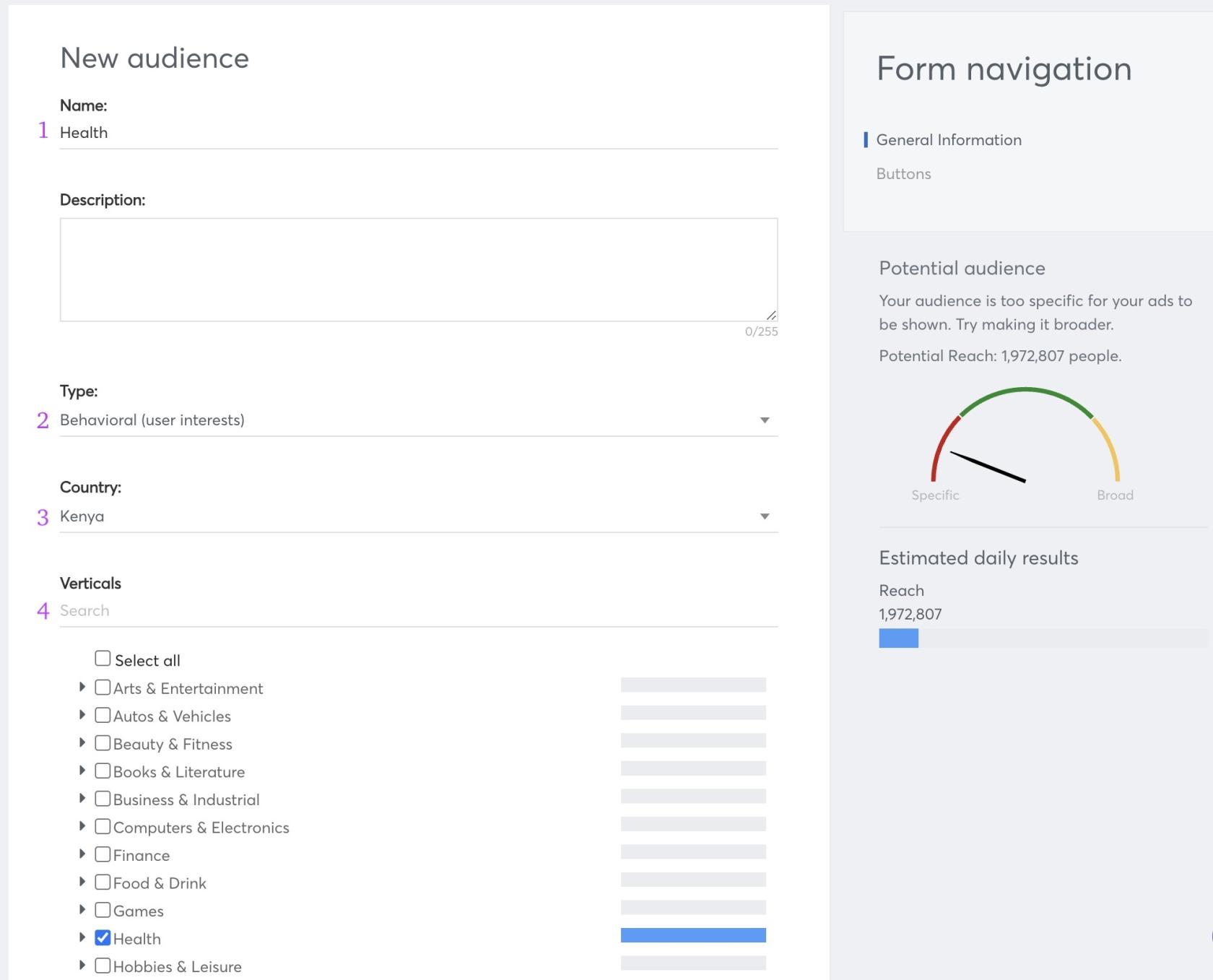
<p class="callout info">**Note:** While selecting verticals, you will see the **Potential Audience Reach** displayed in the right-side widget. This helps estimate the available audience size for your targeting.</p>

3. Click **Save** to finalize your audience. The created audience will now appear under the **DMP Audience Groups** list.

---

#### **Step 3: Applying Behavioral Audience to a Campaign**

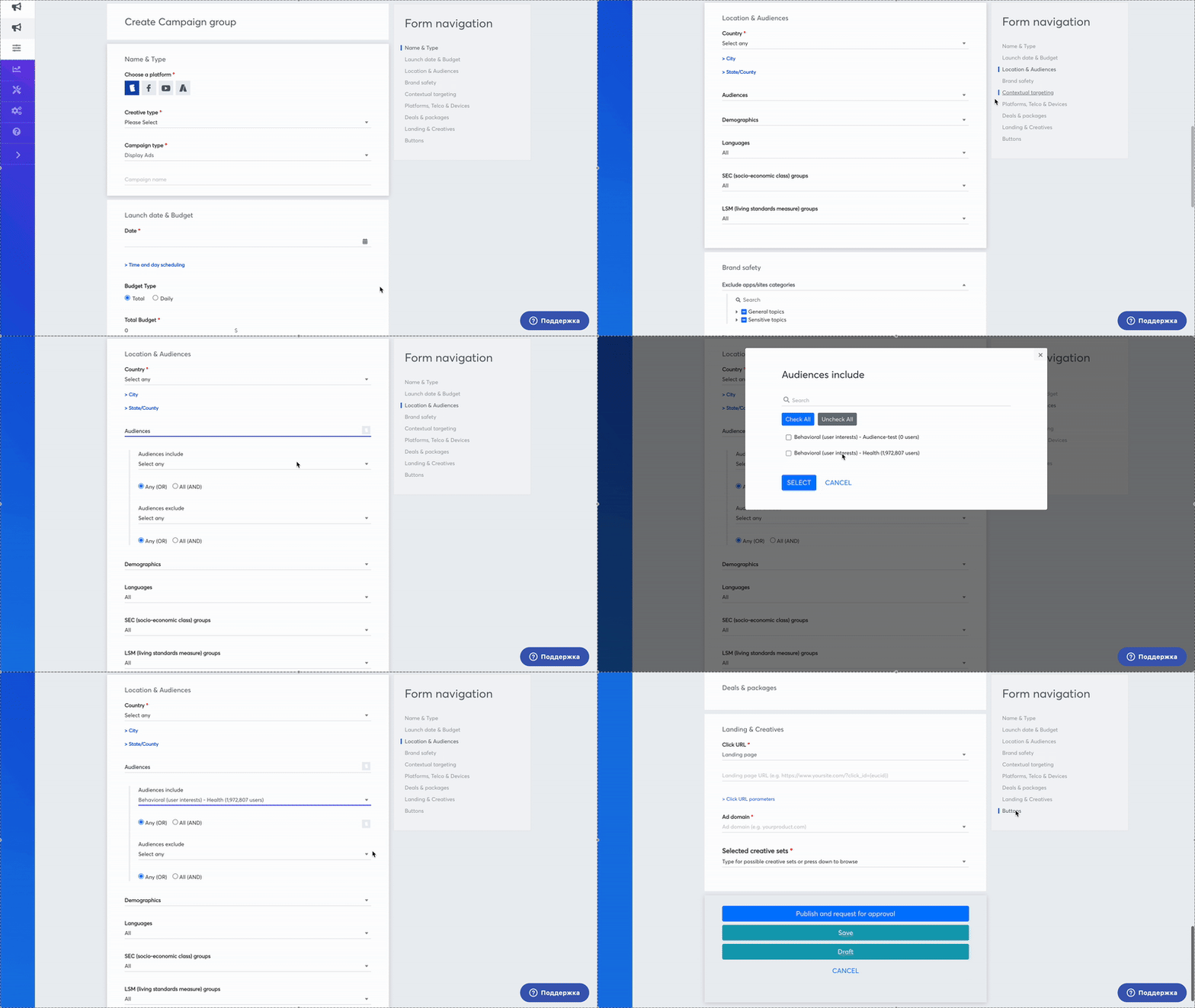
Once your **Behavioral Audience** is created, you can apply it to your campaign:

1. Open the campaign you want to edit.
2. Navigate to the **Audience Targeting** section.
3. Select the **Behavioral Audience** you created.
4. Save the campaign settings.

[![ScreenRecording2025-03-30at18.12.02-ezgif.com-video-to-gif-converter.gif](https://manual.eskimi.com/uploads/images/gallery/2025-03/BgsW6k6NKi6JwbgK-screenrecording2025-03-30at18-12-02-ezgif-com-video-to-gif-converter.gif)](https://manual.eskimi.com/uploads/images/gallery/2025-03/BgsW6k6NKi6JwbgK-screenrecording2025-03-30at18-12-02-ezgif-com-video-to-gif-converter.gif)
<div class="flex flex-1 grow basis-auto flex-col overflow-hidden" id="bkmrk-use-cases-for-behavi"><div class="relative h-full"><div class="flex h-full flex-col overflow-y-auto [scrollbar-gutter:stable]"><div class="mt-1.5 flex flex-col text-sm @thread-xl/thread:pt-header-height"><article class="w-full text-token-text-primary" data-scroll-anchor="true" data-testid="conversation-turn-52" dir="auto">---

#### **Use Cases for Behavioral Targeting**

<div class="text-base my-auto mx-auto py-5 px-6"><div class="mx-auto flex flex-1 text-base gap-4 md:gap-5 lg:gap-6 md:max-w-3xl lg:max-w-[40rem] xl:max-w-[48rem] group/turn-messages focus-visible:outline-none" tabindex="-1"><div class="group/conversation-turn relative flex w-full min-w-0 flex-col agent-turn @xs/thread:px-0 @sm/thread:px-1.5 @md/thread:px-4"><div class="relative flex-col gap-1 md:gap-3"><div class="flex max-w-full flex-col flex-grow"><div class="min-h-8 text-message relative flex w-full flex-col items-end gap-2 whitespace-normal break-words text-start [.text-message+&]:mt-5" data-message-author-role="assistant" data-message-id="17c62157-d380-44db-a061-93c0e311529d" data-message-model-slug="gpt-4o" dir="auto"><div class="flex w-full flex-col gap-1 empty:hidden first:pt-[3px]"><div class="markdown prose w-full break-words dark:prose-invert light">- **Reaching Engaged Users**: Deliver ads to users **actively interested** in selected topics.
- **Enhancing Campaign Performance**: Target users **more likely** to engage with your brand.
- **Optimizing Ad Spend**: Focus on **highly relevant** audiences to improve efficiency.

---

</div></div></div></div></div></div></div></div>#### **Conclusion**

By using **Behavioral Targeting on Eskimi DSP**, advertisers can effectively reach users based on **real-time interests and engagement**. This feature helps improve campaign relevance, increase **ROI**, and enhance audience targeting strategies.

**Start leveraging Behavioral Audiences today to optimize your ad campaigns!**

</article><div>  
</div></div></div></div></div>