Retargeting Apps/Sites Visitors Audience
Creating an App & Site Audience allows to retarget users who have visited specific Apps&Sites and show them relevant ads when they visit other websites.
How to create an Apps/Sites Visitors Audience:
Step 1: Accessing the Audience Management Feature
-
Log in to your Eskimi DSP account.
-
Click on Audiences to access the audience management page.
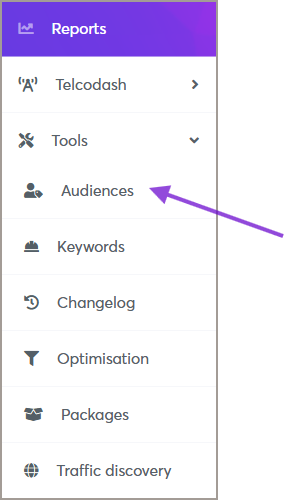
Step 2: Creating a New Behavioral Audience
- On the Audiences page, click the Add Audience button (top right corner).

-
A new window will appear—fill in the required information:
-
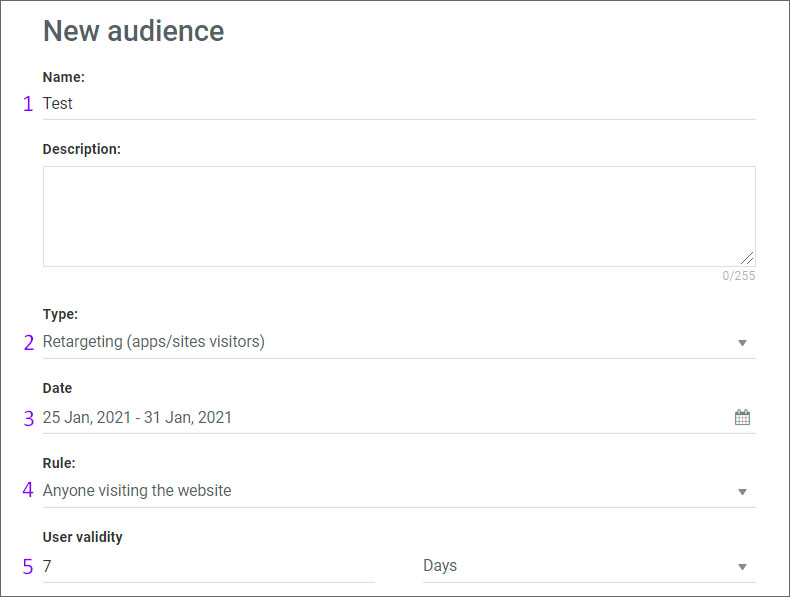
Audience Name: Enter a descriptive name for your audience.
-
Type: Select Retargeting (Apps/Sites Visitors) as the audience type.
-
Date: Choose date interval - here you indicate how long the audience will be collected
- Rule: Choose Rule - Anyone visiting the website (means that users will be collected from all sections of the site/app) OR Users visiting specific web pages (means that users will be collected from a specific section of the site/app (then you will need to indicate keyword for the specific section))
- User Validity: Indicate the user validity - here, you indicate how long the collected audience will be stored
-

- Country: Indicate the country from which you want the audience to be collected.
- Exchange: Also, you can choose from which exchange and what type of audience should be collected.
- Apps/Sites: Then you will need to choose Apps/Sites you wish to collect users from.
There are 2 methods to choose Apps/Sites.
1) The first method is to enter a site name in the search column and select the required one. Then the selected sites will appear in a separate list.
2) The second method is uploading apps/sites names from the CSV file. CSV file requirements - sites/apps must be entered in a column without additional characters (such as semicolons, spaces, etc.). So it is basically a domain name or app bundle if this is an app.
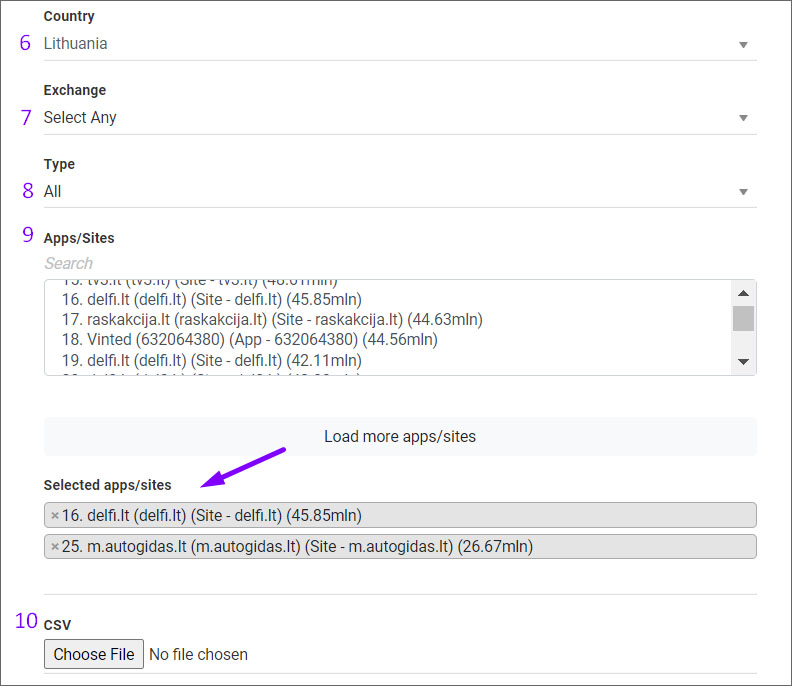
- Hit "Save" and your created audience will be saved in the list under First party. After the audience is updated by the system, you will see the audience pool gathered.
Step 3: Retargeting Apps/Sites Visitors Audience to a Campaign
Once your Geolocation Audience is created, you can apply it to your campaign:
-
Open the campaign you want to edit.
-
Navigate to the Audience Targeting section.
-
Select the Retargeting Apps/Sites Visitors Audience you created.
-
Save the campaign settings.
