How to brief
- What are Open Files?
- Why do we need Open Files?
- 3D and High Impact Format T's & C's
- 3D modelling and rendering: timelines and complexity
- Pitching with AI
- Creating with AI: Client Rules and Disclosures
- The downside of .GIF formats
- Reverts 101
- Campaign Creative Requirements 2.0
What are Open Files?
QUICK ANSWER
- Open Files are the original, layered design files
- For static designs, send .PSD, .PSB, .AI, .EPS or .FIG
- For editable animation, send the original .AEP project
- .PNG, .JPG, .PDF, .MP4 and .MOV files are finished outputs, not Open Files
WHAT SHOULD I SEND?
| WHAT YOU WANT TO CREATE | FILES TO SEND US |
|
A template banner |
.PSD | .PSB | .AI | .EPS | .FIG files, including font files |
| A custom rich media banner with animated elements | .PSD | .PSB | .AI | .EPS | .FIG files, including font files |
| A custom rich media banner with video elements | .PSD | .PSB | .AI | .EPS | .FIG files, including font files AND .MP4 | .MOV files, or YouTube link |
| A custom rich media banner with video elements that need to be edited | .PSD | .PSB | .AI | .EPS | .FIG files, including font files AND .AEP files |
| A custom rich media banner with custom animation | .PSD | .PSB | .AI | .EPS | .FIG files, including font files |
⚠️ 3D projects have their own separate, additional asset requirements. Read the 3D-modelling specific Help Page here.
Need more detail? Read the explanations below👇
DEFINITION
Open Files (also called working files or source files) are the original, editable documents created by a designer using specific creative software.
They are organised into layers, with different parts of the design kept separate. For example, the background, product, logo and text may each sit on their own layer.
This allows Creative Studio to open the artwork and move, resize, replace or edit each part individually.
OPEN FILE TYPES
The correct Open File format depends on whether we are working with a static design or a video.
🖼️ STATIC DESIGNS (TEMPLATE BANNERS + CUSTOM RICH MEDIA)
| FILE TYPE | CREATED IN |
|
.PSD |
Adobe Photoshop |
| .PSB | Adobe Photoshop |
| .AI | Adobe Illustrator |
| .EPS | Adobe Illustrator |
| .FIG | Figma |
These files can contain separate, editable layers for elements such as the background, product, logo and text.
🎬 VIDEO DESIGNS
| FILE TYPE | CREATED IN |
| .AEP | Adobe After Effects |
⚠️ Do not send .AEP files for static banner executions.
We only need an .AEP file when we must edit the original video, for example:
- Cropping it to different dimensions
- Isolating a specific section or playback time
- Moving or editing elements within the video, like text or a logo
An .MP4 or .MOV file can only be used exactly as supplied. We cannot change its dimensions, playback time or content.
❌ FILES WE CAN'T USE FOR EDITS
| FILE TYPE | WHY WE CAN'T USE IT |
| .PNG | It's a flat image without editable layers |
| .JPG / .JPEG | It's a flat image without editable layers |
| .MOV | It is an exported final video, not the editable video project |
| .MP4 | It is an exported final video, not the editable video project |
| .CDR | It is a proprietary CorelDRAW format that we don't support |
⚠️ IMPORTANT EXCEPTION
A .PNG or .JPG can still be used as one element inside a larger Open File. For example, a layered Photoshop file might contain:
- A client logo supplied as a .PNG
- A product image supplied as a .JPG
- Editable text on a separate layer
- A background on another layer
The .PNG or .JPG is only one part of the design. Because the overall .PSD, .AI or .FIG file remains layered, we can still edit and adapt the complete banner.
Simple rule: A .PNG or .JPG can be an element inside an Open File, but it is not an Open File by itself.
*Static images can also be animated.
FONT FILES
If the creative assets have any text, we also need to have font files included in the Open Files.
We do also need the original font files when we do image resizes for banners.
Think of it like opening a file on your computer that uses fonts that you don't have installed - your computer can't display the original font because it doesn't exist on your system. If a computer does not have the specific font installed, the design software will substitute a default font. This ruins the layout, changes line breaks, and alters the visual style.
Without the original font, we have two options:
-
Substitute it with a different font, which changes the appearance of the design and may no longer match the brand guidelines
-
Flatten the text as part of the image, meaning it can no longer be edited, resized, repositioned, or updated independently
An Open File is incomplete if its fonts or linked assets are missing.
ANIMATING STATIC ELEMENTS
We can use layered static Open Files (.PSD, .AI or .FIG) to create a new animations. Because the design elements are separate, we can animate the logo, text, product, background or other elements individually.
Exported videos cannot be reanimated. A .MOV or .MP4 is a completed, exported video. Its original elements and animation settings are no longer separate, so we cannot take it apart and reanimate them.
ANIMATION TYPES
An animation is movement created by a developer, or by an animator.
Creative Studio produces animation in two different ways. The right approach depends on whether we are adding movement to existing design elements or creating new animated content.
1. ADDING MOVEMENT TO EXISTING ELEMENTS
Our developers can animate the separate layers supplied in a static Open File. For example, they can make an existing:
- Floating logo or text
- Objects fade onto the screen
- Product grow or shrink
- Button pulse
- Elements move, rotate or respond to interaction
The elements already exist. The developer is adding movement to them using code.
Think of this as moving existing pieces around the screen.
2. CREATING NEW ANIMATED CONTENT
Some concepts require movement or visual content that does not already exist in the supplied design. For example:
- Making a product move realistically in 3D
- Creating an object from different angles
- Animating liquid, smoke, leaves or other effects
- Building movement that cannot be created from flat design layers
- Creating a complete animated scene
This work must be created by an animator or 3D artist. It requires specialist animation software, additional production time and a separate editable project file.
Think of this as creating a new moving performance that didn't exist before, not simply moving existing pieces.
| ANIMATION TYPE | WHAT NEEDS TO BE EXECUTED | CREATED BY |
| Movement added to existing elements | Layered static assets that already exist | Developer |
| New animation production | New movement, angles, effects or scenes that still need to be created | Animator and / or 3D artist |
Both developers and animators create movement. The difference is whether we are animating visual elements that already exist, or first need to create new visual content.
VIDEO
Unlike animation, video refers to completed footage supplied by the client. It is treated as a fixed asset rather than something we can recreate or reanimate.
We treat this footage as a finished visual asset. We can use it within a creative execution, but we cannot create additional footage or change what was originally filmed.
✅ WHAT WE CAN DO
Depending on the supplied file and the request, we may be able to:
- Crop the video to fit different dimensions
- Select or trim a specific part of the video
- Add separate elements over the video, such as a logo, text or button
- Use the video as part of a larger banner execution
❌ WHAT WE CAN'T DO
- Create additional footage that was not supplied
- Change the actions taking place in the footage
- Make a person or object move differently
- Reposition individual people or objects inside the video
- Separate elements that are already part of the footage
- Reanimate the footage as if it were an editable animation
Simple rule: We can adjust how the supplied video is used, but we cannot change what happens inside the footage.
WATCH OUR VIDEO TUTORIAL
⚠️ 3D projects have their own separate, additional asset requirements. Read the 3D-modelling specific Help Page here.
Why do we need Open Files?
SEPARATE ELEMENTS
In an Open File, these elements remain separate:
- Logo
- Headline and other text
- Product images
- Background
- Buttons
- Colours, etc
This means we can move, resize, replace or edit one element without changing everything else.
WHY WE NEED SEPARATE LAYERS
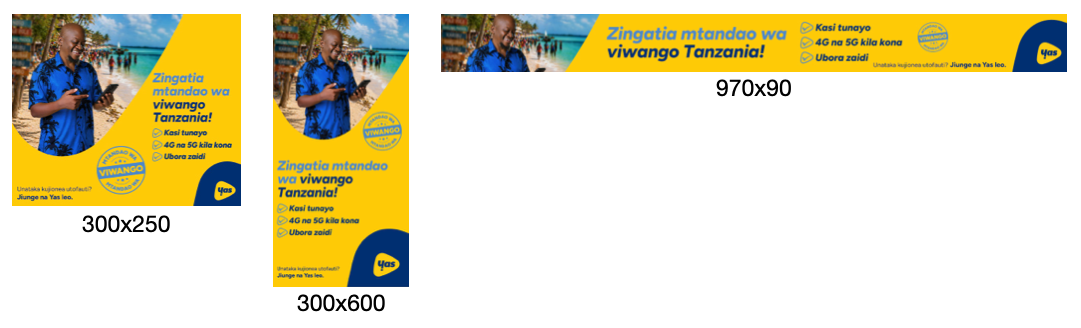
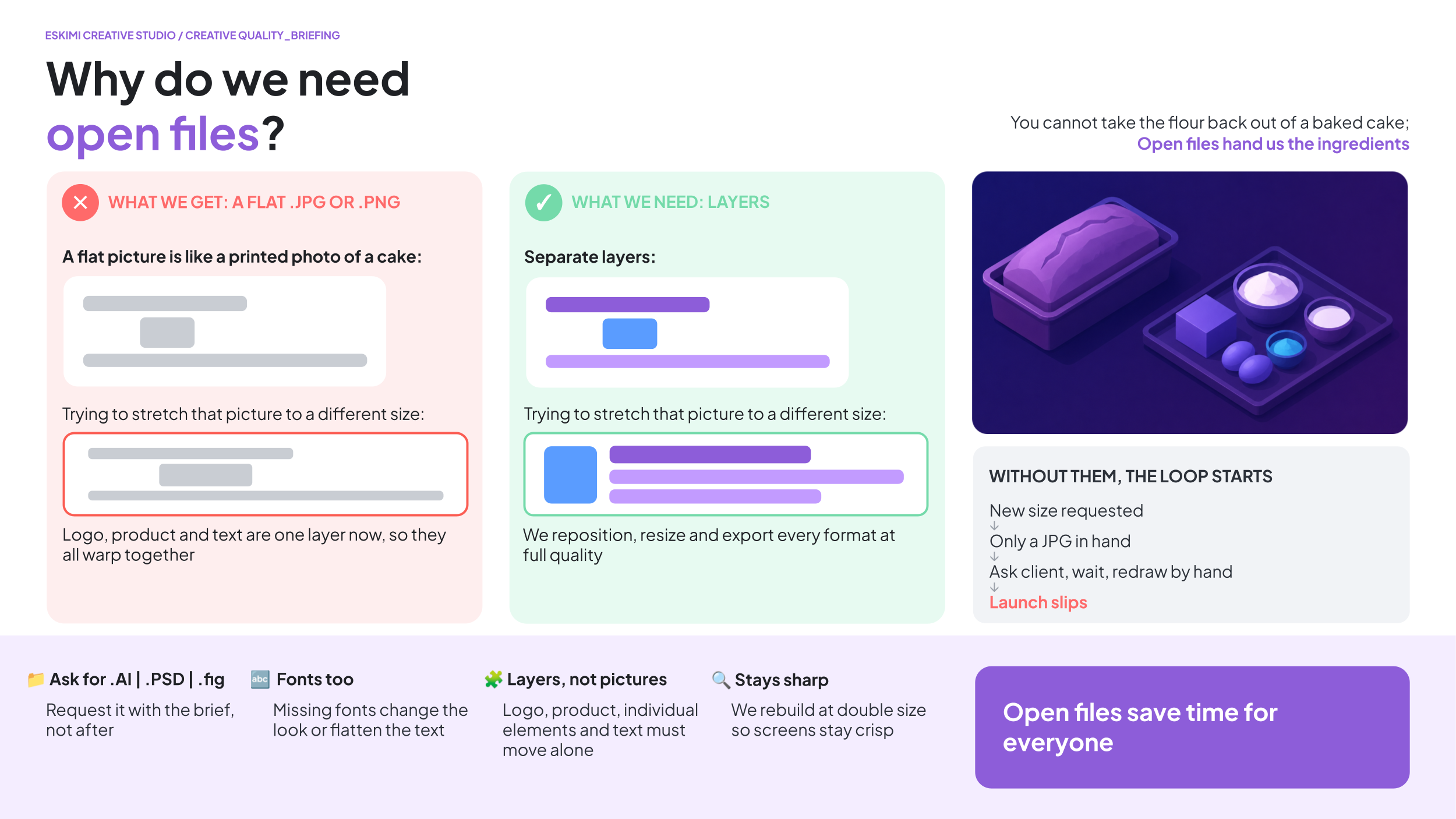
To resize your banners for different ratios, we need to physically move the individual design elements independently within the full image itself; we cannot simply stretch a 300×250 banner into a 970×250 banner (as an example - this principle applies to all sizes); it would look like this:
WHAT IT SHOULD LOOK LIKE
WHAT IT ENDS UP LOOKING LIKE
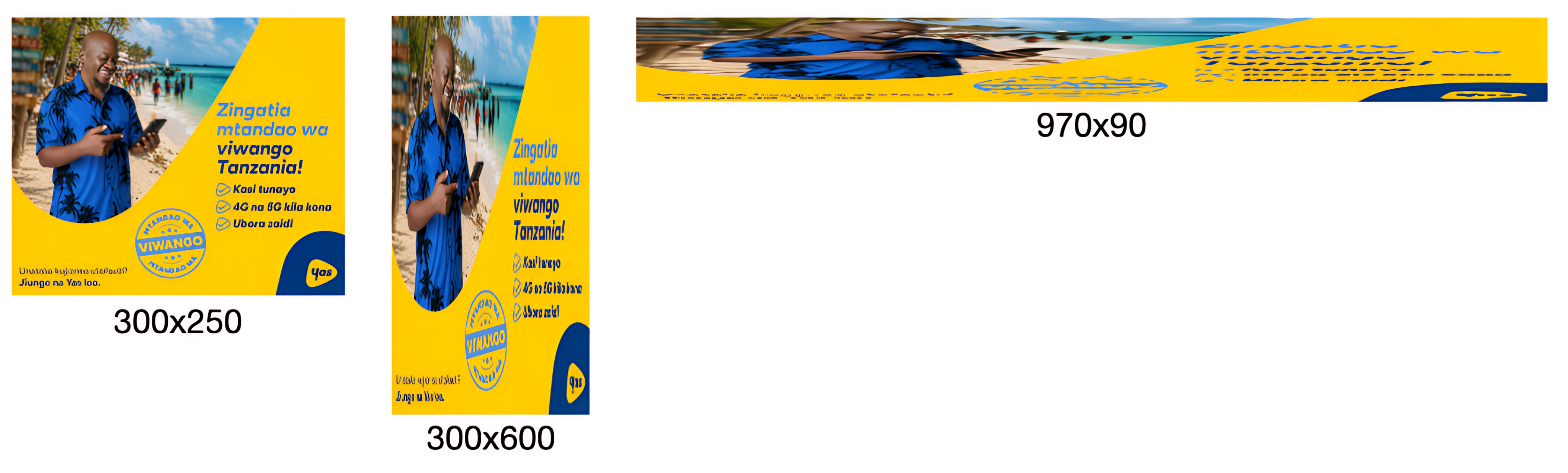
See this in action here.
This is important because proper resizing requires us to work with individual elements independently to:
- Move a product without moving the background
- Move a logo separately from the headline
- Resize and reposition assets for different formats
- Optimise layouts for different screen sizes
When we only receive a flattened image (.JPG, .PNG, etc), none of these elements exist separately anymore - to us, the entire banner becomes a single picture.
Imagine it like receiving a photo of a loaf of bread and being asked to change the flour - the flour is already baked into the bread; they’re no longer separate elements that can be changed.
The same applies here. Without layered source files, we cannot accurately isolate products, logos, text, backgrounds, buttons, or other creative elements.
⚠️ 3D projects have their own separate, additional asset requirements. Read the 3D-modelling specific Help Page here.
*Read more about what Open Files are here.
3D and High Impact Format T's & C's
HIGH IMPACT PROJECT REQUIREMENTS
High Impact projects involve more planning, production and specialist work than standard banner projects. Following these requirements helps Creative Studio begin production on time and avoid unexpected delays.
Standard lead time: Allow up to 7 working days from receipt of all required assets, information and clarifications. Actual timelines depend on the complexity of the execution.
📦 CREATIVE ASSETS
📦 CREATIVE ASSETS
Development can only begin when Creative Studio has received all the assets required for the project.
STANDARD BRAND ASSETS
For ALL projects, please provide:
- Editable brand or campaign files, such as .PSD, .AI or .FIG
- High-resolution logos
- Font files
- Brand guidelines, if available
- Final, approved copy
- Final call to action (CTA)
- Music as an .MP3, or an approved music reference if relevant
- Legal copy and mandatory disclaimers
*Read more about Open Files for standard projects here.
🧊 ASSETS REQUIRED FOR 3D PROJECTS
If the project includes a 3D product or object, we also need:
- An existing 3D model of the product
- 3D model file format: .GLTF for web 3D format, .FBX or .OBJ
- UV wrapped with provided texture image files
- If 3D assets don't exist, we would need the below to create a 3D model from scratch:
- Flat label or sticker artwork in .AI, .EPS or print-ready PDF format
- Packaging layouts and dielines
- Material and finish details, such as matte, gloss, metallic or transparent
- Clear reference photographs from different angles (IE. orthographic reference photos)
WHAT DOES “UV MAPPED” MEAN?
- A 3D model is the shape of the object
- The texture image is the surface design, such as its colours, label, logo and product information
- UV mapping tells the 3D software exactly where each part of the flat texture image must appear on the model
- It works like wrapping a printed label around a bottle or packaging artwork around a box
WHAT ARE ORTHOGRAPHIC REFERENCE PHOTOS?
- These are photographs taken straight from the front, side, back or top of an object
- The photographs should be taken from flat, parallel angles to reduce perspective and camera distortion
- Around 20 photographs from different angles are usually needed to produce a smooth and accurate 3D model

📅 WHEN DOES THE PRODUCTION TIMELINE BEGIN?
Lead times commence only after:
-
All necessary assets have been received
-
The storyboard has been approved, where required
-
Legal copy and disclaimers have been approved
-
The project scope has been confirmed
-
A Creative Studio production slot has been allocated
The estimated timeline assumes:
- Feedback is consolidated
- There are no major scope changes
- Approvals are provided within the agreed review times
🗺️ STORYBOARDS
🗺️ STORYBOARDS
WHEN IS A STORYBOARD REQUIRED?
A storyboard is used for experiences that include 3D modelling or animation.
It shows how the experience will work before development begins. This allows the client to review and approve the complete experience in advance.
WHAT DOES STORYBOARD APPROVAL INCLUDE?
Approving the storyboard means approving:
- The user journey
- Gameplay
- Navigation
- User interactions
- Features
- Functional behaviour
- Screen order and flow
- Success or completion states
- CTA placement
Development begins only after the storyboard has been approved.
WHAT HAPPENS AFTER STORYBOARD APPROVAL?
Once the storyboard is approved, the project scope is considered locked.
This means the agreed structure and functionality should not change during production. Requests such as the following may be treated as a change in scope / new project:
- New game mechanics
- New interactions
- New animations
- Additional screens
- A different user journey
- Different prizes
- New platform integrations
- Additional tracking requirements
- Different loading sequences
- New augmented reality behaviours
A scope change may require:
- A revised production timeline
- Additional production costs
- A new project estimate
- The project to restart as a new brief
✏️ PRODUCTION REVERTS
✏️ PRODUCTION REVERTS
A production revert is a small visual or content change that does not change how the approved experience works.
EXAMPLES OF PRODUCTION REVERTS
- Updating copy
- Changing a logo
- Adjusting colours
- Changing a font
- Replacing an image
- Making a small positioning adjustment
- Changing CTA wording
WHAT IS NOT A PRODUCTION REVERT?
The following requests change the structure or functionality of the experience and must be submitted as a new brief:
- New features
- New interactions
- New animations
- New game logic
- Additional screens
- New prizes
- Different win logic
- Additional tracking
- Changes to camera behaviour
- A redesign of the experience
A new brief may require a new production schedule and may affect the delivery date.
💬 CLIENT FEEDBACK
All feedback must be collected and submitted as one complete list per revision round.
WHAT IS A REVISION ROUND?
A revision / revert round is one consolidated submission of client feedback.
It may include several individual changes, provided they are sent together. Creative Studio will complete the changes and return one revised version.
❌ PLEASE DO NOT SEND FEEDBACK:
- Across several separate emails
- In small pieces at different times
- Across different Slack conversations
- Separately from different stakeholders
- After the version has already been approved
Before making changes, Creative Studio may ask for confirmation that feedback from all decision-makers has been included.
Once a revised version has been returned, any additional feedback will count as a new revision round, even if the requested changes are small.
The new revision round will re-enter the production schedule according to current Creative Studio capacity. This may affect the final delivery date.
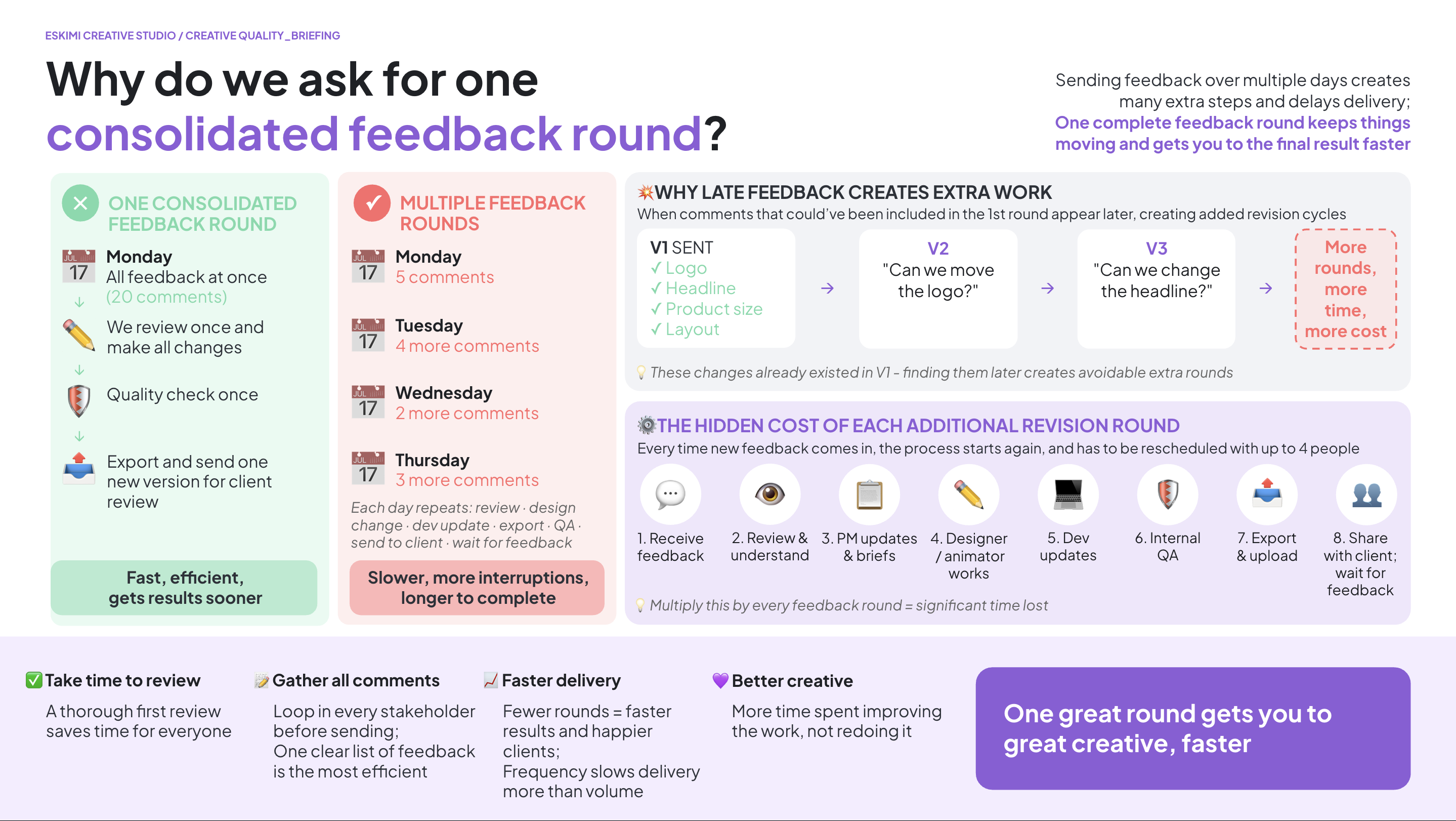
Submitting consolidated feedback allows the Creative Studio to complete revisions more efficiently, reduces project coordination overhead, minimises the risk of conflicting instructions, and helps ensure timely delivery.
⏱️ CLIENT REVIEW TIMES
The production timeline allows the following time for client review:
| REVIEW STAGE |
CLIENT REVIEW TIME |
| Version 1 | 1 working day |
| Version 2 | 1 working day |
| Final quality check | 1 working day |
If feedback or approval takes longer, the final delivery date will move accordingly. The timeline may also change depending on the number and complexity of the requested revisions.
🚨 NEW REQUIREMENTS DURING PRODUCTION
Adding new requirements after production has started increases the amount of work, project coordination and delivery risk. The agreed timeline assumes that the approved brief will remain substantially the same throughout production.
If requirements change after development begins, Creative Studio may need to review:
- The project scope
- The delivery timeline
- Production costs
- The commercial agreement
Further production may pause until the revised requirements have been reviewed and agreed.
Complete brief = faster project start. Missing information, late feedback or changes to the approved scope may affect the production schedule and delivery date.
⚖️ LEGAL RESPONSIBILITIES
⚖️ LEGAL RESPONSIBILITIES
The client team is responsible for supplying all required legal and regulatory information.
This may include:
- Mandatory legal copy
- Regulatory disclaimers
- Promotional terms and conditions
- Competition rules
- Prize conditions
- Age restrictions
- Nutritional statements
- Compliance wording required for specific countries
Creative Studio can add the supplied legal wording to the experience, but cannot provide legal advice or approve the wording on the client’s behalf.
The client must confirm that all supplied wording is correct, approved and suitable for the countries where the campaign will run.
USEFUL LINKS
🔗 3D modelling and rendering: timelines and complexity
3D modelling and rendering: timelines and complexity
QUICK ANSWER
3D modelling and animation can produce incredibly engaging creative experiences, but they involve more complex production processes than standard design or animation.
This guide explains why some 3D projects take longer than others, what affects production timelines and costs, and why certain technical processes cannot simply be accelerated - even for urgent campaigns.
Standard lead time: Allow up to 7 working days from receipt of all required assets, information and clarifications. Actual timelines depend on the complexity of the execution.
Need more detail? Read the explanations below👇
⏱️ HOW LONG DOES 3D PRODUCTION TAKE?
HOW LONG DOES 3D PRODUCTION TAKE?
3D modelling and animation require up to 7 working days, starting from the point when Creative Studio has received all required assets, information and clarifications needed to begin production.
This lead time reflects the technical work involved, including modelling, animation, simulations, rendering and quality checks.
Important: The production timeline does not necessarily begin when a brief is submitted. Missing assets, incomplete information or outstanding clarifications can delay the start of production.
💰 WHY ARE 3D PROJECTS MORE EXPENSIVE?
WHY ARE 3D PROJECTS MORE EXPENSIVE?
3D animation is a specialist craft. Projects often involve:
-
3D modelling
-
Texturing
-
Lighting
-
Animation
-
Visual effects
-
Rendering
-
Multiple rounds of testing and quality assurance
Complex animations can take many days to produce, which is why 3D projects typically have higher production costs and minimum media investments than standard banner production.
🏎️ WHY URGENT PROJECTS CAN'T ALWAYS SIMPLY BE COMPLETED FASTER
WHY CAN'T URGENT 3D PROJECTS SIMPLY BE COMPLETED FASTER?
We understand that some campaigns are commercially important, time-sensitive or linked to significant client opportunities. Creative Studio will always aim to support these priorities wherever possible.
However, commercial urgency does not reduce the technical complexity of 3D production.
Unlike traditional design work, many stages of 3D production rely on computational processes that cannot simply be accelerated by working faster or assigning more people. For example:
-
Modelling: Complex objects must be constructed and prepared before they can be animated.
-
Animation: Movement, lighting, materials and interactions must be configured and tested.
-
Simulations: Effects such as water, smoke and fire require mathematical calculations to behave realistically.
-
Rendering: Software must calculate each frame, including lighting, shadows, reflections and movement. A final render alone can take several hours.
-
Revisions: Changes may require animations, simulations or rendered sequences to be recalculated.
Some tasks can be prioritised or performed in parallel, but others must happen in sequence. Adding more people or requesting a faster turnaround does not necessarily shorten these processes.
COMPROMISING BETWEEN SPEED AND QUALITY
A challenge faced by production is the careful balance of speed and quality. Tipping this balance toward one or the other will always require some compromise. We can sometimes deliver faster by simplifying the execution or reprioritising existing work, but each of those options comes with a trade-off.
3D BRIEFS ACROSS THE BUSINESS
This is also in an ecosystem where at any given time, other colleagues across the business are waiting for their own 3D projects, many of which are equally commercially important to their regions too. Accelerating one campaign often means delaying another, so we have to balance those priorities across the entire business.
WHAT DOES THIS MEAN FOR CAMPAIGN PLANNING?
For technically complex formats, it's important to involve Creative Studio early and plan campaign launch dates around the communicated production lead times.
We can assess opportunities to simplify an execution or reduce its complexity when shorter timelines are required, but this may mean adjusting the creative concept or scope.
The key takeaway: Priority determines when we focus our resources on a project. It cannot eliminate the technical steps required to produce it.
Planning a 3D campaign? Allow up to 7 working days from receipt of all required assets and clarifications. Urgent commercial deadlines do not automatically shorten technical production times. Please involve Creative Studio early if your campaign has a fixed launch date.
⏳ WHY DOES RENDERING TAKE SO LONG?
WHY DOES RENDERING TAKE SO LONG?
Finishing the animation doesn't mean it's ready immediately. Once all changes are complete, the computer still needs to calculate every frame of the final animation.
Even once the modelling and design are complete, the final rendering process alone can take up to 8 hours. This is a computational process where the software calculates movement, lighting, shadows, reflections, etc. It's not something the producer can simply work faster to complete, regardless of the urgency or commercial value of the campaign.
Think of it like baking a cake. Mixing the ingredients doesn't make the cake ready - you still have to bake it. Rendering is that baking stage. For every frame, the computer calculates:
-
Lighting
-
Shadows
-
Reflections
-
Transparency
-
Materials
-
Visual effects
A short animation may contain hundreds of frames, so rendering alone can take several hours.
WHY CAN'T RENDERING BE MADE FASTER?
Rendering is performed by the computer, rather than the artist. Once rendering begins, the computer must calculate every frame individually.
While we always optimise our scenes where possible, rendering time is largely determined by the complexity of the animation and cannot simply be sped up without reducing quality.
Rendering is computationally intensive → the software needs time to process → commercial urgency cannot override that processing time.
🧮 WHY DO MULTIPLE REVISION ROUNDS TAKE LONGER IN 3D?
WHY DO MULTIPLE REVISION ROUNDS TAKE LONGER IN 3D?
Unlike a presentation or Photoshop file, a 3D scene is built as one complete environment where everything works together.
Changing one element often affects many others. For example, moving an object may also require updates to:
-
Camera angles
-
Lighting
-
Shadows
-
Reflections
-
Animations
-
Scene composition
Once those changes are complete, the entire animation usually needs to be rendered again before a new preview can be shared.
For this reason, repeated revision rounds can have a significant impact on delivery timelines.
Think of it like building a house. It's much easier to decide where the windows go before the walls are built than to move them after the house is finished.
To keep projects moving efficiently, we ask clients to review versions carefully and provide one consolidated round of feedback wherever possible.
🧩 WHY ARE SOME 3D PROJECTS & REVISIONS MORE COMPLEX?
WHY ARE SOME 3D PROJECTS MORE COMPLEX THAN OTHERS?
Not all 3D projects require the same level of effort.
Simple product animations (such as rotating bottles, cans, phones, or packaging) are generally quicker to produce than people, animals, or characters.
Characters are significantly more complex because they require:
-
Build the entire character in 3D, with correct proportions from all angles
-
Make the body bend and move naturally
-
Make the face smile, blink, and show expressions
-
Make hair and clothing move realistically with believable textures
-
Animate everything so it looks believable
-
Spend much more time testing and refining the final result
Think about how many tiny muscles in your face move when you smile, laugh, frown, blink, or talk. A 3D artist has to recreate all of those movements digitally so the character looks natural rather than stiff or lifeless. A product only needs to exist. A character needs to act. It has to move, express emotion, and behave.
As a result, character-based 3D projects typically require more specialist skills, longer timelines, and larger budgets than product visualisation.
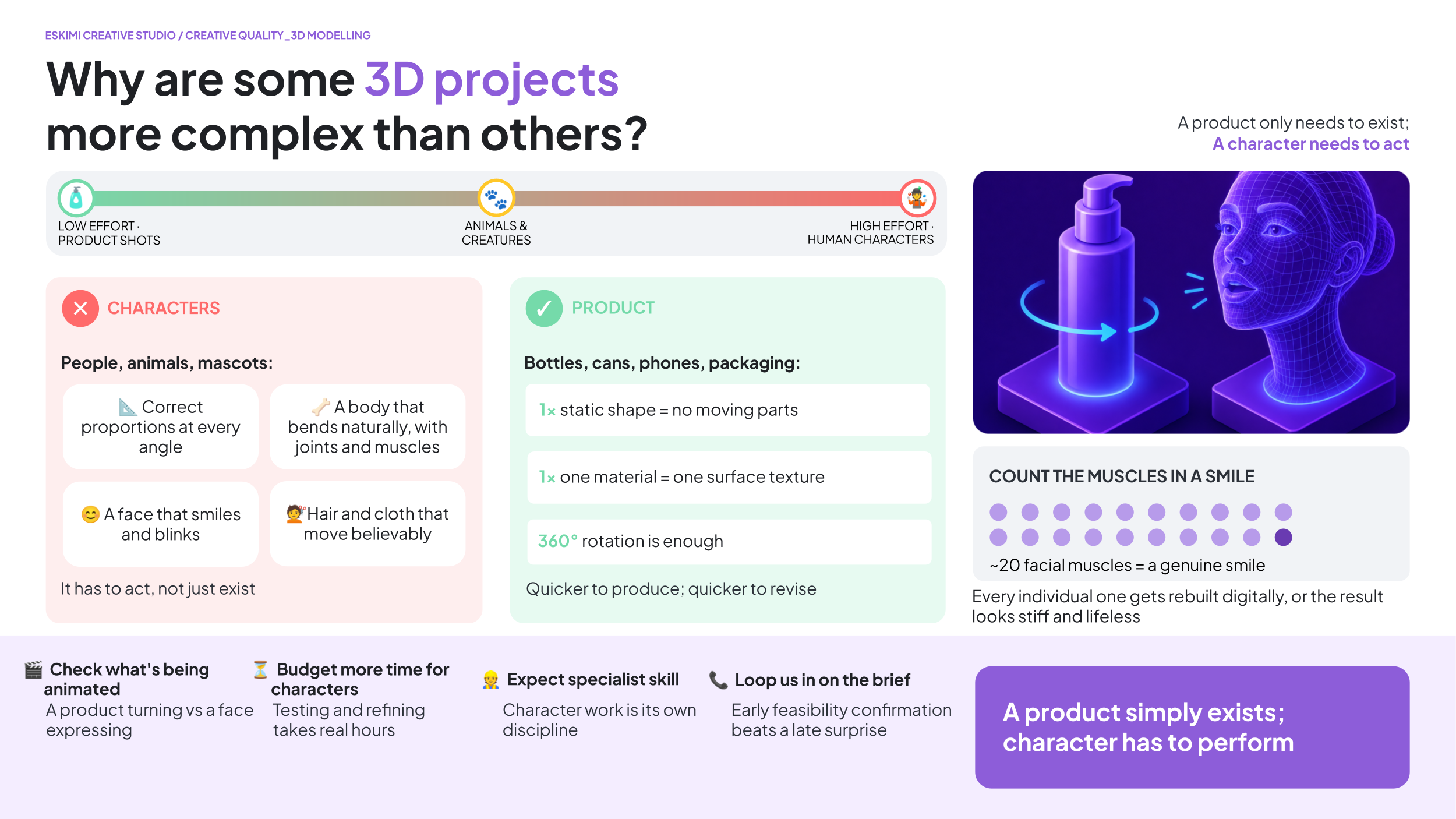
If a brief involves animated people, animals, or characters, please involve Creative Studio early so we can advise on feasibility, timelines, and production requirements before commitments are made.
WHY ARE 3D ANIMATIONS SO MUCH MORE COMPLEX TO BUILD AND CHANGE?
Unlike a flat design, a 3D scene is a complete virtual environment. Changing the position of an object often means reworking:
-
Camera angles
-
Lighting
-
Shadows
-
Reflections
-
Object animations
-
The overall composition
What looks like a small change can require rebuilding part of the scene so everything still looks natural.
WHY DO MULTIPLE 3D REVISION ROUNDS TAKE LONG?
Not all revisions are equal. Changing text or colours may be relatively quick.
However, changing how objects move, interact, or appear in the scene often means rebuilding and reanimating parts of the project rather than simply editing what already exists.
The more movement involved, the more work is usually required.
🔪 WHY CAN'T YOU JUST SPLIT UP OR DIVIDE THE 3D MODEL?
WHY CAN'T YOU JUST SPLIT UP OR DIVIDE THE 3D MODEL?
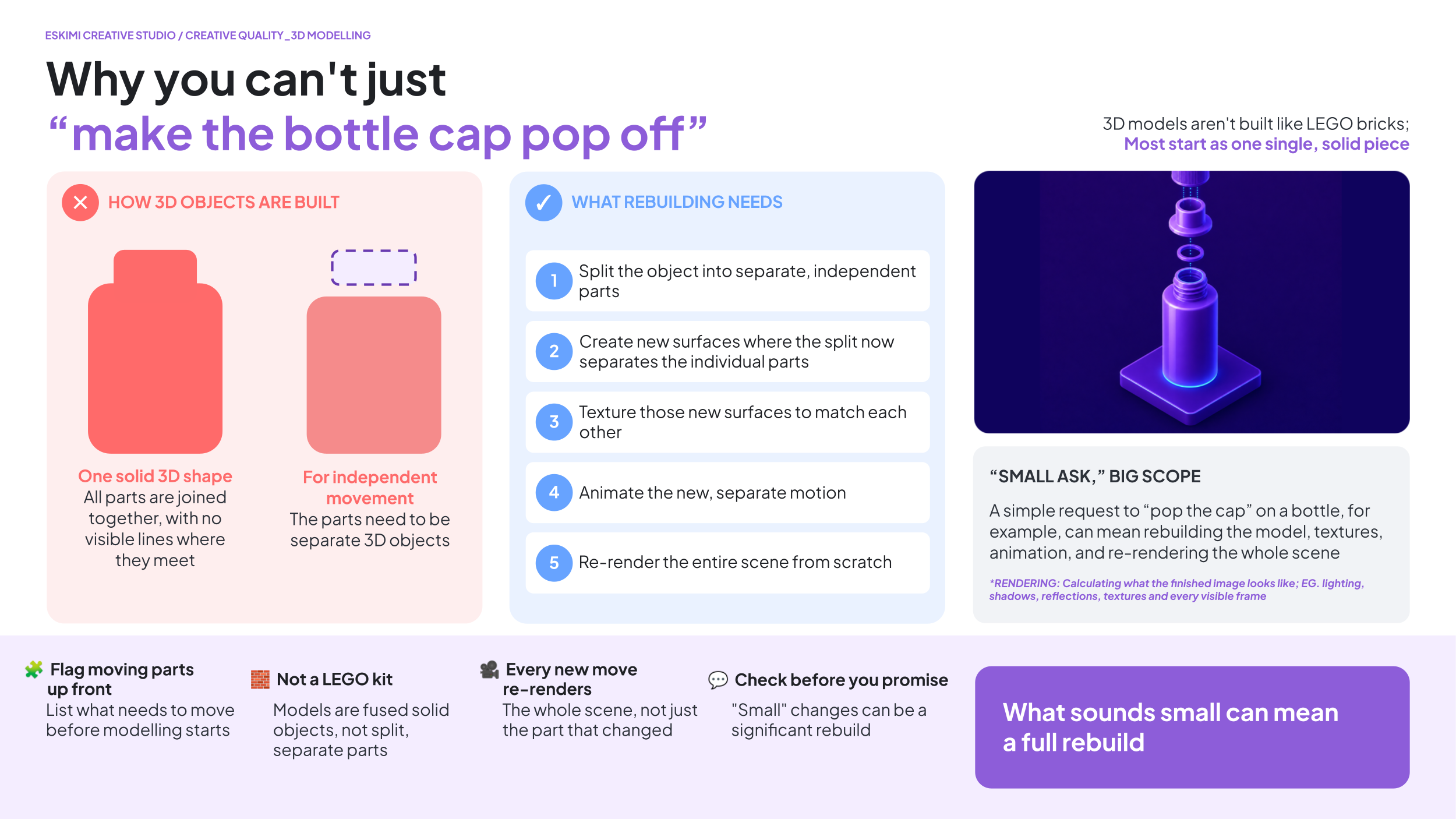
3D models aren't built like LEGO bricks.
Many models are created as a single object. If a client later wants part of that object to move independently (such as a bottle cap opening), we first need to rebuild the model into separate moving parts.
That may involve:
-
Rebuilding the model
-
Creating new surfaces and textures
-
Creating new animations
-
Re-rendering the entire scene
What sounds like a small change can sometimes become a significant rebuild.
🔥 MIST, SMOKE, WATER, AND FIRE EFFECTS
WHY DO MIST, SMOKE, AND FIRE EFFECTS TAKE LONGER?
Effects like water, steam, smoke, bubbles, splashes and fire aren't simply videos placed on top of an animation. The computer calculates how these effects move through the scene, frame by frame.
Think of it like drawing a puff of smoke...
...then drawing it again...
...and again...
...for every single frame of a 10-second animation.
That's why these effects require considerably more processing time than simple object animation.
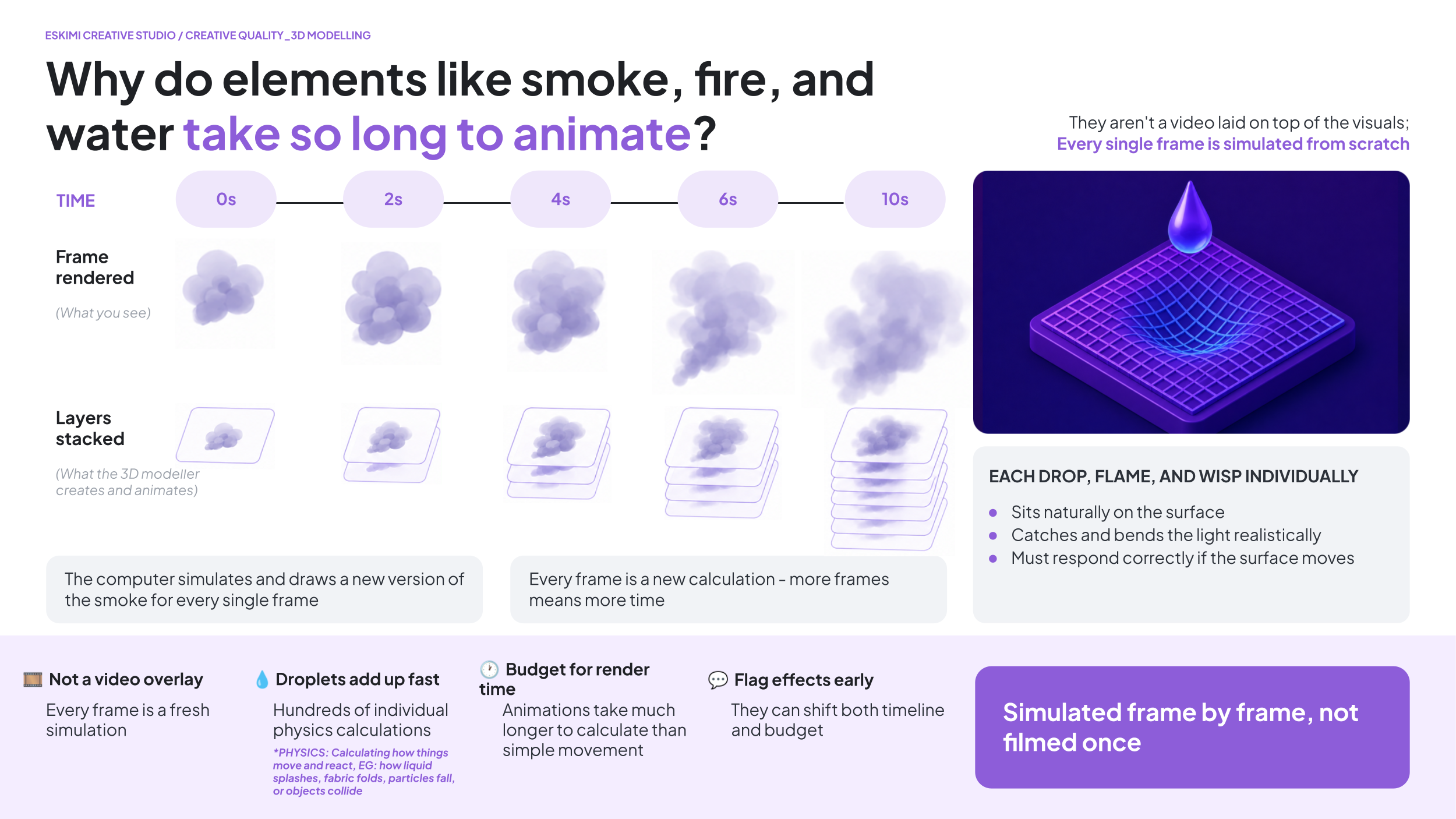
WHY DO WATER DROPS TAKE SO LONG?
A wet bottle isn't just a bottle with dots on it. Each individual droplet has to:
-
Sit naturally on the curved surface
-
Catch the light correctly
-
Reflect its surroundings
-
Look realistic from every viewing angle
-
Move naturally as the object rotate
A single bottle can contain hundreds of droplets, each of which the computer must calculate separately.
🚗 3D MODELS FOR CARS
CAN WE CREATE 3D MODELS FOR CAR BRANDS?
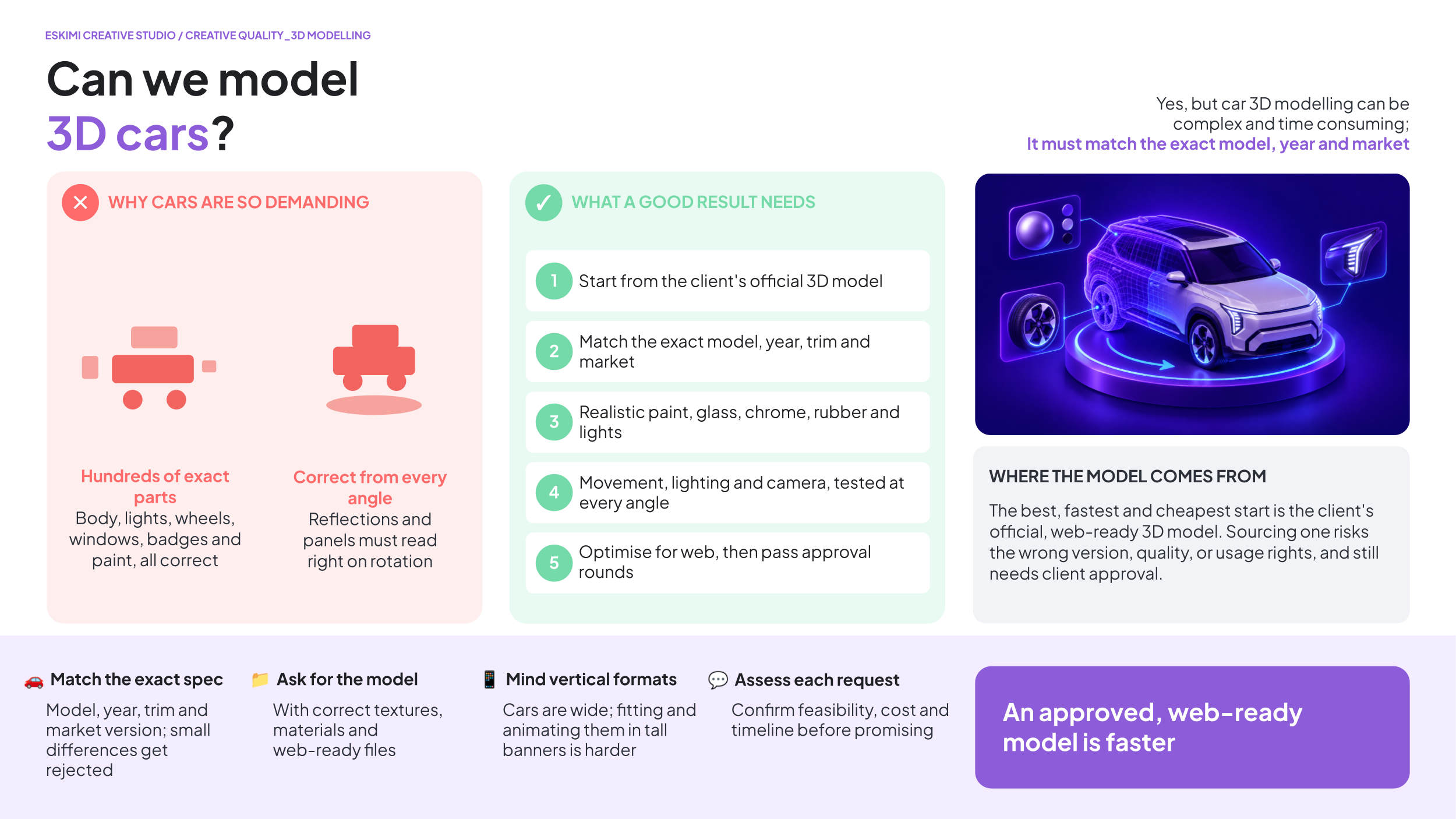
Theoretically, yes - but automotive 3D modelling can be complex and time consuming.
Cars contain hundreds of precise details, including their body shape, lights, wheels, windows, interior, badges, paint finishes and reflections. For an automotive brand, the vehicle must match the exact model, year, trim and market version. Even a small difference may cause the brand to reject the work.
WHY IS IT SO CHALLENGING?
| The model must be completely accurate | Small differences in the headlights, grille, wheels, badges or body shape can make it the wrong vehicle |
| Every material must look realistic | Paint, glass, chrome, rubber and lights all reflect light differently |
| The car must look correct from every angle | Problems that are hidden in one view may become obvious when the vehicle rotates |
| Movement adds more work | Wheels, doors, camera movements, rotating platforms, lighting and background changes must all be set up and tested |
| Web banners have strict file-size limits | A highly detailed 3D model may be too large or demanding to run smoothly in a browser, especially on mobile devices. It may need to be simplified without changing its appearance |
| Automotive approval is usually strict | The brand may require several internal, technical and legal approval rounds |
WHERE DOES THE 3D MODEL COME FROM?
There are two possible routes:
- The client supplies the official 3D model.
- This is the best option because it gives us the most accurate starting point. The model should include the correct textures and materials.
- We source an existing model. We can look for a suitable model online, but:
- The exact model or version may not be available.
- The quality may not be good enough.
- Parts or details may be inaccurate.
- The file may be too large for digital advertising.
- Commercial usage rights may need to be purchased.
- The client must approve the model before production begins.
Creating an accurate vehicle from scratch without an official model would require a specialist 3D artist, detailed reference material and significantly more production time.
WHAT DO WE NEED FROM THE CLIENT?
Before confirming the project, we need:
-
The exact vehicle model, year, trim and market version.
-
An official 3D model, if available.
-
Approved paint colours, wheel options and product details.
-
Clear reference images from all required angles.
-
Brand guidelines and rules for showing the vehicle.
-
Written approval for any externally sourced model.
-
Confirmation of the required movements and camera views.
-
Enough time for modelling, testing, client feedback and corrections.
A reference video shows the type of result the client wants - it does not provide the 3D assets needed to recreate it.
WHY CAN IT TAKE LONGER?
The work may involve sourcing or building the model, correcting its details, applying realistic materials, setting up lighting and movement, rendering or developing the experience, optimising it for the web, testing it across devices and completing several approval rounds.
We should assess every automotive 3D request individually before confirming feasibility, cost or turnaround time. The project becomes much faster and more affordable when the client supplies an approved, web-ready 3D model.
🦾 WHY CAN'T AI JUST DO THE 3D WORK FASTER?
WHY CAN'T AI JUST DO THE 3D WORK FASTER?
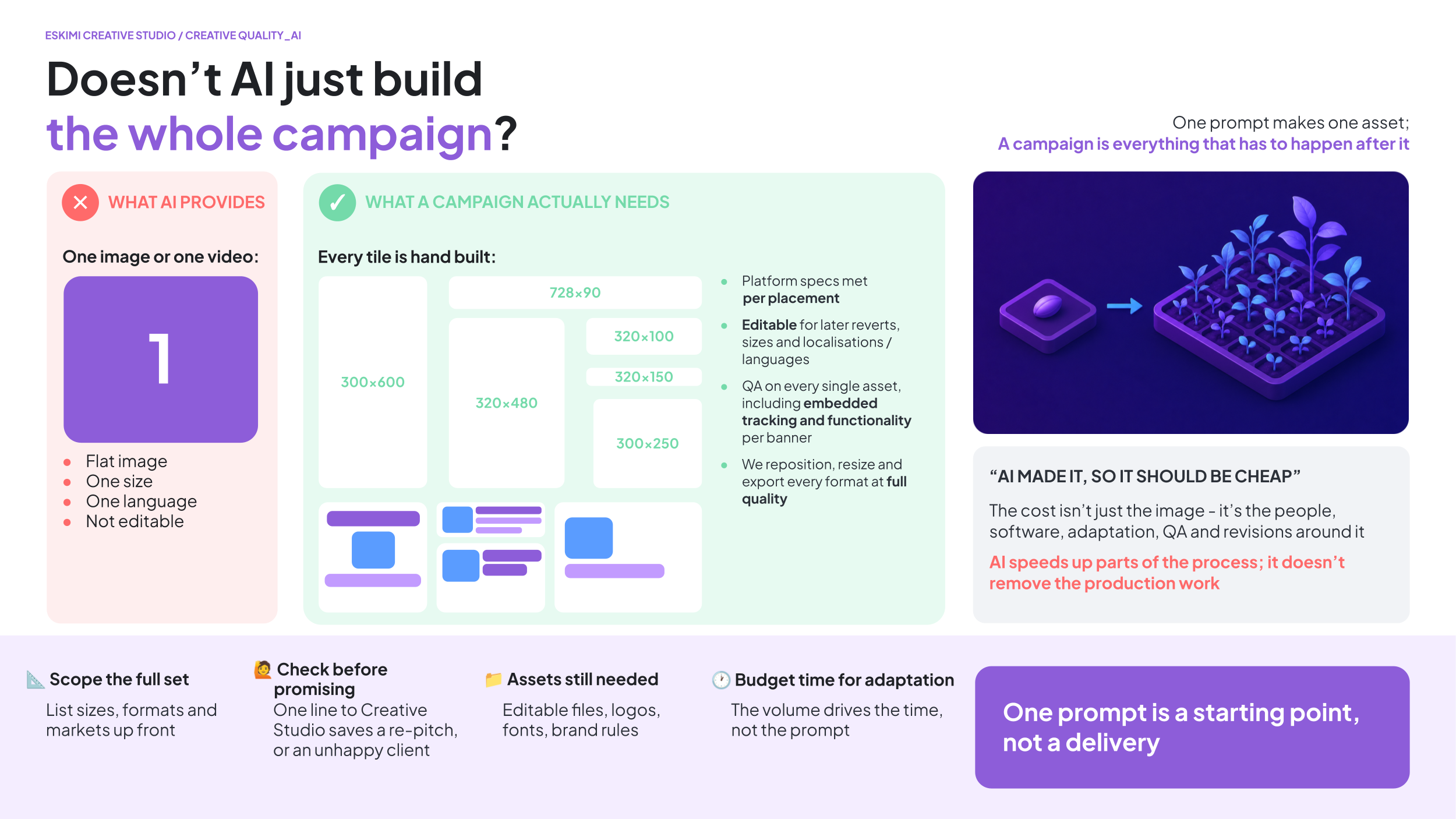
AI is an incredibly useful creative tool, but it isn't yet capable of replacing professional 3D production for most commercial advertising.
While AI can often generate an impressive-looking image or short video, it currently struggles with the things we need for real advertising campaigns, such as:
-
Creating consistent results across multiple scenes
-
Producing editable assets that can be revised later
-
Making changes based on client feedback
-
Recreating the same animation across multiple banner sizes and formats
-
Maintaining accurate branding, products, and fine details
Advertising rarely ends with the first version. Clients often request copy changes, logo updates, different languages, new products, or revised animations. To make those changes, we need editable project files rather than a finished AI-generated video.
Think of it like asking AI to bake a cake. It might produce something that looks great in a photo, but if the client later asks for less sugar, a different flavour, or a larger cake, it's much easier if you still have the recipe than if all you have is the finished cake.
AI is already helping us speed up parts of our workflow where appropriate, and we continue to evaluate new tools as they mature. However, for high-quality, editable, production-ready advertising, skilled artists and traditional 3D workflows are still essential.
USEFUL LINKS
🔗 3D and High Impact Format T's & C's
Pitching with AI

AI BEST PRACTICES: PITCHING
AI-generated creative can be extremely valuable: It can help accelerate ideation, create new visual possibilities, and unlock creative opportunities that were previously difficult or expensive to achieve.
BUT! AI-generated creative still needs to follow the same production realities as any other creative project.
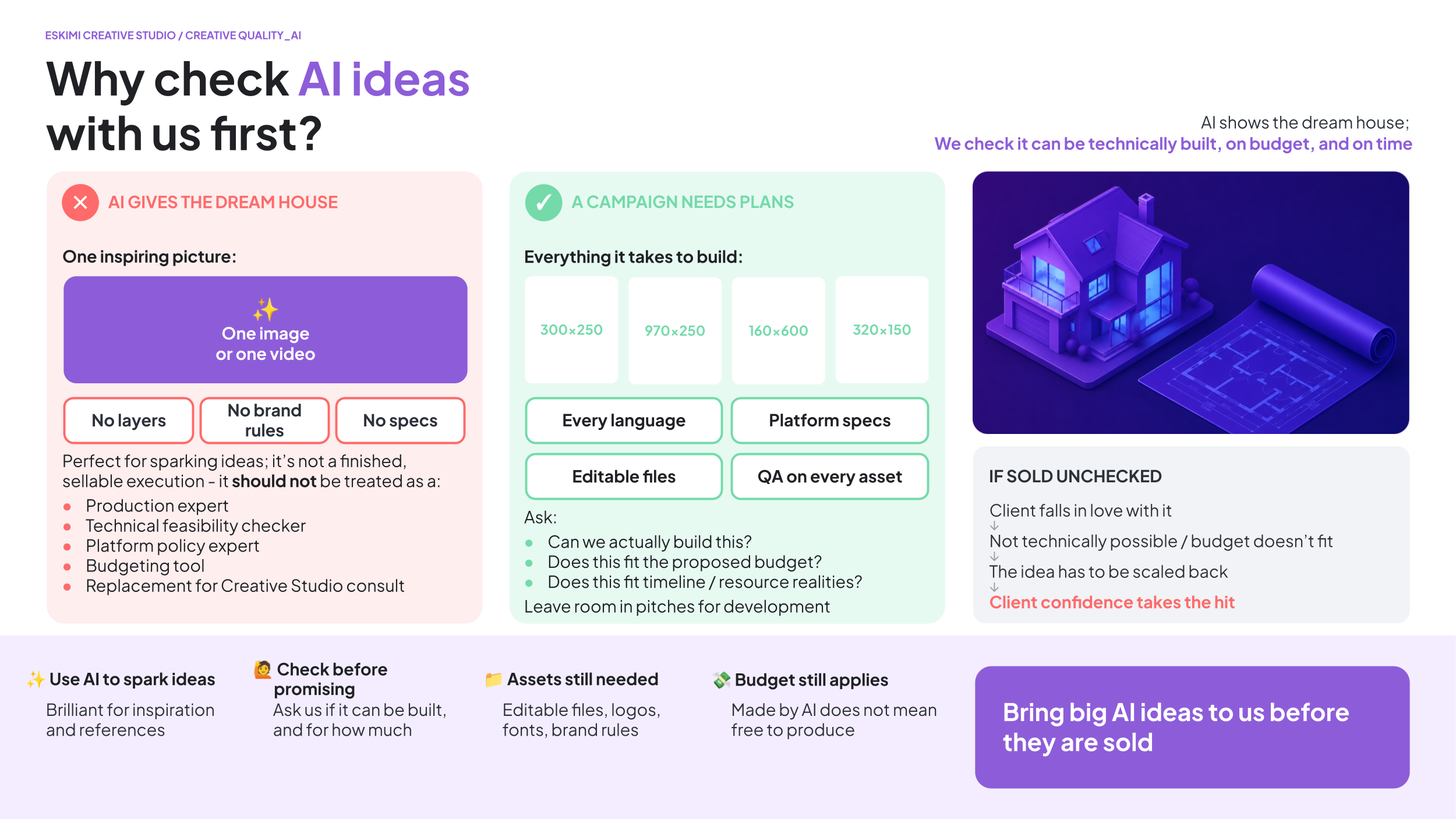
We’re increasingly seeing situations where ambitious AI-generated concepts are being pitched to clients before Creative Studio has confirmed whether:
-
The idea is technically possible
-
It fits within budget
-
Timelines are realistic
✅ AI CAN BE USEFUL FOR
- Generating early-stage inspiration
-
Helping structure thoughts
-
Creating references or jumping-off points
-
Accelerating brainstorming
❌ AI SHOULD NOT BE TREATED AS
- A production expert
-
A technical feasibility checker
-
A platform policy expert
-
A budgeting tool
-
A replacement for Creative Studio consultation
The Creative Studio official mockup tool is coming soon! Watch this space. 👀
*Read our blog post on AI-Gen Creatives here.
BEST PRACTICE
-
Use AI to spark thinking, NOT finalise deliverables
-
Bring ambitious ideas to Creative Studio EARLY
-
Validate feasibility before pitching externally
-
Ask:
-
Can we actually build this?
-
Does this fit the proposed budget?
-
Does this fit timeline / resource realities?
-
- Leave room in client pitches for collaborative development instead of specifying executions too early.
If in doubt, involve Creative Studio early. We’d much rather help shape an idea before it is sold than have to scale it back afterwards. 🙏
Clients do not differentiate between Sales and Creative Studio. To them, we are one team. If we pitch unrealistic concepts, the whole business loses credibility. Going forward, please treat AI-generated concepts as exploratory inspiration - not as production-ready solutions.
Need more detail? Read the explanations below👇
A few important points to keep in mind:
INVOLVE CREATIVE STUDIO BEFORE PROMISING AI TO CLIENTS
What may look simple in an AI-generated video can be extremely complex to recreate in a scalable advertising format.
Or, worst case, the execution you have sold your client might not exist.
Before committing to an execution, please check feasibility with the Creative Studio team so we don’t end up seeming uncooperative when we have to be the bad guys and say it can’t be done. 🥺
A 10-SECOND AI CLIP IS NOT A 10-MINUTE BANNER
AI video tools can turn a prompt into a cinematic sequence in minutes. A fist punches the screen, the glass shatters, steel turns into a bridge, the logo lands. It looks finished, so it feels quick.
It isn't. Every action in that clip is a separate piece of animation our team has to design, build and time, and then make work across every banner size within file-size limits. A mockup that took two minutes to generate can take days to produce properly.
We're increasingly receiving requests that are short films, not banners. When that lands on a same-day deadline, something has to give, and it's usually quality, the timeline, or both.
✅ WHAT A GOOD AI-INSPIRED REQUEST LOOKS LIKE
- One clear idea you can describe in a sentence
- One main animated moment (EG. the "50 Years" text pops out in 3D)
- The AI image or clip attached as mood reference, not as the spec
- A timeline that matches the complexity
❌ WHAT CAUSES DELAYS
- Chains of actions (A happens, which causes B, which transforms into C)
- New actions added after work has started ("can the fist also smash the screen?")
- Complex ideas sold to the client on an urgent deadline
- AI visuals shown to the client before the Studio has confirmed we can build them
KNOW WHICH LEVEL YOU'RE ASKING FOR
- Simple: logo reveal, text animation, CTA, product entrance - standard turnaround
- Enhanced: 2-3 animated elements and one transition - allow extra time
- Motion sequence: multiple actions, transformations, effects (anything that looks like an AI video clip) - treated as custom production: needs a storyboard sign-off, the matching budget tier, and extra time
If you're not sure which level your idea falls into, ask us before you pitch it.
URGENT = SIMPLE
If the deadline is tight, pitch the simple version. A clean, well-built simple idea wins more often than an ambitious one delivered late or half-finished. If the client likes it, we can build the bigger version once the campaign is confirmed and there is time and budget for it.
PITCH OR PRODUCTION? SUBMIT IT IN THE RIGHT PLACE
- Pitch mockup (client hasn't confirmed): submit as a token request; one concept, one revision round
- Won campaign: submit a production request with budget, assets and deadline; this is where the full build happens

AI is a great way to show us what's in your head. It is not a quote, a timeline or a promise to the client. Talk to the Studio before the client sees it, and we'll help you pitch something we can actually deliver on time.
✏️ HOW TO BRIEF IN AI
HOW TO BRIEF IN AI
💸 REVENUE RISK
Even with the best intentions, we can accidentally cause more harm than good for our clients. If we have to tell a client that a concept that they loved, it:
-
Damages client confidence
-
Makes us look disorganised internally
-
Positions Creative Studio as “the bad guy”
-
Creates unnecessary back-and-forth and delays
-
Weakens confidence in our capabilities
-
Risks overpromising and underdelivering
-
Wastes time for all stakeholders
-
Worst case: you lose your pitch, and blame Creative Studio
🧭 GIVE US THE DIRECTION, NOT A PRODUCTION SCRIPT
AI can quickly turn a simple idea into a detailed, scene-by-scene creative brief. The result may sound impressive, but it can include effects, interactions or game mechanics that have not been checked by Creative Studio.
Every specific effect you put in front of a client (“sparks here”, “liquid there,” etc) can become a promise.
If the final execution works differently, then it’s too much, too little, not what the client pictured - they may feel that something is missing or become disappointed. This can lead to confusion, additional revisions and slower delivery.
💡 Give us the general creative direction and examples. Leave the detailed flow and technical execution to Creative Studio to bring to life.
WHAT CAN YOUR BRIEF INCLUDE?
- The main campaign idea
- The campaign objective
- The desired mood or visual style
- What you want the audience to understand or do
- Important products, messages or assets to include
- Examples or references the client likes
- Any confirmed client requirements
WHAT SHOULD CREATIVE STUDIO DEVELOP?
Leave the following to our designers and developers:
- The scene-by-scene sequence
- Exact animation effects
- Detailed user interactions
- Game steps and mechanics
- Transitions between screens
- Technical behaviour
- How the concept adapts across banner sizes
- Alternative solutions if an element cannot work as imagined
Creative Studio understands how the idea must work inside the advertising unit, what is technically possible and how the execution can be adjusted when the client requests changes. That’s the part we’re here for.💪
A few clear and honest lines about the idea are more useful than two pages of AI-generated instructions.
Creative Studio is happy to help shape and strengthen ideas early in the process. Strong collaboration before the pitch creates better outcomes for everyone:
-
Better client trust
-
Smoother production
-
Fewer delays
-
Stronger work
-
A better reputation
OPEN FILES ARE STILL NECESSARY
If a client wants an AI-generated concept, we still need the same production assets as any other project, including:
-
Editable PSD / PSB / AI files
-
Logos
-
Product assets
-
Fonts
-
Brand guidelines
-
Any other relevant source materials
AI outputs alone are rarely sufficient to build a production-ready campaign.
AI DOESN’T KNOW THE CLIENT’S BRAND RULES
AI tools are not familiar with client:
-
Brand guidelines
-
Legal requirements
-
Regulatory restrictions, etc
Generated outputs should always be reviewed rather than assumed to be correct.
AI DOESN’T AUTOMATICALLY MAKE MULTIPLE ASSETS
One AI-generated video is not the same as a complete campaign.
We still need to:
-
Build multiple banner sizes
-
Create different formats and placements
-
Adapt for multiple markets and languages
-
Ensure assets can be edited and updated later
-
Meet platform specifications
People often think AI generates an entire campaign with one prompt. In reality, AI usually creates one image or one video. We still need to:
-
Build every required banner size
-
Adapt layouts for different aspect ratios
-
Replace text for different languages
-
Meet each platform's technical specifications
-
QA every asset before delivery
AI speeds up parts of the process; it doesn't remove the production work.
BUDGET STILL MATTERS
Another common misconception is that “the AI made it, therefore it should be cheap.”
We still invest in people, software, infrastructure, quality control, revisions, project management, and creative expertise to bring campaigns to life.
Remember that minimum spend requirements are there to ensure production costs are covered by sales margins.
🙅 LIMITS OF AI
WHY WE CAN’T USE AI TO RECREATE REAL PEOPLE
Using AI to recreate a real person does not remove the need to obtain the appropriate rights and permissions.
There are typically two separate legal considerations:
-
Copyright: the rights associated with the original photograph or artwork
-
Personality (or publicity) rights: the rights associated with a person's name, image, likeness, or identity
Generating images of real public figures using AI does not remove the legal or commercial licensing requirements.
COPYRIGHT
When we purchase a stock photograph, we're paying for the copyright licence to use that specific image.
-
If we instead generate an AI image, we may avoid licensing the photograph itself, but we're still creating a commercial advertisement featuring the recognisable likeness of real people without permission to do so
-
For commercial advertising, this may still require permission from the individual or their authorised representatives
PERSONALITY (OR PUBLICITY) RIGHTS
Many public figures - particularly athletes, actors, musicians, and influencers - have commercial agreements governing how their likeness may be used in advertising.
-
These rights exist independently of the copyright in any particular photograph
-
Using AI does not automatically bypass them
-
Many sponsorship agreements give brands exclusive rights to use an athlete in advertising within certain product categories
AI should not be considered a replacement for obtaining the necessary commercial rights. Using AI-generated images of real individuals in advertising could still expose the campaign to legal or contractual issues if the advertiser does not have the appropriate rights to use those peoples’ likenesses.
For that reason, we cannot assume that "just using AI" is a compliant alternative to licensing photography.
Where a campaign features a recognisable real person, the safest approach is for the client to provide assets that they have the legal right to use, such as:
-
Officially licensed promotional assets
-
Photographs with the appropriate commercial usage rights
-
Written confirmation that the required image and publicity rights have been secured
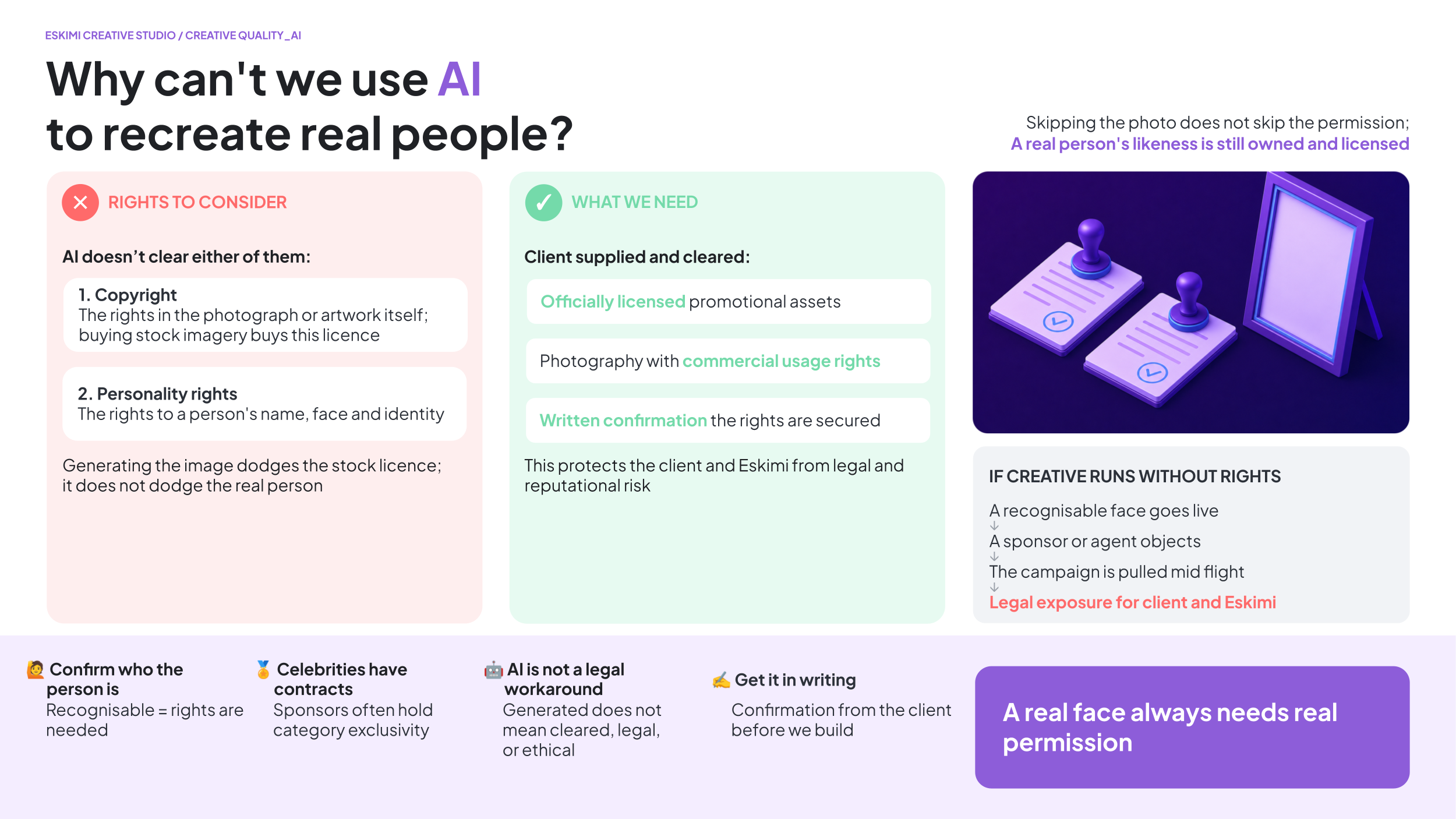
This helps protect both the client and Eskimi from potential legal, contractual, and reputational risks.
WHY WE CAN'T USE AI OR 3D TO RECREATE COPYRIGHTED CHARACTERS
Using AI or 3D modelling to recreate well-known fictional characters does not remove the need to obtain the appropriate intellectual property rights.
Many famous characters - such as those from Disney, Pixar, Marvel, DC, Nintendo, Pokémon, Minions, The Simpsons, and other films, TV shows, games, or comics - are protected by copyright and trademark law. Even apparel like Nike Air Jordans are extremely restrictive about this.
Whether the character (or even logo) is:
-
AI-generated
-
3D modelled from scratch
-
Illustrated
-
Animated
-
or manually recreated
…the underlying intellectual property still belongs to the rights holder.
Creating "something that looks like" a protected character for commercial advertising may still infringe those rights, even if no existing artwork was copied.
For this reason, AI and 3D modelling should not be considered a way to bypass licensing requirements.
If a campaign requires the use of a recognisable fictional character, the client should provide:
-
Officially licensed artwork or models
-
Written confirmation that they have the necessary commercial rights
-
Brand guidelines or usage instructions where applicable
This helps protect both the client and Eskimi from potential legal, contractual, and reputational risks.
Creating with AI: Client Rules and Disclosures
Generative AI can help Creative Studio develop new images, extend backgrounds, explore visual directions and create elements that may be difficult or expensive to produce traditionally.
However, not every client allows AI to be used.
Some clients prohibit it completely. Others allow it only under specific conditions. Certain campaigns may also need to disclose that AI was used.
Before Creative Studio begins, we need to understand:
-
Does the client allow us to use AI?
-
Does the client have rules that control how we use it?
-
Does the campaign require an AI disclosure?
-
If a disclosure is required, exactly what must we include?
AI permission, AI rules and AI disclosures are three different things. We need an answer for each one.
✅ QUICK ANSWER
| QUESTION | WHAT WE NEED |
|---|---|
| Can we use AI? | A clear Yes or No from the client |
| Does the client have AI rules? | The complete policy, restrictions or written instructions |
| Is disclosure required? | Confirmation from the client or their legal/compliance team |
| What must the disclosure say? | The exact approved wording, icons and usage instructions |
If AI use has not been confirmed, do not assume that it is allowed.
BEST PRACTICE
Ask these questions before the creative concept is finalised.
AI restrictions may change:
-
The concept we recommend
-
The assets we need
-
The tools we can use
-
The production method
-
The time required
-
The format layout
-
The final disclosure treatment
The earlier Creative Studio receives the correct information, the easier it is to develop a compliant and realistic solution.
If AI rules are confirmed before production, we can design around them. If they arrive after production, we may need to rebuild the creative. When in doubt, ask the client. Creative Studio can implement the rules, but the client must define and approve them.
Need more detail? Read the explanations below👇
WHAT DO WE MEAN BY “USING AI”?
Using AI can include asking an AI tool to create or change part of a visual.
Examples include:
-
Generating a new image
-
Creating a background or environment
-
Adding objects that were not in the original image
-
Removing or replacing objects
-
Extending an image beyond its original edges
-
Changing a person, face, body or clothing
-
Creating AI-generated people
-
Creating different product environments
-
Generating visual effects
-
Using AI-generated video
-
Using AI to change an existing photograph
AI may be used for only one small part of a banner, but it still counts as AI use.
1. DOES THE CLIENT ALLOW AI?
1. DOES THE CLIENT ALLOW AI?
The first question in the Creative Studio brief asks: Is your client comfortable with Creative Studio using generative AI when creating their banners?
The answer must reflect the client’s position, not the salesperson’s personal opinion.
✅ SELECT “YES” WHEN
- The client has confirmed that Creative Studio may use AI
-
The client’s approved policy allows AI for this type of work
-
Any conditions or restrictions have been identified and shared
❌ SELECT “NO” WHEN
- The client does not allow AI-generated content
-
The client has prohibited external partners from using AI
-
The client’s industry, brand or internal policy prevents its use
-
The client has approved only traditional production methods
❓ IF THE CLIENT HAS NOT CONFIRMED
Do not guess or select “Yes” because AI would make the concept easier to produce. Ask the client before submitting the brief. Until permission is confirmed, Creative Studio must treat AI as not approved.
No confirmation does not necessarily automatically mean permission.
WHY MIGHT A CLIENT SAY NO?
A client may object to AI for many reasons, including:
-
Copyright or ownership concerns
-
Brand reputation
-
Ethical concerns
-
Protection of customer or company information
-
Restrictions on uploading assets into AI tools
-
Concerns about how AI tools were trained
-
Legal or regulatory requirements
-
Industry-specific rules
-
Contracts with photographers, artists, models or celebrities
-
Internal company policy
-
A preference for human-created work
Creative Studio does not need to agree or disagree with the client’s position - we need to understand it and follow it.
2. DOES THE CLIENT HAVE SPECIFIC AI RULES?
2. DOES THE CLIENT HAVE SPECIFIC AI RULES?
Permission to use AI does not mean that anything is allowed. A client may say: “Yes, you may use AI, but only under these conditions.”
The briefing form therefore asks whether the client has an AI policy or any specific restrictions.
CLIENT RULES MAY CONTROL
-
Whether AI-generated people may be used
-
Whether real people may be altered
-
Whether faces, bodies or clothing may be changed
-
Whether products may be generated or changed
-
Whether logos or brand assets may be uploaded
-
Which AI tools may be used
-
Whether confidential information may be entered into an AI tool
-
Whether the final content needs human review
-
Whether AI-created elements must be disclosed
-
Whether AI may be used only for backgrounds or surroundings
-
Whether AI-generated content may be used in particular countries
-
Whether the client must approve AI-generated elements separately
For example: A client may allow Creative Studio to:
-
Generate or extend the environment around a person
-
Create background elements
-
Remove unwanted objects from the surroundings
But prohibit us from:
-
Generating a person
-
Changing a real person’s face or body
-
Altering their appearance
-
Creating additional poses or expressions
DISCLOSURE EXAMPLES
- Nescafe wouldn’t let us use it on people
- Kaufland needed a formal AI badge on the creative
- Lenovo needed formal AI disclosure wording
*Read our blog post on AI-Gen Creatives here.
WHAT MUST SALES PROVIDE?
If the client has an AI policy, attach or link the complete policy in the brief.
This may be:
-
A formal policy document
-
Written instructions from the client
-
An email from the client’s legal or compliance team
-
Brand-specific AI guidelines
-
Campaign-specific instructions
Do not shorten a detailed policy to:
-
“AI is fine”
-
“Do not use people”
-
“Use AI carefully”
-
“Client has restrictions”
A short summary can accidentally remove an important condition.
Provide the original instructions wherever possible. Creative Studio should not have to interpret a second-hand version of the client’s policy.
IF THE POLICY IS UNCLEAR
If the policy uses unclear language, ask the client for clarification before production begins.
For example:
-
Does “no AI people” include editing photographs of real people?
-
Can AI be used for backgrounds?
-
Can product images be uploaded into an AI tool?
-
Are AI-generated objects allowed?
-
Does the restriction apply to final content only, or also to concept development?
-
Are specific AI tools approved or prohibited?
-
Does the policy apply in every campaign market?
3. DOES THE CAMPAIGN REQUIRE AI DISCLOSURE?
3. DOES THE CAMPAIGN REQUIRE AI DISCLOSURE?
An AI disclosure tells the audience that content was created or changed using AI.
A disclosure may be required because of:
-
The client’s internal policy
-
Local or regional law
-
Industry regulations
-
Platform or publisher requirements
-
The type of AI-generated content being used
-
The market in which the campaign will run
Examples may include:
-
Written disclosure text
-
An AI information label
-
An icon or symbol
-
A notice displayed on or near the creative
-
Information provided when a user clicks an icon
-
Machine-readable information added to the file
AI disclosure requirements are not the same in every country, on every platform or for every type of content.
For example: The EU AI Act
The EU AI Act includes transparency obligations for certain AI-generated or manipulated content.
For example, Article 50 includes disclosure requirements relating to certain “deep fake” image, audio and video content. It also includes separate requirements for providers of AI systems to make certain AI-generated outputs detectable in a machine-readable format.
This does not mean that every use of AI in every advertisement automatically needs the same label.
The correct requirement depends on factors such as:
-
What was created or changed
-
How realistic the content appears
-
How the content will be used
-
Where the campaign will run
-
Who is legally responsible for deploying it
-
Whether another law, platform rule or client policy also applies
*Read Article 50 of the EU AI Act for the official legal text.
DO NOT ASSUME THAT EU RULES ONLY AFFECT EU CLIENTS
The client’s headquarters are not the only consideration. Disclosure requirements may depend on where the campaign will be shown.
For example, a campaign from a non-EU brand may still be subject to EU requirements if it runs in an EU market. The brief must therefore include:
-
Every campaign country
-
Any regional variations
-
The platforms or publishers being used
-
Any market-specific disclosure instructions
The campaign market matters, not only the client’s location.
4. WHAT DO WE NEED WHEN DISCLOSURE IS REQUIRED?
4. WHAT DO WE NEED WHEN DISCLOSURE IS REQUIRED?
Because a disclosure may carry legal meaning, Creative Studio cannot invent, rewrite or interpret it.
The client must provide the complete, approved disclosure instructions.
REQUIRED INFORMATION
| REQUIREMENT | WHAT THE CLIENT MUST PROVIDE |
|---|---|
| Exact wording | The final approved disclosure text |
| Language versions | Approved wording for every campaign language |
| Icon or symbol | The correct production-ready file |
| Placement | Where it must appear in the creative |
| Size | How large the text or icon must be |
| Colour and contrast | Any rules controlling how it must appear |
| Visibility | Whether it must always be visible or may appear temporarily |
| Timing | When and for how long it must appear in animation or video |
| Interaction | Whether the user must be able to click or open more information |
| Destination link | The approved URL, if the disclosure links somewhere |
| Market rules | Which version applies in each country |
| Approval | Confirmation that the final disclosure has been approved |
WHY DOES THE CLIENT NEED TO PROVIDE THE EXACT WORDING?
A small wording change can change the legal meaning of a disclosure.
Creative Studio cannot safely:
-
Write legal disclosure copy
-
Decide which law applies
-
Shorten wording to make it fit
-
Translate legal text
-
Choose an icon without instructions
-
Decide how long a disclosure should appear
-
Confirm that the disclosure is legally sufficient
-
Approve disclosure placement on the client’s behalf
We can implement approved disclosure instructions. We cannot create or legally approve them.
DISCLOSURE ICONS AND GUIDELINES
If an icon is required, do not describe it as:
-
“The normal AI icon”
-
“Use any sparkle icon”
-
“Add an AI symbol”
-
“Use the icon from another campaign”
There is no single icon that automatically satisfies every company policy or legal requirement.
The client must provide:
-
The correct icon file
-
The permitted file format
-
Clear space requirements
-
Minimum size
-
Approved colours
-
Placement rules
-
Any link or interaction required
-
Instructions for different backgrounds or banner sizes
If the icon is part of the client’s policy, request its official usage guidelines.
LANGUAGE VERSIONS
Creative Studio must receive approved disclosure wording for every language used in the campaign.
We should not translate legal or compliance wording ourselves.For example, if a campaign runs in English, French and Lithuanian, the client must provide the approved disclosure in all three languages.
Campaign localisation includes the disclosure.
EXAMPLE BRIEF RESPONSES
Can Creative Studio use AI?
Yes.
Does the client have specific AI rules?
Yes. AI may be used for backgrounds and surrounding objects. It may not be used to generate or alter people, faces, bodies or clothing. The complete client policy is linked in the brief.
Is AI disclosure required?
Yes, for this campaign market.
What must be included?
The client has supplied the approved wording in all campaign languages, the required icon, minimum-size rules, placement instructions and the final destination URL.
The downside of .GIF formats
✔️WHY .GIFS AREN’T A GOOD BANNER FORMAT
.GIFs can often be huge files because they act as a "flipbook" of entirely separate images stacked into a single file.
Unlike video formats (like .MP4) that only save the pixels that change from frame to frame, a .GIF saves every single full frame - for example, a 5-second animation at 24 frames per second means the file contains 120 separate images, stacked one after the other.
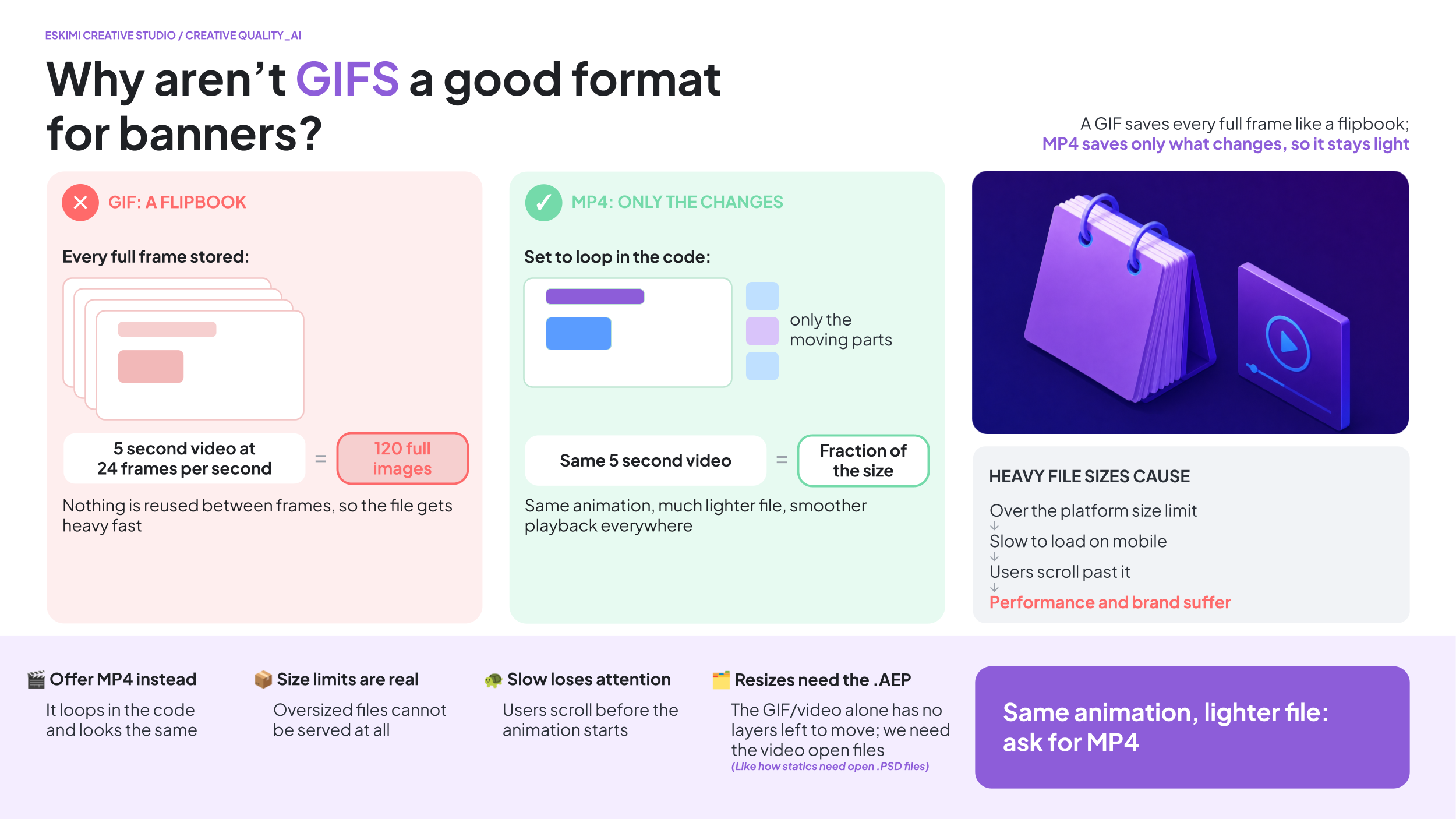
Having really large file sizes come with risks:
Upload limits:
-
Many DSPs and ad servers have maximum file size limits. If a file exceeds these limits, it simply cannot be uploaded or served
Slower loading:
- Larger files take longer to download on a user's device, particularly on slower mobile networks. This can delay the animation from starting or cause it to play less smoothly
Reduced user experience:
-
If the creative takes too long to load or the animation stutters, users are less likely to engage with it; in some cases, they may scroll away before the banner has even finished loading
-
This will directly impact campaign performance
-
If creatives load slowly or don't play smoothly, engagement rates of any kind may decrease, reducing the overall effectiveness of the campaign
Brand perception:
A more efficient option is to rather have an .MP4 and set it to automatically loop in the code - you can see an example of that here.
WHY WE NEED ORIGINAL ANIMATION FILES TO RESIZE GIFS:
To resize a GIF and produce a high quality resized version, we'll need the original animation project file - this type of file usually ends with .AEP.
-
A .GIF is the final exported version of the animation
-
It's similar to a finished video - it contains all of the frames, but it no longer contains the individual artwork, text, or animation layers that were used to create it
-
When creating a new size, we don't simply stretch the existing .GIF - each layout usually needs to be rebuilt so that the text, products, logos, and animations fit the new dimensions correctly while maintaining image quality
-
Without this, we can only scale the entire .GIF as one flat animation - this often results in blurry visuals, distorted proportions, or elements being cropped, and we can't reposition or resize individual objects because they no longer exist as separate layers (similar to how static .JPGs behave when we need to resize them)
A .GIF is like a finished movie. You can watch it, but you can't ask the actors to stand in different places. The original animation file is the film set, where every object and character can still be moved independently.
Reverts 101
WHY WE ASK FOR ONE CONSOLIDATED ROUND OF FEEDBACK
We completely understand that clients often think of additional comments after reviewing a creative. However, sending feedback over multiple days is much less efficient than sending one complete list. EG:
SCENARIO A:
-
Monday: 20 comments received
-
The Creative Studio team:
-
Reviews the feedback once
-
Makes all changes together
-
Performs one round of quality checks
-
Exports the files
-
Sends one updated version
SCENARIO B:
-
Monday: 5 comments
-
Tuesday: 4 more comments
-
Wednesday: 2 more comments
-
Thursday: 3 more comments
Although there are fewer comments overall, the team must repeatedly:
-
Stop other work
-
Reopen the project
-
Understand the new request
-
Make the changes
-
Check that nothing else has broken
-
Export new files
-
Upload and share new previews
The project keeps restarting instead of moving forward.
Another common challenge is when comments that could have been identified during the first review only come through in later revision rounds. EG:
-
V1: "Looks great."
-
V2: "Actually, can we move the logo?"
-
V3: "Can we also change the headline?"
-
V4: "The product should be bigger."
None of these comments are unreasonable on their own, but together they create additional rounds of production that could often have been avoided if everything had been reviewed together at the start
THE HIDDEN COST
People assume only the designer is affected. In reality, every extra feedback round also means:
-
The PM has to review the request
-
The PM has to brief the designer / developer
-
The designer / developer has to stop what they're doing
-
The PM has to QA the output
-
The PM has to upload the files
-
The PM has to communicate back to Sales / client
-
Everyone has to switch context before returning to their previous work
Providing one consolidated round of feedback helps us:
-
Deliver revisions faster
-
Reduce unnecessary work
-
Keep your project moving
-
Spend more time improving the creative instead of restarting the process
It's usually faster to wait an extra hour to collect all of a client's comments than to spend four days implementing them one message at a time.
Campaign Creative Requirements 2.0
This page is the evolution of the previous Creative Requirements page. Updated 09.2026.
⚡ START HERE
The creative assets needed for campaigns depend on two things:
-
The creative format you are using
-
Whether the client is supplying a finished advert or asking Creative Studio to build it
Use this chapter to check the required file types, dimensions, file sizes and supporting information before either submitting a brief, or before going live with supplied creative.
Requirements may differ by country, publisher or placement. Always confirm the final campaign requirements.
📌 STICKY ADS
📌 STICKY ADS
A sticky ad remains visible in a fixed position while the user moves through the page.
| REQUIREMENT | DETAILS |
|---|---|
| Accepted files | .PNG, .JPG, .GIF or finished HTML5 |
| Recommended size | Up to 150 KB |
| Maximum size | 4.5 MB |
*See above about .GIF limitations.
SUPPORTED DIMENSIONS
| HEADER | FOOTER | SIDEBAR | FULL SCREEN |
| 300 × 50 | 120 × 600 | 120 × 600 | 320 × 480 |
| 300 × 100 | 160 × 600 | 160 × 90 | 480 × 320 |
| 300 × 250 | 200 × 200 | 160 × 600 | 720 × 1280 |
| 320 × 50 | 250 × 250 | 200 × 200 | 768 × 1024 |
| 728 × 90 | 300 × 50 | 234 × 60 | 1,024 × 768 |
| 300 × 100 | 240 × 400 | ||
| 300 × 250 | 250 × 250 | ||
| 300 × 600 | 300 × 50 | ||
| 320 × 50 | 300 × 100 | ||
| 320 × 100 | 300 × 250 | ||
| 320 × 480 | 300 × 600 | ||
| 336 × 280 | 320 × 50 | ||
| 468 × 60 | 320 × 100 | ||
| 728 × 40 | 336 × 280 | ||
| 728 × 90 | 728 × 90 | ||
| 970 × 90 | 970 × 250 |
✨ TEMPLATED RICH MEDIA
✨ TEMPLATED RICH MEDIA
The Rich Media Template Builder is a self-serve tool inside the Eskimi DSP that lets you turn static images and videos into interactive, high-impact rich media ads in minutes, without any coding. Users choose from 20+ pre-designed templates (such as Carousel, 3D Cube, Pixel Pages, Parallax and Scratch to Reveal), upload their assets into the template's frames, and are immediately ready for campaign go-live. It's available to every client tier, including self-service, with no Creative Studio involvement or minimum budget. Custom rich media, by contrast, is built by the Studio and carries a minimum spend.

*See Pitch-ready presentation slides here.
WHAT TO PROVIDE
- High-quality .PNG or .JPG images in the required banner dimensions
-
We usually prefer to deliver them in double the dimensions to prevent any pixelation - here’s how it works using a standard 300x250 banner as an example:
-
The actual “slot” on the website is 300x250 pixels
-
If we provide a file that is exactly 300x250, it can look blurry on those sharp screens
-
To fix this, we create the image at 600x500 (double the size)
-
The website then “squeezes” those extra pixels into that original 300x250 slot
-
This isn’t about making the banner physically bigger on the page - it’s a compression tactic to make sure the image stays crisp and sharp
- See this in action here
-
-
- .MP4 videos in the relevant dimensions for video templates
- File size is recommended as 150 KB each, but the DSP can accept higher - however it may begin to impact performance
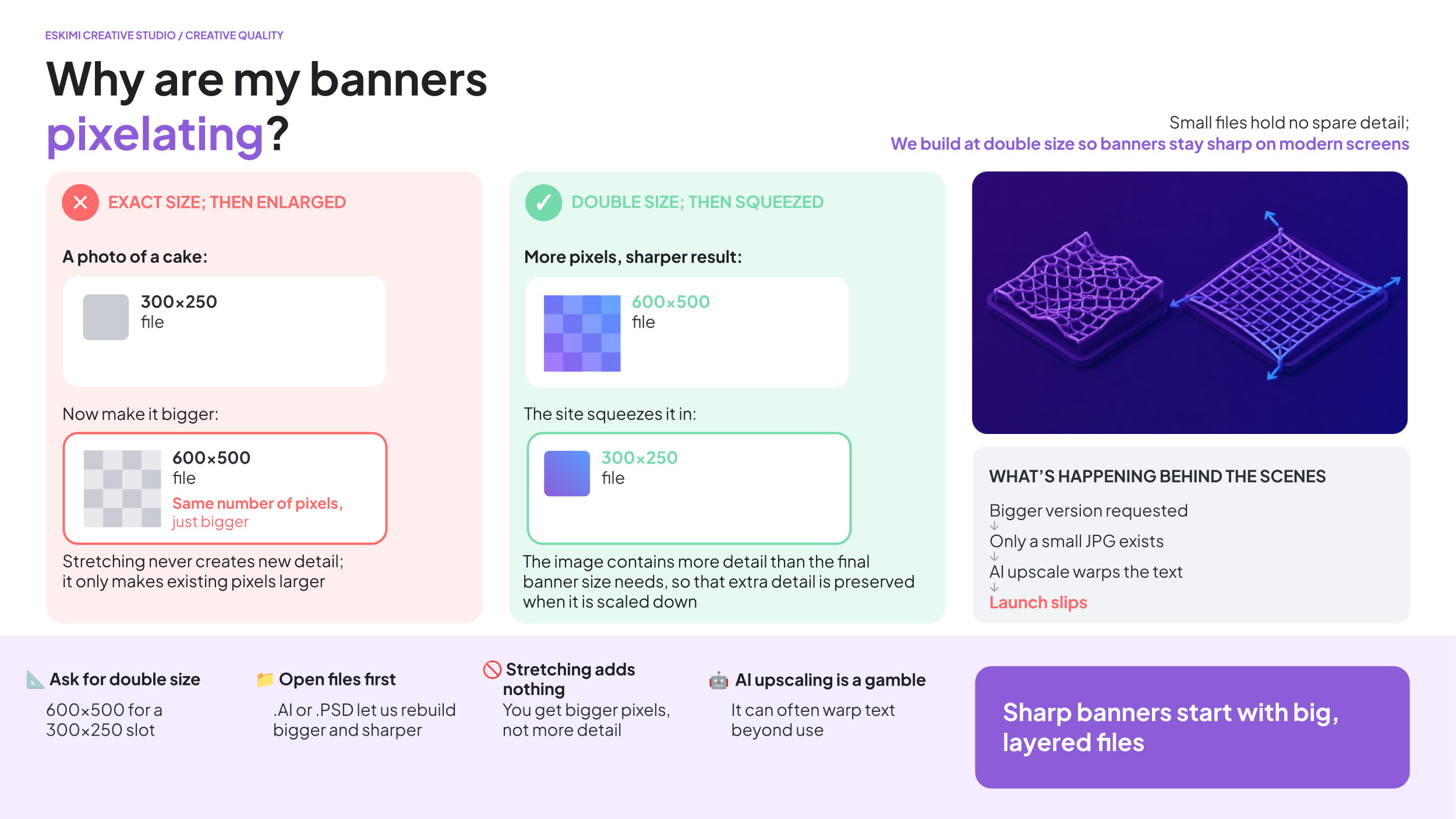
*See this in action here.
SUPPORTED DIMENSIONS
| HORIZONTAL | SQUARE | VERTICAL |
| 300 × 50 | 300 × 300 | 160 × 600 |
| 300 × 150 | 320 × 320 | 300 × 600 |
| 300 × 250 | 320 × 480 | |
| 320 × 50 | ||
| 320 × 100 | ||
| 336 × 280 | ||
| 728 × 90 | ||
| 970 × 90 | ||
| 970 × 250 |
*See dimensions per template format here.
The Creative Studio team can help with resizes - resizing work usually takes 24 hours depending on seasonal capacity. To assist with this, the Creative Studio requires Open Files from the client team.
HOW MANY IMAGES ARE REQUIRED?
The number of required images depends on the selected template - previews of all available Eskimi Templated Rich Media can be found here.
| ASSETS AVAILABLE | POSSIBLE FORMATS |
|---|---|
| 1 image |
Rotating Billboard (needs 1x dimensions export) SpinView Gallery (1x background image; 1x product image) |
| 2 images |
Countdown (needs 1x dimensions export) Dancing 3D (1st image not in view; ensure main image is in 2nd image placement) Scratch to Reveal (needs 1x dimensions export) Shake & Break (2nd image needs 1x dimensions export) SpinView Gallery (+ background image) |
| 3 images |
SpinView Gallery (+ background image) |
| 4 images |
3D Cubes Animated Parallax (2nd and 4th images not in view; ensure main images are in 1st and 3rd image placement) SpinView Gallery (+ background image) |
| 5 - 6 images |
SpinView Gallery (+ background image) |
| 7 - 10 images | 3D Cube Rotating Carousel Carousel Splitscreen Pixel Pages SpinView Gallery (+ background image) |
HOW MANY VIDEOS ARE REQUIRED?
The DSP Template Builder also supports video formats - either as video only, or as video + images.
| ASSETS AVAILABLE | POSSIBLE FORMATS |
|---|---|
| 3 - 10 videos + images | |
| 2 - 10 videos + images | |
| 3 - 4 videos + images | |
| 1 - 10 videos + images | |
| 3 - 10 videos + images | |
| 1 video |
Some formats have additional requirements. Check the individual format specifications before confirming the execution with the client.
🧩 CUSTOM RICH MEDIA
🧩 CUSTOM RICH MEDIA
Custom Rich Media is designed and developed specifically for the campaign rather than built from an existing template.
WHAT TO PROVIDE
-
Editable .PSD or other approved Open Files from the client team
- Brand guidelines or brand book (especially useful for a first time client)
-
Logos
-
Font files
-
Final copy (especially if the campaign is not in English, and the language uses any special characters)
-
Final CTA
-
All required banner dimensions
-
A short explanation of the required user journey
- Any legal disclaimers needed
Brief in your custom request here. (COMING SOON)
WHAT IS THE USER JOURNEY?
The user journey explains what happens when someone sees or interacts with the advert.
For example:
-
The product appears
-
The user selects an option.
-
The advert displays the result
-
The user clicks the CTA to visit the client’s website
A few clear sentences are enough for an initial brief. More complex experiences may require a storyboard before development begins.
*See a very thorough example here.
🧊 FORCED PERSPECTIVE AND 3D FORMATS
Forced Perspective and other 3D formats require both the campaign design and accurate product references.
STANDARD BRAND ASSETS
For ALL projects, please provide:
- Editable brand or campaign files, such as .PSD, .AI or .FIG
- High-resolution logos
- Font files
- Brand guidelines, if available
- Final, approved copy
- Final call to action (CTA)
- Music as an .MP3, or an approved music reference if relevant
- Legal copy and mandatory disclaimers
🧊 ASSETS REQUIRED FOR 3D PROJECTS
If the project includes a 3D product or object, we also need:
- An existing 3D model of the product
- 3D model file format: .GLTF for web 3D format, .FBX or .OBJ
- UV wrapped with provided texture image files
- If 3D assets don't exist, we would need the below to create a 3D model from scratch:
- Flat label or sticker artwork in .AI, .EPS or print-ready PDF format
- Packaging layouts and dielines
- Material and finish details, such as matte, gloss, metallic or transparent
- Clear reference photographs from different angles (IE. orthographic reference photos)
*Read more details on 3D format creative requirements here.
💥 HIGH IMPACT FORMATS
High Impact formats use larger or more unusual placements to create a more noticeable experience.
WHAT TO PROVIDE
-
Editable .PSD or other approved Open Files from the client team
- Brand guidelines or brand book (especially useful for a first time client)
-
Logos
-
Font files
-
Final copy (especially if the campaign is not in English, and the language uses any special characters)
-
Final CTA
-
All required banner dimensions
-
A short explanation of the required user journey
- Any legal disclaimers needed
| FORMAT | REQUIREMENT |
|---|---|
| Floating Ad | 150 × 150 .PNG, .JPG or layered .PSD |
| Full Page Takeover | Responsive assets |
| Topscroll | Responsive assets |
| Midscroll | Responsive assets |
A responsive format adjusts to the size of the screen where it appears. This means the design must work across different screen sizes instead of being created at only one fixed dimension. Creative Studio may request additional background images, safe areas or layered assets depending on the selected format.
🔄 DYNAMIC ADS
🔄 DYNAMIC ADS
Dynamic ads automatically change some content using an external source of information.
For example, an advert may display different:
-
Products
-
Prices
-
Locations
-
Weather conditions
-
Promotional messages
WHAT TO PROVIDE
The requirements depend on what will change.
| DYNAMIC CONTENT | WHAT WE NEED |
|---|---|
| Products or prices (data format) | .JSON, .XML, or .CSV format API Endpoint (not within EskimiDSP solution) |
| Weather | The required cities and weather conditions |
| Other live information | Access to a suitable API |
| Creative design | Editable, layered campaign assets |
*Learn more about Dynamic Ad requirements and setup here.
**Access the Pitch presentation with examples here.
***Read about Dynamic Ads with product feeds here.
A product feed is a structured file containing information such as product names, images, prices and links. An API is a connection that allows the advert to request information from another system.
DYNAMIC AD DIMENSIONS
| COMMON MOBILE DIMENSIONS | COMMON DESKTOP DIMENSIONS |
|
200 × 200 |
120 × 600 |
| 250 × 250 | 160 × 600 |
| 300 × 50 | 250 × 250 |
| 300 × 100 | 300 × 250 |
| 300 × 250 | 300 × 600 |
| 300 × 600 | 336 × 280 |
| 320 × 50 | 728 × 90 |
| 320 × 480 | 970 × 90 |
| 468 × 60 | - |
📹 VIDEO AND AUDIO FORMATS
VIDEO AND AUDIO FORMATS
🎮 IN-GAME ADS
In-game advertising may use a banner or video displayed inside a game environment.
ACCEPTED FILES
| Banner | .JPG, .GIF, finished HTML5 or approved tags |
| Video | MP4 |
BANNER DIMENSIONS
| COMMON BANNER DIMENSIONS | ADDITIONAL SUPPORTED DIMENSIONS MAY INCLUDE | VIDEO DIMENSIONS |
| 300 × 250 | 160 × 600 | 320 × 480 |
| 320 × 50 | 250 × 250 | 480 × 320 |
| 320 × 480 | 300 × 600 | 768 × 1024 |
| 336 × 280 | 320 × 100 | 1024 × 768 |
| 480 × 320 | 320 × 180 | |
| 640 × 360 | 320 × 320 | |
| 640 × 480 | 360 × 640 | |
| 728 × 90 | ||
| 768 × 1024 | ||
| 970 × 250 | ||
| 1920 × 1080 |
VIDEO SPECIFICATIONS
| VIDEO REQUIREMENT | GUIDANCE |
| Recommended file size | Less than 15 MB |
| Recommended duration | 6–15 seconds |
▶️ IN-BANNER VIDEO
| REQUIREMENT | DETAILS |
|---|---|
| File type | .MP4 |
| Aspect ratio | 4:3 |
| Maximum size | 5 MB |
| Recommended duration | Up to 30 seconds |
Also provide:
-
A short description
-
CTA wording
-
An optional 300 × 250 companion banner in .PNG, .JPG or finished HTML5 format
🎬 VAST VIDEO
VAST is a standard method used to deliver video ads across compatible websites and apps.
| REQUIREMENT | DETAILS |
|---|---|
| File type | .MP4 |
| Aspect ratio | 16:9 |
| Maximum size | 5 MB |
| Recommended duration | Up to 30 seconds |
| Maximum duration | 6 minutes |
Also provide:
-
A short description
-
CTA wording
-
An optional 300 × 250 companion banner in .PNG, .JPG or finished HTML5 format
🎁 REWARDED VIDEO
Rewarded video gives a user an in-app reward for watching the advert.
| REQUIREMENT | DETAILS |
|---|---|
| File type | .MP4 |
| Dimensions | 320 × 480 or 480 × 320 |
| Maximum size | 5 MB |
| Recommended duration | Up to 30 seconds |
Also provide:
-
A short description
-
CTA wording
-
An optional 300 × 250 companion banner in .PNG, .JPG or finished HTML5 format
📺 CONNECTED TV ADS
Connected TV, also called CTV, refers to video advertising shown through internet-connected television services and devices.
| REQUIREMENT | DETAILS |
|---|---|
| Accepted file | .MP4 |
| Alternative delivery | External VAST URL without VPAID |
| Dimensions | 1920 × 1080 |
| Recommended size | Up to 45 MB |
| Maximum size | 100 MB |
| Recommended duration | Up to 30 seconds |
| Maximum duration | 1 minute |
*VPAID and OMID are not supported. This means viewability cannot be tracked using these technologies.
🔊 AUDIO ADS
| REQUIREMENT | DETAILS |
|---|---|
| Accepted files | .MP3, .WAV, .WMA or .OGG |
| Minimum bitrate | 128 kbps |
| Maximum size | 50 MB |
| Recommended duration | 15–30 seconds |
*Some limited inventory supports audio up to 60 seconds. Confirm availability before promising a longer execution.
⏭️ YOUTUBE BUMPER ADS
A bumper ad is a short YouTube video advert.
REQUIREMENTS
-
The video must be no longer than 6 seconds
-
The final video must be uploaded to YouTube
-
The YouTube video link must be provided
📹 YOUTUBE IN-STREAM ADS
REQUIREMENTS
-
Recommended video duration: 15, 20 or 30 seconds
-
The final video must be uploaded to YouTube
-
The YouTube video link must be provided