Eskimi Creative Studio 101
A practical guide to Eskimi Creative Studio: who we are, what we do and how we help brands create more effective digital advertising. This manual covers our creative services, capabilities, formats and ways of working, as well as how to brief and collaborate with the Studio. It also includes minimum media investments, production requirements, lead times, responsibilities, processes, best practices and answers to frequently asked questions.
- Getting to know Eskimi Creative Studio
- How to brief
- What are Open Files?
- Why do we need Open Files?
- 3D and High Impact Format T's & C's
- 3D modelling and rendering: timelines and complexity
- Pitching with AI
- Creating with AI: Client Rules and Disclosures
- The downside of .GIF formats
- Reverts 101
- Campaign Creative Requirements 2.0
- Frequently asked questions
- What are Client Tiers?
- What are creative Minimum Investments, and why do we have them?
- What are Tokens, and how do they work?
- How Creative Studio can help brainstorm your idea
- Why are my banners pixelating?
- Creative Studio Glossary
- New creative formats
Getting to know Eskimi Creative Studio
An introduction to Eskimi Creative Studio: what we are, our purpose and mission, and the role we play within Eskimi. This chapter explains our value proposition, strategic objective and core responsibilities, as well as how we define and measure our success.
What is Eskimi Creative Studio?

Eskimi Creative Studio is the creative strategy and production function within Eskimi. We turn campaign opportunities into effective, technically sound and commercially viable creative solutions.
Creative Studio is a multidisciplinary team that creates and adapts visual assets for brand campaigns - from video and display, to interactive and branded content.
We connect media strategy with creative execution, helping Eskimi and its clients deliver advertising experiences designed to capture attention, support campaign performance and strengthen commercial outcomes.
👀 AT A GLANCE
| What we are | Eskimi’s internal creative strategy, production and innovation function |
| Why we exist | To give every campaign the strongest possible creative execution, for the best possible campaign performance; to remove blockers to going live and serving out full campaign inventory |
| Who we support | Eskimi’s clients, commercial teams, regional teams and campaign delivery teams |
| What success means | Strong creative delivered reliably, commercially and at scale |
🧭 PURPOSE
We turn media opportunities into campaign-ready creative solutions.
- Turn ideas, briefs and media plans into effective advertising experiences
- Strengthen the creative contribution to campaign performance
- Support the success of Eskimi’s clients and wider business
🚀 MISSION
To enable Eskimi’s clients and commercial teams to launch better-performing campaigns through accessible, scalable and data-informed creative solutions.
- We deliver creative excellence at speed, helping brands of all sizes access innovative advertising formats, technical expertise, and creative thinking without the complexity of managing multiple specialist vendors
- We provide creative thinking, production expertise and technical support without requiring clients or regional teams to manage multiple specialist resources
Creative Studio exists to support the success of other business functions.
⚙️ OUR ROLE WITHIN ESKIMI
Eskimi helps brands capture attention in a crowded digital environment. Creative Studio supports this by ensuring that campaigns are not only delivered to the right audiences, but are also engaging, memorable and effective.
We operate as a strategic enablement function across the business:
| WHO WE SUPPORT | HOW WE CONTRIBUTE |
| Sales and regional teams | Strengthen pitches, shape creative opportunities and support commercial conversations |
| Account management and campaign teams | Help deliver effective campaigns and stronger client experiences |
| Product and leadership teams | Support product adoption, client retention and sustainable revenue growth |
We are not simply a production team; we are a business function that contributes to commercial success through creative expertise, technical execution, and operational support.
💎 OUR VALUE PROPOSITION
Creative Studio gives Eskimi, its clients and its partners access to specialist capabilities that may not be readily available within their own teams:
| WHAT WE PROVIDE | WHAT IT MEANS |
| Creative expertise | Creative concepts, design thinking, visual storytelling and campaign execution |
| Technical expertise | Advertising experiences designed to meet technical, platform and delivery requirements |
| Speed | Efficient creative delivery while maintaining quality and compliance |
| Scalability | The ability to support campaigns across markets, languages and varying levels of demand |
| Innovation | Continuous exploration of new creative capabilities and emerging advertising technologies |
| Performance focus | Creative decisions informed by campaign goals, audience behaviour and measurable outcomes |
🎯 STRATEGIC BENEFITS
Our strategic objective is to make creative execution a competitive advantage for Eskimi. Every process, capability, hire, system, and decision should contribute to one or more of the following outcomes:
- Better campaign performance
- Better client experience
- Greater operational scalability
- Increased commercial impact
- Sustainable team growth
🛠️ CORE RESPONSIBILITIES
Creative Studio is responsible for:
| RESPONSIBILITY | WHAT WE DO |
| Creative production | Creation and adaptation of campaign assets across supported advertising formats |
| Technical development | Development of interactive, dynamic, rich media, and bespoke advertising experiences |
| Creative consultation | Advising internal teams and clients on creative feasibility, best practices, technical requirements, and production approaches |
| Operational support | Supporting campaign delivery through quality assurance, troubleshooting, technical validation, and creative implementation |
| Innovation and capability development | Researching, testing, documenting, and introducing new creative capabilities that strengthen Eskimi's market offering |
| Knowledge management | Creating systems, documentation, training materials, and operational standards that enable consistent delivery across the team |
📊 HOW WE MEASURE SUCCESS
Creative quality matters, but it is only one part of how we judge our success. The Creative Studio measures success through:
- Campaign delivery reliability
- Creative quality
- Technical quality
- Turnaround times
- Client satisfaction
- Internal stakeholder satisfaction
- Revenue enablement
- Adoption of premium and bespoke creative solutions
- Team capability growth
- Operational efficiency
- Knowledge retention and scalability
The measure of success is not creative quality alone. It’s creative quality - delivered reliably, at scale, to every Eskimi client regardless of market size, budget, or internal resources.
Creative Studio 2026/27 Roadmap
👁️ VISION
Creative Studio exists to make creative execution a competitive advantage for Eskimi - not occasionally, but consistently.
We are building a Creative Studio known for:
- Creative innovation
- Operational excellence
- Technical expertise
- Commercial impact
- Exceptional client experience
- Trusted for how it delivers
- Valued for what it enables
A Studio that is trusted for how it delivers and valued for what it enables. Sales teams that win more. Clients that keep coming back. Campaigns that perform.
🗺️ WHERE WE ARE GOING
We are building a Creative Studio that people can count on:
| WHO | WHAT THEY CAN EXPECT |
| Our clients | Creative that performs |
| Our sales teams | Ideas and expertise that help them win |
| Our creative team | Clarity, growth and work that matters |
🌟 HOW CREATIVE STUDIO WILL BE KNOWN
💡 Systemised creative innovation
- Innovation that continuously pushes what programmatic advertising can be
🛠️ Technical expertise
- The ability to turn complex briefs into effective, campaign-ready executions
⚙️ Operational excellence
- Reliable, predictable delivery that does not depend on individual heroics
📈 Commercial impact
- A clear connection between creative decisions and business outcomes
🤝 Exceptional client experience
- A working experience that makes delivering creative through Eskimi feel effortless
🏛️ THE FOUNDATIONS BENEATH THE VISION
Everything we want to achieve depends on three foundations:
| FOUNDATION | WHAT IT MEANS |
| Stability | A team and operating system strong enough to absorb pressure without breaking |
| Scalability | Processes and infrastructure that grow with demand rather than working against it |
| Predictability | Stakeholders know what to expect and consistently receive it |
These foundations allow strong creative work to happen repeatedly, reliably and at scale.
🔎 A LOOK BACK AT 2026
Creative Studio entered 2026 during a period of significant disruption.
The departure of key project management personnel in early Q2 destabilised operations at a critical point of growth. Processes that depended on institutional knowledge rather than proper documentation became particularly vulnerable.
The team is talented, committed and capable. However, they have frequently had to compensate for weak systems through exceptional individual effort.
This has left the Studio operating in damage-control and stabilisation mode. The team has been permanently reactive, not because of individual failure, but because the systems supporting them were not strong enough to absorb change.
That is not a sustainable operating model. It is also not fair to the people working within it.
⚠️ OUR BIGGEST RISK
The greatest risk facing Creative Studio is not technology, AI or budget. It is the possibility that demand continues to grow faster than our operational maturity.
As the Studio becomes more valuable, it attracts more work and more pressure. Without stronger systems, success itself becomes a risk. Every initiative in the Creative Studio roadmap is therefore designed to close the gap between the Studio’s potential and the systems supporting it.
🔄 HOW WE'RE EVOLVING
| PAST | FUTURE |
| Reactive production team | Stabilised and rebuilt after disruption, becoming a governed delivery engine |
| Informal and unstructured |
Governance designed to create a structured brief intake and triage |
| Relationship-driven | Institutional knowledge captured |
| Knowledge held by individuals | Reduced key-person dependency |
| Output measured primarily by volume | Output measured by impact |
| Engaged after decisions were made | Innovation protected and active |
| Firefighting as the default | Move toward greater visibility for predictable, scalable delivery |
🎯 WHAT SUCCESS LOOKS LIKE
This transformation will be successful when we have:
- Clear governance and decision-making frameworks that operate without constant leadership intervention
- Strong project management capability supported by documented, consistent processes
- Reduced key-person dependency, so one departure cannot disable a Studio function
- Workload visibility and capacity planning that stakeholders can see and trust
- Clear role definitions and growth paths that retain the people who make the team exceptional
- A Studio that can absorb growth without immediately creating operational strain
Success will not simply mean that Creative Studio delivered more. It will mean that Creative Studio became more.
💼 HOW WE'LL OPERATE
⚙️ Systems over heroics
- Creative Studio’s success should not depend on exceptional individuals compensating for weak systems
- Every process, framework and decision structure we introduce should make the system more dependable than any one person
🌿 Calm over chaos
- The Studio needs to feel calmer - not slower or less ambitious; simply calmer
- People should spend less time firefighting and more time doing meaningful work
- Creating the conditions for that is a leadership responsibility, not a team behaviour problem
🛡️ Accountability without fear
- We maintain high standards and give direct feedback
- Every team member is expected to take ownership of outcomes, communication and quality
- Accountability means recognising consequences, learning and improving. It does not mean blame
📊 Commercial clarity
- Creative Studio exists to contribute to Eskimi’s commercial success
- Every governance decision, process improvement and capability investment must answer one question: Does this make Creative Studio more commercially valuable?
🧩 PRINCIPLES GOVERNING THE FUTURE OF CREATIVE STUDIO
Creative Studio already has strong creative capability. The challenge is making that capability consistently available at scale, without relying on exceptional effort from exceptional individuals.
| Innovation must be systematic | One-off experiments do not create a sustainable competitive advantage; repeatable systems do |
| Data should inform creativity | Performance intelligence should help shape creative decisions without replacing creative instinct |
| Delivery and experimentation must coexist | Reactive delivery and proactive innovation are both necessary. Our operating model must protect space for each |
| Sales enablement drives adoption | Creative Studio becomes indispensable when Sales believes our involvement increases its likelihood of winning |
| Modular thinking enables scale | Reusable component systems can reduce production time, relieve pressure on developers and make solutions easier to use across markets |
✨ WHY THIS MOMENT MATTERS
Most people join teams that are already built. They inherit established processes, learn existing systems and enter a culture that was formed before they arrived. Their role is to understand the environment and perform within it.
You are joining Creative Studio at a different kind of moment.
The team is small, globally distributed and disproportionately talented. Its work spans more than 40 markets, nine time zones and some of the most technically sophisticated formats in programmatic advertising.
Creative Studio supports major agencies, regional brands and emerging markets simultaneously, with a team far smaller than the scale of its output might suggest.
More importantly, you are joining while the Studio is being deliberately rebuilt.
New governance, systems, career frameworks and ways of working are being established now. This means your contribution will extend beyond the tickets you manage:
- The processes built now will be used by future team members
- The standards established now will shape the quality of future work
- The relationships developed now will influence how Creative Studio is perceived across Eskimi
You are not joining a finished thing. You are joining something in the process of becoming what it is meant to be.
That is rarer than it sounds, and it is worth being excited about.
Meet your Creative Studio Team
MEET YOUR TEAM
One of the best things about Creative Studio is the people. Everyone brings different strengths, and we work best when we collaborate, ask questions, and support one another. Here's a quick introduction to some of the people you'll be working with most often.

🚀 LEE GELDENHUYS
💼 Creative Director
Lee's role is to make sure the Creative Studio has everything it needs to be successful - from strategy and resourcing through to process improvement, stakeholder management and team development.
Lee believes in giving people ownership, encouraging questions, and creating an environment where it's safe to learn, experiment and challenge the status quo.
Come to Lee for:
-
Prioritisation and escalations.
-
Creative Studio processes.
-
Career development.
-
Feedback and coaching.
-
Anything you're unsure about

🎯 KASPARAS
Senior Creative Project Manager
Kasparas leads our more technically complex and bespoke creative projects. If a campaign involves custom development, interactive experiences, or requires particularly close coordination between designers and developers, there's a good chance Kasparas is involved.
He's knowledgeable about our workflows, our products, and how bespoke campaigns are delivered.
Come to Kasparas for:
- Bespoke and interactive campaigns
-
Technical delivery questions
-
Rich media workflows
-
Historical project knowledge
-
Practical project management advice

🎯 PURITY
Creative Project Manager
Purity helps guide Creative Studio projects from the initial brief through to production and delivery. She works closely with Sales and the creative team to check that briefs are complete, the correct assets have been supplied, and everyone understands what is required. Purity helps keep work organised, follows up on missing information and makes sure questions are resolved before they cause delays.
Come to Purity for:
- Brief requirements and missing information
- Creative asset requirements
- Project status updates
- Coordinating feedback and reverts
- General project support

🎯 REGINA
Creative Project Manager
Regina coordinates Creative Studio projects and helps keep communication flowing between Sales, designers and developers. She tracks each project through the production process, communicates updates and helps manage timelines, feedback and final delivery. Regina is a useful first point of contact when you need to understand what stage a project has reached or what needs to happen next.
Come to Regina for:
- Project timelines and delivery planning
- Production progress and next steps
- Coordinating client feedback
- General project support
🎨 ALONA
Graphic Designer
Alona is one of our senior designers and one of the creative engines of the studio.
She has a great eye for quality and is incredibly experienced across the wide variety of formats we produce. She's collaborative, thoughtful, and always willing to explain the "why" behind creative decisions.
Working well with Alona means providing clear briefs, asking good questions, and trusting her creative expertise.
Come to Alona for:
- Design feasibility
-
Creative best practices
-
Asset requirements
-
Visual quality
-
Design feedback

🎨 RAHID
Graphic Designer
Rahid joined the team more recently and brings fresh creative energy to the studio.
He works across a wide range of creative production, adapting assets, creating banners, and helping bring campaigns to life. Like everyone in Creative Studio, he thrives when briefs are clear and expectations are well defined.
Come to Rahid for:
- Creative production updates
-
Design implementation
-
Animation

💻 SHAMIM
Front End Rich Media Developer
Shamim builds many of the interactive experiences that make our campaigns stand out.
Whether it's rich media executions, animations ,or custom functionality, he's often the person bringing a creative vision to life.
He's proactive, dependable, and an excellent problem-solver. The earlier he's involved in technically complex projects, the better the outcomes tend to be.
Come to Shamim for:
- Technical feasibility
-
Interactive functionality
-
HTML5 and rich media questions
-
Technical troubleshooting

💻 CHIBUZO
Front End Rich Media Developer
Chibuzo is another highly experienced developer within the Creative Studio and works across many of our bespoke campaigns.
He has deep technical knowledge and collaborates closely with both designers and Project Managers to turn ideas into polished, functional creative experiences.
Come to Chibuzo for:
- Technical implementation
-
Development estimates
-
Rich media functionality
-
Complex interactive campaigns

🌍 THESHLIN
Senior Creative Strategist
Theshlin is our Creative Studio strategist and one of the team's biggest idea generators. While the rest of the studio is focused on delivering campaigns, Theshlin is often thinking about what we should build next - whether that's new creative concepts, sales playbooks, workshops, certifications, industry narratives or resources that help our teams (and clients) better understand what Eskimi can do.
He works closely with Sales, Marketing, Product and the Creative Studio to identify opportunities, solve business problems, and translate complex ideas into clear stories and scalable resources.
Come to Theshlin for:
- Creative strategy and campaign ideation
-
Proposal and pitch support
-
Client narratives and storytelling
-
Creative workshops and playbooks
How to brief
What are Open Files?
QUICK ANSWER
- Open Files are the original, layered design files
- For static designs, send .PSD, .PSB, .AI, .EPS or .FIG
- For editable animation, send the original .AEP project
- .PNG, .JPG, .PDF, .MP4 and .MOV files are finished outputs, not Open Files
WHAT SHOULD I SEND?
| WHAT YOU WANT TO CREATE | FILES TO SEND US |
|
A template banner |
.PSD | .PSB | .AI | .EPS | .FIG files, including font files |
| A custom rich media banner with animated elements | .PSD | .PSB | .AI | .EPS | .FIG files, including font files |
| A custom rich media banner with video elements | .PSD | .PSB | .AI | .EPS | .FIG files, including font files AND .MP4 | .MOV files, or YouTube link |
| A custom rich media banner with video elements that need to be edited | .PSD | .PSB | .AI | .EPS | .FIG files, including font files AND .AEP files |
| A custom rich media banner with custom animation | .PSD | .PSB | .AI | .EPS | .FIG files, including font files |
⚠️ 3D projects have their own separate, additional asset requirements. Read the 3D-modelling specific Help Page here.
Need more detail? Read the explanations below👇
DEFINITION
Open Files (also called working files or source files) are the original, editable documents created by a designer using specific creative software.
They are organised into layers, with different parts of the design kept separate. For example, the background, product, logo and text may each sit on their own layer.
This allows Creative Studio to open the artwork and move, resize, replace or edit each part individually.
OPEN FILE TYPES
The correct Open File format depends on whether we are working with a static design or a video.
🖼️ STATIC DESIGNS (TEMPLATE BANNERS + CUSTOM RICH MEDIA)
| FILE TYPE | CREATED IN |
|
.PSD |
Adobe Photoshop |
| .PSB | Adobe Photoshop |
| .AI | Adobe Illustrator |
| .EPS | Adobe Illustrator |
| .FIG | Figma |
These files can contain separate, editable layers for elements such as the background, product, logo and text.
🎬 VIDEO DESIGNS
| FILE TYPE | CREATED IN |
| .AEP | Adobe After Effects |
⚠️ Do not send .AEP files for static banner executions.
We only need an .AEP file when we must edit the original video, for example:
- Cropping it to different dimensions
- Isolating a specific section or playback time
- Moving or editing elements within the video, like text or a logo
An .MP4 or .MOV file can only be used exactly as supplied. We cannot change its dimensions, playback time or content.
❌ FILES WE CAN'T USE FOR EDITS
| FILE TYPE | WHY WE CAN'T USE IT |
| .PNG | It's a flat image without editable layers |
| .JPG / .JPEG | It's a flat image without editable layers |
| .MOV | It is an exported final video, not the editable video project |
| .MP4 | It is an exported final video, not the editable video project |
| .CDR | It is a proprietary CorelDRAW format that we don't support |
⚠️ IMPORTANT EXCEPTION
A .PNG or .JPG can still be used as one element inside a larger Open File. For example, a layered Photoshop file might contain:
- A client logo supplied as a .PNG
- A product image supplied as a .JPG
- Editable text on a separate layer
- A background on another layer
The .PNG or .JPG is only one part of the design. Because the overall .PSD, .AI or .FIG file remains layered, we can still edit and adapt the complete banner.
Simple rule: A .PNG or .JPG can be an element inside an Open File, but it is not an Open File by itself.
*Static images can also be animated.
FONT FILES
If the creative assets have any text, we also need to have font files included in the Open Files.
We do also need the original font files when we do image resizes for banners.
Think of it like opening a file on your computer that uses fonts that you don't have installed - your computer can't display the original font because it doesn't exist on your system. If a computer does not have the specific font installed, the design software will substitute a default font. This ruins the layout, changes line breaks, and alters the visual style.
Without the original font, we have two options:
-
Substitute it with a different font, which changes the appearance of the design and may no longer match the brand guidelines
-
Flatten the text as part of the image, meaning it can no longer be edited, resized, repositioned, or updated independently
An Open File is incomplete if its fonts or linked assets are missing.
ANIMATING STATIC ELEMENTS
We can use layered static Open Files (.PSD, .AI or .FIG) to create a new animations. Because the design elements are separate, we can animate the logo, text, product, background or other elements individually.
Exported videos cannot be reanimated. A .MOV or .MP4 is a completed, exported video. Its original elements and animation settings are no longer separate, so we cannot take it apart and reanimate them.
ANIMATION TYPES
An animation is movement created by a developer, or by an animator.
Creative Studio produces animation in two different ways. The right approach depends on whether we are adding movement to existing design elements or creating new animated content.
1. ADDING MOVEMENT TO EXISTING ELEMENTS
Our developers can animate the separate layers supplied in a static Open File. For example, they can make an existing:
- Floating logo or text
- Objects fade onto the screen
- Product grow or shrink
- Button pulse
- Elements move, rotate or respond to interaction
The elements already exist. The developer is adding movement to them using code.
Think of this as moving existing pieces around the screen.
2. CREATING NEW ANIMATED CONTENT
Some concepts require movement or visual content that does not already exist in the supplied design. For example:
- Making a product move realistically in 3D
- Creating an object from different angles
- Animating liquid, smoke, leaves or other effects
- Building movement that cannot be created from flat design layers
- Creating a complete animated scene
This work must be created by an animator or 3D artist. It requires specialist animation software, additional production time and a separate editable project file.
Think of this as creating a new moving performance that didn't exist before, not simply moving existing pieces.
| ANIMATION TYPE | WHAT NEEDS TO BE EXECUTED | CREATED BY |
| Movement added to existing elements | Layered static assets that already exist | Developer |
| New animation production | New movement, angles, effects or scenes that still need to be created | Animator and / or 3D artist |
Both developers and animators create movement. The difference is whether we are animating visual elements that already exist, or first need to create new visual content.
VIDEO
Unlike animation, video refers to completed footage supplied by the client. It is treated as a fixed asset rather than something we can recreate or reanimate.
We treat this footage as a finished visual asset. We can use it within a creative execution, but we cannot create additional footage or change what was originally filmed.
✅ WHAT WE CAN DO
Depending on the supplied file and the request, we may be able to:
- Crop the video to fit different dimensions
- Select or trim a specific part of the video
- Add separate elements over the video, such as a logo, text or button
- Use the video as part of a larger banner execution
❌ WHAT WE CAN'T DO
- Create additional footage that was not supplied
- Change the actions taking place in the footage
- Make a person or object move differently
- Reposition individual people or objects inside the video
- Separate elements that are already part of the footage
- Reanimate the footage as if it were an editable animation
Simple rule: We can adjust how the supplied video is used, but we cannot change what happens inside the footage.
WATCH OUR VIDEO TUTORIAL
⚠️ 3D projects have their own separate, additional asset requirements. Read the 3D-modelling specific Help Page here.
Why do we need Open Files?
SEPARATE ELEMENTS
In an Open File, these elements remain separate:
- Logo
- Headline and other text
- Product images
- Background
- Buttons
- Colours, etc
This means we can move, resize, replace or edit one element without changing everything else.
WHY WE NEED SEPARATE LAYERS
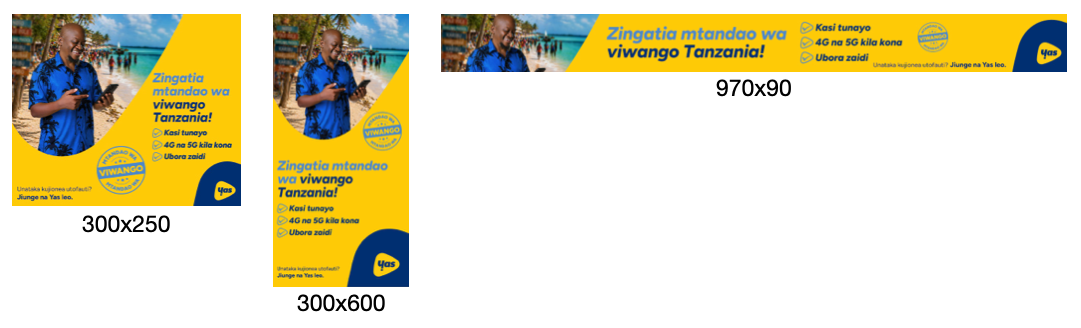
To resize your banners for different ratios, we need to physically move the individual design elements independently within the full image itself; we cannot simply stretch a 300×250 banner into a 970×250 banner (as an example - this principle applies to all sizes); it would look like this:
WHAT IT SHOULD LOOK LIKE
WHAT IT ENDS UP LOOKING LIKE
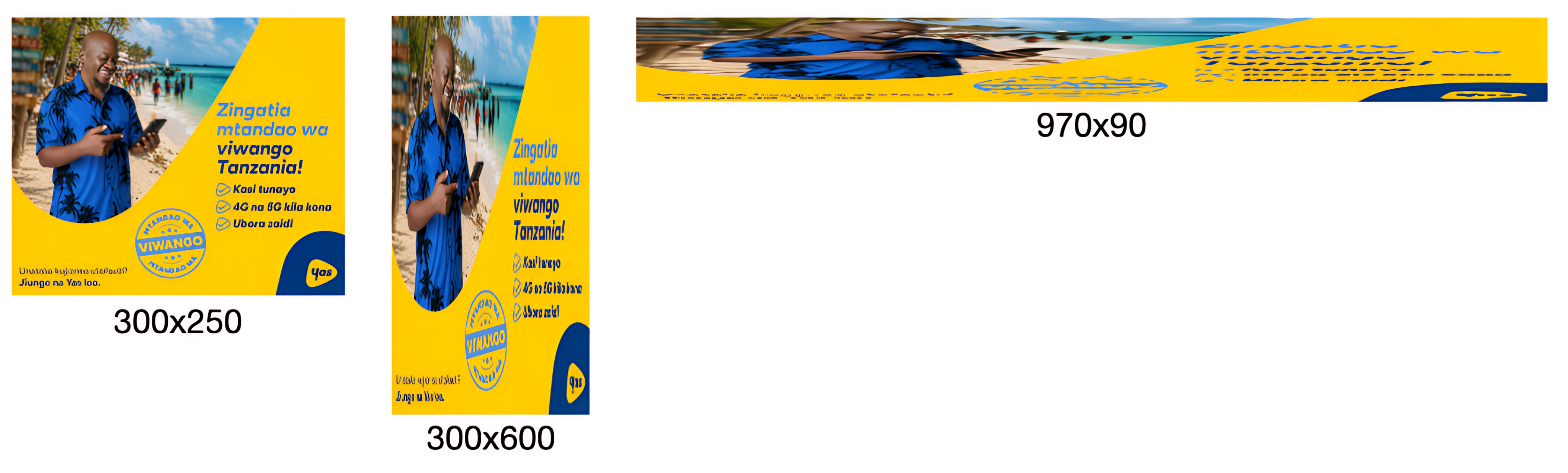
See this in action here.
This is important because proper resizing requires us to work with individual elements independently to:
- Move a product without moving the background
- Move a logo separately from the headline
- Resize and reposition assets for different formats
- Optimise layouts for different screen sizes
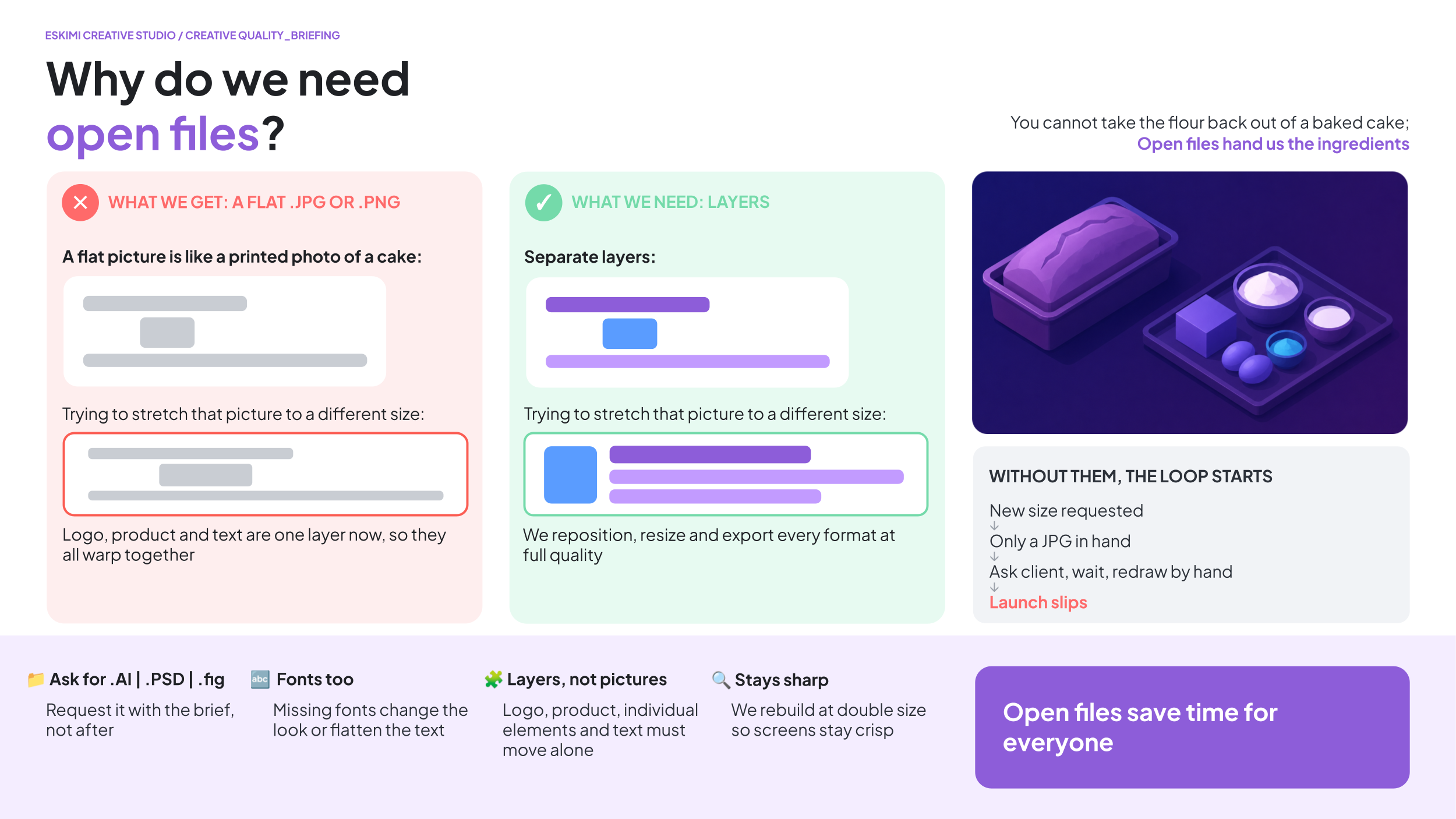
When we only receive a flattened image (.JPG, .PNG, etc), none of these elements exist separately anymore - to us, the entire banner becomes a single picture.
Imagine it like receiving a photo of a loaf of bread and being asked to change the flour - the flour is already baked into the bread; they’re no longer separate elements that can be changed.
The same applies here. Without layered source files, we cannot accurately isolate products, logos, text, backgrounds, buttons, or other creative elements.
⚠️ 3D projects have their own separate, additional asset requirements. Read the 3D-modelling specific Help Page here.
*Read more about what Open Files are here.
3D and High Impact Format T's & C's
HIGH IMPACT PROJECT REQUIREMENTS
High Impact projects involve more planning, production and specialist work than standard banner projects. Following these requirements helps Creative Studio begin production on time and avoid unexpected delays.
Standard lead time: Allow up to 7 working days from receipt of all required assets, information and clarifications. Actual timelines depend on the complexity of the execution.
📦 CREATIVE ASSETS
📦 CREATIVE ASSETS
Development can only begin when Creative Studio has received all the assets required for the project.
STANDARD BRAND ASSETS
For ALL projects, please provide:
- Editable brand or campaign files, such as .PSD, .AI or .FIG
- High-resolution logos
- Font files
- Brand guidelines, if available
- Final, approved copy
- Final call to action (CTA)
- Music as an .MP3, or an approved music reference if relevant
- Legal copy and mandatory disclaimers
*Read more about Open Files for standard projects here.
🧊 ASSETS REQUIRED FOR 3D PROJECTS
If the project includes a 3D product or object, we also need:
- An existing 3D model of the product
- 3D model file format: .GLTF for web 3D format, .FBX or .OBJ
- UV wrapped with provided texture image files
- If 3D assets don't exist, we would need the below to create a 3D model from scratch:
- Flat label or sticker artwork in .AI, .EPS or print-ready PDF format
- Packaging layouts and dielines
- Material and finish details, such as matte, gloss, metallic or transparent
- Clear reference photographs from different angles (IE. orthographic reference photos)
WHAT DOES “UV MAPPED” MEAN?
- A 3D model is the shape of the object
- The texture image is the surface design, such as its colours, label, logo and product information
- UV mapping tells the 3D software exactly where each part of the flat texture image must appear on the model
- It works like wrapping a printed label around a bottle or packaging artwork around a box
WHAT ARE ORTHOGRAPHIC REFERENCE PHOTOS?
- These are photographs taken straight from the front, side, back or top of an object
- The photographs should be taken from flat, parallel angles to reduce perspective and camera distortion
- Around 20 photographs from different angles are usually needed to produce a smooth and accurate 3D model

📅 WHEN DOES THE PRODUCTION TIMELINE BEGIN?
Lead times commence only after:
-
All necessary assets have been received
-
The storyboard has been approved, where required
-
Legal copy and disclaimers have been approved
-
The project scope has been confirmed
-
A Creative Studio production slot has been allocated
The estimated timeline assumes:
- Feedback is consolidated
- There are no major scope changes
- Approvals are provided within the agreed review times
🗺️ STORYBOARDS
🗺️ STORYBOARDS
WHEN IS A STORYBOARD REQUIRED?
A storyboard is used for experiences that include 3D modelling or animation.
It shows how the experience will work before development begins. This allows the client to review and approve the complete experience in advance.
WHAT DOES STORYBOARD APPROVAL INCLUDE?
Approving the storyboard means approving:
- The user journey
- Gameplay
- Navigation
- User interactions
- Features
- Functional behaviour
- Screen order and flow
- Success or completion states
- CTA placement
Development begins only after the storyboard has been approved.
WHAT HAPPENS AFTER STORYBOARD APPROVAL?
Once the storyboard is approved, the project scope is considered locked.
This means the agreed structure and functionality should not change during production. Requests such as the following may be treated as a change in scope / new project:
- New game mechanics
- New interactions
- New animations
- Additional screens
- A different user journey
- Different prizes
- New platform integrations
- Additional tracking requirements
- Different loading sequences
- New augmented reality behaviours
A scope change may require:
- A revised production timeline
- Additional production costs
- A new project estimate
- The project to restart as a new brief
✏️ PRODUCTION REVERTS
✏️ PRODUCTION REVERTS
A production revert is a small visual or content change that does not change how the approved experience works.
EXAMPLES OF PRODUCTION REVERTS
- Updating copy
- Changing a logo
- Adjusting colours
- Changing a font
- Replacing an image
- Making a small positioning adjustment
- Changing CTA wording
WHAT IS NOT A PRODUCTION REVERT?
The following requests change the structure or functionality of the experience and must be submitted as a new brief:
- New features
- New interactions
- New animations
- New game logic
- Additional screens
- New prizes
- Different win logic
- Additional tracking
- Changes to camera behaviour
- A redesign of the experience
A new brief may require a new production schedule and may affect the delivery date.
💬 CLIENT FEEDBACK
All feedback must be collected and submitted as one complete list per revision round.
WHAT IS A REVISION ROUND?
A revision / revert round is one consolidated submission of client feedback.
It may include several individual changes, provided they are sent together. Creative Studio will complete the changes and return one revised version.
❌ PLEASE DO NOT SEND FEEDBACK:
- Across several separate emails
- In small pieces at different times
- Across different Slack conversations
- Separately from different stakeholders
- After the version has already been approved
Before making changes, Creative Studio may ask for confirmation that feedback from all decision-makers has been included.
Once a revised version has been returned, any additional feedback will count as a new revision round, even if the requested changes are small.
The new revision round will re-enter the production schedule according to current Creative Studio capacity. This may affect the final delivery date.
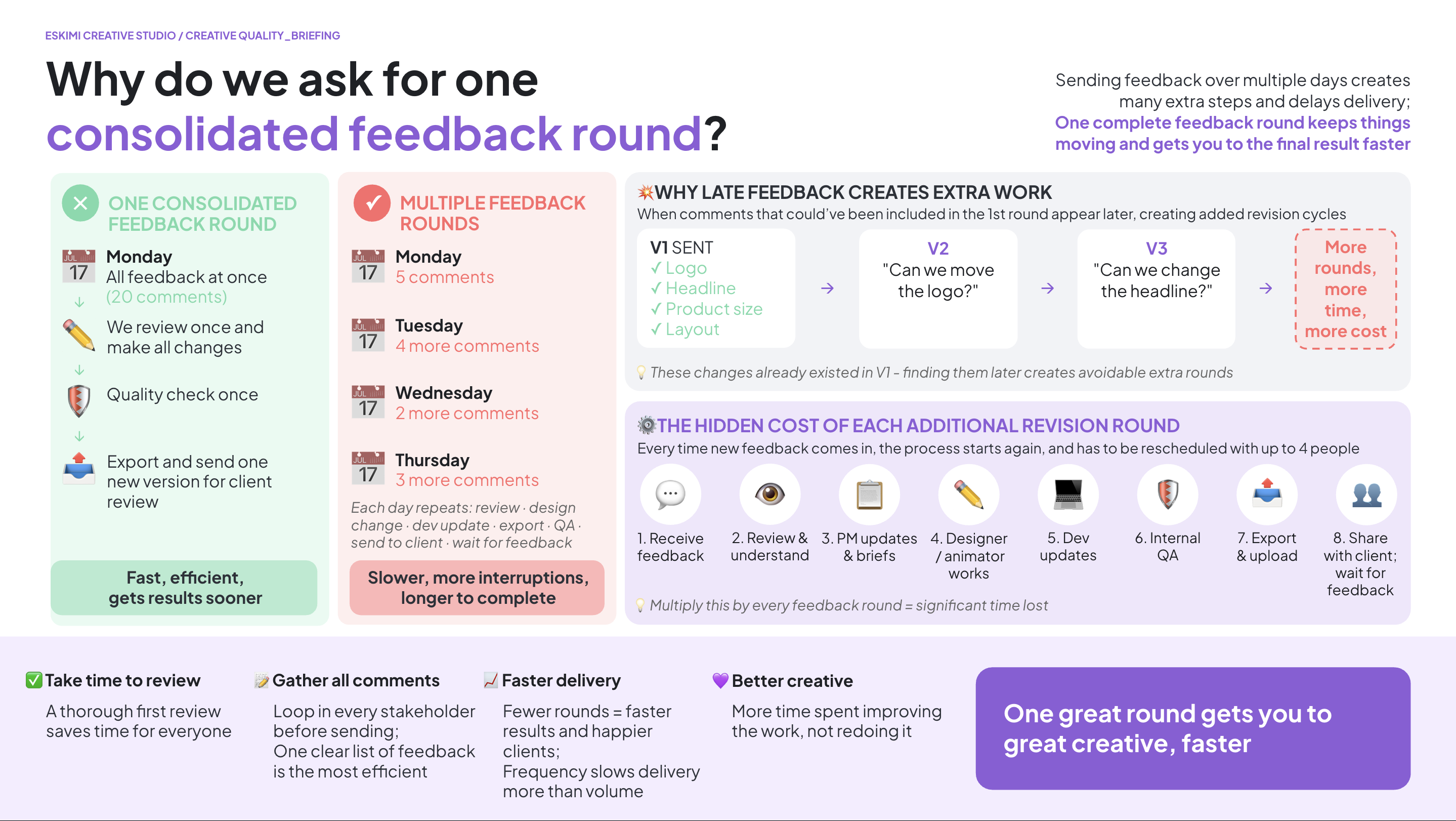
Submitting consolidated feedback allows the Creative Studio to complete revisions more efficiently, reduces project coordination overhead, minimises the risk of conflicting instructions, and helps ensure timely delivery.
⏱️ CLIENT REVIEW TIMES
The production timeline allows the following time for client review:
| REVIEW STAGE |
CLIENT REVIEW TIME |
| Version 1 | 1 working day |
| Version 2 | 1 working day |
| Final quality check | 1 working day |
If feedback or approval takes longer, the final delivery date will move accordingly. The timeline may also change depending on the number and complexity of the requested revisions.
🚨 NEW REQUIREMENTS DURING PRODUCTION
Adding new requirements after production has started increases the amount of work, project coordination and delivery risk. The agreed timeline assumes that the approved brief will remain substantially the same throughout production.
If requirements change after development begins, Creative Studio may need to review:
- The project scope
- The delivery timeline
- Production costs
- The commercial agreement
Further production may pause until the revised requirements have been reviewed and agreed.
Complete brief = faster project start. Missing information, late feedback or changes to the approved scope may affect the production schedule and delivery date.
⚖️ LEGAL RESPONSIBILITIES
⚖️ LEGAL RESPONSIBILITIES
The client team is responsible for supplying all required legal and regulatory information.
This may include:
- Mandatory legal copy
- Regulatory disclaimers
- Promotional terms and conditions
- Competition rules
- Prize conditions
- Age restrictions
- Nutritional statements
- Compliance wording required for specific countries
Creative Studio can add the supplied legal wording to the experience, but cannot provide legal advice or approve the wording on the client’s behalf.
The client must confirm that all supplied wording is correct, approved and suitable for the countries where the campaign will run.
USEFUL LINKS
🔗 3D modelling and rendering: timelines and complexity
3D modelling and rendering: timelines and complexity
QUICK ANSWER
3D modelling and animation can produce incredibly engaging creative experiences, but they involve more complex production processes than standard design or animation.
This guide explains why some 3D projects take longer than others, what affects production timelines and costs, and why certain technical processes cannot simply be accelerated - even for urgent campaigns.
Standard lead time: Allow up to 7 working days from receipt of all required assets, information and clarifications. Actual timelines depend on the complexity of the execution.
Need more detail? Read the explanations below👇
⏱️ HOW LONG DOES 3D PRODUCTION TAKE?
HOW LONG DOES 3D PRODUCTION TAKE?
3D modelling and animation require up to 7 working days, starting from the point when Creative Studio has received all required assets, information and clarifications needed to begin production.
This lead time reflects the technical work involved, including modelling, animation, simulations, rendering and quality checks.
Important: The production timeline does not necessarily begin when a brief is submitted. Missing assets, incomplete information or outstanding clarifications can delay the start of production.
💰 WHY ARE 3D PROJECTS MORE EXPENSIVE?
WHY ARE 3D PROJECTS MORE EXPENSIVE?
3D animation is a specialist craft. Projects often involve:
-
3D modelling
-
Texturing
-
Lighting
-
Animation
-
Visual effects
-
Rendering
-
Multiple rounds of testing and quality assurance
Complex animations can take many days to produce, which is why 3D projects typically have higher production costs and minimum media investments than standard banner production.
🏎️ WHY URGENT PROJECTS CAN'T ALWAYS SIMPLY BE COMPLETED FASTER
WHY CAN'T URGENT 3D PROJECTS SIMPLY BE COMPLETED FASTER?
We understand that some campaigns are commercially important, time-sensitive or linked to significant client opportunities. Creative Studio will always aim to support these priorities wherever possible.
However, commercial urgency does not reduce the technical complexity of 3D production.
Unlike traditional design work, many stages of 3D production rely on computational processes that cannot simply be accelerated by working faster or assigning more people. For example:
-
Modelling: Complex objects must be constructed and prepared before they can be animated.
-
Animation: Movement, lighting, materials and interactions must be configured and tested.
-
Simulations: Effects such as water, smoke and fire require mathematical calculations to behave realistically.
-
Rendering: Software must calculate each frame, including lighting, shadows, reflections and movement. A final render alone can take several hours.
-
Revisions: Changes may require animations, simulations or rendered sequences to be recalculated.
Some tasks can be prioritised or performed in parallel, but others must happen in sequence. Adding more people or requesting a faster turnaround does not necessarily shorten these processes.
COMPROMISING BETWEEN SPEED AND QUALITY
A challenge faced by production is the careful balance of speed and quality. Tipping this balance toward one or the other will always require some compromise. We can sometimes deliver faster by simplifying the execution or reprioritising existing work, but each of those options comes with a trade-off.
3D BRIEFS ACROSS THE BUSINESS
This is also in an ecosystem where at any given time, other colleagues across the business are waiting for their own 3D projects, many of which are equally commercially important to their regions too. Accelerating one campaign often means delaying another, so we have to balance those priorities across the entire business.
WHAT DOES THIS MEAN FOR CAMPAIGN PLANNING?
For technically complex formats, it's important to involve Creative Studio early and plan campaign launch dates around the communicated production lead times.
We can assess opportunities to simplify an execution or reduce its complexity when shorter timelines are required, but this may mean adjusting the creative concept or scope.
The key takeaway: Priority determines when we focus our resources on a project. It cannot eliminate the technical steps required to produce it.
Planning a 3D campaign? Allow up to 7 working days from receipt of all required assets and clarifications. Urgent commercial deadlines do not automatically shorten technical production times. Please involve Creative Studio early if your campaign has a fixed launch date.
⏳ WHY DOES RENDERING TAKE SO LONG?
WHY DOES RENDERING TAKE SO LONG?
Finishing the animation doesn't mean it's ready immediately. Once all changes are complete, the computer still needs to calculate every frame of the final animation.
Even once the modelling and design are complete, the final rendering process alone can take up to 8 hours. This is a computational process where the software calculates movement, lighting, shadows, reflections, etc. It's not something the producer can simply work faster to complete, regardless of the urgency or commercial value of the campaign.
Think of it like baking a cake. Mixing the ingredients doesn't make the cake ready - you still have to bake it. Rendering is that baking stage. For every frame, the computer calculates:
-
Lighting
-
Shadows
-
Reflections
-
Transparency
-
Materials
-
Visual effects
A short animation may contain hundreds of frames, so rendering alone can take several hours.
WHY CAN'T RENDERING BE MADE FASTER?
Rendering is performed by the computer, rather than the artist. Once rendering begins, the computer must calculate every frame individually.
While we always optimise our scenes where possible, rendering time is largely determined by the complexity of the animation and cannot simply be sped up without reducing quality.
Rendering is computationally intensive → the software needs time to process → commercial urgency cannot override that processing time.
🧮 WHY DO MULTIPLE REVISION ROUNDS TAKE LONGER IN 3D?
WHY DO MULTIPLE REVISION ROUNDS TAKE LONGER IN 3D?
Unlike a presentation or Photoshop file, a 3D scene is built as one complete environment where everything works together.
Changing one element often affects many others. For example, moving an object may also require updates to:
-
Camera angles
-
Lighting
-
Shadows
-
Reflections
-
Animations
-
Scene composition
Once those changes are complete, the entire animation usually needs to be rendered again before a new preview can be shared.
For this reason, repeated revision rounds can have a significant impact on delivery timelines.
Think of it like building a house. It's much easier to decide where the windows go before the walls are built than to move them after the house is finished.
To keep projects moving efficiently, we ask clients to review versions carefully and provide one consolidated round of feedback wherever possible.
🧩 WHY ARE SOME 3D PROJECTS & REVISIONS MORE COMPLEX?
WHY ARE SOME 3D PROJECTS MORE COMPLEX THAN OTHERS?
Not all 3D projects require the same level of effort.
Simple product animations (such as rotating bottles, cans, phones, or packaging) are generally quicker to produce than people, animals, or characters.
Characters are significantly more complex because they require:
-
Build the entire character in 3D, with correct proportions from all angles
-
Make the body bend and move naturally
-
Make the face smile, blink, and show expressions
-
Make hair and clothing move realistically with believable textures
-
Animate everything so it looks believable
-
Spend much more time testing and refining the final result
Think about how many tiny muscles in your face move when you smile, laugh, frown, blink, or talk. A 3D artist has to recreate all of those movements digitally so the character looks natural rather than stiff or lifeless. A product only needs to exist. A character needs to act. It has to move, express emotion, and behave.
As a result, character-based 3D projects typically require more specialist skills, longer timelines, and larger budgets than product visualisation.
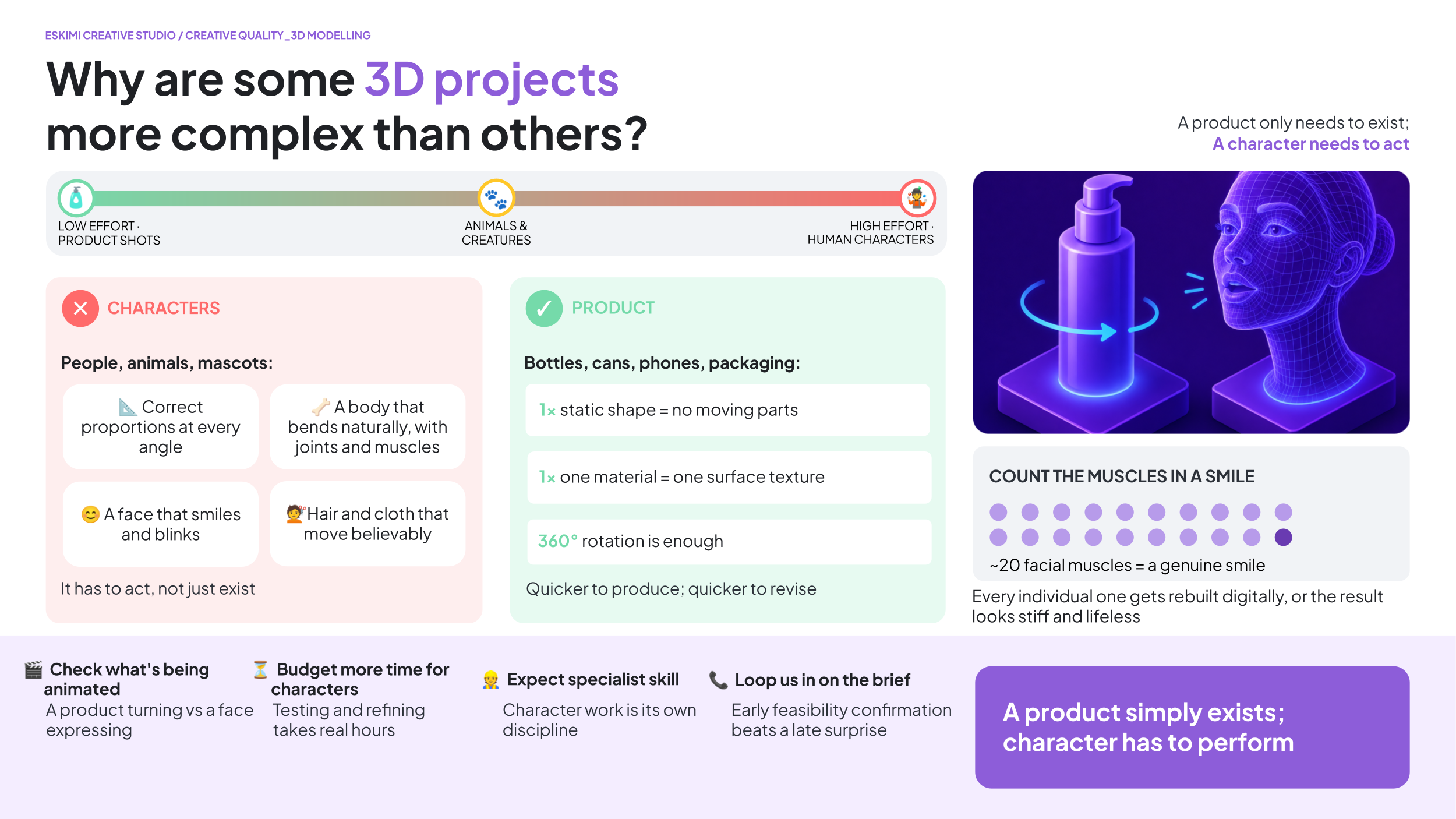
If a brief involves animated people, animals, or characters, please involve Creative Studio early so we can advise on feasibility, timelines, and production requirements before commitments are made.
WHY ARE 3D ANIMATIONS SO MUCH MORE COMPLEX TO BUILD AND CHANGE?
Unlike a flat design, a 3D scene is a complete virtual environment. Changing the position of an object often means reworking:
-
Camera angles
-
Lighting
-
Shadows
-
Reflections
-
Object animations
-
The overall composition
What looks like a small change can require rebuilding part of the scene so everything still looks natural.
WHY DO MULTIPLE 3D REVISION ROUNDS TAKE LONG?
Not all revisions are equal. Changing text or colours may be relatively quick.
However, changing how objects move, interact, or appear in the scene often means rebuilding and reanimating parts of the project rather than simply editing what already exists.
The more movement involved, the more work is usually required.
🔪 WHY CAN'T YOU JUST SPLIT UP OR DIVIDE THE 3D MODEL?
WHY CAN'T YOU JUST SPLIT UP OR DIVIDE THE 3D MODEL?
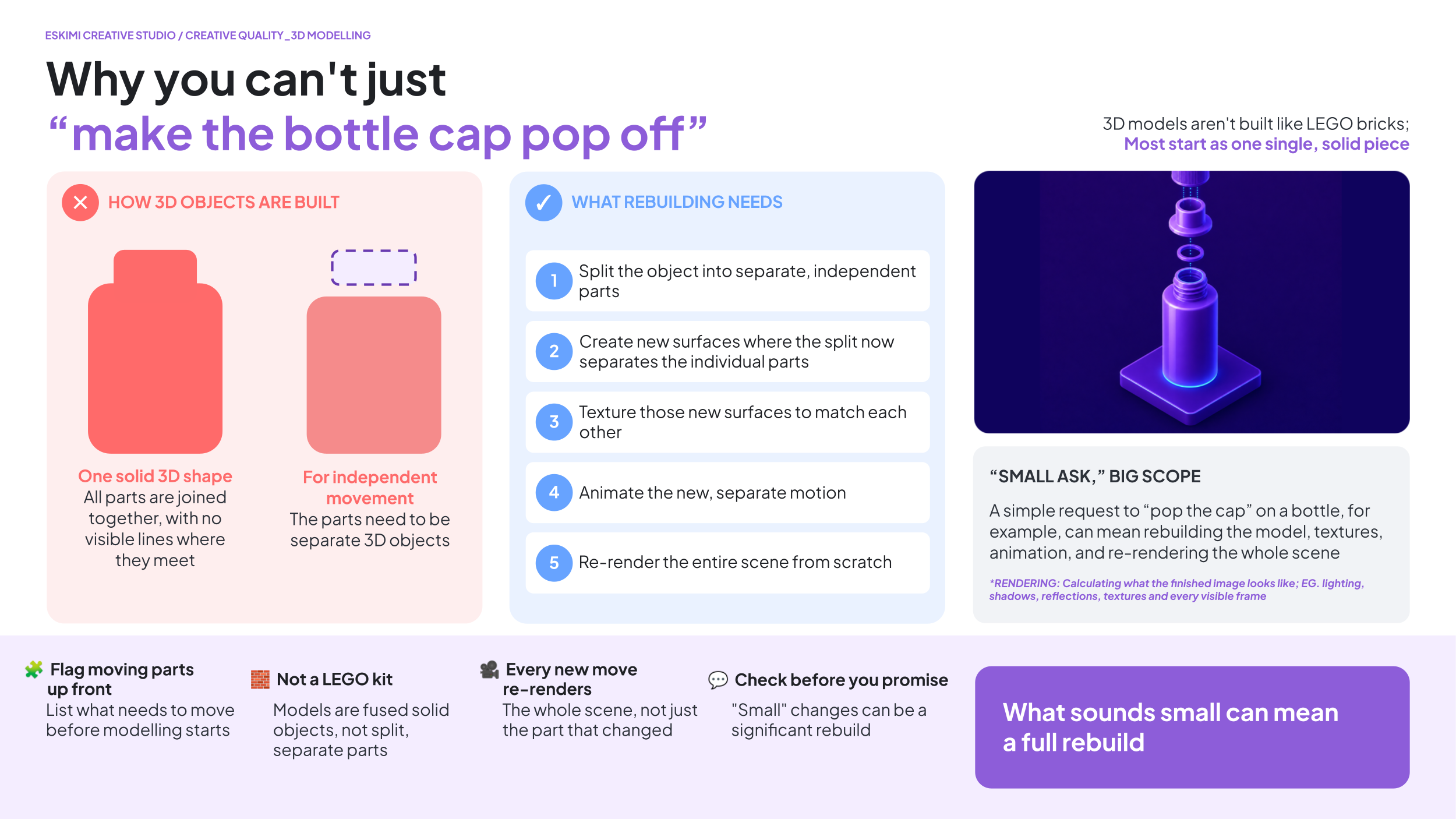
3D models aren't built like LEGO bricks.
Many models are created as a single object. If a client later wants part of that object to move independently (such as a bottle cap opening), we first need to rebuild the model into separate moving parts.
That may involve:
-
Rebuilding the model
-
Creating new surfaces and textures
-
Creating new animations
-
Re-rendering the entire scene
What sounds like a small change can sometimes become a significant rebuild.
🔥 MIST, SMOKE, WATER, AND FIRE EFFECTS
WHY DO MIST, SMOKE, AND FIRE EFFECTS TAKE LONGER?
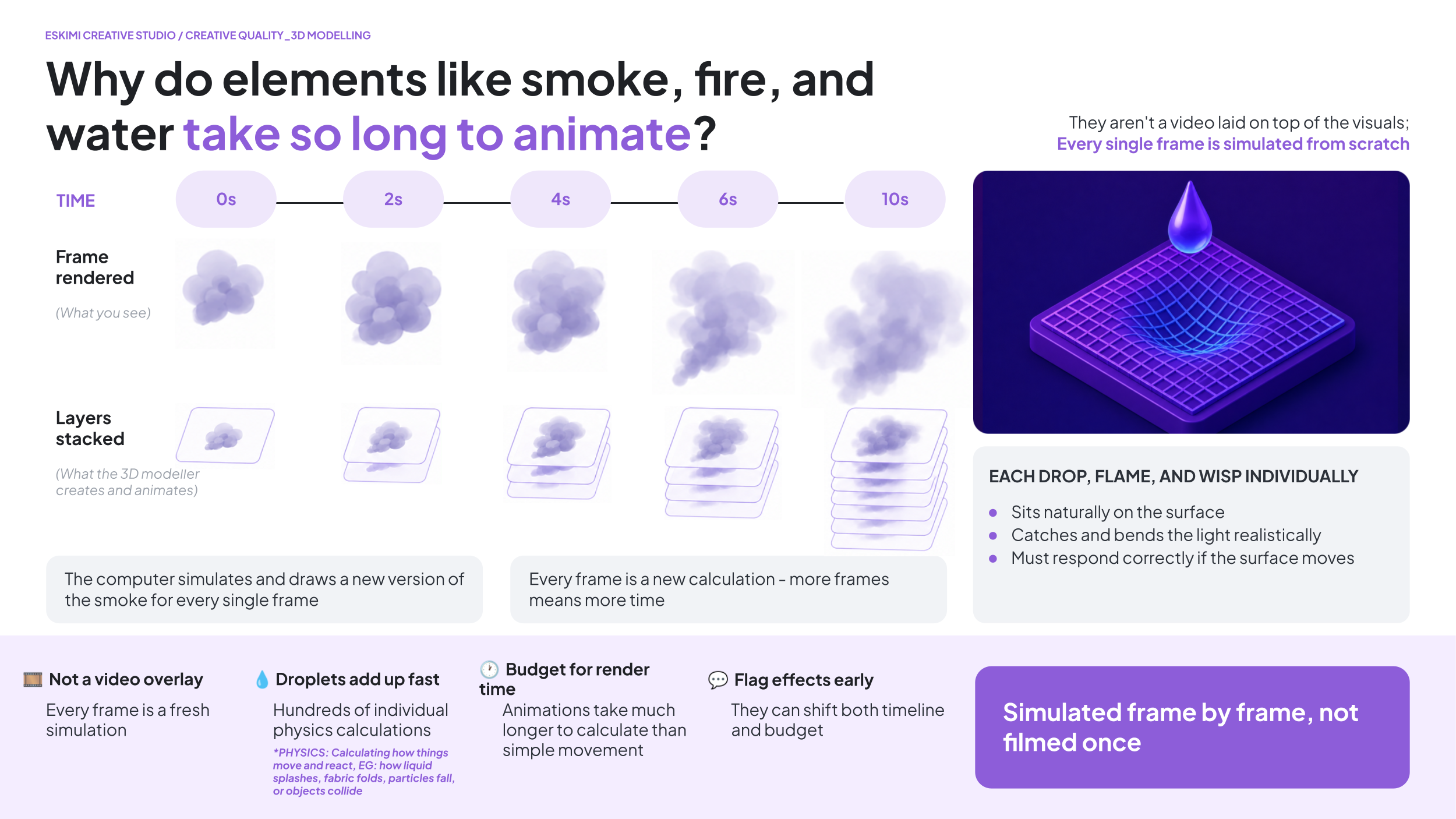
Effects like water, steam, smoke, bubbles, splashes and fire aren't simply videos placed on top of an animation. The computer calculates how these effects move through the scene, frame by frame.
Think of it like drawing a puff of smoke...
...then drawing it again...
...and again...
...for every single frame of a 10-second animation.
That's why these effects require considerably more processing time than simple object animation.
WHY DO WATER DROPS TAKE SO LONG?
A wet bottle isn't just a bottle with dots on it. Each individual droplet has to:
-
Sit naturally on the curved surface
-
Catch the light correctly
-
Reflect its surroundings
-
Look realistic from every viewing angle
-
Move naturally as the object rotate
A single bottle can contain hundreds of droplets, each of which the computer must calculate separately.
🚗 3D MODELS FOR CARS
CAN WE CREATE 3D MODELS FOR CAR BRANDS?
Theoretically, yes - but automotive 3D modelling can be complex and time consuming.
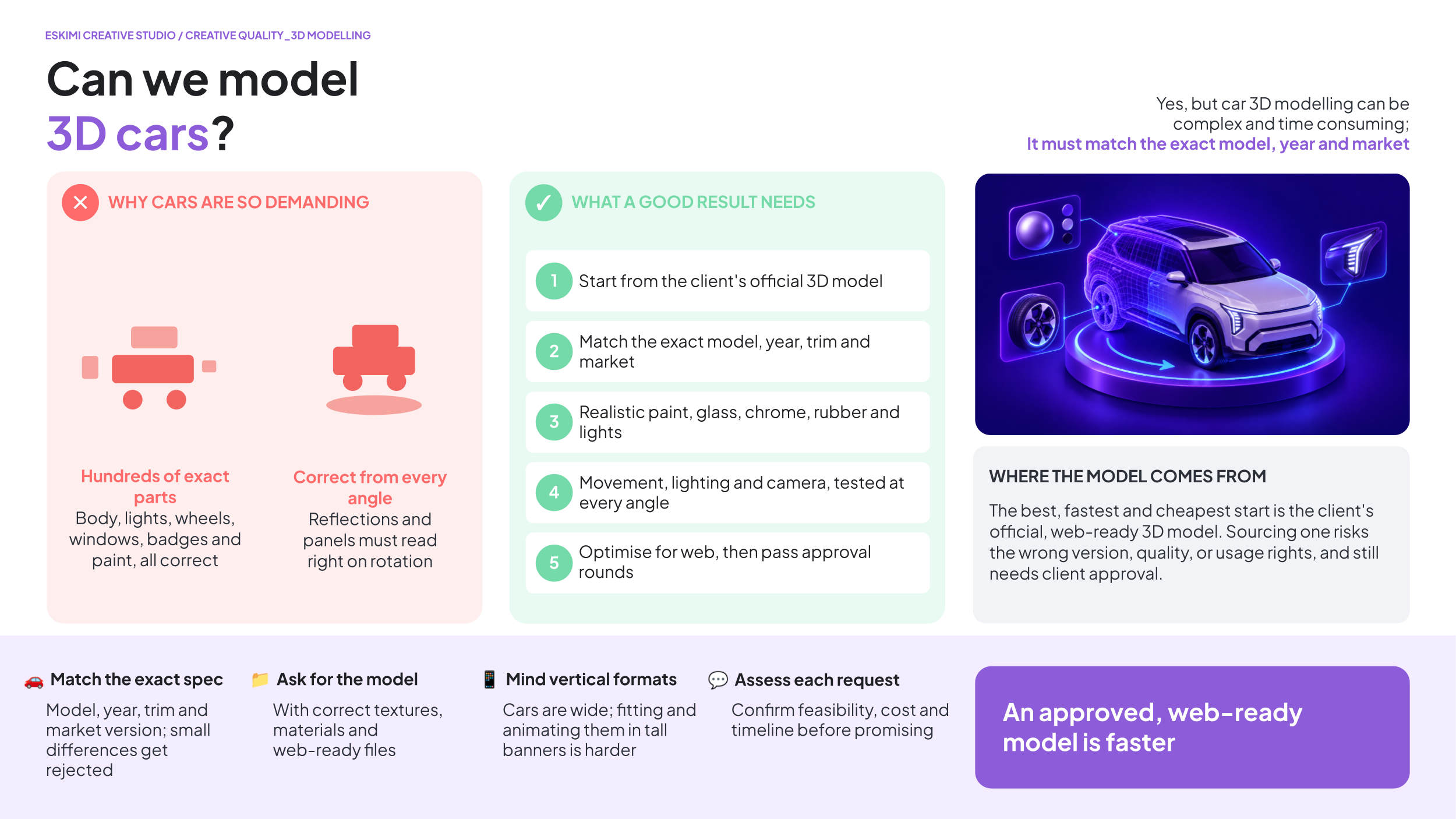
Cars contain hundreds of precise details, including their body shape, lights, wheels, windows, interior, badges, paint finishes and reflections. For an automotive brand, the vehicle must match the exact model, year, trim and market version. Even a small difference may cause the brand to reject the work.
WHY IS IT SO CHALLENGING?
| The model must be completely accurate | Small differences in the headlights, grille, wheels, badges or body shape can make it the wrong vehicle |
| Every material must look realistic | Paint, glass, chrome, rubber and lights all reflect light differently |
| The car must look correct from every angle | Problems that are hidden in one view may become obvious when the vehicle rotates |
| Movement adds more work | Wheels, doors, camera movements, rotating platforms, lighting and background changes must all be set up and tested |
| Web banners have strict file-size limits | A highly detailed 3D model may be too large or demanding to run smoothly in a browser, especially on mobile devices. It may need to be simplified without changing its appearance |
| Automotive approval is usually strict | The brand may require several internal, technical and legal approval rounds |
WHERE DOES THE 3D MODEL COME FROM?
There are two possible routes:
- The client supplies the official 3D model.
- This is the best option because it gives us the most accurate starting point. The model should include the correct textures and materials.
- We source an existing model. We can look for a suitable model online, but:
- The exact model or version may not be available.
- The quality may not be good enough.
- Parts or details may be inaccurate.
- The file may be too large for digital advertising.
- Commercial usage rights may need to be purchased.
- The client must approve the model before production begins.
Creating an accurate vehicle from scratch without an official model would require a specialist 3D artist, detailed reference material and significantly more production time.
WHAT DO WE NEED FROM THE CLIENT?
Before confirming the project, we need:
-
The exact vehicle model, year, trim and market version.
-
An official 3D model, if available.
-
Approved paint colours, wheel options and product details.
-
Clear reference images from all required angles.
-
Brand guidelines and rules for showing the vehicle.
-
Written approval for any externally sourced model.
-
Confirmation of the required movements and camera views.
-
Enough time for modelling, testing, client feedback and corrections.
A reference video shows the type of result the client wants - it does not provide the 3D assets needed to recreate it.
WHY CAN IT TAKE LONGER?
The work may involve sourcing or building the model, correcting its details, applying realistic materials, setting up lighting and movement, rendering or developing the experience, optimising it for the web, testing it across devices and completing several approval rounds.
We should assess every automotive 3D request individually before confirming feasibility, cost or turnaround time. The project becomes much faster and more affordable when the client supplies an approved, web-ready 3D model.
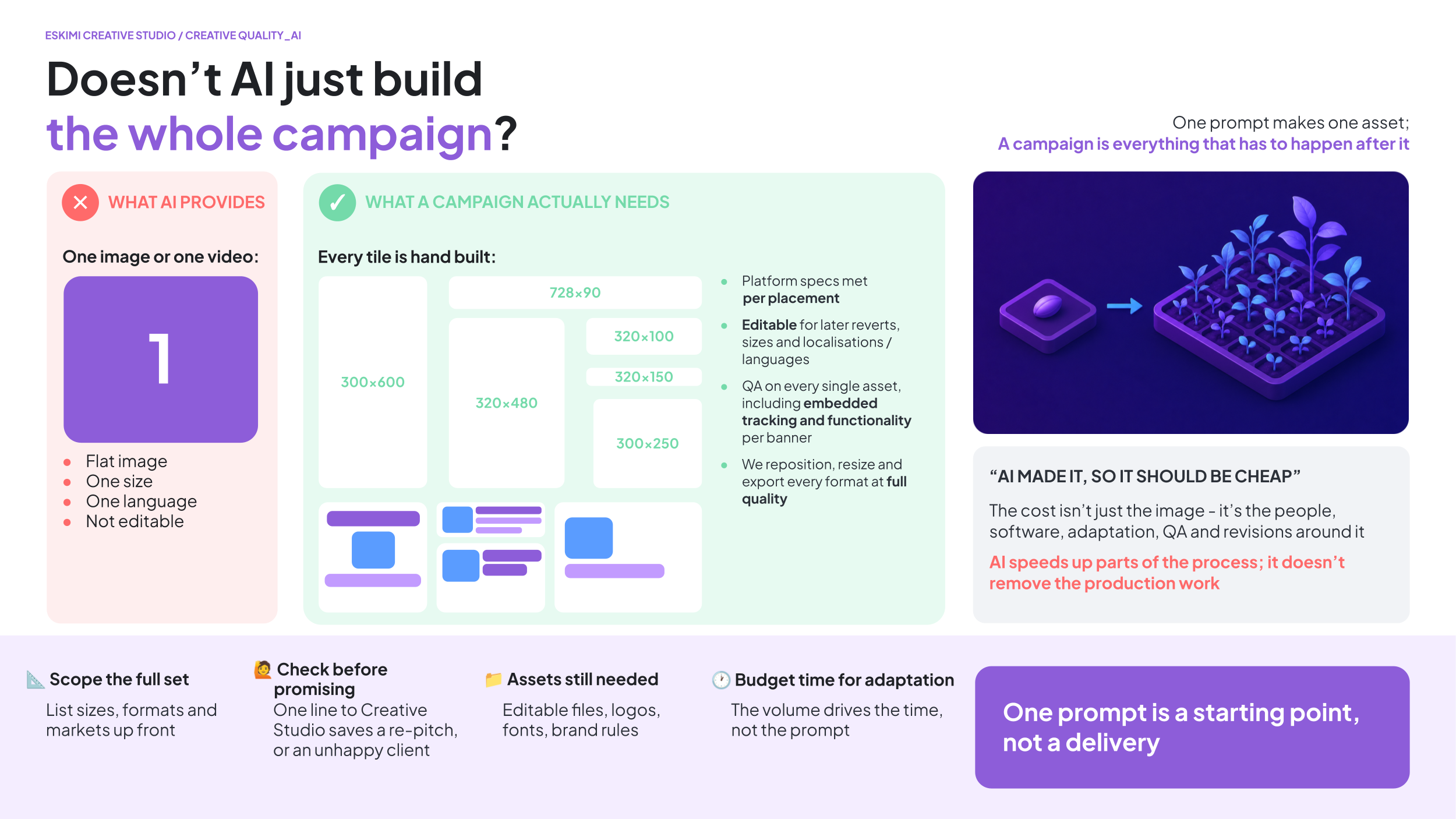
🦾 WHY CAN'T AI JUST DO THE 3D WORK FASTER?
WHY CAN'T AI JUST DO THE 3D WORK FASTER?
AI is an incredibly useful creative tool, but it isn't yet capable of replacing professional 3D production for most commercial advertising.
While AI can often generate an impressive-looking image or short video, it currently struggles with the things we need for real advertising campaigns, such as:
-
Creating consistent results across multiple scenes
-
Producing editable assets that can be revised later
-
Making changes based on client feedback
-
Recreating the same animation across multiple banner sizes and formats
-
Maintaining accurate branding, products, and fine details
Advertising rarely ends with the first version. Clients often request copy changes, logo updates, different languages, new products, or revised animations. To make those changes, we need editable project files rather than a finished AI-generated video.
Think of it like asking AI to bake a cake. It might produce something that looks great in a photo, but if the client later asks for less sugar, a different flavour, or a larger cake, it's much easier if you still have the recipe than if all you have is the finished cake.
AI is already helping us speed up parts of our workflow where appropriate, and we continue to evaluate new tools as they mature. However, for high-quality, editable, production-ready advertising, skilled artists and traditional 3D workflows are still essential.
USEFUL LINKS
🔗 3D and High Impact Format T's & C's
Pitching with AI

AI BEST PRACTICES: PITCHING
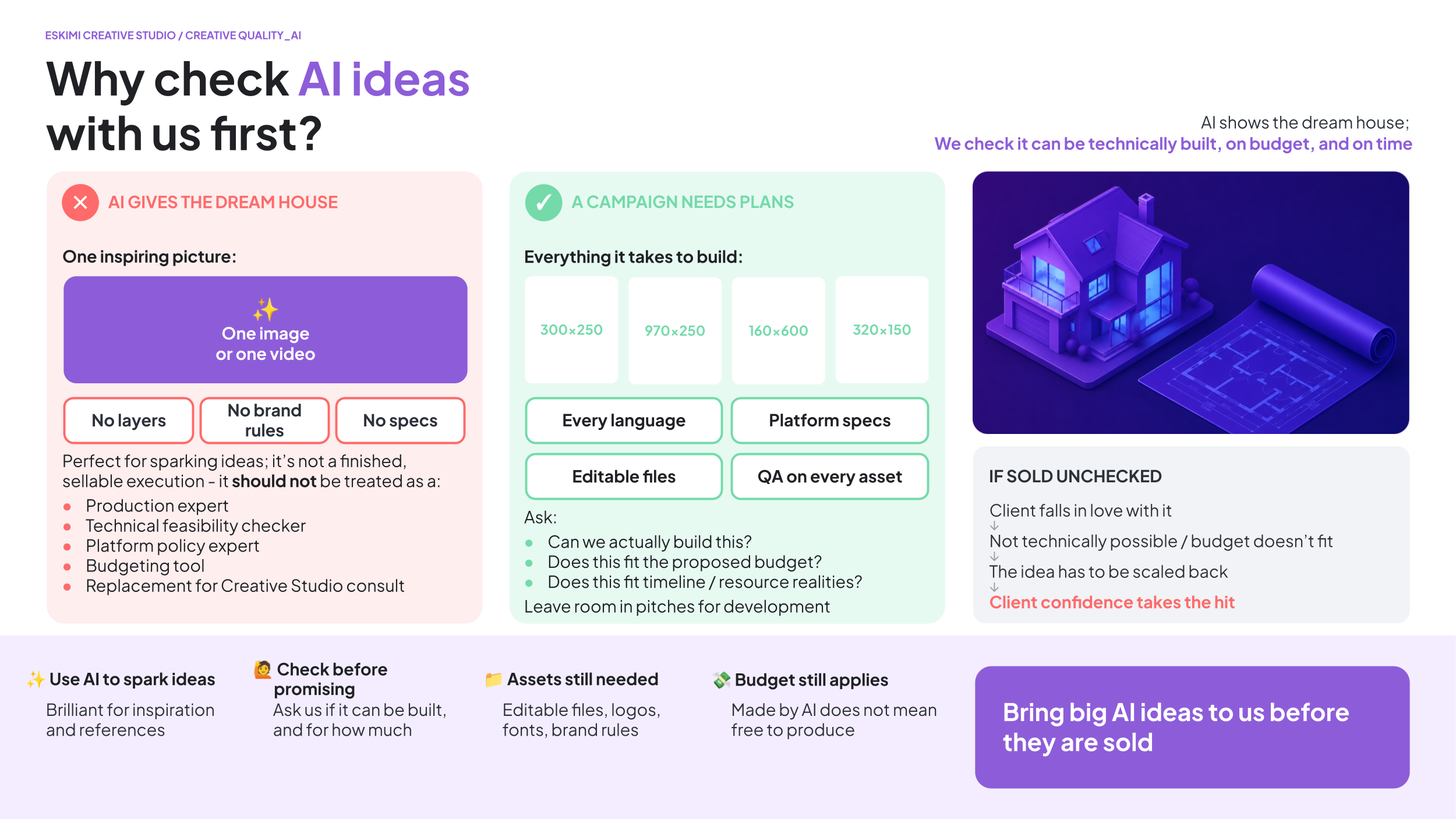
AI-generated creative can be extremely valuable: It can help accelerate ideation, create new visual possibilities, and unlock creative opportunities that were previously difficult or expensive to achieve.
BUT! AI-generated creative still needs to follow the same production realities as any other creative project.
We’re increasingly seeing situations where ambitious AI-generated concepts are being pitched to clients before Creative Studio has confirmed whether:
-
The idea is technically possible
-
It fits within budget
-
Timelines are realistic
✅ AI CAN BE USEFUL FOR
- Generating early-stage inspiration
-
Helping structure thoughts
-
Creating references or jumping-off points
-
Accelerating brainstorming
❌ AI SHOULD NOT BE TREATED AS
- A production expert
-
A technical feasibility checker
-
A platform policy expert
-
A budgeting tool
-
A replacement for Creative Studio consultation
The Creative Studio official mockup tool is coming soon! Watch this space. 👀
*Read our blog post on AI-Gen Creatives here.
BEST PRACTICE
-
Use AI to spark thinking, NOT finalise deliverables
-
Bring ambitious ideas to Creative Studio EARLY
-
Validate feasibility before pitching externally
-
Ask:
-
Can we actually build this?
-
Does this fit the proposed budget?
-
Does this fit timeline / resource realities?
-
- Leave room in client pitches for collaborative development instead of specifying executions too early.
If in doubt, involve Creative Studio early. We’d much rather help shape an idea before it is sold than have to scale it back afterwards. 🙏
Clients do not differentiate between Sales and Creative Studio. To them, we are one team. If we pitch unrealistic concepts, the whole business loses credibility. Going forward, please treat AI-generated concepts as exploratory inspiration - not as production-ready solutions.
Need more detail? Read the explanations below👇
A few important points to keep in mind:
INVOLVE CREATIVE STUDIO BEFORE PROMISING AI TO CLIENTS
What may look simple in an AI-generated video can be extremely complex to recreate in a scalable advertising format.
Or, worst case, the execution you have sold your client might not exist.
Before committing to an execution, please check feasibility with the Creative Studio team so we don’t end up seeming uncooperative when we have to be the bad guys and say it can’t be done. 🥺
A 10-SECOND AI CLIP IS NOT A 10-MINUTE BANNER
AI video tools can turn a prompt into a cinematic sequence in minutes. A fist punches the screen, the glass shatters, steel turns into a bridge, the logo lands. It looks finished, so it feels quick.
It isn't. Every action in that clip is a separate piece of animation our team has to design, build and time, and then make work across every banner size within file-size limits. A mockup that took two minutes to generate can take days to produce properly.
We're increasingly receiving requests that are short films, not banners. When that lands on a same-day deadline, something has to give, and it's usually quality, the timeline, or both.
✅ WHAT A GOOD AI-INSPIRED REQUEST LOOKS LIKE
- One clear idea you can describe in a sentence
- One main animated moment (EG. the "50 Years" text pops out in 3D)
- The AI image or clip attached as mood reference, not as the spec
- A timeline that matches the complexity
❌ WHAT CAUSES DELAYS
- Chains of actions (A happens, which causes B, which transforms into C)
- New actions added after work has started ("can the fist also smash the screen?")
- Complex ideas sold to the client on an urgent deadline
- AI visuals shown to the client before the Studio has confirmed we can build them
KNOW WHICH LEVEL YOU'RE ASKING FOR
- Simple: logo reveal, text animation, CTA, product entrance - standard turnaround
- Enhanced: 2-3 animated elements and one transition - allow extra time
- Motion sequence: multiple actions, transformations, effects (anything that looks like an AI video clip) - treated as custom production: needs a storyboard sign-off, the matching budget tier, and extra time
If you're not sure which level your idea falls into, ask us before you pitch it.
URGENT = SIMPLE
If the deadline is tight, pitch the simple version. A clean, well-built simple idea wins more often than an ambitious one delivered late or half-finished. If the client likes it, we can build the bigger version once the campaign is confirmed and there is time and budget for it.
PITCH OR PRODUCTION? SUBMIT IT IN THE RIGHT PLACE
- Pitch mockup (client hasn't confirmed): submit as a token request; one concept, one revision round
- Won campaign: submit a production request with budget, assets and deadline; this is where the full build happens

AI is a great way to show us what's in your head. It is not a quote, a timeline or a promise to the client. Talk to the Studio before the client sees it, and we'll help you pitch something we can actually deliver on time.
✏️ HOW TO BRIEF IN AI
HOW TO BRIEF IN AI
💸 REVENUE RISK
Even with the best intentions, we can accidentally cause more harm than good for our clients. If we have to tell a client that a concept that they loved, it:
-
Damages client confidence
-
Makes us look disorganised internally
-
Positions Creative Studio as “the bad guy”
-
Creates unnecessary back-and-forth and delays
-
Weakens confidence in our capabilities
-
Risks overpromising and underdelivering
-
Wastes time for all stakeholders
-
Worst case: you lose your pitch, and blame Creative Studio
🧭 GIVE US THE DIRECTION, NOT A PRODUCTION SCRIPT
AI can quickly turn a simple idea into a detailed, scene-by-scene creative brief. The result may sound impressive, but it can include effects, interactions or game mechanics that have not been checked by Creative Studio.
Every specific effect you put in front of a client (“sparks here”, “liquid there,” etc) can become a promise.
If the final execution works differently, then it’s too much, too little, not what the client pictured - they may feel that something is missing or become disappointed. This can lead to confusion, additional revisions and slower delivery.
💡 Give us the general creative direction and examples. Leave the detailed flow and technical execution to Creative Studio to bring to life.
WHAT CAN YOUR BRIEF INCLUDE?
- The main campaign idea
- The campaign objective
- The desired mood or visual style
- What you want the audience to understand or do
- Important products, messages or assets to include
- Examples or references the client likes
- Any confirmed client requirements
WHAT SHOULD CREATIVE STUDIO DEVELOP?
Leave the following to our designers and developers:
- The scene-by-scene sequence
- Exact animation effects
- Detailed user interactions
- Game steps and mechanics
- Transitions between screens
- Technical behaviour
- How the concept adapts across banner sizes
- Alternative solutions if an element cannot work as imagined
Creative Studio understands how the idea must work inside the advertising unit, what is technically possible and how the execution can be adjusted when the client requests changes. That’s the part we’re here for.💪
A few clear and honest lines about the idea are more useful than two pages of AI-generated instructions.
Creative Studio is happy to help shape and strengthen ideas early in the process. Strong collaboration before the pitch creates better outcomes for everyone:
-
Better client trust
-
Smoother production
-
Fewer delays
-
Stronger work
-
A better reputation
OPEN FILES ARE STILL NECESSARY
If a client wants an AI-generated concept, we still need the same production assets as any other project, including:
-
Editable PSD / PSB / AI files
-
Logos
-
Product assets
-
Fonts
-
Brand guidelines
-
Any other relevant source materials
AI outputs alone are rarely sufficient to build a production-ready campaign.
AI DOESN’T KNOW THE CLIENT’S BRAND RULES
AI tools are not familiar with client:
-
Brand guidelines
-
Legal requirements
-
Regulatory restrictions, etc
Generated outputs should always be reviewed rather than assumed to be correct.
AI DOESN’T AUTOMATICALLY MAKE MULTIPLE ASSETS
One AI-generated video is not the same as a complete campaign.
We still need to:
-
Build multiple banner sizes
-
Create different formats and placements
-
Adapt for multiple markets and languages
-
Ensure assets can be edited and updated later
-
Meet platform specifications
People often think AI generates an entire campaign with one prompt. In reality, AI usually creates one image or one video. We still need to:
-
Build every required banner size
-
Adapt layouts for different aspect ratios
-
Replace text for different languages
-
Meet each platform's technical specifications
-
QA every asset before delivery
AI speeds up parts of the process; it doesn't remove the production work.
BUDGET STILL MATTERS
Another common misconception is that “the AI made it, therefore it should be cheap.”
We still invest in people, software, infrastructure, quality control, revisions, project management, and creative expertise to bring campaigns to life.
Remember that minimum spend requirements are there to ensure production costs are covered by sales margins.
🙅 LIMITS OF AI
WHY WE CAN’T USE AI TO RECREATE REAL PEOPLE
Using AI to recreate a real person does not remove the need to obtain the appropriate rights and permissions.
There are typically two separate legal considerations:
-
Copyright: the rights associated with the original photograph or artwork
-
Personality (or publicity) rights: the rights associated with a person's name, image, likeness, or identity
Generating images of real public figures using AI does not remove the legal or commercial licensing requirements.
COPYRIGHT
When we purchase a stock photograph, we're paying for the copyright licence to use that specific image.
-
If we instead generate an AI image, we may avoid licensing the photograph itself, but we're still creating a commercial advertisement featuring the recognisable likeness of real people without permission to do so
-
For commercial advertising, this may still require permission from the individual or their authorised representatives
PERSONALITY (OR PUBLICITY) RIGHTS
Many public figures - particularly athletes, actors, musicians, and influencers - have commercial agreements governing how their likeness may be used in advertising.
-
These rights exist independently of the copyright in any particular photograph
-
Using AI does not automatically bypass them
-
Many sponsorship agreements give brands exclusive rights to use an athlete in advertising within certain product categories
AI should not be considered a replacement for obtaining the necessary commercial rights. Using AI-generated images of real individuals in advertising could still expose the campaign to legal or contractual issues if the advertiser does not have the appropriate rights to use those peoples’ likenesses.
For that reason, we cannot assume that "just using AI" is a compliant alternative to licensing photography.
Where a campaign features a recognisable real person, the safest approach is for the client to provide assets that they have the legal right to use, such as:
-
Officially licensed promotional assets
-
Photographs with the appropriate commercial usage rights
-
Written confirmation that the required image and publicity rights have been secured
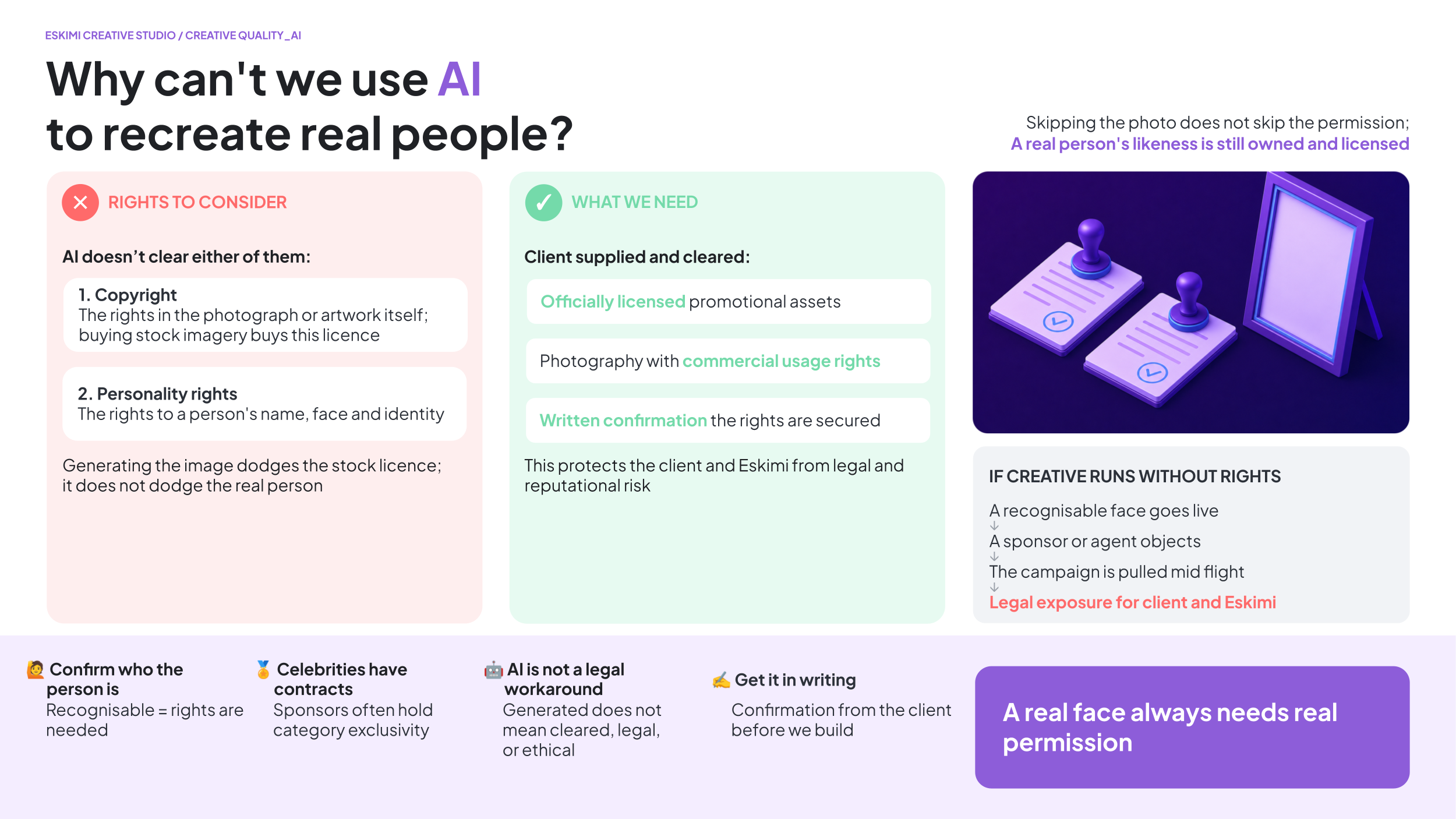
This helps protect both the client and Eskimi from potential legal, contractual, and reputational risks.
WHY WE CAN'T USE AI OR 3D TO RECREATE COPYRIGHTED CHARACTERS
Using AI or 3D modelling to recreate well-known fictional characters does not remove the need to obtain the appropriate intellectual property rights.
Many famous characters - such as those from Disney, Pixar, Marvel, DC, Nintendo, Pokémon, Minions, The Simpsons, and other films, TV shows, games, or comics - are protected by copyright and trademark law. Even apparel like Nike Air Jordans are extremely restrictive about this.
Whether the character (or even logo) is:
-
AI-generated
-
3D modelled from scratch
-
Illustrated
-
Animated
-
or manually recreated
…the underlying intellectual property still belongs to the rights holder.
Creating "something that looks like" a protected character for commercial advertising may still infringe those rights, even if no existing artwork was copied.
For this reason, AI and 3D modelling should not be considered a way to bypass licensing requirements.
If a campaign requires the use of a recognisable fictional character, the client should provide:
-
Officially licensed artwork or models
-
Written confirmation that they have the necessary commercial rights
-
Brand guidelines or usage instructions where applicable
This helps protect both the client and Eskimi from potential legal, contractual, and reputational risks.
Creating with AI: Client Rules and Disclosures
Generative AI can help Creative Studio develop new images, extend backgrounds, explore visual directions and create elements that may be difficult or expensive to produce traditionally.
However, not every client allows AI to be used.
Some clients prohibit it completely. Others allow it only under specific conditions. Certain campaigns may also need to disclose that AI was used.
Before Creative Studio begins, we need to understand:
-
Does the client allow us to use AI?
-
Does the client have rules that control how we use it?
-
Does the campaign require an AI disclosure?
-
If a disclosure is required, exactly what must we include?
AI permission, AI rules and AI disclosures are three different things. We need an answer for each one.
✅ QUICK ANSWER
| QUESTION | WHAT WE NEED |
|---|---|
| Can we use AI? | A clear Yes or No from the client |
| Does the client have AI rules? | The complete policy, restrictions or written instructions |
| Is disclosure required? | Confirmation from the client or their legal/compliance team |
| What must the disclosure say? | The exact approved wording, icons and usage instructions |
If AI use has not been confirmed, do not assume that it is allowed.
BEST PRACTICE
Ask these questions before the creative concept is finalised.
AI restrictions may change:
-
The concept we recommend
-
The assets we need
-
The tools we can use
-
The production method
-
The time required
-
The format layout
-
The final disclosure treatment
The earlier Creative Studio receives the correct information, the easier it is to develop a compliant and realistic solution.
If AI rules are confirmed before production, we can design around them. If they arrive after production, we may need to rebuild the creative. When in doubt, ask the client. Creative Studio can implement the rules, but the client must define and approve them.
Need more detail? Read the explanations below👇
WHAT DO WE MEAN BY “USING AI”?
Using AI can include asking an AI tool to create or change part of a visual.
Examples include:
-
Generating a new image
-
Creating a background or environment
-
Adding objects that were not in the original image
-
Removing or replacing objects
-
Extending an image beyond its original edges
-
Changing a person, face, body or clothing
-
Creating AI-generated people
-
Creating different product environments
-
Generating visual effects
-
Using AI-generated video
-
Using AI to change an existing photograph
AI may be used for only one small part of a banner, but it still counts as AI use.
1. DOES THE CLIENT ALLOW AI?
1. DOES THE CLIENT ALLOW AI?
The first question in the Creative Studio brief asks: Is your client comfortable with Creative Studio using generative AI when creating their banners?
The answer must reflect the client’s position, not the salesperson’s personal opinion.
✅ SELECT “YES” WHEN
- The client has confirmed that Creative Studio may use AI
-
The client’s approved policy allows AI for this type of work
-
Any conditions or restrictions have been identified and shared
❌ SELECT “NO” WHEN
- The client does not allow AI-generated content
-
The client has prohibited external partners from using AI
-
The client’s industry, brand or internal policy prevents its use
-
The client has approved only traditional production methods
❓ IF THE CLIENT HAS NOT CONFIRMED
Do not guess or select “Yes” because AI would make the concept easier to produce. Ask the client before submitting the brief. Until permission is confirmed, Creative Studio must treat AI as not approved.
No confirmation does not necessarily automatically mean permission.
WHY MIGHT A CLIENT SAY NO?
A client may object to AI for many reasons, including:
-
Copyright or ownership concerns
-
Brand reputation
-
Ethical concerns
-
Protection of customer or company information
-
Restrictions on uploading assets into AI tools
-
Concerns about how AI tools were trained
-
Legal or regulatory requirements
-
Industry-specific rules
-
Contracts with photographers, artists, models or celebrities
-
Internal company policy
-
A preference for human-created work
Creative Studio does not need to agree or disagree with the client’s position - we need to understand it and follow it.
2. DOES THE CLIENT HAVE SPECIFIC AI RULES?
2. DOES THE CLIENT HAVE SPECIFIC AI RULES?
Permission to use AI does not mean that anything is allowed. A client may say: “Yes, you may use AI, but only under these conditions.”
The briefing form therefore asks whether the client has an AI policy or any specific restrictions.
CLIENT RULES MAY CONTROL
-
Whether AI-generated people may be used
-
Whether real people may be altered
-
Whether faces, bodies or clothing may be changed
-
Whether products may be generated or changed
-
Whether logos or brand assets may be uploaded
-
Which AI tools may be used
-
Whether confidential information may be entered into an AI tool
-
Whether the final content needs human review
-
Whether AI-created elements must be disclosed
-
Whether AI may be used only for backgrounds or surroundings
-
Whether AI-generated content may be used in particular countries
-
Whether the client must approve AI-generated elements separately
For example: A client may allow Creative Studio to:
-
Generate or extend the environment around a person
-
Create background elements
-
Remove unwanted objects from the surroundings
But prohibit us from:
-
Generating a person
-
Changing a real person’s face or body
-
Altering their appearance
-
Creating additional poses or expressions
DISCLOSURE EXAMPLES
- Nescafe wouldn’t let us use it on people
- Kaufland needed a formal AI badge on the creative
- Lenovo needed formal AI disclosure wording
*Read our blog post on AI-Gen Creatives here.
WHAT MUST SALES PROVIDE?
If the client has an AI policy, attach or link the complete policy in the brief.
This may be:
-
A formal policy document
-
Written instructions from the client
-
An email from the client’s legal or compliance team
-
Brand-specific AI guidelines
-
Campaign-specific instructions
Do not shorten a detailed policy to:
-
“AI is fine”
-
“Do not use people”
-
“Use AI carefully”
-
“Client has restrictions”
A short summary can accidentally remove an important condition.
Provide the original instructions wherever possible. Creative Studio should not have to interpret a second-hand version of the client’s policy.
IF THE POLICY IS UNCLEAR
If the policy uses unclear language, ask the client for clarification before production begins.
For example:
-
Does “no AI people” include editing photographs of real people?
-
Can AI be used for backgrounds?
-
Can product images be uploaded into an AI tool?
-
Are AI-generated objects allowed?
-
Does the restriction apply to final content only, or also to concept development?
-
Are specific AI tools approved or prohibited?
-
Does the policy apply in every campaign market?
3. DOES THE CAMPAIGN REQUIRE AI DISCLOSURE?
3. DOES THE CAMPAIGN REQUIRE AI DISCLOSURE?
An AI disclosure tells the audience that content was created or changed using AI.
A disclosure may be required because of:
-
The client’s internal policy
-
Local or regional law
-
Industry regulations
-
Platform or publisher requirements
-
The type of AI-generated content being used
-
The market in which the campaign will run
Examples may include:
-
Written disclosure text
-
An AI information label
-
An icon or symbol
-
A notice displayed on or near the creative
-
Information provided when a user clicks an icon
-
Machine-readable information added to the file
AI disclosure requirements are not the same in every country, on every platform or for every type of content.
For example: The EU AI Act
The EU AI Act includes transparency obligations for certain AI-generated or manipulated content.
For example, Article 50 includes disclosure requirements relating to certain “deep fake” image, audio and video content. It also includes separate requirements for providers of AI systems to make certain AI-generated outputs detectable in a machine-readable format.
This does not mean that every use of AI in every advertisement automatically needs the same label.
The correct requirement depends on factors such as:
-
What was created or changed
-
How realistic the content appears
-
How the content will be used
-
Where the campaign will run
-
Who is legally responsible for deploying it
-
Whether another law, platform rule or client policy also applies
*Read Article 50 of the EU AI Act for the official legal text.
DO NOT ASSUME THAT EU RULES ONLY AFFECT EU CLIENTS
The client’s headquarters are not the only consideration. Disclosure requirements may depend on where the campaign will be shown.
For example, a campaign from a non-EU brand may still be subject to EU requirements if it runs in an EU market. The brief must therefore include:
-
Every campaign country
-
Any regional variations
-
The platforms or publishers being used
-
Any market-specific disclosure instructions
The campaign market matters, not only the client’s location.
4. WHAT DO WE NEED WHEN DISCLOSURE IS REQUIRED?
4. WHAT DO WE NEED WHEN DISCLOSURE IS REQUIRED?
Because a disclosure may carry legal meaning, Creative Studio cannot invent, rewrite or interpret it.
The client must provide the complete, approved disclosure instructions.
REQUIRED INFORMATION
| REQUIREMENT | WHAT THE CLIENT MUST PROVIDE |
|---|---|
| Exact wording | The final approved disclosure text |
| Language versions | Approved wording for every campaign language |
| Icon or symbol | The correct production-ready file |
| Placement | Where it must appear in the creative |
| Size | How large the text or icon must be |
| Colour and contrast | Any rules controlling how it must appear |
| Visibility | Whether it must always be visible or may appear temporarily |
| Timing | When and for how long it must appear in animation or video |
| Interaction | Whether the user must be able to click or open more information |
| Destination link | The approved URL, if the disclosure links somewhere |
| Market rules | Which version applies in each country |
| Approval | Confirmation that the final disclosure has been approved |
WHY DOES THE CLIENT NEED TO PROVIDE THE EXACT WORDING?
A small wording change can change the legal meaning of a disclosure.
Creative Studio cannot safely:
-
Write legal disclosure copy
-
Decide which law applies
-
Shorten wording to make it fit
-
Translate legal text
-
Choose an icon without instructions
-
Decide how long a disclosure should appear
-
Confirm that the disclosure is legally sufficient
-
Approve disclosure placement on the client’s behalf
We can implement approved disclosure instructions. We cannot create or legally approve them.
DISCLOSURE ICONS AND GUIDELINES
If an icon is required, do not describe it as:
-
“The normal AI icon”
-
“Use any sparkle icon”
-
“Add an AI symbol”
-
“Use the icon from another campaign”
There is no single icon that automatically satisfies every company policy or legal requirement.
The client must provide:
-
The correct icon file
-
The permitted file format
-
Clear space requirements
-
Minimum size
-
Approved colours
-
Placement rules
-
Any link or interaction required
-
Instructions for different backgrounds or banner sizes
If the icon is part of the client’s policy, request its official usage guidelines.
LANGUAGE VERSIONS
Creative Studio must receive approved disclosure wording for every language used in the campaign.
We should not translate legal or compliance wording ourselves.For example, if a campaign runs in English, French and Lithuanian, the client must provide the approved disclosure in all three languages.
Campaign localisation includes the disclosure.
EXAMPLE BRIEF RESPONSES
Can Creative Studio use AI?
Yes.
Does the client have specific AI rules?
Yes. AI may be used for backgrounds and surrounding objects. It may not be used to generate or alter people, faces, bodies or clothing. The complete client policy is linked in the brief.
Is AI disclosure required?
Yes, for this campaign market.
What must be included?
The client has supplied the approved wording in all campaign languages, the required icon, minimum-size rules, placement instructions and the final destination URL.
The downside of .GIF formats
✔️WHY .GIFS AREN’T A GOOD BANNER FORMAT
.GIFs can often be huge files because they act as a "flipbook" of entirely separate images stacked into a single file.
Unlike video formats (like .MP4) that only save the pixels that change from frame to frame, a .GIF saves every single full frame - for example, a 5-second animation at 24 frames per second means the file contains 120 separate images, stacked one after the other.
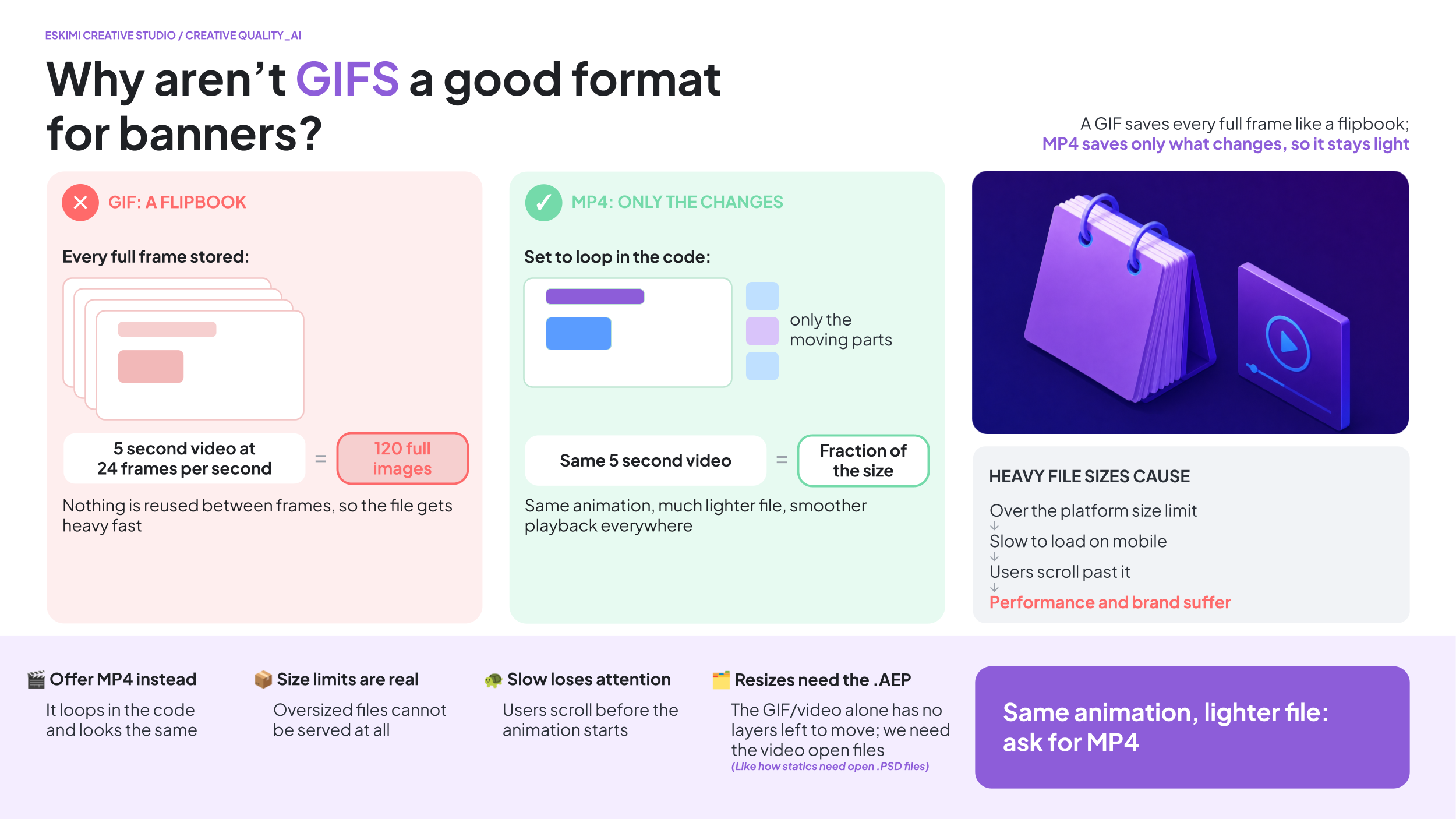
Having really large file sizes come with risks:
Upload limits:
-
Many DSPs and ad servers have maximum file size limits. If a file exceeds these limits, it simply cannot be uploaded or served
Slower loading:
- Larger files take longer to download on a user's device, particularly on slower mobile networks. This can delay the animation from starting or cause it to play less smoothly
Reduced user experience:
-
If the creative takes too long to load or the animation stutters, users are less likely to engage with it; in some cases, they may scroll away before the banner has even finished loading
-
This will directly impact campaign performance
-
If creatives load slowly or don't play smoothly, engagement rates of any kind may decrease, reducing the overall effectiveness of the campaign
Brand perception:
A more efficient option is to rather have an .MP4 and set it to automatically loop in the code - you can see an example of that here.
WHY WE NEED ORIGINAL ANIMATION FILES TO RESIZE GIFS:
To resize a GIF and produce a high quality resized version, we'll need the original animation project file - this type of file usually ends with .AEP.
-
A .GIF is the final exported version of the animation
-
It's similar to a finished video - it contains all of the frames, but it no longer contains the individual artwork, text, or animation layers that were used to create it
-
When creating a new size, we don't simply stretch the existing .GIF - each layout usually needs to be rebuilt so that the text, products, logos, and animations fit the new dimensions correctly while maintaining image quality
-
Without this, we can only scale the entire .GIF as one flat animation - this often results in blurry visuals, distorted proportions, or elements being cropped, and we can't reposition or resize individual objects because they no longer exist as separate layers (similar to how static .JPGs behave when we need to resize them)
A .GIF is like a finished movie. You can watch it, but you can't ask the actors to stand in different places. The original animation file is the film set, where every object and character can still be moved independently.
Reverts 101
WHY WE ASK FOR ONE CONSOLIDATED ROUND OF FEEDBACK
We completely understand that clients often think of additional comments after reviewing a creative. However, sending feedback over multiple days is much less efficient than sending one complete list. EG:
SCENARIO A:
-
Monday: 20 comments received
-
The Creative Studio team:
-
Reviews the feedback once
-
Makes all changes together
-
Performs one round of quality checks
-
Exports the files
-
Sends one updated version
SCENARIO B:
-
Monday: 5 comments
-
Tuesday: 4 more comments
-
Wednesday: 2 more comments
-
Thursday: 3 more comments
Although there are fewer comments overall, the team must repeatedly:
-
Stop other work
-
Reopen the project
-
Understand the new request
-
Make the changes
-
Check that nothing else has broken
-
Export new files
-
Upload and share new previews
The project keeps restarting instead of moving forward.
Another common challenge is when comments that could have been identified during the first review only come through in later revision rounds. EG:
-
V1: "Looks great."
-
V2: "Actually, can we move the logo?"
-
V3: "Can we also change the headline?"
-
V4: "The product should be bigger."
None of these comments are unreasonable on their own, but together they create additional rounds of production that could often have been avoided if everything had been reviewed together at the start
THE HIDDEN COST
People assume only the designer is affected. In reality, every extra feedback round also means:
-
The PM has to review the request
-
The PM has to brief the designer / developer
-
The designer / developer has to stop what they're doing
-
The PM has to QA the output
-
The PM has to upload the files
-
The PM has to communicate back to Sales / client
-
Everyone has to switch context before returning to their previous work
Providing one consolidated round of feedback helps us:
-
Deliver revisions faster
-
Reduce unnecessary work
-
Keep your project moving
-
Spend more time improving the creative instead of restarting the process
It's usually faster to wait an extra hour to collect all of a client's comments than to spend four days implementing them one message at a time.
Campaign Creative Requirements 2.0
This page is the evolution of the previous Creative Requirements page. Updated 09.2026.
⚡ START HERE
The creative assets needed for campaigns depend on two things:
-
The creative format you are using
-
Whether the client is supplying a finished advert or asking Creative Studio to build it
Use this chapter to check the required file types, dimensions, file sizes and supporting information before either submitting a brief, or before going live with supplied creative.
Requirements may differ by country, publisher or placement. Always confirm the final campaign requirements.
📌 STICKY ADS
📌 STICKY ADS
A sticky ad remains visible in a fixed position while the user moves through the page.
| REQUIREMENT | DETAILS |
|---|---|
| Accepted files | .PNG, .JPG, .GIF or finished HTML5 |
| Recommended size | Up to 150 KB |
| Maximum size | 4.5 MB |
*See above about .GIF limitations.
SUPPORTED DIMENSIONS
| HEADER | FOOTER | SIDEBAR | FULL SCREEN |
| 300 × 50 | 120 × 600 | 120 × 600 | 320 × 480 |
| 300 × 100 | 160 × 600 | 160 × 90 | 480 × 320 |
| 300 × 250 | 200 × 200 | 160 × 600 | 720 × 1280 |
| 320 × 50 | 250 × 250 | 200 × 200 | 768 × 1024 |
| 728 × 90 | 300 × 50 | 234 × 60 | 1,024 × 768 |
| 300 × 100 | 240 × 400 | ||
| 300 × 250 | 250 × 250 | ||
| 300 × 600 | 300 × 50 | ||
| 320 × 50 | 300 × 100 | ||
| 320 × 100 | 300 × 250 | ||
| 320 × 480 | 300 × 600 | ||
| 336 × 280 | 320 × 50 | ||
| 468 × 60 | 320 × 100 | ||
| 728 × 40 | 336 × 280 | ||
| 728 × 90 | 728 × 90 | ||
| 970 × 90 | 970 × 250 |
✨ TEMPLATED RICH MEDIA
✨ TEMPLATED RICH MEDIA
The Rich Media Template Builder is a self-serve tool inside the Eskimi DSP that lets you turn static images and videos into interactive, high-impact rich media ads in minutes, without any coding. Users choose from 20+ pre-designed templates (such as Carousel, 3D Cube, Pixel Pages, Parallax and Scratch to Reveal), upload their assets into the template's frames, and are immediately ready for campaign go-live. It's available to every client tier, including self-service, with no Creative Studio involvement or minimum budget. Custom rich media, by contrast, is built by the Studio and carries a minimum spend.

*See Pitch-ready presentation slides here.
WHAT TO PROVIDE
- High-quality .PNG or .JPG images in the required banner dimensions
-
We usually prefer to deliver them in double the dimensions to prevent any pixelation - here’s how it works using a standard 300x250 banner as an example:
-
The actual “slot” on the website is 300x250 pixels
-
If we provide a file that is exactly 300x250, it can look blurry on those sharp screens
-
To fix this, we create the image at 600x500 (double the size)
-
The website then “squeezes” those extra pixels into that original 300x250 slot
-
This isn’t about making the banner physically bigger on the page - it’s a compression tactic to make sure the image stays crisp and sharp
- See this in action here
-
-
- .MP4 videos in the relevant dimensions for video templates
- File size is recommended as 150 KB each, but the DSP can accept higher - however it may begin to impact performance
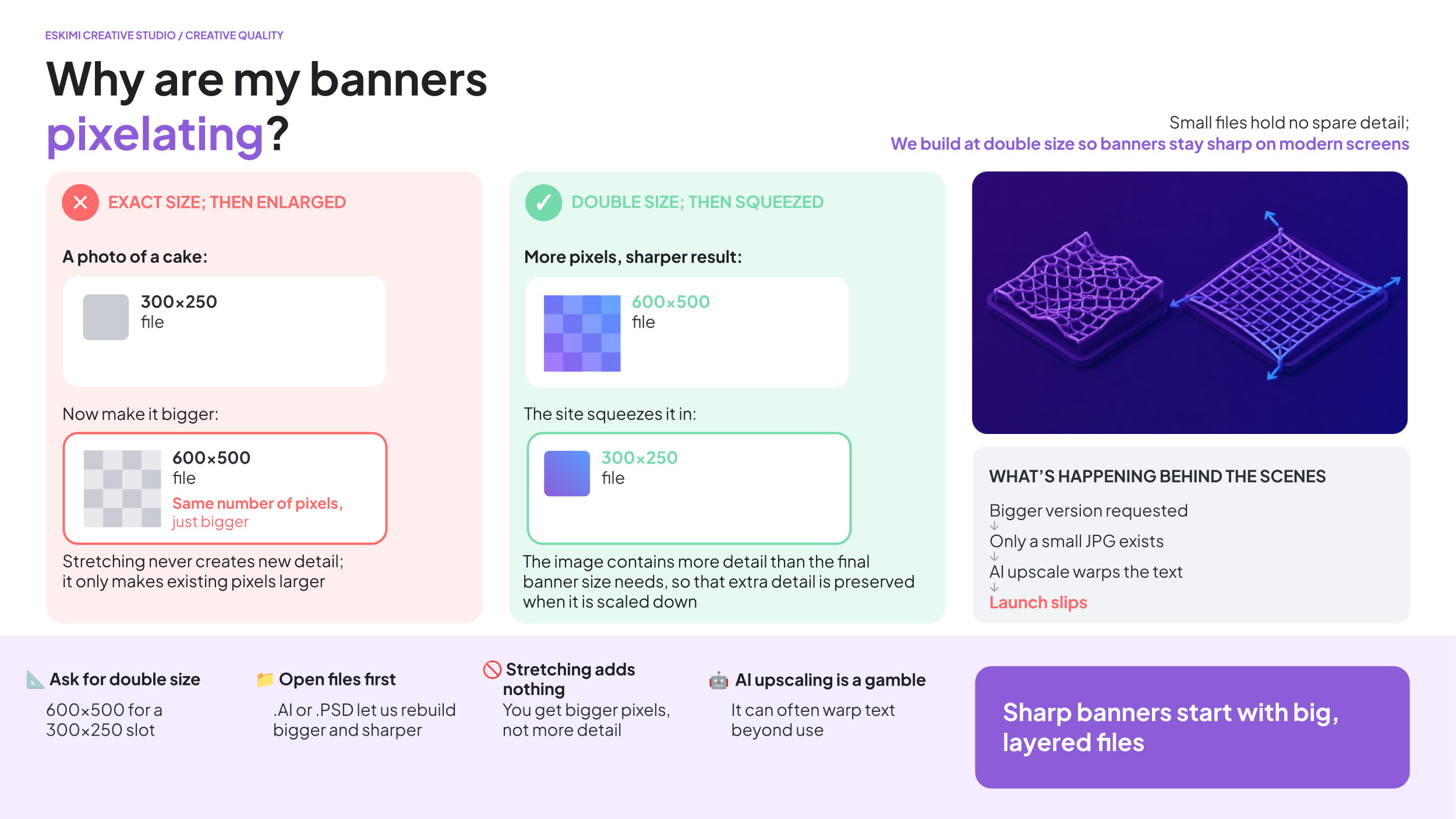
*See this in action here.
SUPPORTED DIMENSIONS
| HORIZONTAL | SQUARE | VERTICAL |
| 300 × 50 | 300 × 300 | 160 × 600 |
| 300 × 150 | 320 × 320 | 300 × 600 |
| 300 × 250 | 320 × 480 | |
| 320 × 50 | ||
| 320 × 100 | ||
| 336 × 280 | ||
| 728 × 90 | ||
| 970 × 90 | ||
| 970 × 250 |
*See dimensions per template format here.
The Creative Studio team can help with resizes - resizing work usually takes 24 hours depending on seasonal capacity. To assist with this, the Creative Studio requires Open Files from the client team.
HOW MANY IMAGES ARE REQUIRED?
The number of required images depends on the selected template - previews of all available Eskimi Templated Rich Media can be found here.
| ASSETS AVAILABLE | POSSIBLE FORMATS |
|---|---|
| 1 image |
Rotating Billboard (needs 1x dimensions export) SpinView Gallery (1x background image; 1x product image) |
| 2 images |
Countdown (needs 1x dimensions export) Dancing 3D (1st image not in view; ensure main image is in 2nd image placement) Scratch to Reveal (needs 1x dimensions export) Shake & Break (2nd image needs 1x dimensions export) SpinView Gallery (+ background image) |
| 3 images |
SpinView Gallery (+ background image) |
| 4 images |
3D Cubes Animated Parallax (2nd and 4th images not in view; ensure main images are in 1st and 3rd image placement) SpinView Gallery (+ background image) |
| 5 - 6 images |
SpinView Gallery (+ background image) |
| 7 - 10 images | 3D Cube Rotating Carousel Carousel Splitscreen Pixel Pages SpinView Gallery (+ background image) |
HOW MANY VIDEOS ARE REQUIRED?
The DSP Template Builder also supports video formats - either as video only, or as video + images.
| ASSETS AVAILABLE | POSSIBLE FORMATS |
|---|---|
| 3 - 10 videos + images | |
| 2 - 10 videos + images | |
| 3 - 4 videos + images | |
| 1 - 10 videos + images | |
| 3 - 10 videos + images | |
| 1 video |
Some formats have additional requirements. Check the individual format specifications before confirming the execution with the client.
🧩 CUSTOM RICH MEDIA
🧩 CUSTOM RICH MEDIA
Custom Rich Media is designed and developed specifically for the campaign rather than built from an existing template.
WHAT TO PROVIDE
-
Editable .PSD or other approved Open Files from the client team
- Brand guidelines or brand book (especially useful for a first time client)
-
Logos
-
Font files
-
Final copy (especially if the campaign is not in English, and the language uses any special characters)
-
Final CTA
-
All required banner dimensions
-
A short explanation of the required user journey
- Any legal disclaimers needed
Brief in your custom request here. (COMING SOON)
WHAT IS THE USER JOURNEY?
The user journey explains what happens when someone sees or interacts with the advert.
For example:
-
The product appears
-
The user selects an option.
-
The advert displays the result
-
The user clicks the CTA to visit the client’s website
A few clear sentences are enough for an initial brief. More complex experiences may require a storyboard before development begins.
*See a very thorough example here.
🧊 FORCED PERSPECTIVE AND 3D FORMATS
Forced Perspective and other 3D formats require both the campaign design and accurate product references.
STANDARD BRAND ASSETS
For ALL projects, please provide:
- Editable brand or campaign files, such as .PSD, .AI or .FIG
- High-resolution logos
- Font files
- Brand guidelines, if available
- Final, approved copy
- Final call to action (CTA)
- Music as an .MP3, or an approved music reference if relevant
- Legal copy and mandatory disclaimers
🧊 ASSETS REQUIRED FOR 3D PROJECTS
If the project includes a 3D product or object, we also need:
- An existing 3D model of the product
- 3D model file format: .GLTF for web 3D format, .FBX or .OBJ
- UV wrapped with provided texture image files
- If 3D assets don't exist, we would need the below to create a 3D model from scratch:
- Flat label or sticker artwork in .AI, .EPS or print-ready PDF format
- Packaging layouts and dielines
- Material and finish details, such as matte, gloss, metallic or transparent
- Clear reference photographs from different angles (IE. orthographic reference photos)
*Read more details on 3D format creative requirements here.
💥 HIGH IMPACT FORMATS
High Impact formats use larger or more unusual placements to create a more noticeable experience.
WHAT TO PROVIDE
-
Editable .PSD or other approved Open Files from the client team
- Brand guidelines or brand book (especially useful for a first time client)
-
Logos
-
Font files
-
Final copy (especially if the campaign is not in English, and the language uses any special characters)
-
Final CTA
-
All required banner dimensions
-
A short explanation of the required user journey
- Any legal disclaimers needed
| FORMAT | REQUIREMENT |
|---|---|
| Floating Ad | 150 × 150 .PNG, .JPG or layered .PSD |
| Full Page Takeover | Responsive assets |
| Topscroll | Responsive assets |
| Midscroll | Responsive assets |
A responsive format adjusts to the size of the screen where it appears. This means the design must work across different screen sizes instead of being created at only one fixed dimension. Creative Studio may request additional background images, safe areas or layered assets depending on the selected format.
🔄 DYNAMIC ADS
🔄 DYNAMIC ADS
Dynamic ads automatically change some content using an external source of information.
For example, an advert may display different:
-
Products
-
Prices
-
Locations
-
Weather conditions
-
Promotional messages
WHAT TO PROVIDE
The requirements depend on what will change.
| DYNAMIC CONTENT | WHAT WE NEED |
|---|---|
| Products or prices (data format) | .JSON, .XML, or .CSV format API Endpoint (not within EskimiDSP solution) |
| Weather | The required cities and weather conditions |
| Other live information | Access to a suitable API |
| Creative design | Editable, layered campaign assets |
*Learn more about Dynamic Ad requirements and setup here.
**Access the Pitch presentation with examples here.
***Read about Dynamic Ads with product feeds here.
A product feed is a structured file containing information such as product names, images, prices and links. An API is a connection that allows the advert to request information from another system.
DYNAMIC AD DIMENSIONS
| COMMON MOBILE DIMENSIONS | COMMON DESKTOP DIMENSIONS |
|
200 × 200 |
120 × 600 |
| 250 × 250 | 160 × 600 |
| 300 × 50 | 250 × 250 |
| 300 × 100 | 300 × 250 |
| 300 × 250 | 300 × 600 |
| 300 × 600 | 336 × 280 |
| 320 × 50 | 728 × 90 |
| 320 × 480 | 970 × 90 |
| 468 × 60 | - |
📹 VIDEO AND AUDIO FORMATS
VIDEO AND AUDIO FORMATS
🎮 IN-GAME ADS
In-game advertising may use a banner or video displayed inside a game environment.
ACCEPTED FILES
| Banner | .JPG, .GIF, finished HTML5 or approved tags |
| Video | MP4 |
BANNER DIMENSIONS
| COMMON BANNER DIMENSIONS | ADDITIONAL SUPPORTED DIMENSIONS MAY INCLUDE | VIDEO DIMENSIONS |
| 300 × 250 | 160 × 600 | 320 × 480 |
| 320 × 50 | 250 × 250 | 480 × 320 |
| 320 × 480 | 300 × 600 | 768 × 1024 |
| 336 × 280 | 320 × 100 | 1024 × 768 |
| 480 × 320 | 320 × 180 | |
| 640 × 360 | 320 × 320 | |
| 640 × 480 | 360 × 640 | |
| 728 × 90 | ||
| 768 × 1024 | ||
| 970 × 250 | ||
| 1920 × 1080 |
VIDEO SPECIFICATIONS
| VIDEO REQUIREMENT | GUIDANCE |
| Recommended file size | Less than 15 MB |
| Recommended duration | 6–15 seconds |
▶️ IN-BANNER VIDEO
| REQUIREMENT | DETAILS |
|---|---|
| File type | .MP4 |
| Aspect ratio | 4:3 |
| Maximum size | 5 MB |
| Recommended duration | Up to 30 seconds |
Also provide:
-
A short description
-
CTA wording
-
An optional 300 × 250 companion banner in .PNG, .JPG or finished HTML5 format
🎬 VAST VIDEO
VAST is a standard method used to deliver video ads across compatible websites and apps.
| REQUIREMENT | DETAILS |
|---|---|
| File type | .MP4 |
| Aspect ratio | 16:9 |
| Maximum size | 5 MB |
| Recommended duration | Up to 30 seconds |
| Maximum duration | 6 minutes |
Also provide:
-
A short description
-
CTA wording
-
An optional 300 × 250 companion banner in .PNG, .JPG or finished HTML5 format
🎁 REWARDED VIDEO
Rewarded video gives a user an in-app reward for watching the advert.
| REQUIREMENT | DETAILS |
|---|---|
| File type | .MP4 |
| Dimensions | 320 × 480 or 480 × 320 |
| Maximum size | 5 MB |
| Recommended duration | Up to 30 seconds |
Also provide:
-
A short description
-
CTA wording
-
An optional 300 × 250 companion banner in .PNG, .JPG or finished HTML5 format
📺 CONNECTED TV ADS
Connected TV, also called CTV, refers to video advertising shown through internet-connected television services and devices.
| REQUIREMENT | DETAILS |
|---|---|
| Accepted file | .MP4 |
| Alternative delivery | External VAST URL without VPAID |
| Dimensions | 1920 × 1080 |
| Recommended size | Up to 45 MB |
| Maximum size | 100 MB |
| Recommended duration | Up to 30 seconds |
| Maximum duration | 1 minute |
*VPAID and OMID are not supported. This means viewability cannot be tracked using these technologies.
🔊 AUDIO ADS
| REQUIREMENT | DETAILS |
|---|---|
| Accepted files | .MP3, .WAV, .WMA or .OGG |
| Minimum bitrate | 128 kbps |
| Maximum size | 50 MB |
| Recommended duration | 15–30 seconds |
*Some limited inventory supports audio up to 60 seconds. Confirm availability before promising a longer execution.
⏭️ YOUTUBE BUMPER ADS
A bumper ad is a short YouTube video advert.
REQUIREMENTS
-
The video must be no longer than 6 seconds
-
The final video must be uploaded to YouTube
-
The YouTube video link must be provided
📹 YOUTUBE IN-STREAM ADS
REQUIREMENTS
-
Recommended video duration: 15, 20 or 30 seconds
-
The final video must be uploaded to YouTube
-
The YouTube video link must be provided
Frequently asked questions
Creative production comes with plenty of questions, especially when technical requirements affect what can be built, how long it will take, and what assets are needed. This chapter brings together clear answers to the questions Creative Studio receives most often. It covers common topics including open files, image quality, banner resizing, GIFs, minimum media investments, AI-generated concepts, usage rights, 3D production and client feedback. Use it as a practical reference when preparing briefs, managing client expectations or explaining why certain production requirements and limitations exist.
What are Client Tiers?

*Read company positioning on Tiers here.
CHOOSING CLIENT TIERS IN CREATIVE BRIEFS
Client tiers help Creative Studio understand the strategic importance of the client relationship. They do not describe:
- How urgent the brief is
- How difficult the creative is
- How much attention the client personally requests
- How important the opportunity feels to the salesperson
When briefing, choose the tier based on the client or agency relationship, not the urgency of the individual brief.
🥇 TIER 1
- Clients under Big 5 agencies (previously Big 6) (and Simply Black in Africa) or Top Global brands
- The "Big 6" refers to the six largest global advertising and marketing holding companies that control a vast majority of worldwide media spending, creative campaigns, and public relations
- Even small clients count as Tier 1 if they belong to a Big 6 agency
- Why this matters - these relationships may involve:
- Global or multinational accounts
- Important agency partnerships
- Opportunities across multiple markets
- High long-term retention value
- Strong strategic value to Eskimi
*Read our Big 5 (previously Big 6) overview here.
Not sure whether an agency belongs to the Big 5? Check the approved agency list below before selecting the tier.
🥈 TIER 2
- Important local or regional clients that do not qualify for Tier 1
- This includes:
- Recognised top clients in your local market
- Large independent agencies
- Important regional clients
- Established accounts with high local strategic value
- Why this matters - these clients may offer:
- Strong local or regional relationships
- Repeat business
- High retention value
- Important revenue within a specific market
- Opportunities to strengthen Eskimi’s local position
If you are unsure whether an account qualifies, confirm it with your regional or commercial lead.
🥉 TIER 3
- When the client does not qualify for Tier 1, Tier 2 or Tier 7
-
This usually includes:
-
Smaller independent agencies
-
Smaller direct clients
-
Standard accounts without a confirmed strategic classification
-
Tier 3 clients generally don't qualify for custom creative work, as the goal it to move them to a low touch environment. However, if there is an opportunity to grow the client, or there is a high media investment value attached, let's talk!
🏅 TIER 7
- Gambling and performance clients which were handed over to Roigen
Tier 7 is a special routing category. It does not mean “seventh priority.”
🌿 GROWTH CLIENT
- Accounts in active growth phase, or with high upsell potential
- There is clear evidence that the account is actively growing or has a realistic, near-term upsell opportunity
- This may include:
- Confirmed additional campaigns
- A documented increase in planned spend
- Active expansion into new markets
- A confirmed opportunity to add products or formats
- A specific upsell already being discussed with the client
- Why this matters:
- Growth clients may have additional commercial potential
- Strong creative support can help Eskimi deepen the relationship and convert confirmed opportunities into future business
🆕 NEW CLIENT
- First custom Rich Media brief with Creative Studio
- Why this matters - the first Creative Studio project establishes the client’s expectations of our:
- Creative quality
- Communication
- Process
- Reliability
- Overall service
- First impressions matter; new clients get elevated treatment on their first brief regardless of size
The New Client flag applies only to the first custom Rich Media brief. Remove it from future briefs for the same client.
Growth Client and New Client are additional priority flags. They do not replace the client’s main tier.
HOW ESKIMI WORKS WITH BIG 5 AGENCIES
There’s this thing in the advertising world called the “Big 6,” which refers to the biggest ad agency holding companies around the world. Before starting to navigate this ecosystem, one often has no idea how complicated it is.
Agency holding companies are “live organisms” that rapidly change, expanding and acquiring new members or losing some of them along the way.
Most of us see hundreds of agencies worldwide as individual players in the industry. However, all of them fall under the giant umbrellas of slightly more than ten agency holding companies (parent advertising agency groups that own smaller agencies).
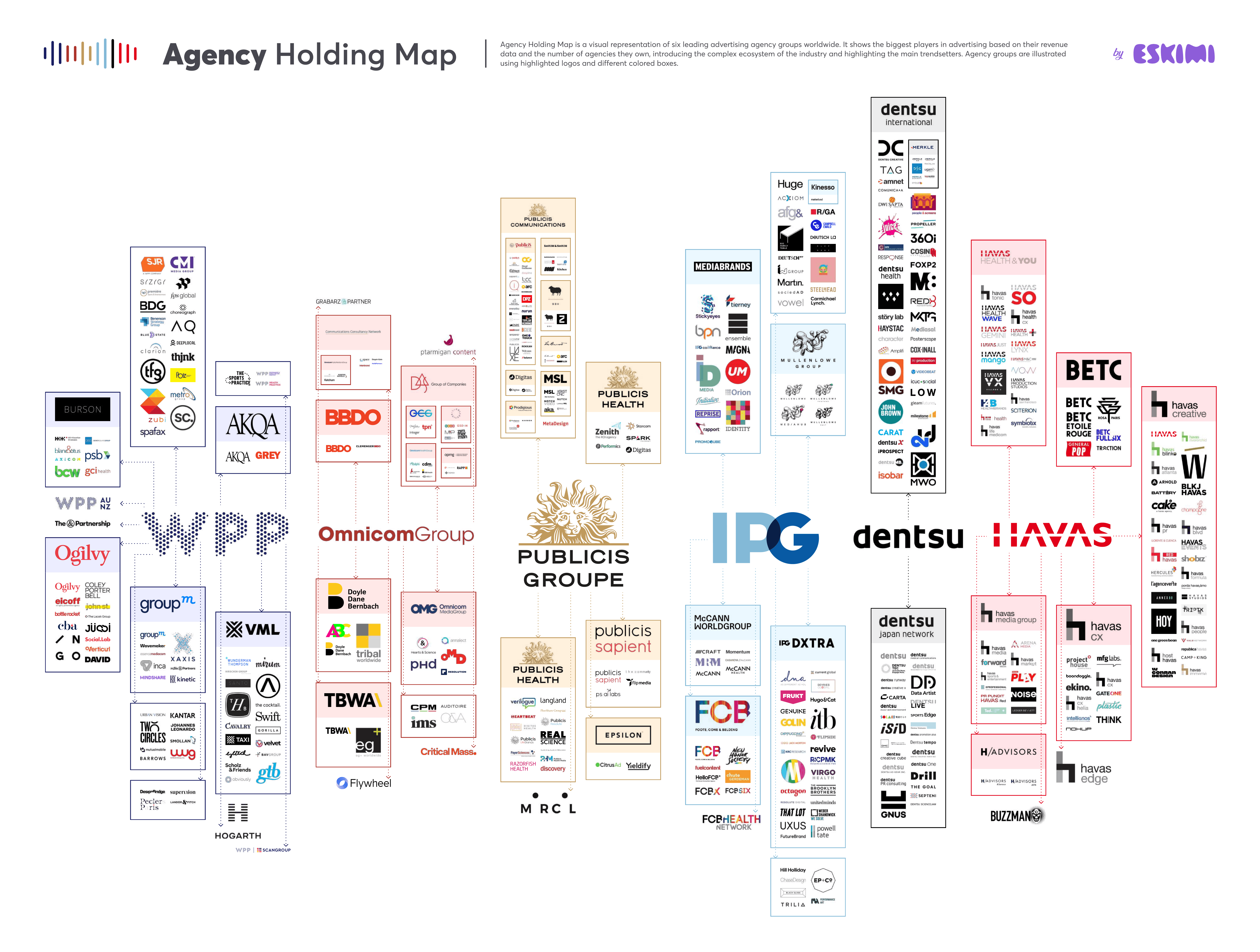
Read our blog post on the Big 5 (previously Big 6) here.
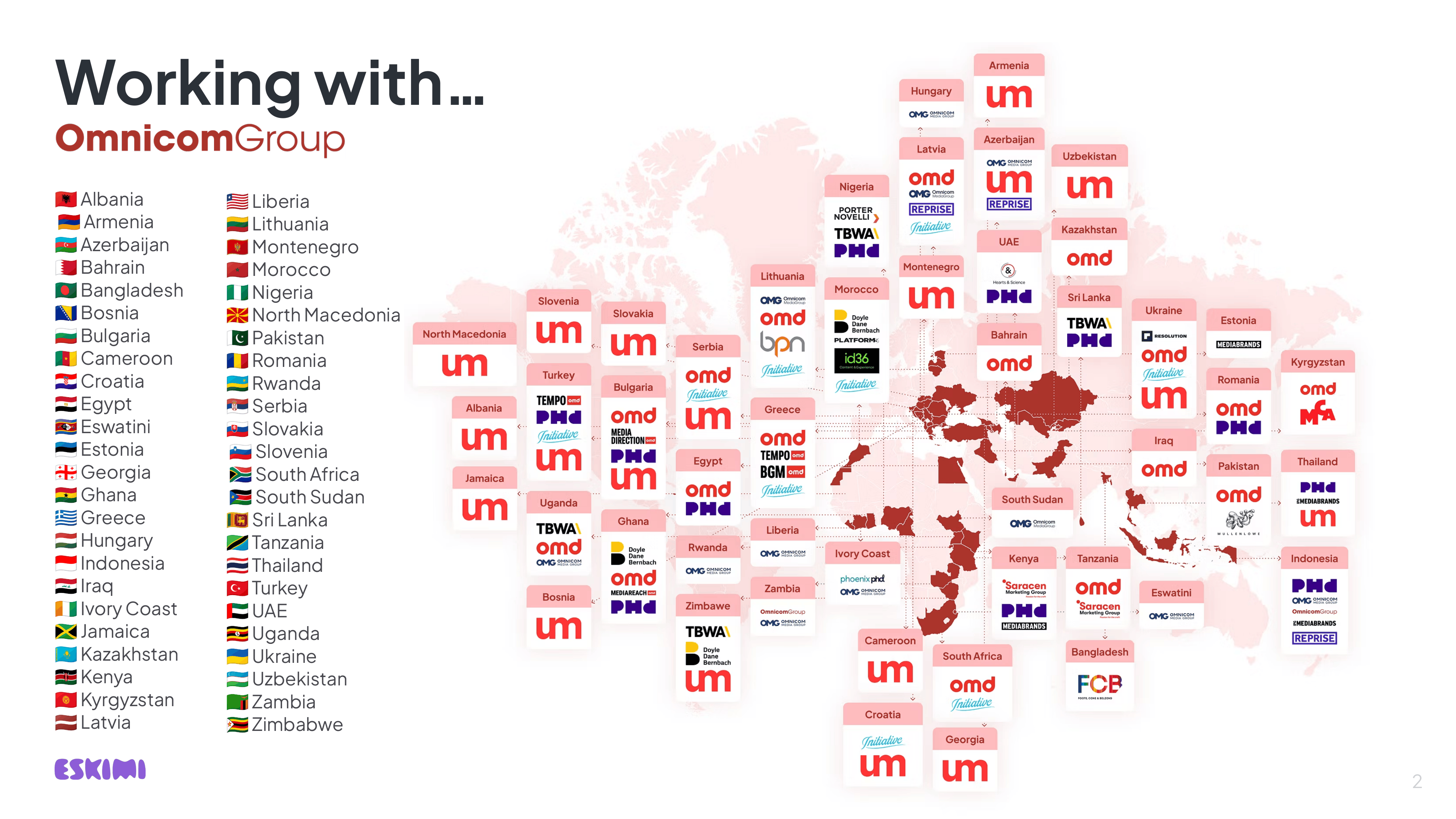
What are creative Minimum Investments, and why do we have them?
WIP
What are Tokens, and how do they work?

⚡ QUICK ANSWER
Creative Tokens give regional teams access to Creative Studio production time for promising opportunities that do not yet have an approved media budget.
They allow Sales to show clients what Eskimi could create, bring proactive ideas to existing clients and strengthen important pitches before a campaign has been confirmed.
💡A Token is a unit of Creative Studio production capacity. It is not money, a discount or an approved campaign budget.
*Check your region's available Tokens here.
✅ USE A CREATIVE TOKEN WHEN
- There is no approved IO or confirmed media budget
- The work is proactive and could help win or grow business
- The potential opportunity is worth at least $5,000
- Your Regional Manager supports the request
- You have submitted a complete brief
- Your region has enough Tokens available
❌ DO NOT USE A TOKEN WHEN
- The campaign already has an approved IO
- The client is already going to buy the campaign
- The request is routine campaign production
- The brief is incomplete
- The request has little realistic commercial potential
- You need delivery in less than 7 days
BEFORE SUBMITTING A TOKEN REQUEST
Confirm that:
- ☑️ The work is genuinely proactive
- ☑️ The campaign does not already have an approved IO
- ☑️ The opportunity is worth at least $5,000
- ☑️ The requested creative matches the potential value
- ☑️ Your Regional Manager has approved the request
- ☑️ Your region has enough Tokens available
- ☑️ The purpose of the pitch is clear
- ☑️ The requested delivery date allows 7 - 14 days
- ☑️ The client meeting or pitch date is confirmed
Need more detail? Read the explanations below👇
🍭 WHAT IS A CREATIVE TOKEN?
🍭 WHAT IS A CREATIVE TOKEN?
A Creative Token allows a region to request proactive creative work without a confirmed campaign budget.
Creative Studio reserves a limited amount of production time for this work each quarter. Each region receives a Token allocation based on factors such as:
- Market size
- Market maturity
- Pitching activity
- Previous Token usage
- Demand for proactive work
- Available Creative Studio capacity
Regions decide which opportunities are important enough to support with their available Tokens.
Because production capacity is limited, Tokens should be used thoughtfully on opportunities with genuine commercial potential.
✅ WHAT CAN TOKENS BE USED FOR?
- New business pitches: Use creative examples to strengthen a proposal, open a conversation or help a client understand what Eskimi can produce
- Proactive client ideas: Present a new idea to an existing client before they request it. This may help grow the account, introduce a new format or encourage an upsell
- More ambitious creative: Support a valuable opportunity where the available media budget does not meet the normal minimum investment for the requested format
- Detailed creative exploration: Request more detailed brainstorming, a creative concept, storyboard or demonstration when informal advice is not enough
❌ WHAT TOKENS ARE NOT FOR
Tokens should not be used to replace the normal production process. They are not intended for:
- Campaigns that already have an approved IO
- Standard work that the client has already agreed to buy
- Basic campaigns presented as proactive work
- Requests with no clear opportunity or client need
- Incomplete ideas that Creative Studio must develop from nothing
- Several costly concepts for one small opportunity
- Avoiding the minimum media investment without a strong commercial reason
- Urgent requests that have not been planned properly
If the campaign already has an approved budget, do not use a Token. Submit the brief through the normal Creative Studio process.
Business-as-usual campaign production continues as normal and does not use the regional Token allocation.
🧭 DO I NEED A TOKEN FOR PROACTIVE WORK?
🧭 DO I NEED A TOKEN FOR PROACTIVE WORK?
| SITUATION | TOKEN REQUIRED? | WHAT TO DO |
| The campaign has an approved IO | NO | Submit a normal production brief |
| The client has approved the campaign and budget | NO | Submit a normal production brief |
| You want creative for an unconfirmed pitch | YES | Request Regional Manager approval; submit a Token brief |
| You want to present a proactive idea | YES | Request Regional Manager approval; submit a Token brief |
| The budget is below the minimum for the requested format | MAYBE | Upsell, choose another format, or request a Token |
| You only need informal advice from a Project Manager | NO | Discuss the idea before submitting a Token brief |
| You need a storyboard, concept or demo for an unconfirmed opportunity | YES | Request Regional Manager approval; submit a Token brief |
| You need full strategic pitch support | NO | Contact Theshlin and follow the strategic pitch requirements |
🎟️ HOW MANY TOKENS DOES A REQUEST USE?
🎟️ HOW MANY TOKENS DOES A REQUEST USE?
| REQUEST | TOKEN COST |
| Proactive static creative concept | 1 Token |
| Custom Rich Media banner for confirmed campaign below the normal minimum investment | 1 Token |
| Proactive detailed creative brainstorming or concept development | 2 Tokens |
| Proactive storyboard or demo | 2 Tokens |
| 3D Forced Perspective / Augmented Reality banner for confirmed campaign below the normal minimum investment | 2 Tokens |
The Token cost may increase if the request includes:
- Several different concepts
- Several complex formats
- A storyboard and a working demo
- 3D production
- Custom animation
- Complex interactive functionality
- A large number of sizes or versions
One Token does not automatically cover every item included in a pitch. Creative Studio will confirm the Token cost after reviewing the complete brief.
🔎 TOKEN ALLOCATION & T'S & C'S
🔎 CHECK YOUR TOKEN ALLOCATION AND USAGE
Each region receives a new Token allocation for the quarter.
FIND YOUR QUARTERLY ALLOCATION
Check the Creative Tokens presentation to see how many Tokens have been allocated to your region for the current quarter.
The presentation shows the starting allocation before any Tokens are used, returned or transferred.
TRACK TOKENS USED AND REMAINING (COMING SOON)
Use the Creative Token tracking dashboard to check:
-
Which Token requests have been submitted
-
How many Tokens your region has used
-
How many Tokens your region has remaining
-
Whether Tokens have been returned after a successful campaign
💰 MINIMUM OPPORTUNITY VALUE
A Token request should support a potential media opportunity worth at least $5,000.
The potential value should also make sense for the format being requested.
For example, an expensive 3D concept should support an opportunity that could realistically meet the usual minimum media investment for that type of execution if the pitch is successful.
This prevents Creative Studio from spending a large amount of production time creating several high-cost demonstrations for a small or guaranteed campaign.
The scale of the creative request should match the realistic value of the opportunity.
📋 TOKEN BRIEFS STILL NEED TO BE COMPLETE
A Token gives access to production time. It does not remove the normal briefing requirements.
The Sales Team must please confirm:
- Who the client is
- What the opportunity is
- Whether the campaign is confirmed or still being pitched
- The potential media value
- What the client needs
- When the pitch or client meeting will take place
- What Creative Studio is expected to deliver
A strong Token brief gives the team enough information to understand the opportunity and recommend the right creative approach.
⏱️ LEAD TIMES AND WEEKLY CAPACITY
The standard lead time for Token work is 7 -14 days.
The exact delivery date depends on:
- The complexity of the request
- Whether all assets have been supplied
- Current campaign workload
- Available Token production slots
- The amount of work already scheduled
Shorter delivery times may occasionally be possible, but they cannot be guaranteed.
Creative Studio can deliver a maximum of four Tokens of work per week across the whole company.
During busy periods, Token work may be limited, paused or scheduled for a later date.
🔄 WHAT HAPPENS IF THE PITCH BECOMES A CAMPAIGN?
If the proactive work results in a paid campaign and an IO is assigned, inform Creative Studio.
The Token used for that opportunity will be returned to the region’s available allocation. This allows the region to invest the Token in another proactive opportunity.
Win the campaign, get the Token back.
The Token is only returned once the campaign and IO have been confirmed. A positive client response or possible future campaign is not enough.
📆 TOKEN EXPIRY AND QUARTERLY ALLOCATIONS
Tokens are allocated per quarter.
Unused Tokens:
- Do not automatically carry over into the next quarter
- May result in a smaller future allocation
- May be transferred to another region before they expire
- Are lost if they are not used or reassigned
Token allocations may increase or decrease each quarter based on:
- Previous usage
- Regional demand
- Commercial potential
- Creative Studio workload
- Seasonal production requirements
Regions may agree to exchange or transfer Tokens. Any transfer must be confirmed by the relevant Regional Managers and communicated to Creative Studio.
If your region has run out of Tokens, speak to your Regional Manager. Additional capacity may sometimes be available from another region or from the central overflow allocation.
Tokens should not be saved indefinitely for a perfect opportunity. Use them carefully, but use them while they are available.
🎄 Q4 AND PEAK-SEASON AVAILABILITY
Creative Studio has less capacity for proactive production during Q4 because of increased campaign demand and the holiday season.
Token availability may therefore be reduced or paused during Q4. Token briefs are not accepted during the Christmas production period unless capacity has been agreed in advance.
Plan important Q4 pitches early and submit them before the communicated cut-off date.
📉 WHAT IF A CONFIRMED CAMPAIGN DOES NOT MEET THE MINIMUM SPEND?
Minimum media investments help ensure that the income from a campaign covers the cost of producing the creative.
Creative production includes costs such as:
- Staff time
- Freelancer support
- Specialist production
- Software
- Hardware
- Quality assurance
- Operational costs
If the media investment of a confirmed campaign does not cover production, Creative Studio may be required to complete the work at a loss. Repeatedly doing this is not sustainable to the business.
If a proposed campaign does not meet the minimum investment, you have three options:
- UPSELL THE CLIENT: try negotiate to increase the proposed media investment so that it meets the minimum required for the format.
- RECOMMEND A DIFFERENT FORMAT: Choose an execution that is available within the client’s confirmed budget.
- REQUEST A TOKEN: if the opportunity is strategically valuable and meets the Token requirements, ask your Regional Manager to approve the use of a Token, and submit a Token brief.
A Token is an exception for a valuable opportunity. It should not become the standard way to sell formats below their minimum investment.
🚨 NOTE: there are NO approved lower minimums in any regions. Anything that comes in below minimum investment is assessed and approved on a case by case basis. All exceptions need to be approved by Lee.
⭐️ EXAMPLES & FAQ'S
🌟 EXAMPLE: USING A TOKEN TO OPEN A DOOR
The Turkey team wanted to secure a meeting with Coca-Cola after trying to open the conversation for more than a year.
Creative Studio produced a proactive “Share a Coke” banner that displayed client names.
This is a good Token use because:
- There was a clear commercial objective
- The creative was specific to the client
- It demonstrated Eskimi’s capabilities
- It helped the team access an opportunity that had previously been difficult to reach
A Token does not need to produce an immediate campaign to be valuable. However, it should have a clear purpose and a realistic chance of helping the business.
❓FREQUENTLY ASKED QUESTIONS
- DOES A CAMPAIGN WITH AN IO NEED A TOKEN?
- No; campaigns with an approved IO follow the standard production process
- CAN I USE A TOKEN FOR A CAMPAIGN THE CLIENT HAS ALREADY AGREED TO BUY?
- Normally, no; Tokens are intended for proactive work and unconfirmed opportunities, not guaranteed business
- CAN I USE A TOKEN WHEN THE BUDGET IS BELOW THE FORMAT MINIMUM?
- Yes, if the opportunity is strategically valuable, meets the Token eligibility requirements and is approved by your Regional Manager
- DOES ONE REQUEST ALWAYS COST ONE TOKEN?
- No; simple concepts may cost one Token, while storyboards, demos, 3D work or more complex requests may cost two or more
- CAN I REQUEST SEVERAL DEMOS USING ONE TOKEN?
- Not automatically; the Token cost depends on the total amount and complexity of the requested work
- CAN CREATIVE STUDIO DEVELOP THE IDEA FOR ME?
- Creative Studio can help develop a clear starting idea, but the local team must provide the client context, opportunity, objective, available assets and expected outcome
- HOW QUICKLY WILL I RECEIVE THE WORK?
- Standard production time is 7 -14 days after the complete brief has been accepted
- CAN TOKEN WORK BE COMPLETED URGENTLY?
- Urgent delivery cannot be guaranteed; confirmed campaign work takes priority
- WHAT HAPPENS IF WE WIN THE CAMPAIGN?
- Once the campaign receives an IO, tell Creative Studio and the Token will be returned to your region
- CAN UNUSED TOKENS MOVE TO THE NEXT QUARTER?
- No; Tokens expire at the end of the quarter unless a different arrangement has been approved
- WHAT IF MY REGION HAS NO TOKENS LEFT?
- Speak to your Regional Manager; they may request a transfer from another region or ask whether central overflow capacity is available
- ARE TOKENS AVAILABLE DURING Q4?
- Availability is limited during Q4 and may be paused during the festive production period; always check the current allocation and cut-off dates before submitting a request
🔗 USEFUL LINKS
- Submit a Creative Token brief
- Creative Token overview and allocation information
- Quarterly Token activity tracking dashboard
How Creative Studio can help brainstorm your idea
💬 LEVELS OF PROACTIVE SUPPORT
Not every conversation requires a Token.
| SUPPORT LEVEL | WHEN TO USE IT | REQUIREMENTS |
| Informal brainstorming | You need quick advice about possible formats or available assets | Speak to a Creative Project Manager |
| Creative Token support | You need a concept, storyboard, demo or proactive creative production | Regional approval, complete brief and available Tokens |
| Full strategic pitch support | You need deeper strategy, data, storytelling and pitch development | Qualifying media opportunity and confirmed availability |
The difference:
- Informal brainstorming helps you explore possibilities.
- Tokens give you access to Creative Studio production time to create something for the opportunity.
- Strategic support helps develop the pitch direction and story.
✅ CHOOSING THE RIGHT SUPPORT: QUICK ANSWER
| IF YOU NEED | START WITH |
| A quick opinion on formats or assets | 💡 Creative Project Manager |
| Initial strategic ideas for a possible opportunity | 🧠 Brainstorming with a strategist |
| A concept, storyboard or demo | 🎟️ Creative Tokens |
| Help developing a specific client pitch | 🎯 Pitch Assistance with a strategist |
| A reusable resource for an industry | 📚 Vertical Playbook with a strategist |
| A client or internal learning session | 🎤 Events or Workshops with a strategist |
Need more detail? Read the explanations below👇
💡 INFORMAL BRAINSTORMING
💡 INFORMAL BRAINSTORMING
Creative Project Managers can help you review assets and discuss possible creative formats. This is useful when you need initial guidance before deciding whether to submit a full brief. This can happen directly on Slack in the #creative-forum channel, or via our new briefing form COMING SOON.
Helpful resources include:
Informal advice does not include the production of a finished concept, storyboard or demo.
🎟️ TOKENS
🎟️ TOKENS
Creative Tokens are used when you need Creative Studio to produce something for a proactive opportunity that does not yet have an approved IO or confirmed creative budget.
Unlike informal brainstorming or strategic advice, Token support may include an actual creative output, such as:
- A static creative concept
- More detailed concept development
- A storyboard
- A demo
- Proactive Rich Media production
- A more complex format that does not meet the usual minimum media investment
| TOKEN SUPPORT | DETAILS |
|---|---|
| 1 Token | Static concept, detailed concept development or eligible Rich Media production |
| 2 Tokens | Storyboard, demo or eligible 3D Forced Perspective production |
| Lead time | Normally 7 - 14 working days |
| Approval | Regional approval and available Tokens required |
Token requests must include a complete brief, the available client assets and a clear explanation of the commercial opportunity. Tokens are not required for campaigns that already have an approved IO. These follow the normal Creative Studio production process.
*For more details, read "What are Tokens, and how do they work?"
💡 FULL STRATEGIC PITCH SUPPORT
💡 FULL STRATEGIC PITCH SUPPORT
For qualifying opportunities, our Creative Strategist can help turn a business challenge or early idea into a clearer creative direction, client story or pitch approach.
| POTENTIAL MEDIA INVESTMENT | POSSIBLE SUPPORT |
| From $5,000 | Data, examples, creative discussion and initial brainstorming |
| From $7,500 | More detailed strategic involvement and pitch development |
Allow a minimum of five working days. The required time and level of support must be confirmed for each opportunity.
Strategic pitch support is separate from the Creative Token production process. If the pitch also requires concepts, storyboards or demos, Tokens may still be required.
Creative Strategy support is divided into four broad categories:
| SUPPORT TYPE | USE IT WHEN YOU NEED |
| 🧠 Brainstorming | Help exploring ideas, formats or possible creative approaches |
| Strategic support for a specific client opportunity | |
| A reusable sales resource for a particular industry | |
| A structured session for clients or internal teams |
*Request strategic assistance here.
🧠 BRAINSTORMING
Brainstorming is an early-stage discussion used to explore what may be possible before a full pitch or brief has been developed.
This may include:
- Exploring possible campaign ideas
- Recommending suitable creative formats
- Identifying ways to use the available client assets
- Discussing how different formats could support the campaign objective
- Reviewing examples from previous campaigns
- Helping develop a clearer starting direction
*See Castle Lite example here.
Brainstorming helps shape the idea. It does not include production of a finished concept, storyboard, demo or pitch deck.
🎯 PITCH ASSISTANCE
Pitch Assistance is for a specific, active client opportunity that needs deeper strategic support.
The strategist may help with:
- Developing the central pitch idea
- Building a clear campaign story
- Connecting the creative recommendation to the client’s objective
- Selecting relevant formats and examples
- Adding supporting data or industry insights
- Structuring Creative Studio content within the pitch
- Preparing talking points for the client presentation
- Joining a pitch meeting where agreed in advance
📚 VERTICAL PLAYBOOKS
A Vertical Playbook is a reusable sales resource built around a specific industry or client category. Examples may include:
- FMCG
- Automotive
- Finance
- Travel
- Retail
- Gaming
- Telecommunications
A playbook may include:
- Common challenges in the industry
- Relevant audience or market insights
- Recommended creative approaches
- Suitable Eskimi formats
- Campaign examples
- Pitching angles
- Key talking points
- Questions to ask clients
- Opportunities for cross-selling or upselling
Vertical Playbooks are designed to support several Sales teams or opportunities.
🎤 EVENTS AND WORKSHOPS
The strategist can help plan or deliver sessions that educate, inspire or develop ideas with clients and internal teams. This may include:
- Client creative workshops
- Campaign ideation sessions
- Format training
- Industry or vertical presentations
- Conference or event content
- Internal Sales training
- Collaborative planning sessions
Support may include:
- Defining the session objective
- Developing the agenda
- Preparing presentation content
- Selecting examples
- Creating discussion exercises
- Facilitating the session
- Summarising recommended next steps
*See Event Presentation example here.
Events and workshops require preparation time. Please involve the strategist before the date or agenda has been promised to the client.
Why are my banners pixelating?

WHY ARE MY BANNER IMAGES PIXELLATING, AND HOW DO WE FIX THIS
The reason the banners are pixellated is because the file sizes and dimensions are simply just small.
We usually prefer to deliver them in double the dimensions to account for this - here’s how it works using a standard 300x250 banner as an example:
-
The actual “slot” on the website is 300x250 pixels
-
If we provide a file that is exactly 300x250, it can look blurry on those sharp screens
-
To fix this, we create the image at 600x500 (double the size)
-
The website then “squeezes” those extra pixels into that original 300x250 slot
This isn’t about making the banner physically bigger on the page - it’s a compression tactic to make sure the image stays crisp and sharp.
WHY CAN’T WE DO THIS IF WE DON’T HAVE OPEN FILES
We can't upscale banners without open files - it's always easier to make things smaller, but to make things bigger isn't as easy because you can't just stretch it; it will make pixelation worse.
Think of it like this: A .JPG is like taking a photograph of a cake.
-
If you want to make the photo smaller, that's easy; you're just shrinking the picture
-
If you want to make it much bigger, the camera didn't capture any extra detail
-
Stretching the photo doesn't create new pixels - it just makes the existing pixels bigger and blurrier
AI can help upscale and sharpen things, however it's not good with text - it warps it quite often so it can become unusable, so we could try this approach, but it’s not always successful.
To fix this, we need open files - files that end in .AI or .PSD.
TO UNDERSTAND WHY WE NEED THIS IF YOU NEED HELP EXPLAINING IT TO YOUR CLIENT
-
A .JPG is a single, flattened image - everything has been merged together into one layer
-
The logos, text, products, backgrounds, and effects are all "baked together" into one picture - like a printed out photo of the cake example from above
-
An open file is like having the original cake recipe and all of the individual ingredients laid out separately. We can:
-
Resize the logo without affecting the background
-
Replace a product with a higher-resolution version
-
Reposition individual elements
-
Export each asset at the correct size
-
Rebuild the artwork at a larger resolution while keeping it sharp
With only a .JPG, none of those individual elements exist anymore. We can't "fill in" the missing detail because that information was removed when the design was flattened into a single image.
You can also think of it like stretching out fishnet stockings. Out of the packaging, they look like this:
When you stretch them, they look like this:
We can’t fill in the gaps because nothing exists to fill the gaps with.
Creative Studio Glossary
CREATIVE FILES
| FILE TYPES | EASY DEFINITION |
| .AEP | An editable animation project created in Adobe After Effects |
| .AI | An editable design file created in Adobe Illustrator |
| .CDR | A CorelDRAW design file; Creative Studio doesn't support this format |
| .EPS | A design file commonly created or opened in Adobe Illustrator |
| .FBX | A common 3D file format used to move models between different 3D programs |
| .FIG | An editable design file exported from Figma |
| .GIF | An image format that can display simple animation; .GIFs have limited colours and may produce larger, lower-quality files |
| .GLTF / .GLB | A 3D model format designed to load efficiently on websites and digital experiences |
| .JPG / .JPEG | A common image format without separate editable layers |
| .MOV | A finished video file; it's not the original editable animation project |
| .MP4 | A common finished video format; it doesn't contain separate editable layers |
| .OBJ | A common 3D model format containing an object’s shape; texture files may need to be supplied separately |
| A document file designed mainly for viewing and sharing; it may not preserve original layers, fonts, assets or effects | |
| .PNG | An image format that supports transparent backgrounds but doesn't contain the original editable design layers |
| .PSB | An Adobe Photoshop file used for very large or detailed layered designs |
| .PSD | An editable, layered design file created in Adobe Photoshop |
CREATIVE STUDIO TERMS
| TERM | EASY DEFINITION |
| 3D model | A digital version of an object that can be viewed or rotated from different angles |
| 3D modelling | The process of building the shape of a product or object in 3D software |
| 3D rendering | Turning a 3D model into a finished image or animation |
| AI disclosure | Text or an icon that tells the audience AI was used to create or change content |
| AI policy | A client’s rules explaining whether and how AI may be used for their brand |
| AI-assisted content | Content mainly created by a person, with AI used to help with certain parts |
| AI-generated content | Images, text, video or other content created partly or fully using AI |
| Animated banner | A digital banner that includes movement |
| Animation | Movement created from design elements, such as making text fade in, a product grow or a button pulse |
| Animation project file | The original editable file used to create an animation |
| Animator | A specialist who creates new or more advanced animated content |
| API | A connection that allows different systems to automatically exchange information |
| Aspect ratio | The relationship between an asset’s width and height; for example, 16:9 is a common video aspect ratio |
| Asset | Any file supplied for a project, such as a logo, image, video, font or product photograph |
| Banner dimensions | The width and height of a banner, normally measured in pixels |
| Big 6 agency | One of the world’s largest advertising and marketing agency groups; clients managed by these agencies are treated as Tier 1 |
| Bitrate | The amount of data used by video or audio; a higher bitrate can improve quality but also increases file size |
| Brief | The information Creative Studio needs to understand what must be created |
| Call to action (CTA) | The words telling the audience what to do next, such as “Shop Now” or “Learn More” |
| Click-through URL | The webpage opened when someone clicks or taps an advert |
| Client tier | A priority category based on the client’s strategic importance, size or relationship with Eskimi |
| Code | Instructions written by a developer that control how a digital creative looks, moves or responds |
| Colour banding | Visible lines or blocks between colours where a smooth colour change should appear |
| Commercial usage rights | Permission to use an image, font, video or other asset in advertising or business activity |
| Companion banner | A banner displayed alongside a video advert to support the message and provide another way to click |
| Compression | Reducing a file’s size; too much compression can lower its visual quality |
| Concept | An early creative idea showing the proposed direction; it is not the finished banner |
| Connected TV (CTV) | Television content watched through an internet-connected television or streaming device |
| Consolidated feedback | One complete list containing feedback from all client stakeholders |
| Creative | The advertisement or visual content shown to the audience |
| Creative format | The type of advert being created, such as a static banner, Rich Media banner or video advert |
| Creative Token | A unit of Creative Studio time allocated for approved proactive work without a confirmed production budget; it is not money |
| Crop | To remove parts from the outside edges of an image or video so it fits a different shape or size |
| Custom Rich Media | A specially designed interactive advert built for a particular campaign or idea |
| Demo | A working example showing how a proposed creative idea or interaction could function |
| Developer | A technical specialist who builds digital creatives and can add movement to supplied design elements using code |
| Dieline | A flat template showing the cuts, folds and panels of product packaging |
| Direct client | A client working with Eskimi directly rather than through an advertising agency |
| Dynamic ad | An advert that automatically changes some of its content using supplied data or rules |
| Editable | A file that can still be opened and changed |
| Exported file | A finished file created from the original working file; it usually no longer contains all the separate editable parts |
| File extension | The letters after a filename that identify its format, such as .PSD, .JPG or .MP4 |
| File format | The type of file and the software or purpose it is designed for |
| File size | The amount of digital storage a file uses, normally measured in KB or MB |
| Flattened image | An image in which all the separate design elements have been combined into one layer and can no longer be edited separately |
| Font file | A file containing a typeface used in the design; it allows Creative Studio to use the correct lettering |
| Footage | Video content supplied by a client, usually showing something that was filmed or already produced. |
| Forced Perspective (3D FP) | A creative format that uses perspective to make a 3D object appear to come out of or extend beyond the advertising space |
| Frame | One individual still image within an animation or video |
| Frame rate (FPS) | The number of frames shown every second; a higher frame rate normally creates smoother movement |
| Generative AI (GenAI) | AI technology that creates new content, such as images or text, from instructions provided by a person |
| Growth client | A client with genuine current growth or upselling potential |
| High Impact ad | A large, prominent or interactive advert designed to attract more attention than a standard banner |
| HTML5 banner | A web-based banner that can include animation, video or interaction while maintaining better quality than a .GIF |
| In-banner video | Video that plays inside a display banner |
| In-game ad | An advert placed inside a digital or mobile game |
| Insertion Order (IO) | The formal document confirming that a client has approved the campaign and its media budget |
| Intellectual property (IP) | Legally protected creations such as logos, artwork, products, characters and brand designs |
| Interactive creative | An advert the audience can actively use, such as by swiping, tapping, playing or selecting something |
| Layer | One separate part of a design, such as the logo, text, product or background |
| Layered file | A file in which the different design elements remain separate and can be edited individually |
| Lead time | The working time required to complete a project after the full brief and correct assets have been received |
| Linked asset | An image or other file used inside a design but stored separately from the main open file |
| Media investment | The amount a client plans to spend on running the advertising campaign |
| Minimum media investment | The lowest campaign spend required for a particular creative format so production costs can be supported |
| Mockup | A visual example showing how an idea might look. It is not necessarily a finished or technically working advert |
| Native ad | An advert designed to match the look and layout of the website or app where it appears |
| New client | A client submitting their first custom Rich Media brief to Creative Studio |
| Occasion Playbook | A reusable sales resource created around an event or occasion, such as Black Friday or Valentine’s Day |
| Open file | The original editable design file; it allows Creative Studio to access and change separate parts of the artwork |
| Pixel | A tiny square of colour that forms part of a digital image |
| Pixelation | Visible square pixels that appear when an image is too small, low quality or enlarged too much |
| Playback time | The point or period during a video or animation when something appears or happens |
| Proactive work | Creative work produced before a confirmed campaign exists, usually to support a pitch, upsell or client conversation |
| Product feed | A file or data source containing product information such as names, prices, images and availability |
| Production slot | Reserved time in the Creative Studio schedule for completing approved work |
| Prompt | The written instruction given to an AI tool to tell it what to create |
| Quality assurance (QA) | The final checks performed to confirm that a creative works correctly and meets the requirements |
| Raster image | An image made from pixels; it may become blurry or pixelated when enlarged |
| Reference image | An example used to explain the desired style, layout, mood or creative direction |
| Resize | To change the width and height of a creative or one of its elements |
| Resolution | The amount of visual detail in an image or video, usually based on its pixel dimensions |
| Responsive creative | A creative that adjusts its layout to fit different screen or advertising-space sizes |
| Revision round | One stage in which the client reviews the work and sends one consolidated set of changes |
| Rewarded video | A video advert that gives the user an in-app or in-game reward after they watch it |
| Rich Media | A digital advert that can include animation, video, sound or interactive features |
| Safe area | The part of a design where important content can be placed without being cropped or covered |
| Scope | The agreed work, features and deliverables included in a project |
| Scope change | A request that adds or changes important functionality, structure or deliverables after the scope was agreed |
| Source file | Another name for an open or working file |
| Static asset | A visual element that does not already move, such as a logo, product image or background |
| Static banner | A banner made from one still image with no animation |
| Static design | A design made from still visual elements rather than existing video footage; it can still be animated |
| Sticky ad | An advert that remains visible in a fixed position while the user scrolls |
| Storyboard | A sequence of images showing what will happen during an animation or interactive experience |
| Templated Rich Media | An interactive advert created using an existing Creative Studio format or structure |
| Texture | An image applied to a 3D model to give it colour and surface detail |
| Tier 1 client | A client connected to a Big 6 agency, Simply Black in Africa or a top global brand |
| Tier 2 client | A major local or regional client, or a large independent agency |
| Tier 3 client | A smaller agency or direct client that does not fall into another priority tier |
| Tier 7 client | A gambling or performance client managed through Roigen |
| Token allocation | The number of Creative Tokens assigned to a region or team for a quarter |
| Upsell | Encouraging an existing client to purchase a larger campaign, higher-value format or additional service |
| Usage guidelines | Instructions explaining how an asset, disclosure, logo or brand element must be displayed |
| UV mapping / UV wrapping | The process of showing 3D software where each part of a flat texture should appear on a 3D model |
| VAST video | A video advert supplied with standard technical instructions that tell an advertising platform how to play and track it |
| Vector artwork | Artwork made from editable shapes and paths; it can be resized without becoming pixelated |
| Vertical Playbook | A reusable sales resource created for a particular industry, such as finance, retail or automotive. |
| Video | In this manual, recorded footage supplied by the client; creative Studio can use or adjust approved elements, but does not create replacement footage |
| Working file | Another name for the original editable file in which the design or animation was created |
*Read more company-wide terminology here.
New creative formats
Explore the latest formats available from Creative Studio and discover new ways to bring campaign ideas to life. This chapter introduces each format through clear explanations, visual examples and practical guidance on where it works best. You’ll also find the creative assets, specifications and briefing information required to get started. Use it when planning a campaign, preparing a client proposal or looking for a more engaging alternative to standard display advertising.
Breakout Ads
*Preview here.
BREAK THE FRAME: BANNERS THAT BLEND SEAMLESSLY INTO YOUR SITE
WHAT ARE BREAKOUT ADS?
This new format uses dynamic animations to pull attention out into the page and guide it back to the banner as you scroll down the page.
BENEFITS OF BREAK OUT ADS
👁️ Disrupts the Scroll
- Gets users to pause by breaking passive browsing
📐 Expands in Page
- 3D assets dynamically grow and change within a publishers website
⭐️ Heightened Immersion
- Attention verification paired with 3D assets pulls users deeper into the brand story
MINIMUM MEDIA INVESTMENT: $10,000
Add it to your presentation using our Pitch-ready slides here.
See Creative Requirements here.
*Preview here.
SET UP REQUIREMENTS
This table outlines the end-to-end SSP campaign workflow, the standard campaign setup process for AdOps, and the test campaign setup process for the Creative Studio team.
Requirement: SSP availability is strictly mandatory for this implementation. Creative planning and discussions will remain on hold until SSP is supported in the market.
SSP CAMPAIGN WORKFLOW
| STEPS | CLARIFICATION | OWNERSHIP |
|
1. Make a deal with the client |
- |
BDM
|
|
2. Receive a brief from the client |
- |
AM / BDM
(Depends on the market and client, based on the internal agreement between the AM and BDM teams)
|
|
3. Check the availability of placements in the Eskimi SSP inventory |
Scenario 1: If client wants
Scenario 2: If no specific sites mentioned or publishers are exist in our Eskimi SSP inventory:
|
AM / BDM
(Depends on the market and client, based on the internal agreement between the AM and BDM teams) |
|
4. Create the placement and send the tag to the publisher |
|
SSP team |
|
5. Prepare the campaign media plan |
|
AM |
|
6. Develop creatives |
The process depends on the creative type:
Scenario 1: static banners or templated Rich Media:
Scenario 2: Custom Rich Media or high-impact ads:
|
Scenario 1: AdOps Scenario 2: AM / Creative team
|
|
7. Confirm creatives with the publisher (optional; depends on the agreement with the publisher) |
For some high-impact campaigns:
When the creative is ready:
|
AdOps / SSP team / Creative team
(Responsibilities are described in the clarification column) |
|
8. Set up the campaign |
Once the media plan and creative preview have final approval, the campaign is ready for setup
|
AdOps |
|
9. AdOps informs the SSP Operations Specialist about the campaign |
Request traffic in the Slack channel #ssp_adops, or in the channel for the specific market, EG: #ssp_croatia or #ssp_greece - include:
Publisher availability must be checked and confirmed with the SSP team before this step (See Step 3) |
AdOps |
|
10. Check traffic and delivery |
|
AdOps / SSP team |
|
11. Request screenshots from all publishers |
|
AdOps / SSP team |
|
12. Campaign ends |
This follows the usual process for any other Eskimi DSP campaign
|
AdOps |
NOTE: Inform the SSP team about the traffic you will need as far in advance as possible. This allows time for traffic ordering, implementation and optimisation where required. Weekends and national holidays may delay traffic opening by SSP partners.
NOTE: Allow up to 24 hours for creative testing after the creative has been approved. This time is needed to confirm that the creative performs correctly and that all required metrics are measured accurately.
SSP CAMPAIGN SETUP FOR ADOPS
Eskimi SSP campaigns are set up differently from standard Eskimi DSP campaigns. Follow these steps:
- Start with the usual campaign setup and creative upload
- Check SSP publisher prices in the online document: https://bit.ly/384waVQ
- You must have access from the SSP team to open this file
- The campaign bid after margin must not be lower than the amount listed in the document
- Do not select targeting options for SSP campaigns unless the campaign is running too quickly or the client does not allow targeting to be removed; do not add impression capping or auto-optimisation
-
Create a package containing the required domains
-
If the site list is large, one common package may be used
-
If you need to control delivery separately for each publisher, create a separate package for each publisher
-
Find site IDs here: https://stats.eskimi.com/admin/adops/AppsSitesLookup/
-
Select IDs for the required exchange and add them to the package
-
In some cases, placement_id must be added instead of site_id
-
This is used when several campaigns run with one publisher at the same time, helping to keep trackers organised and control delivery by campaign or placement
-
The SSP team will confirm which ID is required
-
-
- If delivery is required on specific subdomains or site sections:
- Prepare a keyword list containing the section names used by the subdomain, such as lifestyle or sports
- In targeting settings, select Context options, then Find in URL
- Under Match options, choose Exact word type match
- Upload the keyword list in CSV format
- Set Default to No and Status to Enabled
- Assign the targeting to the relevant account user
- If the publisher provides traffic through a PMP Private Marketplace deal, AdOps must contact the publisher and request:
- Buyer ID
- Brand
- Country
- Creative type and sizes
- Campaign duration
- Position and targeting, if required
- After the publisher confirms the setup and provides the Deal ID, complete the deal setup in the DSP
- Select the exchange where the deal was created instead of the default Eskimi exchanges
- Use deal targeting in a separate campaign split where possible to improve performance control
- Select Allow multiple bids for all SSP campaigns, unless the client specifically requests that ads are not shown this way
- Select the correct exchange:
- Eskimi standard for standard banners
- Eskimi floating for floating banners
- Eskimi takeover for takeover banners
- GroupM or GroupM floating for campaigns running for WPP Kenya
- Check the CPM for every publisher added to the campaign
- Add and check the margin. The buying CPM must not be lower than the publisher CPM
- When setup is complete, use the following form to check whether anything has been missed
SSP TEST CAMPAIGN SETUP FOR CREATIVE TEAM
An Eskimi SSP test campaign is set up in a similar way to a standard SSP campaign:
- Upload the creatives
- Create the package for the site or placement where the creative will be tested
- Go to Tools > Packages > New package
- Enter the package name
- Select the package type and country
- Upload a CSV file containing comma-separated values
- Before uploading, confirm that you copied the correct publisher or placement ID for the creative type, such as takeover or floating
- EG: To test a floating ad in Lithuania, copy the floating-ad publisher or placement ID, place it in Excel, save it as a CSV file, and upload it
- Complete the campaign setup page as follows:
- Creative type: Banner
- Campaign type: Display Ads
- Name: Enter the name of the test
- Campaign goal: Awareness
- Primary campaign objective: CPM, then enter the bid value
- Pre-optimisation based on historical placement stats: Unselected
- Impression capping: Removed
- Date: Select the test date
- Total budget: Enter a small test budget, for example USD 10
- Daily Budget Pacing: Spread daily budget ASAP
- Bid (CPM): Enter the same value used for the primary campaign objective
- Country: Select the relevant country
- Deals and packages: Confirm that Eskimi floating or Eskimi takeover is selected, depending on the test
- Package: Select the test package (test sites and placements for Lithuania and Latvia may be found in the pinned messages in #ssp_lt and #ssp_lv)
- For a site package:
- Select Include Only
- Disable impression capping
- Disable auto optimisation
- Disable budget pacing for this package
- Disable App/site category exclusion
- For a placement ID package, select Include Only
- For a site package:
- Click URL: https://www.eskimi.com/campaigns
- Ad domain: eskimi.com
- Selected creative sets: Select the creatives
- Select Publish
The campaign will now have Pending status. The final step is to approve it:
- Go to Approve page → Ad Exchanges
- Scroll to the end and select E-SSP Partners
- Select the exchange that matches the banner type: Floating or Takeover
*Download Creative Requirements as a PDF here.
Add it to your presentation using our Pitch-ready slides here.
*Preview here.
Contextual Creative
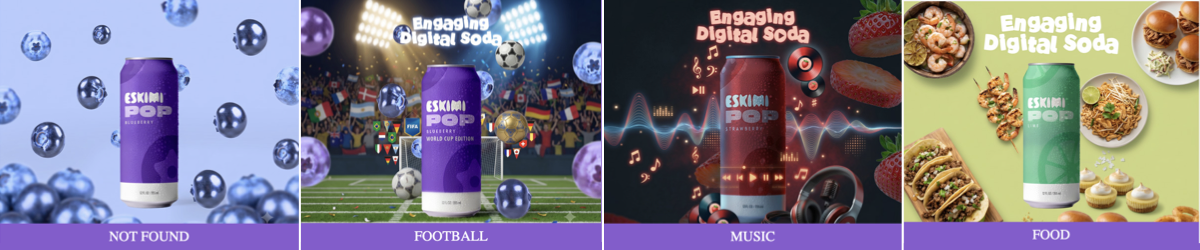
⚡ QUICK ANSWER
Dynamic Contextual Creative allows one banner to display different creative versions depending on the content of the page where the advert appears.
Instead of showing the same message everywhere, the banner can adapt to relevant topics such as food, football or music.
-
Several pre-built creative versions
-
A list of keywords linked to each version
-
One default version
When the advert is served, Eskimi receives contextual keywords describing the page. The banner compares these with the approved keyword lists and displays the most relevant creative version.
If there is no matching keyword, the default version is shown.
*View the interactive preview here.
💬 SIMPLE CLIENT EXPLANATION
Contextual Creative connects each impression with the most relevant pre-approved message available for that page. It allows one banner to adapt its visual or message according to the topic of the page. We create several approved versions in advance and connect each one to relevant keywords. When contextual keyword data is available, the banner automatically displays the best-matching version. If there is no match, it displays the approved default creative.
- One campaign idea, multiple relevant versions
- One creative package, multiple contexts
- Built for different content moments
- Make every placement more relevant with Contextual Creative
Add it to your presentation using our Pitch-ready slides here.
MINIMUM MEDIA INVESTMENT: $10,000
Need more detail? Read the explanations below👇
🧠 WHAT DOES “CONTEXTUAL” MEAN?
Contextual advertising uses the subject of the page to determine which advert or creative version to show. For example:
| PAGE CONTENT | CREATIVE SHOWN |
|---|---|
| Recipes, restaurants or food | Food creative |
| Football results or sports news | Football creative |
| Artists, concerts or playlists | Music creative |
| No matching topic | Default creative |
This helps the advert feel more relevant to what the person is currently reading.
CONTEXT-BASED RELEVANCE
The creative version is selected using the surrounding page content rather than the viewer’s personal profile. It does not use the person’s identity or require us to know who they are.
🔍 WHAT THIS PRODUCT IS - AND IS NOT
🔍 WHAT THIS PRODUCT IS - AND IS NOT
| IT IS | IT IS NOT |
|---|---|
| One master banner containing several approved creative versions | A new banner generated live for every page |
| Based on the topic of the page | Based on the identity of the user |
| Controlled by predefined keyword lists | AI making independent creative decisions |
| Designed to improve contextual relevance | A guarantee that keywords will be available on every impression |
| Supported by a default fallback creative | Dependent on a match for the advert to display |
🎯 WHAT IS IT GOOD FOR?
Dynamic Contextual Creative is useful when one campaign can connect naturally with several content categories.
It can help advertisers:
-
Make one campaign relevant across different page topics
-
Adapt the visual message without creating separate campaign setups
-
Match products or messages to suitable content environments
-
Reduce the repetition of showing one visual everywhere
-
Test different creative approaches within one campaign
-
Scale a central campaign idea across multiple interests
-
Maintain a relevant fallback when no context matches
CONTEXT-LED CREATIVE SELECTION
Unlike standard creative rotation, which usually selects ads according to delivery rules or performance, Contextual Creative selects an approved version based on the content of the page where the ad appears.
| STANDARD CREATIVE OPTIMISATION | CONTEXTUAL CREATIVE |
| Selects or prioritises creatives using rotation rules or performance data | Selects a creative using the content of the current page |
| May learn which version performs better overall | Checks whether available page keywords match a predefined creative version |
| Does not necessarily consider what the person is currently reading | Connects the message to the surrounding content |
| Usually requires separate uploaded creatives | Can hold the approved contextual versions inside one creative package |
SIMPLER SET UP REDUCES OPERATIONAL WORK
Multiple approved contextual versions can be included in one creative package, reducing the need to build a separate campaign setup for every topic.
💡 POSSIBLE USE CASES
- FMCG: Show different products or serving occasions alongside relevant recipes, food articles or lifestyle content
- SPORTS SPONSORSHIP: Display a sports-themed version on football or tournament content while using a broader brand version elsewhere
- MUSIC AND ENTERTAINMENT: Use different creative versions around artist news, streaming, festivals or entertainment content
- RETAIL: Match product categories with relevant page topics, such as fashion, electronics, homeware or beauty
- TRAVEL: Adapt the creative around destination, food, culture, adventure or family-travel content
- AUTOMOTIVE: Show different messages around performance, technology, family travel or sustainability
✅ WHEN TO RECOMMEND IT
This format works best when:
-
The campaign has one central brand idea
-
The idea can be adapted into at least two meaningful contexts
-
Each context has a clear visual or message
-
The client has enough assets to build the variations
-
Relevant page topics can be described using clear keywords
-
A suitable default creative can be created
-
The campaign will run across enough relevant content to make adaptation valuable
⚠️ WHEN IT MAY NOT BE THE RIGHT FORMAT
It may not add value when:
-
The campaign has only one message and one visual
-
The client cannot provide assets for multiple versions
-
The categories are too similar to create meaningful differences
-
The required context cannot be identified through clear keywords
-
The client expects unique content to be generated in real time
-
The campaign depends on every impression receiving a contextual match
-
The selected inventory does not consistently provide contextual keywords
Speak to Creative Studio before promising the format or the number of contextual versions.
⚙️ HOW IT WORKS
⚙️ HOW IT WORKS
1. WE CREATE THE CREATIVE VERSIONS
Creative Studio builds several approved visual versions inside one master banner. For example:
-
Food
-
Football
-
Music
-
Default
These versions must be created and approved before the campaign launches.
2. WE CREATE KEYWORD LISTS
Each creative version is connected to a list of relevant words and phrases - the delivery logic is built with hard coded keywords. For example:
| CATEGORY | EXAMPLE KEYWORDS |
|---|---|
| Food | Recipe, chicken, vegan, crispy, restaurant |
| Football | FIFA, match, striker, goalkeeper, Premier League |
| Music | Playlist, concert, festival, remix, Afrobeats |
The final keyword lists should reflect the campaign, market, language and content the client wants to target.
3. THE PLATFORM PASSES THE PAGE KEYWORDS
When available, the Eskimi platform passes contextual keywords into the banner using the {contextual_keywords} macro.
A macro is a placeholder that the platform automatically replaces with information when the advert is served.
4. THE BANNER SELECTS THE BEST MATCH
*Banner: in this setup, a banner = one package containing several pre-built and pre-approved versions of the campaign creative assets.
A suitable creative is always available, even when contextual keyword data is not.
📦 WHAT WE NEED FOR A CREATIVE BRIEF
📦 WHAT WE NEED FROM THE CLIENT
CAMPAIGN INFORMATION
-
Campaign objective
-
Target market
-
Campaign language or languages
-
Target audience
-
Planned media investment
-
Campaign dates
-
Required banner sizes
-
Final destination URL
CREATIVE DIRECTION
-
The central campaign idea
-
The required contextual categories
-
The message for each category
-
The default message
-
Final CTA
-
Visual references
-
Any mandatory legal copy
CREATIVE ASSETS
-
Editable, layered source files
-
Brand guidelines
-
Logos
-
Font files
-
Product images
-
Backgrounds or lifestyle imagery
-
Any category-specific assets
*See "What Are Open Files?" for accepted editable file types.
📝 HOW TO PLAN THE CREATIVE VERSIONS
Each contextual version should feel clearly relevant while still belonging to the same campaign. For example:
| ELEMENT | WHAT CAN CHANGE |
|---|---|
| Brand identity | NO |
| Main campaign idea | NO |
| Product | YES |
| Background | YES |
| Supporting images | YES |
| Headline | YES |
| Animation details | YES |
| CTA | YES |
| Legal copy | NO |
The differences should be meaningful. Changing only a small decorative element may not create enough value to justify a dynamic setup.
🛟 THE DEFAULT CREATIVE
The default creative is shown when:
-
Contextual keywords are unavailable
-
None of the keywords match
-
The page topic falls outside the planned categories
The default should therefore be a strong, complete advert that can work in any suitable environment. It must not look like an error message, placeholder or less important version.
🛠️ SETUP PROCESS
🛠️ SETUP PROCESS
STEP 1: CONFIRM THE OPPORTUNITY
STEP 2: AGREE ON THE CATEGORIES
Confirm the creative categories before production begins. For example:
-
Food
-
Football
-
Music
-
Default
Adding new categories later may affect the scope and delivery timeline.
STEP 3: PROVIDE THE ASSETS
Supply all editable files, copy, logos, fonts, product images, category-specific assets and legal requirements.
STEP 4: AGREE ON THE KEYWORDS
Create and review a keyword list for each category. Confirm languages, local terminology and any excluded topics.
STEP 5: BUILD THE CREATIVE
Creative Studio designs the versions and develops the matching logic inside one master banner.
STEP 6: REVIEW EVERY VERSION
The client must review and approve:
-
Each contextual creative
-
The default creative
-
The keyword categories
-
Copy and CTA
-
Legal requirements
-
The overall banner behaviour
STEP 7: LAUNCH
The campaign team confirms that the {contextual_keywords} macro is available and correctly passed into the banner.
Final availability may depend on the selected inventory and whether contextual keyword data is supplied for the impression.
🛠️ SETUP PROCESS
❓ FREQUENTLY ASKED QUESTIONS
❓ FREQUENTLY ASKED QUESTIONS
- IS THE CREATIVE GENERATED LIVE?
- No; all creative versions are designed, built and approved before launch
- DOES IT USE AI?
- Not to generate the advert at serve time; the banner follows predefined matching rules and approved keyword lists
- WHAT HAPPENS IF NO KEYWORDS ARE AVAILABLE?
- The default creative is displayed
- DO WE NEED A SEPARATE BANNER FOR EVERY CATEGORY?
- We need a separate visual version for each category, but the versions are contained inside one master creative set
- CAN THE COPY CHANGE?
- Yes; copy may change by category if this is agreed, supplied and approved before launch
- CAN WE ADD MORE CATEGORIES AFTER PRODUCTION STARTS?
- Possibly, but this changes the production scope and may affect the timeline
- Possibly, but this changes the production scope and may affect the timeline
- HOW MANY CATEGORIES SHOULD WE USE?
-
Use enough categories to make the campaign meaningfully relevant, but not so many that the assets, keywords and approval process become difficult to manage
-
Creative Studio will confirm a practical scope for each campaign
-
🔗 USEFUL LINKS
NEW TOOL: 🎸"Mock & Roll" AI Mockups

HOW TO USE THE AI MOCKUP TOOL
The AI Mockup Tool helps you quickly create working examples of Eskimi creative formats for pitches, proactive proposals and client conversations.
Unlike a previous AI-generated image or video mockups, this tool creates:
-
A working, interactive 300 x 600px banner
-
A .ZIP file prepared for upload to the Eskimi DSP
-
An editable, layered Figma file
-
Built-in Eskimi tracking codes
-
Files optimised for banner size limits
This means an approved mockup can be edited, resized, translated and prepared for a live campaign without rebuilding everything from the beginning.
The tool currently includes 25+ new and popular Eskimi rich media banner formats. Ask the tool to show you the available formats before you begin.
NO MINIMUM INVESTMENT.
QUICK ANSWER
| IF YOU NEED TO… | THE TOOL CAN HELP YOU… |
|---|---|
| Show a client how a format could look | Create a visual, interactive example |
| Support a proactive pitch | Build a branded mockup quickly |
| Explain an idea that is difficult to describe | Show the proposed layout or interaction |
| Confirm that you understood a brief | Create an example for the client to review |
| Suggest a creative refresh | Show the client a possible new direction |
| Prepare an approved idea for production | Supply editable Figma files to Creative Studio |

TRAINING VIDEO
*Training was for AM's, but logic applies to everyone.
HOW TO INSTALL THE MOCKUP TOOL
HOW TO INSTALL THE MOCKUP TOOL
BEFORE YOU START: INSTALL THE TOOL
The AI Mockup Tool is added to your Claude account once. After that it stays available in every new chat.
You need to be logged into Claude with your Eskimi work account.
There are two ways to install it. Use Option A. Only use Option B if Option A does not work for you.
OPTION A: INSTALL FROM THE LINK (RECOMMENDED)
This is the standard route. The tool stays connected to the Creative Studio version, so improvements and new formats reach you automatically.
STEP 1: OPEN THE INSTALL LINK
- Open this link in a browser where you are already logged into Claude with your Eskimi account:
🔗 Mock & Roll Skill link share
STEP 2: INSTALL AND TURN IT ON
- Click Install
- Items shared with you may arrive switched off. If you see a toggle, switch it on
STEP 3: START A NEW CHAT AND OPEN THE TOOL
- Open a new Claude chat.
- Open a new Claude chat, type / and select eskimi-rm-mockup
- The tool will open with its first question and guide you from there
IF THE LINK DOESN'T WORK
| PROBLEM | WHAT TO DO |
|---|---|
| The link opens a login page | Log in with your Eskimi account, then open the link again |
| "This item isn't available" | You are logged into a personal Claude account rather than your Eskimi one. Switch accounts and try again |
| The page loads but shows nothing | Open Customise in the left sidebar, go to Plugins, and look under Shared with you |
| You find it but it looks greyed out | Shared items stay switched off until you enable them. Switch it on |
| It is installed but does not appear when you type "/" | Start a new chat. It will not appear in chats you opened before installing it |
| Still nothing | Use Option B below, or contact Creative Studio |
OPTION B: INSTALL THE SKILL FILE MANUALLY
Use this only if Option A does not work.
A manually installed version does not update. When Creative Studio adds formats or fixes problems, your copy stays as it is. You will need to download the new file and repeat these steps each time. Switch to Option A as soon as it works for you.
STEP 1: DOWNLOAD THE SKILL FILE
- Save it somewhere you can find it
- Do not unzip it
STEP 2: OPEN THE SKILLS PAGE
- In Claude, click Customize in the left sidebar, then open the Skills tab
STEP 3: UPLOAD THE FILE
- Click Add in the top right, then select Upload skill
- Choose the file you downloaded
STEP 4: CHECK IT IS ON
- The tool will appear in your Skills list
- If there is a toggle, make sure it is switched on
STEP 5: START A NEW CHAT AND OPEN THE TOOL
- Open a new Claude chat, type / and select eskimi-rm-mockup
KEEPING A MANUAL INSTALL UP TO DATE
If you installed using Option B, check this page occasionally for a newer file. To update, download the current file and repeat Steps 1 to 3. Remove the old version from your Skills list first so you do not end up with two copies.
WHAT DO I NEED TO GET STARTED?
WHAT DO I NEED TO GET STARTED?
You can create a mockup using only the client’s official website. However, the more useful information and assets you provide, the closer the result can be to your intended direction.
MINIMUM INFORMATION
Provide:
-
Client or brand name
-
Official website
-
Product or service
OPTIONAL ASSETS
You can also upload:
-
Logos
-
Product images
-
Campaign artwork
-
Brand guidelines
-
Copy or campaign messages
-
Fonts
-
Reference images
- A short explanation of the idea
-
Examples of the style you want
- Market or country
-
Campaign goal
You do not need to write a long prompt. A short, clear description and the correct website or assets are normally more useful than several pages of detailed instructions.
HOW TO CREATE A MOCKUP
HOW TO CREATE A MOCKUP
STEP 1: OPEN THE TOOL
Open the AI Mockup Tool in Claude.
If you do not know which format to use, ask:
“Show me the available creative formats.”
Review the list and choose the format that best supports your idea.
STEP 2: UPLOAD AVAILABLE ASSETS
Upload any suitable client assets you already have. If you do not have assets, provide the client’s official website. The tool can use it to identify possible:
-
Brand colours
-
Logos
-
Product imagery
-
Fonts
-
Visual style
You may be asked to accept website cookies or allow access to Figma while the tool is working.
STEP 3: DESCRIBE WHAT YOU NEED
Tell the tool what you want to create. For example:
“Create a Gallery 360 mockup for this beer brand. The campaign will run in Zambia and should focus on the new product packaging. Use the brand’s website for its colours and visual style.”
Or it can be as simple as:
"I want to create a banner for this brand, using their website as a reference: https://localbrewery.co/"
The tool may ask for additional information. Answer the questions as clearly as possible.
*See outcome of localbrewery.co mockups here.
STEP 4: LET THE TOOL BUILD THE MOCKUP
The tool will gather the relevant information and create the banner.
Generation time will depend on the selected format, supplied assets and complexity of the request. A mockup may take approximately 20 minutes, but this is not a guaranteed turnaround time. If you make multiple banners, the next banners generally don't take as long as the assets have already been set up from the first mockup.
The tool should explain what it is doing, such as which colours or visual references it identified from the website.
STEP 5: REVIEW THE RESULT CAREFULLY
Always check the complete mockup before showing it to a client. Review:
-
Logo quality
-
Product accuracy
-
Spelling and copy
-
Brand colours
-
Image quality
-
Shadows, gradients and backgrounds
-
Buttons and calls to action
-
Animation and interaction
-
Click-through behaviour.
-
Overall suitability for the client.
AI can produce damaged logos, unusual shadows, incorrect details or other visual mistakes. If something is wrong, ask the tool to correct it or request help from Creative Studio.
Never assume that an AI-generated result is correct simply because it looks finished.
WHAT FILES WILL I RECEIVE?
WHAT FILES WILL I RECEIVE?
1. WORKING BANNER .ZIP
The .ZIP contains the functional banner files, including the standard tags and tracking used by Creative Studio.
The banner can include working interactions such as:
-
Clickable buttons
-
Spinning or rotating elements
-
Gallery interactions
-
Other functionality included in the chosen format
The files are built with Eskimi DSP requirements and file-size optimisation in mind.
2. EDITABLE FIGMA FILE
Figma is a web-based design platform. The tool creates the design in separate, editable layers rather than combining everything into one flat image.
This allows Creative Studio to:
-
Update the copy
-
Replace products or images
-
Correct design details
-
Change languages
-
Create additional sizes
-
Prepare further campaign adaptations
The link to the Figma file should be included with the generated files or supporting README document.
If the client approves the mockup but requests changes, provide Creative Studio with the Figma link.
3. PREVIEW
The preview lets you test how the banner looks and behaves on the DSP before it's shared or uploaded. You can upload it to the DSP as usual.
Test every interaction. Do not rely only on a still screenshot.

COMMON QUESTIONS & LIMITATIONS
COMMON QUESTIONS & LIMITATIONS
The AI Mockup Tool:
-
Does not guarantee that every generated design will be visually correct
-
May produce low-quality or inaccurate brand elements
-
May need help when a website blocks access or contains limited assets
-
Does not replace Creative Studio for detailed design improvements
-
Does not replace a strategist when original campaign thinking is required
-
Does not replace client approval
-
Does not replace the normal quality-checking process
-
Works best with the supported formats already included in the tool
- DO I NEED CLIENT ASSETS?
- No; you can begin with the client’s official website only
- Supplying good-quality logos, product images and campaign assets will normally produce a more accurate result
- CAN I EDIT THE MOCKUP LATER?
- Yes; the tool creates a layered Figma file that Creative Studio can use for updates and adaptations
- CAN CREATIVE STUDIO CREATE OTHER SIZES?
- Yes; share the Figma link and approved design with Creative Studio when briefing the additional work
- CAN I CHANGE THE LANGUAGE?
- Yes; the editable Figma file allows the copy to be replaced for localisation
- CAN I UPLOAD THE .ZIP TO THE DSP?
- The .ZIP is built for the Eskimi DSP; however, it must still be reviewed, approved and checked through the normal campaign process before going live
- DO I HAVE TO COME UP WITH THE CREATIVE IDEA MYSELF?
- No; use the tool when you already have a direction you want to demonstrate or clarify
- If you need help developing the idea itself, speak to a Creative Project Manager or request the appropriate proactive or strategic support
- WHAT IF THE RESULT LOOKS WRONG?
- Ask the tool to correct the problem; if the issue needs design judgement or manual editing, share the Figma link with Creative Studio
REMEMBER
Use the tool to make ideas easier to see, understand and approve. It supports the creative process - it does not replace the people, judgement and approvals required to deliver a successful campaign.
The AI Mockup Tool is an optional resource. It does not mean that the sales team must become designers or develop creative ideas for every brief.
If the client needs original creative thinking, strategic campaign ideas or expert recommendations, use the appropriate Creative Studio support:
-
Speak to a Creative Project Manager for initial guidance
-
Use a Creative Token for proactive concepts or demos
-
Request Creative Strategy support for qualifying opportunities
-
Submit a full brief when Creative Studio production is required
*Read about how to get proactive creative support.
The tool helps you communicate or demonstrate an idea. It does not replace creative strategy or professional creative judgement.
NEW TOOL: Eskimi Event Checker

👉 Access the Event Checker 🔗HERE.
👯 WHO IT'S FOR
- Anyone who needs to confirm a rich media banner is reporting correctly:
- Creative Studio
- Ad Ops
- BDMs
🤔 WHAT IT'S FOR
- Every rich media banner fires small signals back to Eskimi when something happens: it loads, someone interacts with it, a video plays, someone clicks.
- These signals are called tracking pixels or events, and they become the numbers in campaign reports.
- If an event is missing or broken, the banner can look perfect and the report will still be wrong.
- Until now, checking this meant digging through the browser’s developer tools, which was slow and may have needed technical knowledge.
Now, the Event Checker shows every event the moment it fires, so anyone can check a banner in a couple of minutes 🙌
🛠️ HOW TO USE IT
- Open the tool link.
- Paste one or more Eskimi preview links into the box. To check several banners side by side, paste one link per line. Supported links:
- Each banner plays live on screen.
- Interact with the banner as a user would: hover, tap, swipe, play the video, click. On a laptop, use the Simulate buttons to mimic mobile actions.
- Every signal pops up as an alert the moment it fires.
- Watch the Required Events Checklist for each banner. The progress ring turns green once every required event has fired:
- tracker (`x-rm-alias`)
- Main
- Seen_All
- Mouse_Over
- Touch
- *The checklist can be edited if a specific format needs different events
- Every event is caught:
- Engagement events
- The tracker
- Video events (start → quartiles → complete)
- Click-throughs
✋ ALSO HANDY
- Error warnings: Flags problems reported by the banner itself (JS errors and "console.error") like a missing ticket ID or tracker ⚡️
- Live alerts: On-screen alerts, a sound, optional desktop notifications, and an unread count in the browser tab 🔔
- Live log: a running list of every event, filterable by Events, Video, Clicks or Errors, with the full pixel URL for each 📊
- CSV export: download the log as a spreadsheet 📄
- Simulate buttons: Hover, Touch, Swipe and Click, so you can test mobile behaviour without a phone 👆
- Mobile friendly: works on phones, and swipe banners also work in Chrome’s mobile preview mode 📱
- Dark mode 🌑
✅ GOOD TO KNOW
- Testing is safe: Pixels fire in test mode (`test=1`), the same as the official preview, so they won’t affect real campaign numbers
- Clicks don’t open the advertiser’s website: They’re logged, but no new tab opens unless you switch on “Open clicks”
- Shortcut link: add
?url=followed by a preview link to the end of the tool link, and it opens with that banner already loaded:- EG: ?url=<preview-link>
- Useful for sending a ready-to-check link to someone else