# Campaign Creative Requirements 2.0
*This page is the evolution of the previous [Creative Requirements](https://manual.eskimi.com/books/general-information/page/creative-requirements "Creative Requirements") page. Updated 09.2026.*
---
#### **⚡ START HERE**
The creative assets needed for campaigns depend on two things:
1. **The creative format you are using**
2. **Whether the client is supplying a finished advert or asking Creative Studio to build it**
Use this chapter to check the required file types, dimensions, file sizes and supporting information before either submitting a brief, or before going live with supplied creative.
**Requirements may differ by country, publisher or placement. Always confirm the final campaign requirements.**
---
**Select the banner type for more information**👇
🖼️ STATIC BANNERS
#### **🖼️ STATIC BANNERS**
A static banner is a completed image with no movement or interaction.
| **REQUIREMENT** | **DETAILS** |
|---|
| **Accepted files** | .PNG, .JPG or .GIF |
| **Recommended size** | Up to 150 KB |
| **Maximum size** | For File Banner: 150 KB
For Rich Media templates: 4.5 MB |
| **Movement** | None |
*\*While .GIFs are accepted, they come with limitations. [Ready about the file size hurdles with .GIFs here](https://manual.eskimi.com/books/eskimi-creative-studio-101/page/the-downside-of-gif-formats "The downside of .GIFs").*
---
**STATIC BANNER DIMENSIONS:**
These are common dimensions, not a guarantee that every size is available in every market. See top performing sizes per market [here](https://docs.google.com/spreadsheets/d/1AcQkKtDbv9_4JGK4q0qzUWYjhGS8uEN1_3oJpEjqBWQ/edit?usp=sharing "Best Performing Sizes in The Markets"). You can also use the [Traffic Discovery Tool](https://dsp.eskimi.com/admin/trafficDiscovery "Traffic Discovery Tool") for data from the past 30 days (see set by step instructions to do this [here](https://manual.eskimi.com/books/creatives/page/creative-size-requirements "Creative size & requirements")).
| **COMMON MOBILE DIMENSIONS** | **COMMON DESKTOP DIMENSIONS** |
| 200 × 200
| 120 × 600 |
| 250 × 250 | 160 × 600 |
| 300 × 50 | 250 × 250 |
| 300 × 100 | 300 × 250 |
| 300 × 250 | 300 × 600 |
| 300 × 600 | 336 × 280 |
| 320 × 50 | 728 × 90 |
| 320 × 480 | 970 × 90 |
| 468 × 60 | - |
**The Creative Studio team can help with resizes - resizing work usually takes 24 hours depending on seasonal capacity. To assist with this, the [Creative Studio requires Open Files](https://manual.eskimi.com/books/eskimi-creative-studio-101/page/why-do-we-need-open-files "Why do we need Open Files?") from the client team.**
🎞️ ANIMATED BANNERS
#### **🎞️ ANIMATED BANNERS**
These requirements apply for a completed HTML5 banner built by their own developer or creative agency.
| **REQUIREMENT** | **DETAILS** |
|---|
| **File type** | HTML5 using JavaScript |
| **Initial load** | Maximum 150 KB |
| **Total download** | Maximum 5 MB |
| **Animation duration** | Must stop and remain static after 30 seconds |
**TECHNICAL REQUIREMENTS**
The creative team (whether in-house with Eskimi Creative Studio, or the client's own internal or agency creative team) must ensure that:
- The creative is fully SSL compliant
- All files and resources load through secure `https` connections
- The landing page also uses `https`
- The main `index.html` file contains the campaign landing-page URL
- A supported click macro is included
- The click-through opens in a new browser tab or window
- The click target is set to `_blank`
- The HTML and JavaScript code is valid
- The creative passes the [W3C code validator](https://validator.w3.org/)
- The browser console contains no errors
Supported click macros include:
- `{CLICK_URL}`
- `{CLICK_URL_ENC}`
- `{CLICK_URL_ASYNC}`
**PLAIN LANGUAGE DEFINITIONS FOR NON-DEVELOPERS:**
An HTML5 banner is basically a **tiny website inside an advert**. These rules make sure it is safe, works correctly and records clicks.
- **SSL compliant / HTTPS:** Everything must use a secure, locked internet connection; no part of the banner or landing page may use an unsafe `http` link
- **`index.html`:** This is the banner’s main instruction file; it must know which website to open when someone clicks the advert
- **Click macro:** This is a temporary placeholder for the final tracking link; when the advert runs, Eskimi replaces it with the correct URL so the click can be recorded
- **Supported macros:** `{CLICK_URL}`, `{CLICK_URL_ENC}` and `{CLICK_URL_ASYNC}` are different versions of that placeholder; the developer chooses the correct one
- **Open in a new tab:** Clicking the advert should open the client’s website without closing the page the person was viewing
- **`_blank`:** This is the code instruction that tells the browser to open the link in a new tab or window
- **Valid HTML and JavaScript:** The banner’s code must follow the correct rules, like a sentence following grammar rules
- **W3C validator:** This is an online “spell-checker” for website code. It looks for mistakes
- **No browser-console errors:** The browser has a hidden area where it reports technical problems; that area should not show any errors
**In simple terms:** the client must supply a finished banner that is secure, opens the correct link, tracks clicks and contains working code. If they cannot provide that, they should send the editable design files and ask Creative Studio to build it properly.
[*\*Read more about HTML5 creative requirements and validation here.*](https://manual.eskimi.com/books/javascript "HTML5 creative requirements and validation")
**These are developer requirements. If the client cannot provide a [finished and technically compliant HTML5 file](https://manual.eskimi.com/books/javascript "HTML5 Requirements and Validation"), submit the open files and brief Creative Studio to produce the banner instead.**
**ANIMATED BANNER DIMENSIONS:**
As with static banners, these are common dimensions, not a guarantee that every size is available in every market. See top performing sizes per market [here](https://docs.google.com/spreadsheets/d/1AcQkKtDbv9_4JGK4q0qzUWYjhGS8uEN1_3oJpEjqBWQ/edit?usp=sharing "Best Performing Sizes in The Markets"). You can also use the [Traffic Discovery Tool](https://dsp.eskimi.com/admin/trafficDiscovery "Traffic Discovery Tool") for data from the past 30 days.
| **COMMON MOBILE DIMENSIONS** | **COMMON DESKTOP DIMENSIONS** |
| 200 × 200
| 120 × 600 |
| 250 × 250 | 160 × 600 |
| 300 × 50 | 250 × 250 |
| 300 × 100 | 300 × 250 |
| 300 × 250 | 300 × 600 |
| 300 × 600 | 336 × 280 |
| 320 × 50 | 728 × 90 |
| 320 × 480 | 970 × 90 |
| 468 × 60 | - |
**The Creative Studio team can help with resizes - animation work usually takes 24-48 hours depending on seasonal capacity. To assist with this, the [Creative Studio requires Open Files](https://manual.eskimi.com/books/eskimi-creative-studio-101/page/why-do-we-need-open-files "Why do we need Open Files?") from the client team.**
📌 STICKY ADS
#### **📌 STICKY ADS**
A sticky ad remains visible in a fixed position while the user moves through the page.
| **REQUIREMENT** | **DETAILS** |
|---|
| Accepted files | .PNG, .JPG, .GIF or finished HTML5 |
| Recommended size | Up to 150 KB |
| Maximum size | 4.5 MB |
[*\*See above about .GIF limitations.*](https://manual.eskimi.com/books/eskimi-creative-studio-101/page/the-downside-of-gif-formats "The downside of .GIFs")
---
**SUPPORTED DIMENSIONS**
*[\*Everything you need to know about Sticky Ads.](https://manual.eskimi.com/books/sticky-ads/page/everything-you-need-to-know-about-sticky-ads "*Everything you need to know about Sticky Ads")*
✨ TEMPLATED RICH MEDIA
#### **✨ TEMPLATED RICH MEDIA**
The **Rich Media Template Builder** is a self-serve tool inside the [Eskimi DSP](https://dsp.eskimi.com/admin/creatives-builder "Eskimi DSP") that lets you turn static images and videos into interactive, high-impact rich media ads in minutes, without any coding. Users choose from 20+ pre-designed templates (such as Carousel, 3D Cube, Pixel Pages, Parallax and Scratch to Reveal), upload their assets into the template's frames, and are immediately ready for campaign go-live. It's available to every client tier, including self-service, with no Creative Studio involvement or minimum budget. Custom rich media, by contrast, is built by the Studio and carries a minimum spend.
[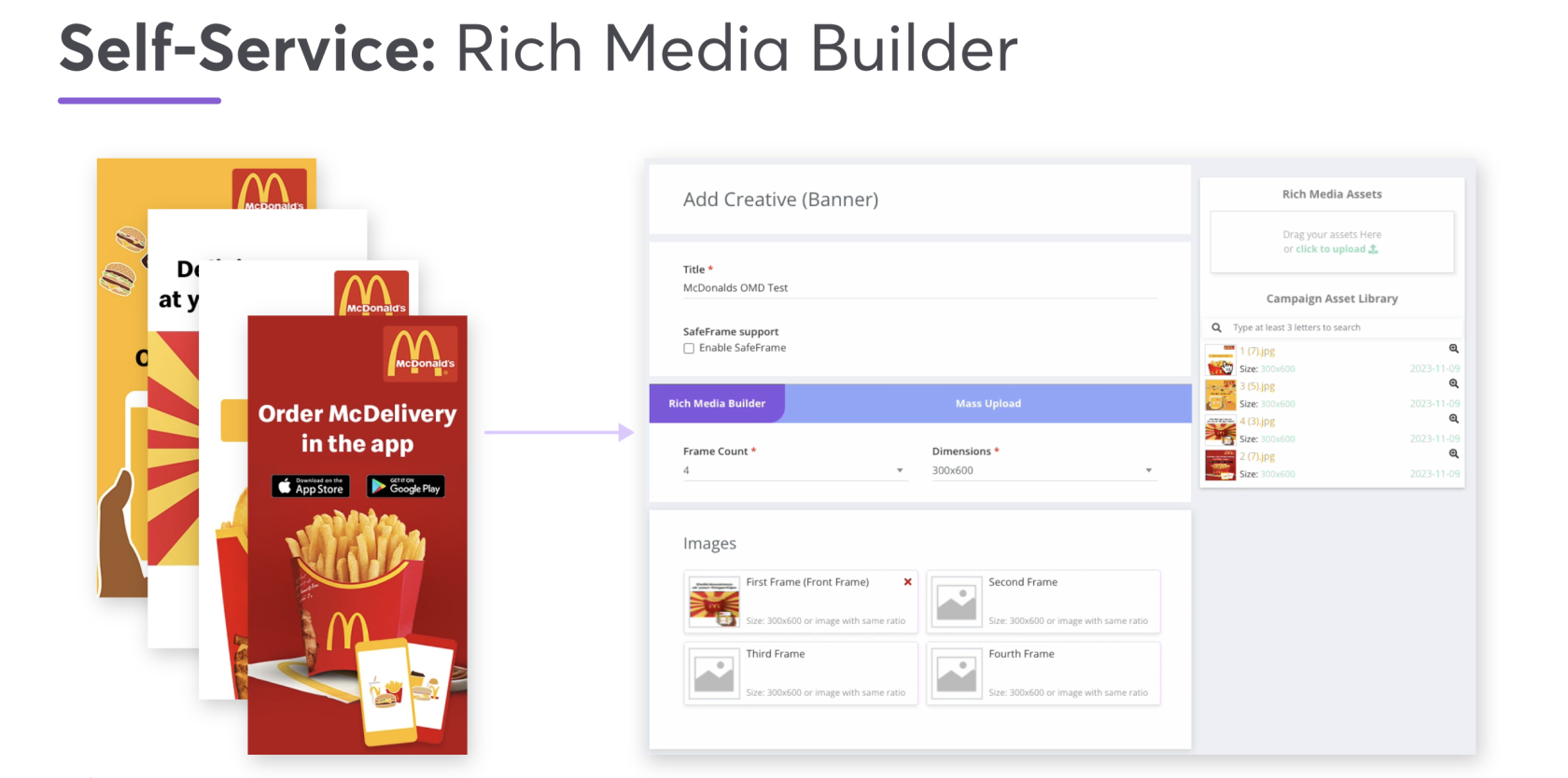](https://dsp.eskimi.com/admin/creatives-builder "Templated RM Builder")
[*\*See Pitch-ready presentation slides here.*](https://app.pitch.com/app/presentation/2e8f851c-3a9e-4cac-81cb-06f3b3d51c87/a9564307-bb8e-435b-a4c0-a187a09524e8 "Rich Media: Creatives builder")
**WHAT TO PROVIDE**
- High-quality .PNG or .JPG images in the required banner dimensions
- We usually prefer to deliver them in **double the dimensions** to prevent any pixelation - here’s how it works using a standard 300x250 banner as an example:
- The actual “slot” on the website is 300x250 pixels
- If we provide a file that is exactly 300x250, it can look blurry on those sharp screens
- To fix this, we create the image at 600x500 (double the size)
- The website then “squeezes” those extra pixels into that original 300x250 slot
- This isn’t about making the banner physically bigger on the page - it’s a compression tactic to make sure the image stays crisp and sharp
- See this in action [here](https://dsp.eskimi.com/preview/creative-set/28lssrqr "Banner dimensions x pixellation example in template RM")
- .MP4 videos in the relevant dimensions for video templates
- File size is recommended as 150 KB each, but the DSP can accept higher - however it may begin to impact performance
[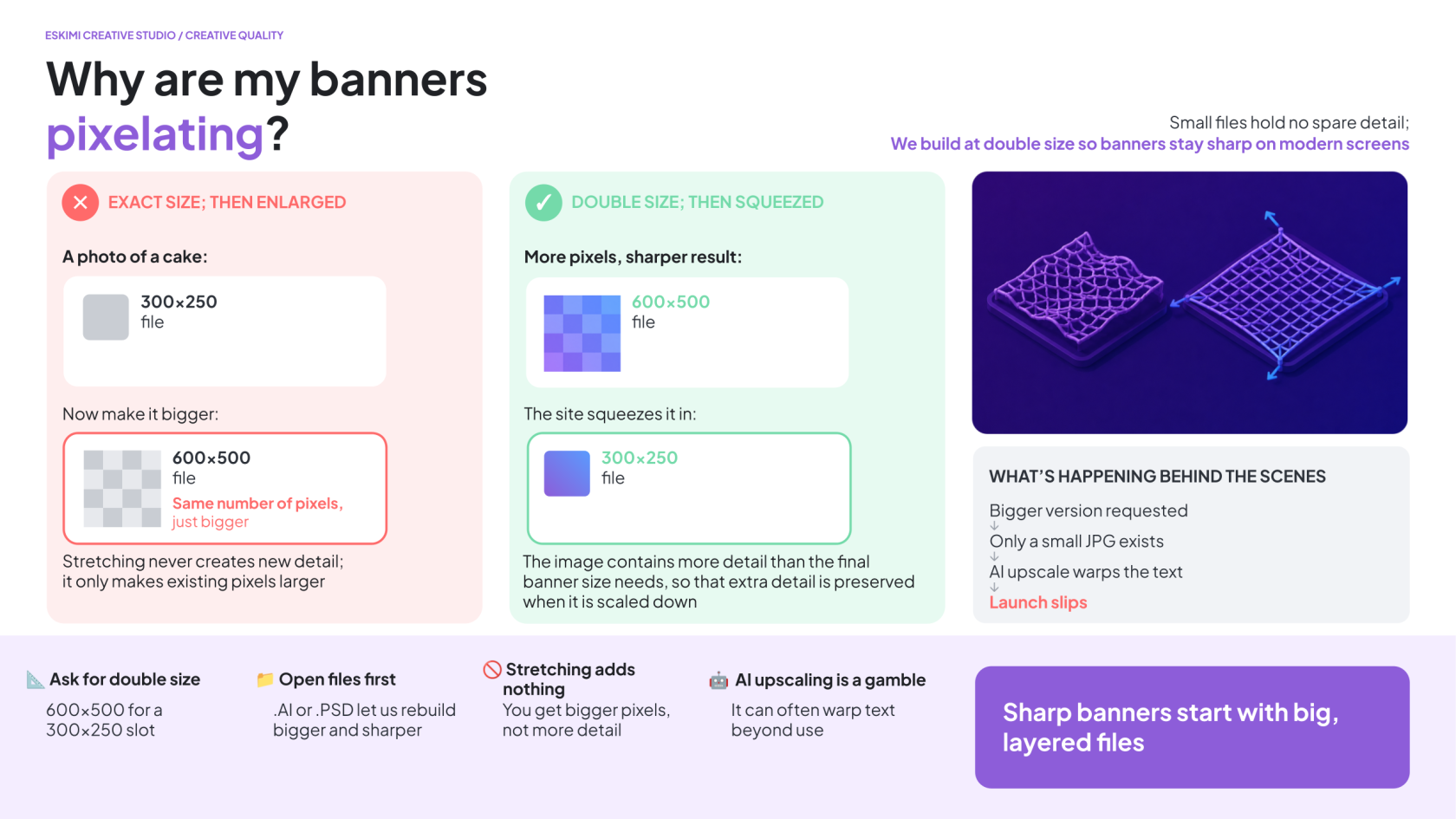](https://manual.eskimi.com/uploads/images/gallery/2026-09/6vLsY59dfAPKK1PL-why-my-banners-are-pixellating.png)
*\*See this in action [here.](https://dsp.eskimi.com/preview/creative-set/28lssrqr "Banner dimensions x pixellation example in template RM")*
---
**SUPPORTED DIMENSIONS**
| **HORIZONTAL** | **SQUARE** | **VERTICAL** |
| 300 × 50 | 300 × 300 | 160 × 600 |
| 300 × 150 | 320 × 320 | 300 × 600 |
| 300 × 250 |
| 320 × 480 |
| 320 × 50 |
|
|
| 320 × 100 |
|
|
| 336 × 280 |
|
|
| 728 × 90 |
|
|
| 970 × 90 |
|
|
| 970 × 250 |
|
|
[*\*See dimensions per template format here.*](https://docs.google.com/spreadsheets/d/1wB7AczCZQKXNf7t9ToDFwsAppZ7y8v5r/edit?usp=sharing&ouid=103418641622676614032&rtpof=true&sd=true "Dimensions per template format")
**The Creative Studio team can help with resizes - resizing work usually takes 24 hours depending on seasonal capacity. To assist with this, the [Creative Studio requires Open Files](https://manual.eskimi.com/books/eskimi-creative-studio-101/page/why-do-we-need-open-files "Why do we need Open Files?") from the client team.**
---
**HOW MANY IMAGES ARE REQUIRED?**
The number of required images depends on the selected template - previews of all available Eskimi Templated Rich Media can be found [here](https://dsp.eskimi.com/adsPreview/9Flpmtrs "All available Eskimi Templated Rich Media").
| **ASSETS AVAILABLE** | **POSSIBLE FORMATS** |
|---|
| **1 image** | [Assemble](https://dsp.eskimi.com/preview/creative/5lsmmqnt "Assemble")
[Glitch](https://dsp.eskimi.com/preview/creative/5lsmmqok "Glitch")
[Rotating Billboard](https://dsp.eskimi.com/preview/creative/9lsmmqom "Rotating Billboard") *(needs 1x dimensions export)*
[SpinView Gallery](https://dsp.eskimi.com/preview/creative/Blsmmqpn "SpinView Gallery") *(1x background image; 1x product image)*
|
| **2 images** | [3D Rotating Cube](https://dsp.eskimi.com/preview/creative/8lsmmqpo "3D Rotating Cube")
[Countdown](https://dsp.eskimi.com/preview/creative/7lsmmqpp "Countdown") *(needs 1x dimensions export)*
[Dancing 3D](https://dsp.eskimi.com/preview/creative/5lsmmqpq "Dancing 3D") *(1st image not in view; ensure main image is in 2nd image placement)*
[Page Flip](https://dsp.eskimi.com/preview/creative/3lsmmqpr "Page Flip")
[Pixel Pages](https://dsp.eskimi.com/preview/creative/Elsmmqps "Pixel Pages")
[Scratch to Reveal](https://dsp.eskimi.com/preview/creative/2lsmmqpt "Scratch to Reveal") *(needs 1x dimensions export)*
[Shake & Break](https://dsp.eskimi.com/preview/creative/Elsmmqqr "Shake & Break") *(2nd image needs 1x dimensions export)*
[Slider](https://dsp.eskimi.com/preview/creative/1lsmmqql "Slider")
[SpinView Gallery](https://dsp.eskimi.com/preview/creative/9lsmmqsp "SpinView Gallery") *(+ background image)*
|
| **3 images** | [3D Prism](https://dsp.eskimi.com/preview/creative/1lsmmqss "3D Prism")
[3D Rotating Cube](https://dsp.eskimi.com/preview/creative/4lsmmqst "3D Rotating Cube")
[3D Triangle](https://dsp.eskimi.com/preview/creative/Blsmmqsr "3D Triangle")
[Blinds](https://dsp.eskimi.com/preview/creative/3lsmmqtk "Blinds")
[Carousel](https://dsp.eskimi.com/preview/creative/Clsmmqtl "Carousel")
[Carousel Splitscreen](https://dsp.eskimi.com/preview/creative/2lsmmqtm "Carousel Splitscreen")
[Pixel Pages](https://dsp.eskimi.com/preview/creative/Elsmmqtn "Pixel Pages")
[SpinView Gallery](https://dsp.eskimi.com/preview/creative/Blsmmqto "SpinView Gallery") *(+ background image)*
|
| **4 images** | [3D Cube](https://dsp.eskimi.com/preview/creative/Dlsmmrkn "3D Cube")
[3D Cubes Animated](https://dsp.eskimi.com/preview/creative/Elsmmrkq "3D Cubes Animated")
[3D Cubes Animated Interactive](https://dsp.eskimi.com/preview/creative/Elsmmrkr "3D Cubes Animated Interactive")
[3D Cube Horizontal](https://dsp.eskimi.com/preview/creative/Clsmmrlt "3D Cube Horizontal")
[3D Cube Rotating](https://dsp.eskimi.com/preview/creative/Clsmmrks "3D Cube Rotating")
[3D Cube Vertical](https://dsp.eskimi.com/preview/creative/3lsmmrkp "3D Cube Vertical")
[Carousel](https://dsp.eskimi.com/preview/creative/Clsmmrkk "Carousel")
[Carousel Splitscreen](https://dsp.eskimi.com/preview/creative/Blsmmrkl "Carousel Splitscreen")
[Parallax](https://dsp.eskimi.com/preview/creative/Dlsmmrkm "Parallax") *(2nd and 4th images not in view; ensure main images are in 1st and 3rd image placement)*
[Pixel Pages](https://dsp.eskimi.com/preview/creative/0lsmmrlk "Pixel Pages")
[SpinView Gallery](https://dsp.eskimi.com/preview/creative/7lsmmrkt "SpinView Gallery") *(+ background image)*
|
| **5 - 6 images** | [3D Cube Rotating](https://dsp.eskimi.com/preview/creative/Blsmmqrt "3D Rotating Cube")
[Carousel](https://dsp.eskimi.com/preview/creative/0lsmmqrs "Carousel")
[Carousel Splitscreen](https://dsp.eskimi.com/preview/creative/3lsmmqsk "Carousel Splitscreen")
[Pixel Pages](https://dsp.eskimi.com/preview/creative/4lsmmqsl "Pixel Pages")
[SpinView Gallery](https://dsp.eskimi.com/preview/creative/Flsmmqsm "SpinView Gallery") *(+ background image)*
|
| **7 - 10 images** | [3D Cube Rotating](https://dsp.eskimi.com/preview/creative/7lsmmqqs "3D Rotating Cube")
[Carousel](https://dsp.eskimi.com/preview/creative/0lsmmqqt "Carousel")
[Carousel Splitscreen](https://dsp.eskimi.com/preview/creative/1lsmmqrk "Carousel Splitscreen")
[Pixel Pages](https://dsp.eskimi.com/preview/creative/1lsmmqrl "Pixel Pages")
[SpinView Gallery](https://dsp.eskimi.com/preview/creative/8lsmmqrq "SpinView Gallery") *(+ background image)*
|
**HOW MANY VIDEOS ARE REQUIRED?**
The DSP Template Builder also supports video formats - either as video only, or as video + images.
| **ASSETS AVAILABLE** | **POSSIBLE FORMATS** |
|---|
| **3 - 10 videos + images** | [Carousel with Video](https://dsp.eskimi.com/preview/creative/Alsmorts "Carousel with Video")
|
| **2 - 10 videos + images** | [Deck of Cards with Video](https://dsp.eskimi.com/preview/creative/6lsmortt "Deck of Cards with Video")
|
| **3 - 4 videos + images** | [3D Cube with Video](https://dsp.eskimi.com/preview/creative/Dlsmoskk "3D Cube with Video")
|
| **1 - 10 videos + images** | [Parallax Spin with Video](https://dsp.eskimi.com/preview/creative/Elsmoskl "Parallax Spin with Video")
|
| **3 - 10 videos + images** | [Story Frames with Video](https://dsp.eskimi.com/preview/creative/5lsmoskm "Story Frames with Video")
|
| **1 video** | [In-Banner Video](https://dsp.eskimi.com/preview/creative/Dlsmotqk "In-Banner Video")
|
Some formats have additional requirements. Check the individual format specifications before confirming the execution with the client.
[*\*Learn how to upload Templated Rich Media to the DSP here.*](https://manual.eskimi.com/books/creatives/page/how-to-create-standard-rich-media-rich-media-builder "Creating Standard Rich Media in Eskimi DSP (Rich Media Builder Guide)")
🧩 CUSTOM RICH MEDIA
#### **🧩 CUSTOM RICH MEDIA**
Custom Rich Media is designed and developed specifically for the campaign rather than built from an existing template.
**WHAT TO PROVIDE**
- [Editable .PSD or other approved Open Files from the client team](https://manual.eskimi.com/books/eskimi-creative-studio-101/page/what-are-open-files "What are Open Files")
- Brand guidelines or brand book (especially useful for a first time client)
- Logos
- Font files
- Final copy (especially if the campaign is not in English, and the language uses any special characters)
- Final CTA
- All required banner dimensions
- A short explanation of the required user journey
- Any legal disclaimers needed
**Brief in your custom request here. (COMING SOON)**
---
**WHAT IS THE USER JOURNEY?**
The user journey explains what happens when someone sees or interacts with the advert.
For example:
1. The product appears
2. The user selects an option.
3. The advert displays the result
4. The user clicks the CTA to visit the client’s website
A few clear sentences are enough for an initial brief. More complex experiences may require a storyboard before development begins.
[*\*See a very thorough example here.*](https://app.pitch.com/app/presentation/2e8f851c-3a9e-4cac-81cb-06f3b3d51c87/9b5268a6-88a7-428d-8ea3-64b757875cb6 "Custom Rich Media banner user journey")
---
##### **🧊 FORCED PERSPECTIVE AND 3D FORMATS**
Forced Perspective and other 3D formats require both the campaign design and accurate product references.
**STANDARD BRAND ASSETS**
For **ALL** projects, please provide:
- Editable brand or campaign files, such as .PSD, .AI or .FIG
- High-resolution logos
- Font files
- Brand guidelines, if available
- Final, approved copy
- Final call to action (CTA)
- Music as an .MP3, or an approved music reference if relevant
- Legal copy and mandatory disclaimers
**🧊 ASSETS REQUIRED FOR 3D PROJECTS**
If the project includes a 3D product or object, we **also** need:
- An existing 3D model of the product
- **3D model file format: .GLTF for web 3D format, .FBX or .OBJ**
- [UV wrapped with provided texture image files](https://www.adobe.com/products/substance3d/discover/uv-mapping.html "What is UV Mapping?")
- If 3D assets don't exist, we would need the below to create a 3D model from scratch:
- Flat label or sticker artwork in .AI, .EPS or print-ready PDF format
- Packaging layouts and [dielines](https://pakfactory.com/blog/what-is-a-dieline "What is a Dieline in Packaging & Print?")
- Material and finish details, such as matte, gloss, metallic or transparent
- Clear reference photographs from different angles (IE. [orthographic reference photos](https://www.britannica.com/technology/orthographic-projection-engineering))
[*\*Read more details on 3D format creative requirements here.*](https://manual.eskimi.com/books/eskimi-creative-studio-101/page/3d-and-high-impact-format-ts-cs "3D format creative requirements")
---
##### **💥 HIGH IMPACT FORMATS**
High Impact formats use larger or more unusual placements to create a more noticeable experience.
**WHAT TO PROVIDE**
- [Editable .PSD or other approved Open Files from the client team](https://manual.eskimi.com/books/eskimi-creative-studio-101/page/what-are-open-files "What are Open Files")
- Brand guidelines or brand book (especially useful for a first time client)
- Logos
- Font files
- Final copy (especially if the campaign is not in English, and the language uses any special characters)
- Final CTA
- All required banner dimensions
- A short explanation of the required user journey
- Any legal disclaimers needed
**A responsive format adjusts to the size of the screen where it appears. This means the design must work across different screen sizes instead of being created at only one fixed dimension. Creative Studio may request additional background images, safe areas or layered assets depending on the selected format.**
🔄 DYNAMIC ADS
#### **🔄 DYNAMIC ADS**
Dynamic ads automatically change some content using an external source of information.
For example, an advert may display different:
- Products
- Prices
- Locations
- Weather conditions
- Promotional messages
**WHAT TO PROVIDE**
The requirements depend on what will change.
| **DYNAMIC CONTENT** | **WHAT WE NEED** |
|---|
| **Products or prices (data format)** | .JSON, .XML, or .CSV format
API Endpoint (not within EskimiDSP solution)
|
| **Weather** | The required cities and weather conditions |
| **Other live information** | Access to a suitable API |
| **Creative design** | Editable, layered campaign assets |
[*\*Learn more about Dynamic Ad requirements and setup here.*](https://manual.eskimi.com/books/creatives "Dynamic Ad requirements and setup")
[*\*\*Access the Pitch presentation with examples here.*](https://pitch.com/v/dynamic-ads_updated-deck-wewjy9/76857f93-4e59-4ddd-b0b7-125c1a011d89 "Dynamic Ads presentation")
*[\*\*\*Read about Dynamic Ads with product feeds here.](https://try.eskimi.com/m/9/ "Dynamic Ads with product feeds")*
**A product feed is a structured file containing information such as product names, images, prices and links. An API is a connection that allows the advert to request information from another system.**
---
**DYNAMIC AD DIMENSIONS**
| **COMMON MOBILE DIMENSIONS** | **COMMON DESKTOP DIMENSIONS** |
| 200 × 200
| 120 × 600 |
| 250 × 250 | 160 × 600 |
| 300 × 50 | 250 × 250 |
| 300 × 100 | 300 × 250 |
| 300 × 250 | 300 × 600 |
| 300 × 600 | 336 × 280 |
| 320 × 50 | 728 × 90 |
| 320 × 480 | 970 × 90 |
| 468 × 60 | - |
📱NATIVE AND SOCIAL FORMATS
#### **NATIVE AND SOCIAL FORMATS**
##### **📰 NATIVE ADS**
Native ads are designed to fit the look and structure of the website or app where they appear.
**REQUIRED ASSETS**
| **ASSET** | **REQUIREMENT** |
|---|
| **Icon or logo** | 128 × 128 |
| **Main image** | 1200 × 627 |
| **Additional image options** | 600 × 600, 400 × 400, or 1200 × 1200 |
| **Title** | Maximum 25 characters |
| **Description** | Maximum 90 characters |
| **CTA** | Maximum 15 characters |
| **Advertiser name** | Maximum 25 characters |
*\*Character limits include spaces and punctuation.*
**OPTIONAL INFORMATION**
Depending on the placement, you may also provide:
- Number of likes
- Number of downloads
- Price
- Sale price
- Phone number
- Address
- Star rating
- Additional description
- Display URL
| **OPTIONAL FIELD** | **MAXIMUM LENGTH** |
|---|
| **Price** | 50 characters |
| **Sale price** | 50 characters |
| **Phone number** | 50 characters |
| **Address** | 100 characters |
| **Star rating** | 4 characters |
| **Additional description** | 90 characters |
| **Display URL** | 1,000 characters |
---
##### **📱 FACEBOOK AND INSTAGRAM IN-FEED ADS**
Before launch, the client’s Facebook account must be correctly connected. Contact Ad Operations for help with account integration and permissions.
**REQUIRED ASSETS**
| **ASSET** | **REQUIREMENT** |
|---|
| **App, product or brand icon** | 128 × 128 |
| **Main landscape image** | 1200 × 627 |
| **Square image** | 600 × 600 |
| **Title** | Maximum 25 characters |
| **Description** | Maximum 90 characters |
| **CTA** | Maximum 15 characters |
| **Advertiser name** | Maximum 25 characters |
*\*Character limits include spaces and punctuation. Keep text within the image to a minimum.*
📹 VIDEO AND AUDIO FORMATS
#### **VIDEO AND AUDIO FORMATS**
##### **🎮 IN-GAME ADS**
In-game advertising may use a banner or video displayed inside a game environment.
**ACCEPTED FILES**
| **Banner** | .JPG, .GIF, finished HTML5 or approved tags |
| **Video** | MP4 |
**BANNER DIMENSIONS**
| **COMMON BANNER DIMENSIONS** | **ADDITIONAL SUPPORTED DIMENSIONS MAY INCLUDE** | **VIDEO DIMENSIONS** |
| 300 × 250 | 160 × 600 | 320 × 480 |
| 320 × 50 | 250 × 250 | 480 × 320 |
| 320 × 480 | 300 × 600 | 768 × 1024 |
| 336 × 280 | 320 × 100 | 1024 × 768 |
| 480 × 320 | 320 × 180 | |
| 640 × 360 | 320 × 320 | |
| 640 × 480 | 360 × 640 | |
| | 728 × 90 | |
| | 768 × 1024 | |
| | 970 × 250 | |
| | 1920 × 1080 | |
**VIDEO SPECIFICATIONS**
| **VIDEO REQUIREMENT** | **GUIDANCE** |
| Recommended file size | Less than 15 MB |
| Recommended duration | 6–15 seconds |
---
##### **▶️ IN-BANNER VIDEO**
In-banner video places a video inside a display banner.
| **REQUIREMENT** | **DETAILS** |
|---|
| File type | .MP4 |
| Aspect ratio | 4:3 |
| Maximum size | 5 MB |
| Recommended duration | Up to 30 seconds |
Also provide:
- A short description
- CTA wording
- An optional 300 × 250 companion banner in .PNG, .JPG or finished HTML5 format
---
##### **🎬 VAST VIDEO**
VAST is a standard method used to deliver video ads across compatible websites and apps.
| **REQUIREMENT** | **DETAILS** |
|---|
| **File type** | .MP4 |
| **Aspect ratio** | 16:9 |
| **Maximum size** | 5 MB |
| **Recommended duration** | Up to 30 seconds |
| **Maximum duration** | 6 minutes |
Also provide:
- A short description
- CTA wording
- An optional 300 × 250 companion banner in .PNG, .JPG or finished HTML5 format
---
##### **🎁 REWARDED VIDEO**
Rewarded video gives a user an in-app reward for watching the advert.
| **REQUIREMENT** | **DETAILS** |
|---|
| **File type** | .MP4 |
| **Dimensions** | 320 × 480 or 480 × 320 |
| **Maximum size** | 5 MB |
| **Recommended duration** | Up to 30 seconds |
Also provide:
- A short description
- CTA wording
- An optional 300 × 250 companion banner in .PNG, .JPG or finished HTML5 format
---
##### **📺 CONNECTED TV ADS**
Connected TV, also called CTV, refers to video advertising shown through internet-connected television services and devices.
| **REQUIREMENT** | **DETAILS** |
|---|
| **Accepted file** | .MP4 |
| **Alternative delivery** | External VAST URL without VPAID |
| **Dimensions** | 1920 × 1080 |
| **Recommended size** | Up to 45 MB |
| **Maximum size** | 100 MB |
| **Recommended duration** | Up to 30 seconds |
| **Maximum duration** | 1 minute |
*\*VPAID and OMID are not supported. This means viewability cannot be tracked using these technologies.*
---
##### **🔊 AUDIO ADS**
| **REQUIREMENT** | **DETAILS** |
|---|
| **Accepted files** | .MP3, .WAV, .WMA or .OGG |
| **Minimum bitrate** | 128 kbps |
| **Maximum size** | 50 MB |
| **Recommended duration** | 15–30 seconds |
*\*Some limited inventory supports audio up to 60 seconds. Confirm availability before promising a longer execution.*
---
##### **⏭️ YOUTUBE BUMPER ADS**
A bumper ad is a short YouTube video advert.
**REQUIREMENTS**
- The video must be no longer than 6 seconds
- The final video must be uploaded to YouTube
- The YouTube video link must be provided
---
##### **📹 YOUTUBE IN-STREAM ADS**
**REQUIREMENTS**
- Recommended video duration: 15, 20 or 30 seconds
- The final video must be uploaded to YouTube
- The YouTube video link must be provided