Eskimi Policies
- Eskimi DSP Policies for Advertising Partners
- Creative Compliance Guidelines
- Campaign Approval for Self-Service Accounts
Eskimi DSP Policies for Advertising Partners
These policies apply to every advertiser, agency and reseller ("Advertising Partners") running campaigns on the Eskimi DSP, whether managed by Eskimi or self-service. They cover the ad creative, its tags and the landing page it leads to. Local laws in the targeted market always apply on top of these policies. Where the two differ, the stricter rule applies.
1. Prohibited content
Ads, creatives and landing pages must not contain or promote:
-
Misleading or deceptive claims: false promises, fake endorsements, "miracle" results, fake news layouts, hidden costs or subscription traps
-
Adult sexual content: nudity, pornography, sexually explicit material or services
-
Intellectual property infringement: copyrighted material, trademarks or brand assets used without permission
-
Counterfeit goods: replicas or imitations of branded products
-
Drugs and drug paraphernalia: illegal or recreational drugs and products made to use them
-
Endangered species products: products made from endangered or protected animals or plants
-
Hate content: content that promotes hatred, violence or discrimination against people or groups
-
Illegal products and services: anything that is illegal in the targeted market
-
Incentivised clicks or installs: rewards, points or payment offered for clicking an ad or installing an app
-
Malicious software and phishing: malware, spyware, unwanted software, or pages that collect personal or payment data under false pretences
-
Shocking or graphic content: gore, explicit violence, or content meant to shock or scare users
-
Low-quality content: pages built mainly to show ads, broken or unfinished pages, scraped or auto-generated content
-
Copyright-infringing services: P2P file sharing, torrent, illegal streaming, or any app or site that facilitates copyright infringement
-
Weapons: firearms, ammunition, explosives and weapon accessories
2. Restricted content
The categories below may run only where they are legal in the targeted market and with Eskimi's prior approval. The Advertising Partner is responsible for holding any licences required and for following local rules on targeting, disclaimers and age limits.
-
Alcohol
-
Financial services (including loans, investments and cryptocurrency)
-
Gambling and betting
-
Lotteries
-
Tobacco, e-cigarettes and related accessories
-
Health and pharmaceutical products and services
Eskimi may ask for proof of a licence or authorisation before approving a campaign in these categories.
3. Users under 18
Advertising Partners must not use the Eskimi DSP to target or retarget users under 18, or to target websites and apps aimed at users under 18.
4. Prohibited creative behaviours
Creatives must not:
-
Open pop-ups or pop-unders: including windows opened on exit (OpenRTB creative attribute 8)
-
Look like a system or app message: alert boxes, fake notifications, fake text fields, or buttons and icons that suggest a function that is not there, such as play, chat, search or "you have a new message" (attribute 14)
-
Expand automatically: creatives may only expand after a user action such as a click or tap (attribute 3)
-
Redirect automatically: users may only be sent to a landing page after they click or tap
-
Download or install without permission: no file, app, service or charge may start without the user's clear consent
-
Play audio automatically: sound must start only after a user action
-
Use flashing or flickering animation that could harm users or disrupt the page (attribute 10)
5. Creative tags and landing pages
-
Reviewable content: Eskimi must be able to see and check the creative behind every tag. Tags that load other ad networks, ad servers or publisher passbacks are not accepted.
-
No geo-blocking of review: if a tag or landing page is limited by location, the Eskimi domain must be whitelisted so the team can review it.
-
Matching landing page: the landing page must be related to the advertiser and the product shown in the ad. A brand-group domain with a product page is fine.
-
Working landing page: the page must load, work on mobile and not redirect to a different, unrelated site.
Full technical requirements are listed in Creative Compliance Guidelines.
6. Editorial standards
-
Clear and accurate: creatives must be readable, of good quality and accurately represent the product or offer.
-
No offensive language: no profanity or language likely to offend or shock users (IAB25-4 Profane Content).
7. Review and enforcement
All campaigns are reviewed before they go live. Review usually takes up to 24 hours (1 business day), and complex cases up to 48 hours (2 business days).
If a campaign, creative or landing page breaks these policies or your agreement with Eskimi, we may:
-
reject or stop the campaign or creative
-
refuse future creatives from the same source
-
suspend or close the account, especially for repeated or serious violations, or suspicious activity
These decisions are made at Eskimi's discretion. Use of the Eskimi DSP is also subject to any agreements you have signed with Eskimi.
8. Questions
If you are unsure whether your campaign fits these policies, contact your Account Manager or adops@eskimi.com before you submit it.
Creative Compliance Guidelines
These guidelines apply to every creative on the platform that contains third-party code: JavaScript and HTML tags, HTML5 creatives that load external resources, VAST and VPAID tags, and third-party impression and click trackers.
They keep users, publishers and our ad exchange partners safe, and they keep your campaigns eligible for the inventory you buy. Exchanges and publishers enforce their own ad quality rules, and a single non-compliant tag can get a campaign blocked across a whole exchange.
How we check creatives
-
We check creative tags with automated scanning and manual review, before campaigns go live and while they run.
-
A creative that breaks these guidelines is paused, even if it was approved earlier.
-
Any change to a tag, or to what it loads, is checked again.
-
Review usually takes up to one business day. Creatives that follow these guidelines are approved fastest.
1. Use recognized sources only
Every script, image, font, video file and tracker in your tag must load over HTTPS from one of these sources:
-
the advertiser’s own domains,
-
files hosted on the platform and the platform’s macros,
-
recognized third-party ad servers and measurement or verification vendors, and
-
standard code libraries from established content delivery networks.
This applies to every URL in the tag, including URLs inside click macros or in encoded form. A recognized vendor in your tag does not cover any other host in the same tag. Hosts we cannot verify are held for review and may be rejected.
2. Your tag must show your creative
We need to see and verify the creative behind every tag.
3. Keep the code transparent
-
No obfuscated or encoded code, such as eval or atob calls that hide what the tag does, URLs assembled from fragments, or hidden hosts.
-
Minified code is fine. Code written to hide its behavior is not.
-
The tag must behave the same way for every viewer and keep the behavior it had when it was approved.
4. Protect user data
-
The tag itself must not collect user data: no reading or writing cookies or local storage, no IP address lookups, no device fingerprinting and no collecting browser or location details.
-
Only your declared ad server and measurement vendors may collect data, and only to serve and measure this campaign.
-
Data passed through the platform’s macros, such as device, site or placement details, may go only to your declared ad server or measurement vendor, for the same purpose.
5. Respect the user’s experience
-
No auto-refresh: one impression shows one creative.
-
No auto-redirects: users leave the page only when they click.
-
No pop-ups, pop-unders, overlays or browser dialogs, and no downloads without a click.
-
Sound plays only after the user chooses to play it.
-
The creative stays within its declared size. Expanding or floating behavior is allowed only when the creative is set up as a floating ad.
-
No fake buttons, fake close buttons or simulated clicks.
6. Clicks and landing pages
-
JavaScript banner tags must use the {CLICK_URL} macro for clicks, so every click is counted. Additional click trackers are allowed only from recognized measurement vendors.” This one applies to every creative type.
-
The landing page must belong to the advertiser on the account or its brand group. A product page on the brand’s global site is fine; a page for a different brand is not.
-
No redirect chains through unrelated domains.
-
Landing pages must not impersonate another brand, ask for login or payment details under false pretenses, or start downloads by themselves.
-
The landing page must be live and open to our reviewers.
What happens if a creative breaks these guidelines
-
The creative or campaign is rejected, with the reason shown in the dashboard.
-
Live campaigns that use the creative are paused.
-
Serious or repeated breaches lead to account suspension. These include malicious code, collecting user data, cloaking, impersonation and phishing.
These guidelines apply in addition to the terms of service for your account. We may update them as industry standards and our partners’ requirements change.
Campaign Approval for Self-Service Accounts
Overview
Every campaign created in a self-service account is reviewed by our team before it can start delivering. The review protects advertisers, publishers and users by making sure creatives are safe, transparent and comply with our creative guidelines.
Once you submit a campaign for approval, it stays in a pending state until the review is complete. You will see the result in the platform: the campaign is either approved and starts according to its schedule, or rejected with a reason explaining what needs to change.
How it works
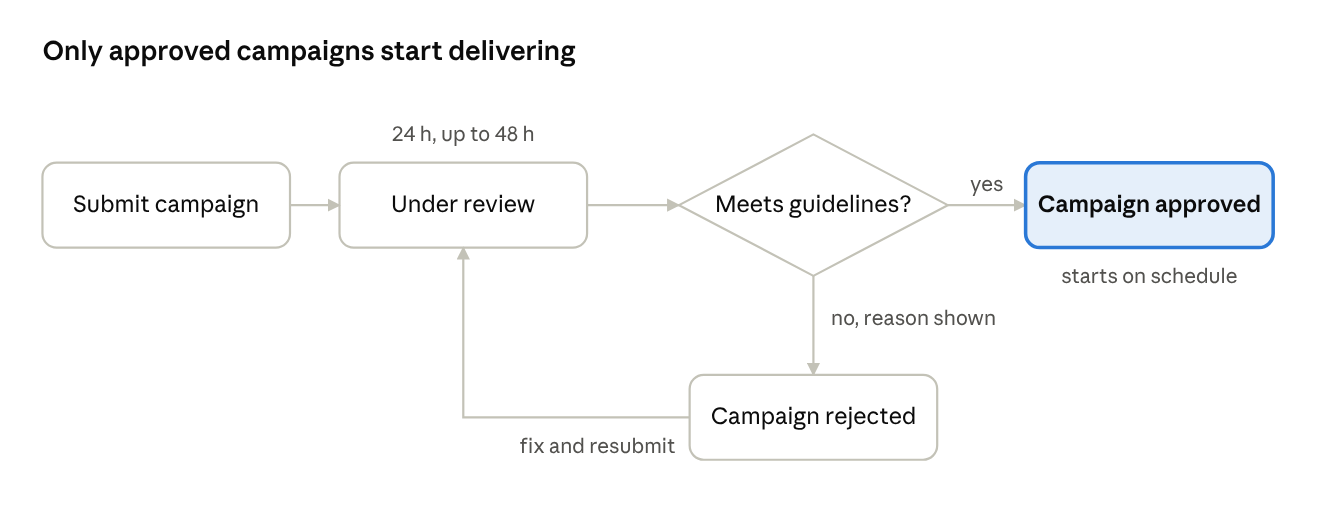
You submit the campaign, our team reviews it, and it is either approved and starts on schedule or rejected with a reason. A rejected campaign can be fixed and submitted again.
Review times
Most campaigns are reviewed within 24 hours of submission. Campaigns that need a closer look, such as those using third-party JavaScript or VAST tags, may take up to 48 hours.
- Submit campaigns well ahead of the planned start date. We recommend at least 48 hours before launch.
- Requests submitted on weekends or public holidays are reviewed on the next business day.
What we review
Our core requirement is simple: our team must be able to see and verify the ad content behind every creative.
|
Element |
What we check |
|---|---|
|
Image and video creatives |
The content complies with our creative guidelines and advertising policies |
|
JavaScript tags |
The tag loads the advertiser's own creative, and the content it serves can be viewed and verified |
|
VAST tags |
The VAST URL returns a valid video creative that can be viewed and verified |
|
Landing pages |
The page works, is safe, and is related to the advertiser's brand |
Landing pages. The landing page domain does not need to match the advertiser's brand name exactly, but it must be clearly related. For example, a product page on the brand group's global domain is accepted.
Common rejection reasons
|
Reason |
How to fix it |
|---|---|
|
The tag loads a third-party ad network, ad server passback or another ad tag instead of the creative |
Use a tag that serves your own creative directly. Tags that pass the impression on to other ad networks are not accepted |
|
The creative behind the tag cannot be viewed or verified |
Make sure the tag renders the full creative when opened, without login, geo or domain restrictions |
|
The VAST tag does not return a playable video |
Check that the VAST URL is valid, publicly accessible and returns a video file |
|
The landing page is not related to the advertiser |
Use a landing page on the advertiser's own or brand-group domain |
|
The landing page does not load or redirects to an unrelated or unsafe site |
Fix the URL and avoid redirect chains to other domains |
|
The creative breaks our creative guidelines |
Review the creative guidelines and update the creative before resubmitting |
If your campaign is rejected
A rejected campaign shows the rejection reason in the platform. To get it approved:
- Read the rejection reason on the campaign.
- Fix the creative, tag or landing page it refers to.
- Submit the campaign for approval again. It goes through the full review and the same review times apply.
If the reason is unclear, contact your account manager or our support team and include the campaign ID.
Before you submit
- Every creative serves your own ad content and can be viewed in full
- JavaScript and VAST tags contain no third-party ad network loaders or passbacks
- Tags are accessible without geo or domain restrictions
- Landing pages load correctly and are related to your brand
- Creatives follow the creative guidelines
- The campaign is submitted at least 48 hours before the planned start
Account safety. Accounts that show suspicious activity or repeatedly break our guidelines may be suspended. Suspension decisions are final.