# General Information

# Creatives types

##### **<span class="s1">STANDARD IMAGE/ .GIF </span>**

<span class="s1">Standard image ads have the lowest CPM from all formats and that allows us to maximize impressions and reach within the given budget.</span>

<span class="s1">Moreover, standard ads can be served to feature phones and proxy browsers. This expands the potential to reach up to a maximum.</span>

<span class="s1">.GIF formats can be used instead of simple images.</span>

<span class="s1">**Recommended formats:** 320x50, 300x50, 300x100, 300x250, 320x250.</span>

<span class="s1">AWARENESS/ MAX REACH/ LOW CPM/ HIGH COVERAGE</span>

---

##### **<span class="s1">INTERACTIVE BANNERS</span>**

<span class="s1">Interactive banners are best for attracting attention, impressing your audience with the creative solution, and driving engagement with your brand.</span>

<span class="s1">Rich media lets to create complex ads that elicit strong user response.</span>

<span class="s1">Using HTML5 technology, the ads can include scratch, swipe, drag&amp;drop, shake, and other interactions.</span>

<span class="s1">Events on the banner are tracked and different engagement levels are reported on your dashboard.</span>

<span class="s1">ENGAGEMENT/ INTERACTION/ MEMORABLE/ HTML5</span>

---

##### **<span class="s1">DYNAMIC/ MOOD BANNERS</span>**

<span class="s1">Dynamic banners allow serving different messages depending on some external data such as weather, time, game score, and etc.</span>

<span class="s1">This solution allows serving your audience the right message at the right time, in the right context. Your brand message becomes more relevant to the people you</span><span class="s2">’</span><span class="s1">re targeting, so they can relate and connect with the brand more easily.</span>

<span class="s1">RELEVANT/ MAX REACH/ CONTEXTUAL </span>

---

##### **<span class="s1">VIDEO ADS</span>**

<span class="s1">Video entertains, educates, and inspires. Video is a great storyteller and keeps users glued to your content.</span>

<span class="s2">Video ads are served on</span><span class="s1"> in-banner and VAST placements.</span>

<span class="s1">Video ads are highly measurable with the detailed video metrics of watched length, view-through-rate, cost-per-view.</span>

<span class="s1">Videos are non-skippable **up to 30s**, so it</span><span class="s3">’</span><span class="s1">s recommended to have them short.</span>

<span class="s1">REACH/ GOOD CTR/ STORY-TELLING</span>

---

##### **<span class="s1">NATIVE ADS</span>**

<span class="s1">Native ads are based on flexible components that are inserted into different layouts, depending on the type of device the ad is served, how the content on the page appears, and more.</span>

<span class="s1">They are less intrusive and produces better results in terms of CTR.</span>

<span class="s1">IMPRESSIONS/ LESS INTRUSIVE/ SELECTIVE INVENTORY</span>

# Uploading Creatives

To set up a campaign the very first thing need to be created / uploaded are the Creatives. Some creatives can be uploaded by the Clients themselves for Self-Served accounts and some creative types needs Ad Ops help to upload / create.

There are 3 types of creative formats / Ads that can be created by the Clients themselves while using their Self-Served accounts:

- Standard Banner Ads
- Native Ads
- Video Ads

---

##### **Banner Ads**

**You can find the requirements for banner ads here: [What are the most popular ad banner formats?](https://manual.eskimi.com/books/additional-creative-formats/page/static-banners-standard-display "Static Banners (standard display)")**

<p class="callout info align-center">Banner **samples** can be found [HERE](https://manual.eskimi.com/books/additional-creative-formats/page/static-banners-standard-display "Static Banners (standard display)") as well.</p>

**Steps to follow:**

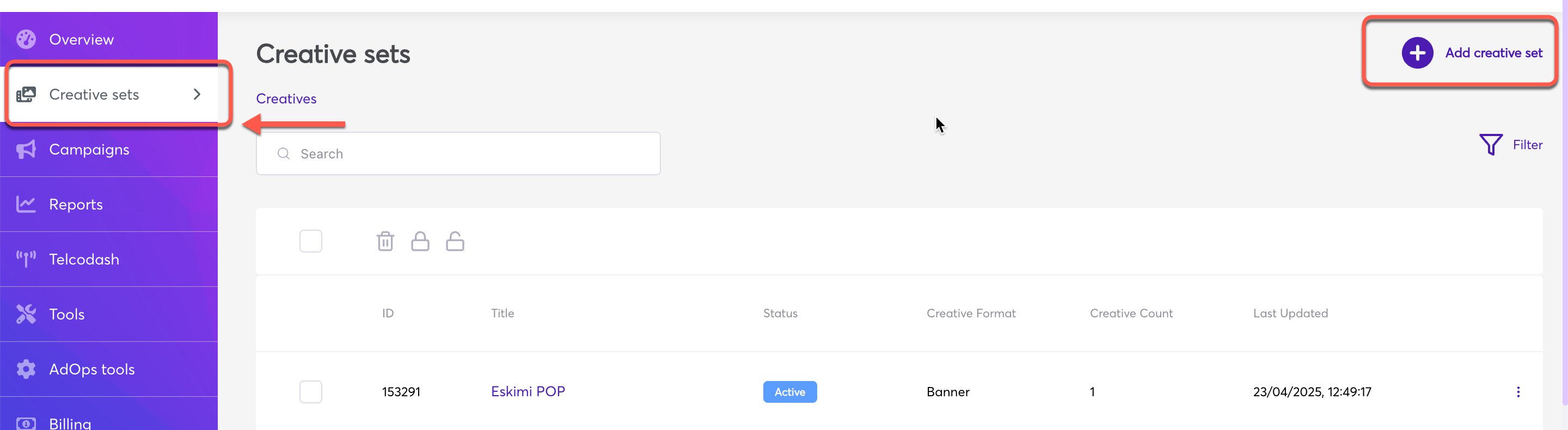
Log in to your DSP account &gt; Go to "***Creative Sets***" &gt; on the new page click "***Add creative set***".

[![2025-06-11_13-12-29.png](https://manual.eskimi.com/uploads/images/gallery/2025-06/HYzWdCYqGChfMIj5-2025-06-11-13-12-29.png)](https://manual.eskimi.com/uploads/images/gallery/2025-04/rECBhmG6brP3woUG-1.png)
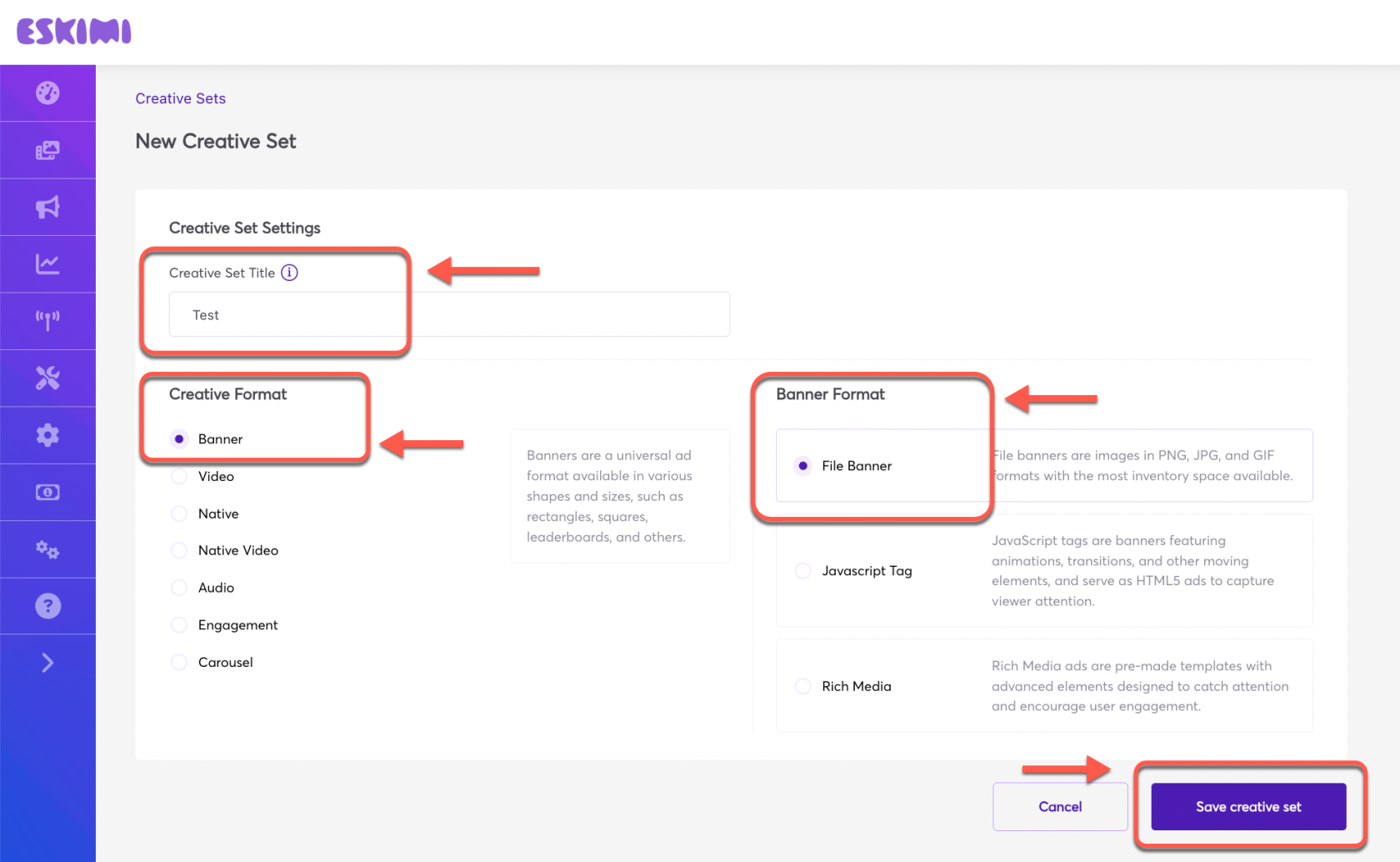
Under **"*Creative set title*"** set the name &gt; Select "***Creative Format***" and "***Banner Format***" &gt; Click "***Save creative set***".

[![2.png](https://manual.eskimi.com/uploads/images/gallery/2025-04/scaled-1680-/IGHqVexY2KQXdndA-2.png)](https://manual.eskimi.com/uploads/images/gallery/2025-04/IGHqVexY2KQXdndA-2.png)

**Uploading Banner Creatives:**

- **<span class="wysiwyg-color-blue">File Banners</span>** - These are simple static images that can be uploaded from your computer. The specifications and requirements are shared above at the beginning of this article.
- **<span class="wysiwyg-color-blue">Javascript Tag</span>** - These are HTML format banners. Note that these ad servers must support https, comply with ad exchange policies, and technical requirements. Example:

[![image-1610548349196.png](https://manual.eskimi.com/uploads/images/gallery/2021-01/scaled-1680-/image-1610548349196.png)](https://manual.eskimi.com/uploads/images/gallery/2021-01/image-1610548349196.png)
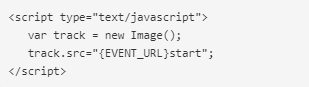
- **Rich Media** - This are animated creatives. Find more about Rich Media creatives and how to create them "[**Here**](https://manual.eskimi.com/books/creatives/page/creating-standard-rich-media-in-eskimi-dsp-rich-media-builder-guide "Creating Standard Rich Media in Eskimi DSP (Rich Media Builder Guide)")" in the article.

After selecting and uploading the desired creative format / creatives, click "Save" and and the Creative set will be created which can be selected later while setting up the campaign.

---

##### **<span data-sheets-root="1">Video</span> Ads:**

**You can find the requirements for Video Ads here: [Video ad formats](https://manual.eskimi.com/books/uploading-video-ads-and-their-requirements/page/what-are-video-ads-formats-and-what-do-i-see-in-report "What are video ads formats and what do I see in report?")**

**Steps to follow:**

Log in to your DSP account &gt; Go to "***Creative Sets***" &gt; on the new page click "***Add creative set***".

[![1.png](https://manual.eskimi.com/uploads/images/gallery/2025-04/scaled-1680-/rECBhmG6brP3woUG-1.png)](https://manual.eskimi.com/uploads/images/gallery/2025-04/rECBhmG6brP3woUG-1.png)

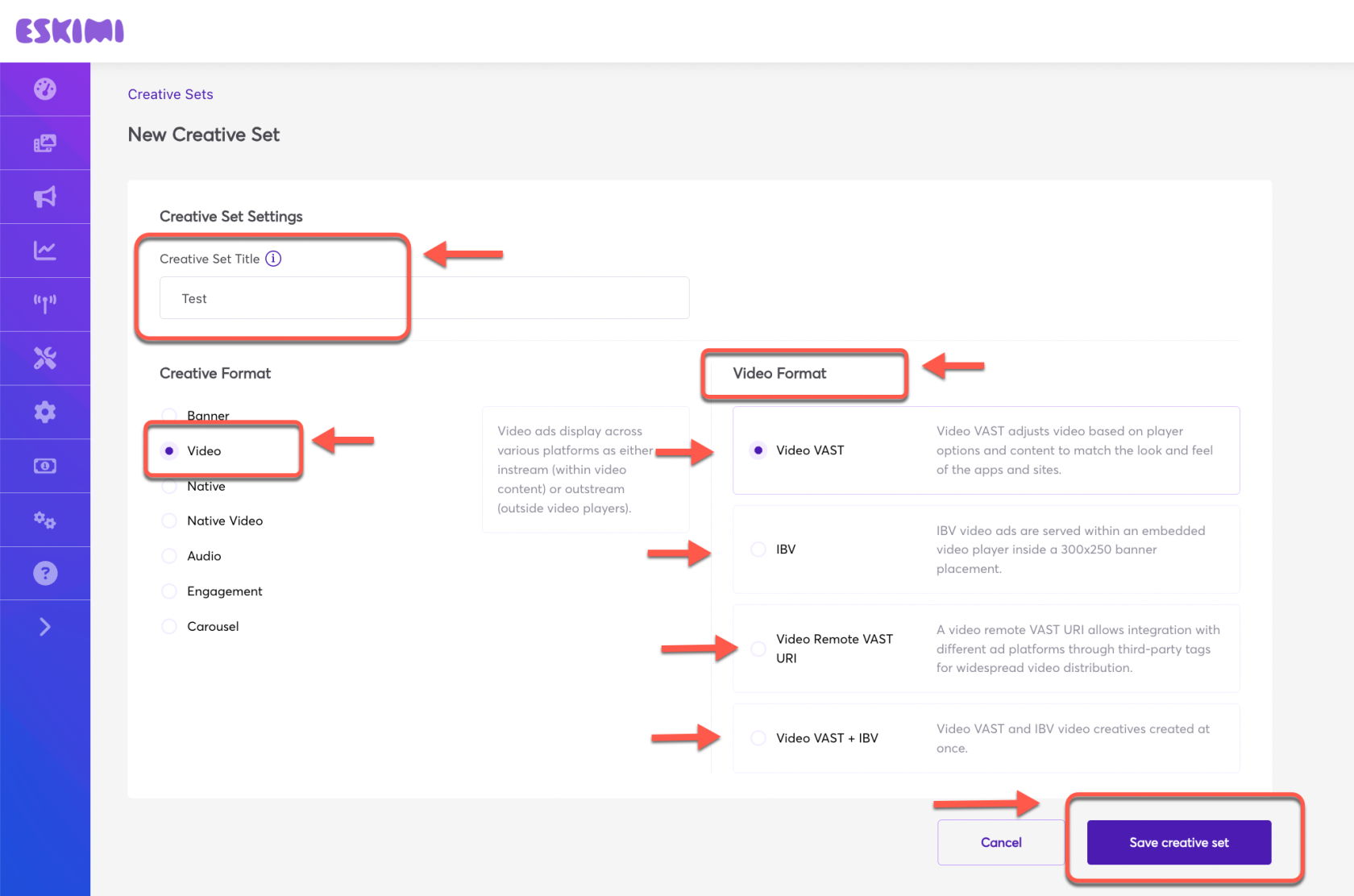
Under **"*Creative set title*"** set the name &gt; Select "***Creative Format***" and "***Video format***" from the 04 provided options &gt; Click "***Save creative set***".

[![3.png](https://manual.eskimi.com/uploads/images/gallery/2025-04/scaled-1680-/HlswDGhzIJZEAWyO-3.png)](https://manual.eskimi.com/uploads/images/gallery/2025-04/HlswDGhzIJZEAWyO-3.png)

If you select "***Video Vast***" or "***IBV***" or "***Video Vast + IBV***", the interface will take you to the next video file upload page.  
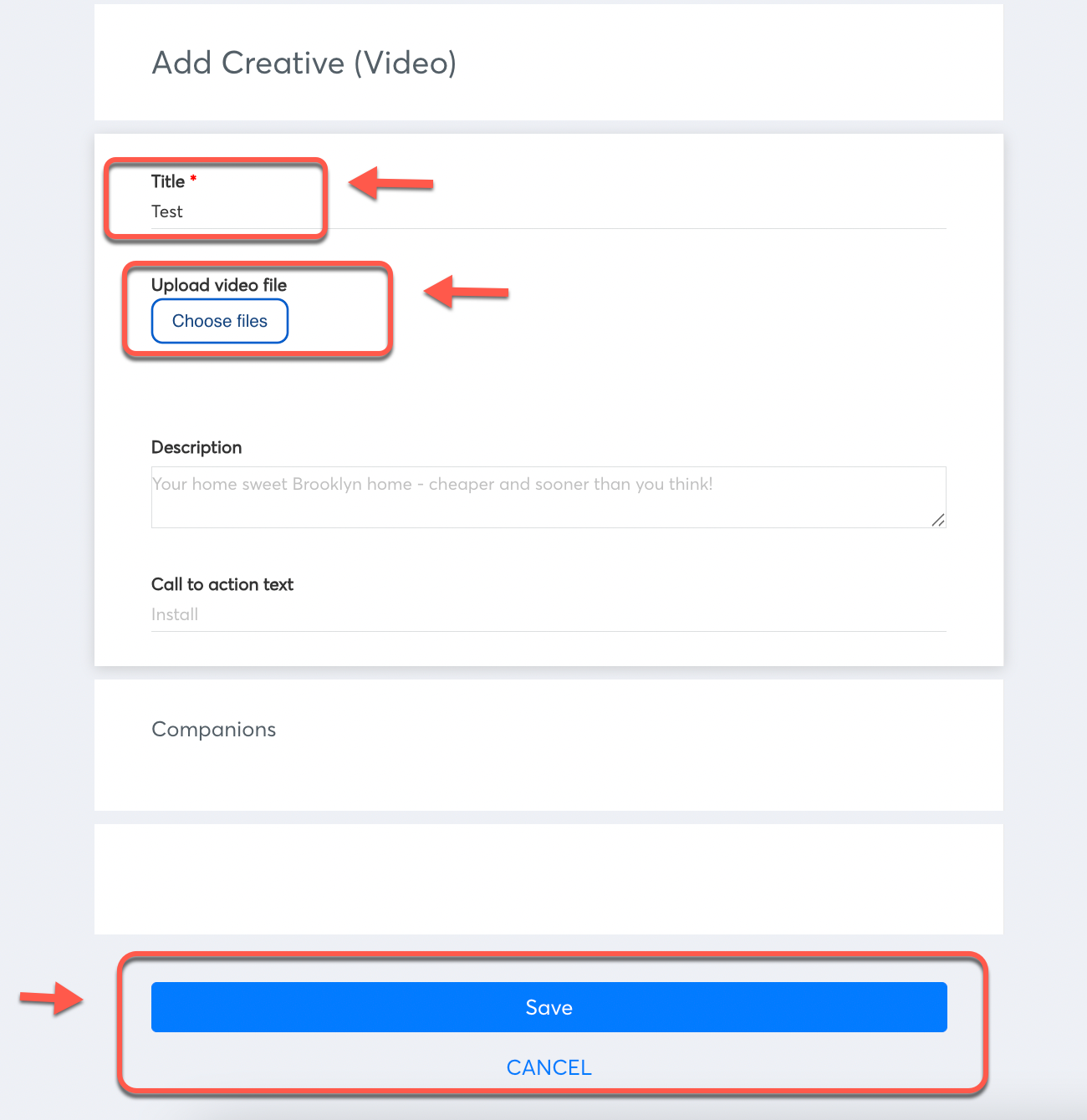
<span data-sheets-root="1">Now give it a name under "***Title***" &gt; Click "***Choose files***" and upload the video files from your computer &gt; and click "***Save***". The creative set will be saved.  
</span>

<span data-sheets-root="1">[![04.png](https://manual.eskimi.com/uploads/images/gallery/2025-04/scaled-1680-/9zmk0ZVSBdv39Hy8-04.png)](https://manual.eskimi.com/uploads/images/gallery/2025-04/9zmk0ZVSBdv39Hy8-04.png)</span>

<span data-sheets-root="1">Companion Banners can be u</span>pload as well, but the step is not necessary / not mandatory and can be skipped. Companion banners must contain at least one of the following sizes: 300x250 or 300x60.  
Write Call to action text. This text should be short and engaging, eg. Buy now. It will describe a call to action button for the destination URL. Can be skipped if not needed as well.

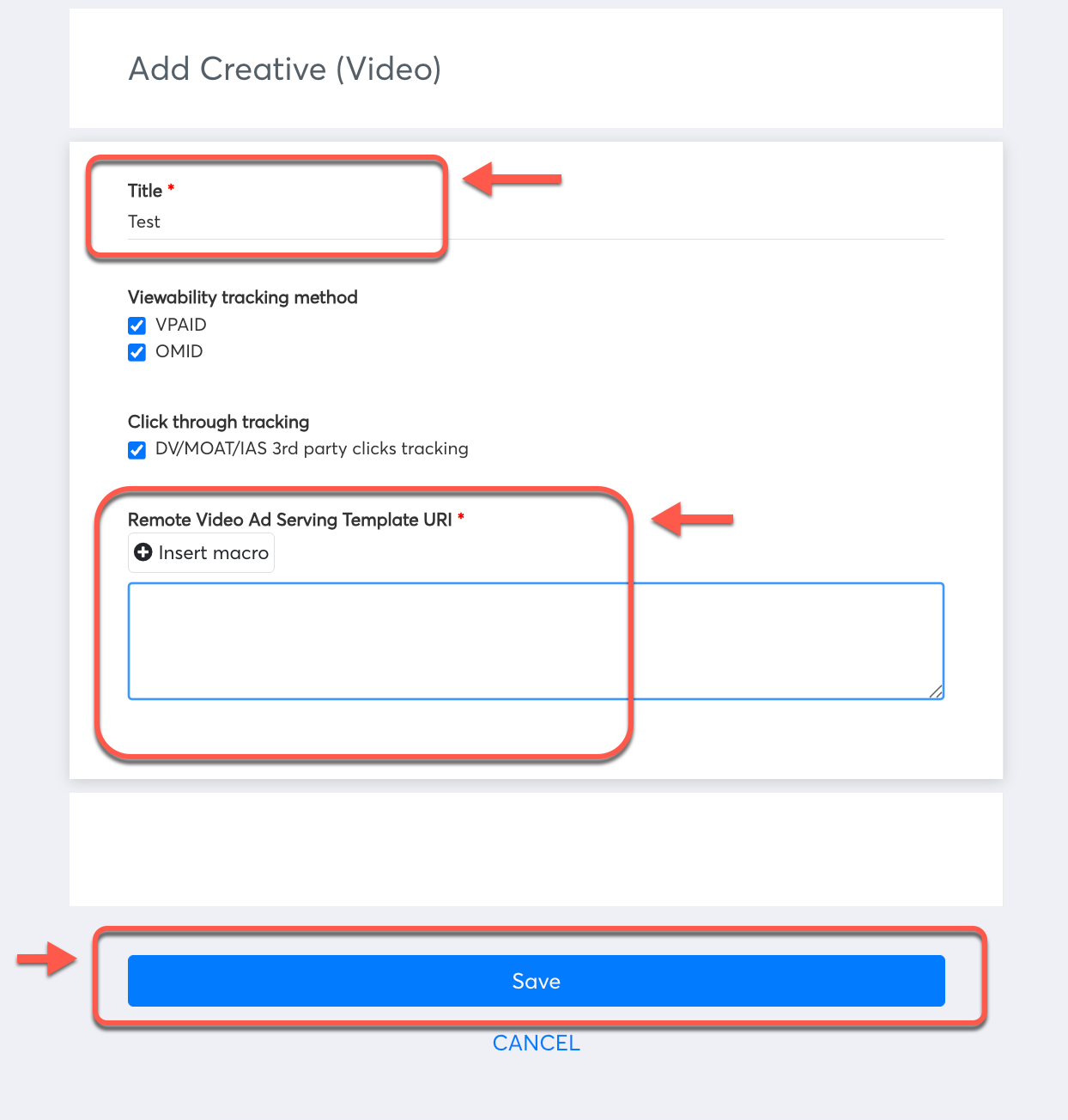
If you select the "***Video Remote VAST URI***" option, it will take you to the next interface where you can upload your video creative tag.
![5.png](https://manual.eskimi.com/uploads/images/gallery/2025-04/scaled-1680-/clBKYcAmV6XrOHcz-5.png)

<span data-sheets-root="1">C</span><span data-sheets-root="1">lick "***Save***". The creative set will be saved.</span>

---

# Preview page

##### **What is a preview page?**

An ad preview page is a powerful tool that allows advertisers and ad operations teams to preview how their ads will appear before they go live. This invaluable resource offers a real-time glimpse of the ad's rendering on different devices (mobile/desktop), ensuring its optimal display and functionality. By enabling users to catch potential issues and make necessary adjustments, an ad preview page significantly enhances the efficiency and effectiveness of advertising campaigns.

##### **How/when to use the preview page?**

The ad preview page serves as a crucial step in the advertising workflow, providing an opportunity for advertisers to verify the accuracy and effectiveness of their ad campaigns before launch. It is best utilized during the final stages of campaign creation, just before the campaign goes live. By accessing the preview page, users can view how their ads will appear across various devices.

Additionally, the preview page allows users to check for any visual or functional discrepancies, such as misplaced elements, broken links, or incorrect targeting settings, which might adversely impact the ad's performance. Moreover, advertisers can leverage the preview page to evaluate the ad's alignment with the brand's guidelines and messaging, guaranteeing brand consistency and professionalism.

##### **- Campaign preview**

##### **- Creative-set preview**

##### **- Individual creative preview**


##### **Campaign preview - How to?**

Set up your campaign and then navigate to the three dots on the right and select from two options "**Preview in browser**" or "**Demo page preview**".

[![image.png](https://manual.eskimi.com/uploads/images/gallery/2025-02/scaled-1680-/BjA6NqI9VzeoEWpq-image.png)](https://manual.eskimi.com/uploads/images/gallery/2025-02/BjA6NqI9VzeoEWpq-image.png)
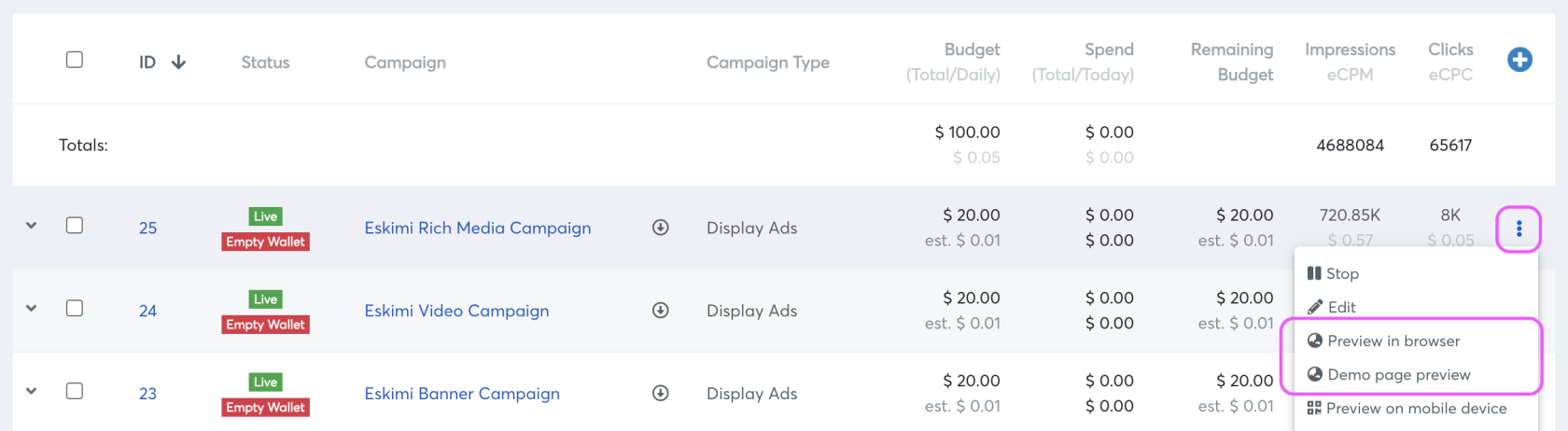
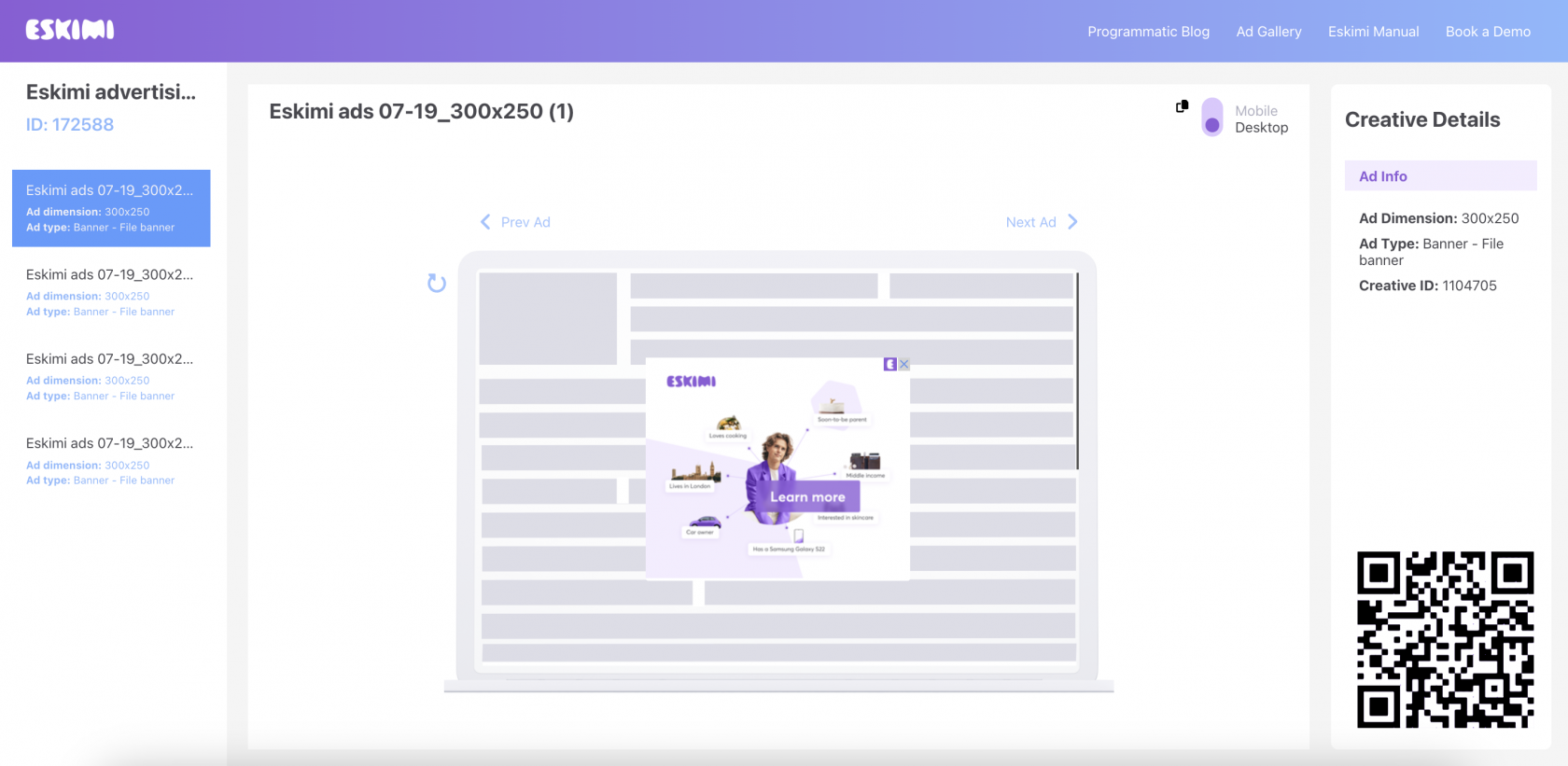
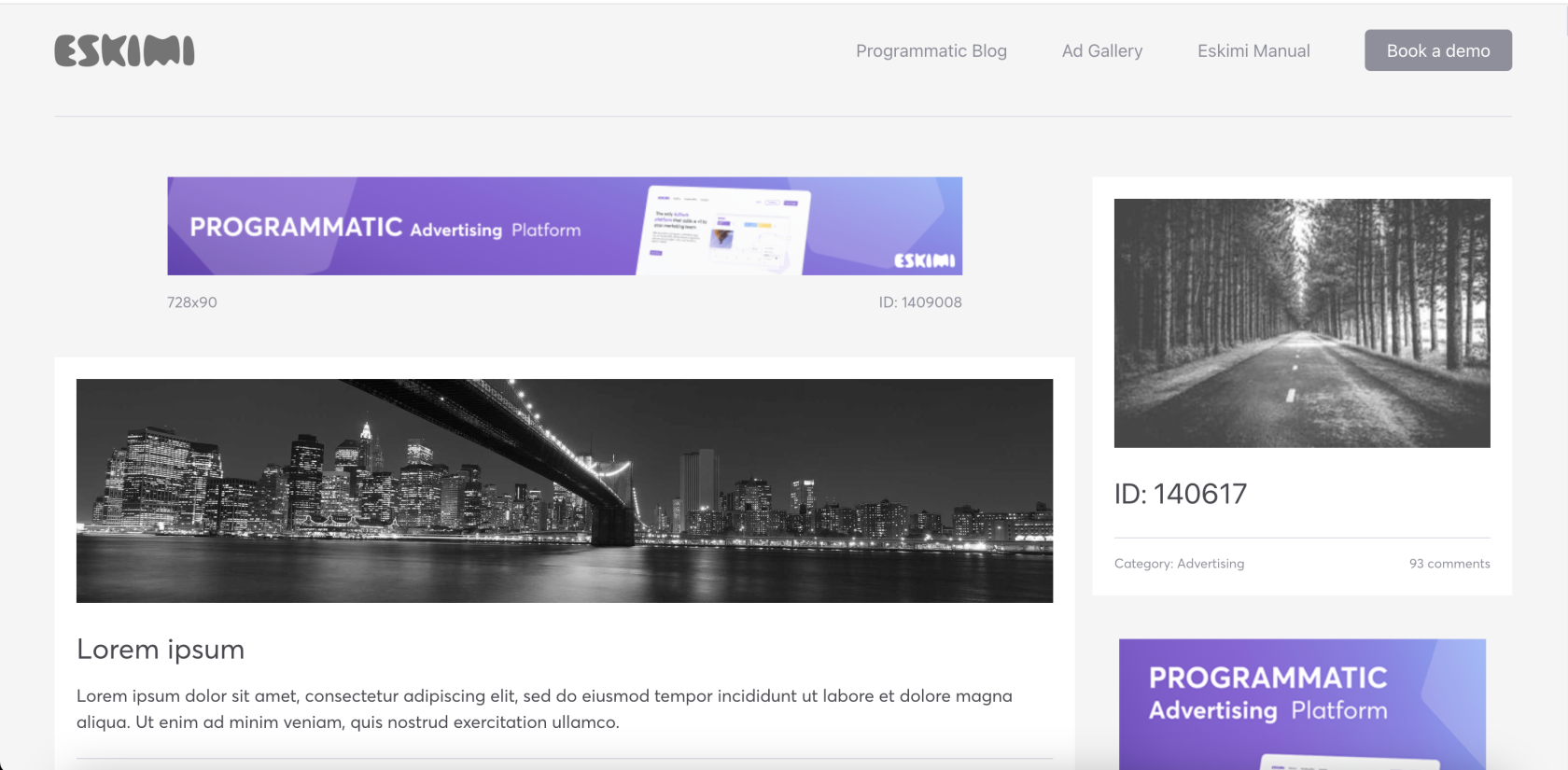
Once you access the Eskimi campaign preview page, you will be able to:

- Verify the proper rendering of all your ads.
- Preview your advertising in both desktop and mobile environments.
- Copy the ad text for reference or further use.

**Preview in browser** page:

[![Screenshot 2023-07-25 at 11.17.12.png](https://manual.eskimi.com/uploads/images/gallery/2023-07/scaled-1680-/5AnOcMHXjvcoFreR-screenshot-2023-07-25-at-11-17-12.png)](https://manual.eskimi.com/uploads/images/gallery/2023-07/5AnOcMHXjvcoFreR-screenshot-2023-07-25-at-11-17-12.png)
**Demo preview page**:

[![image.png](https://manual.eskimi.com/uploads/images/gallery/2025-02/scaled-1680-/u3OdIazT9ihSkaH9-image.png)](https://manual.eskimi.com/uploads/images/gallery/2025-02/u3OdIazT9ihSkaH9-image.png)
##### **Creative-set preview - How to?**

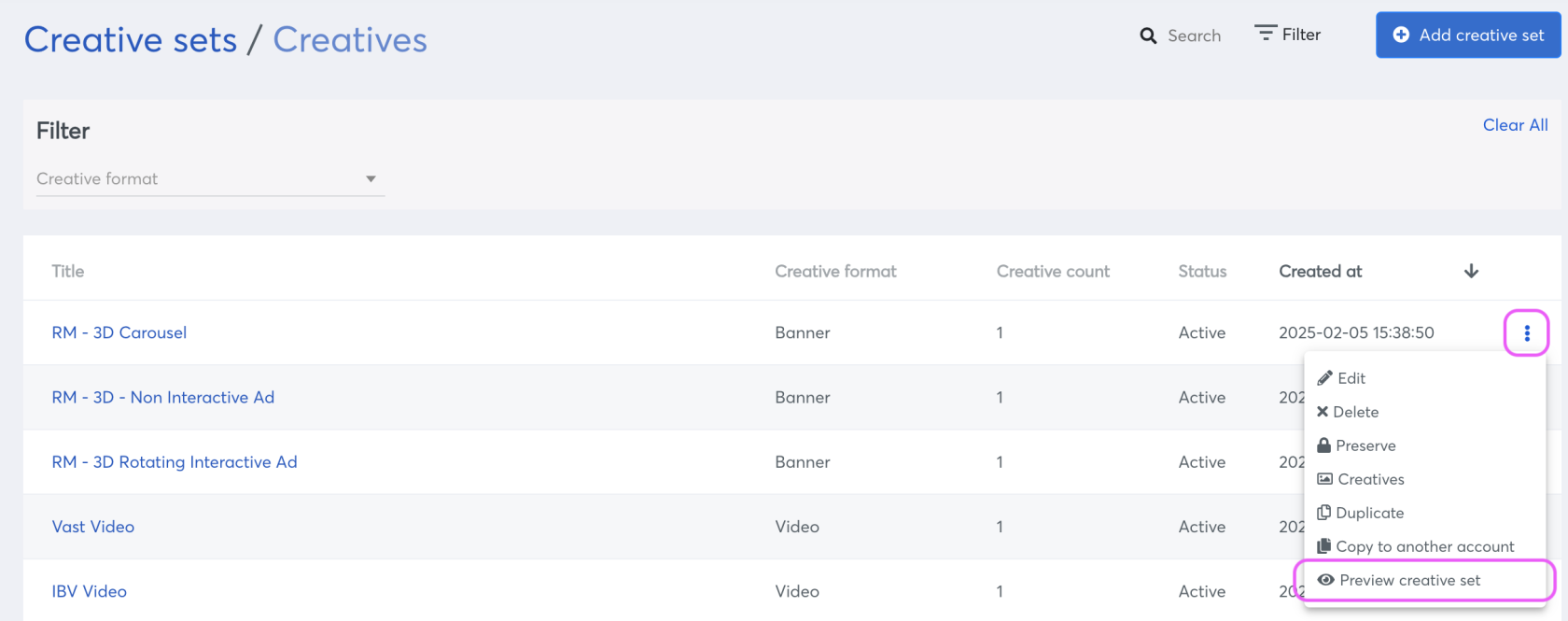
Set up your creatives under creative-set and then navigate to the three dots menu on the right and click "**Preview creative set"**.

[![image.png](https://manual.eskimi.com/uploads/images/gallery/2025-02/scaled-1680-/GyWcTePr06z93jIV-image.png)](https://manual.eskimi.com/uploads/images/gallery/2025-02/GyWcTePr06z93jIV-image.png)

##### **Individual creative preview - How to?**

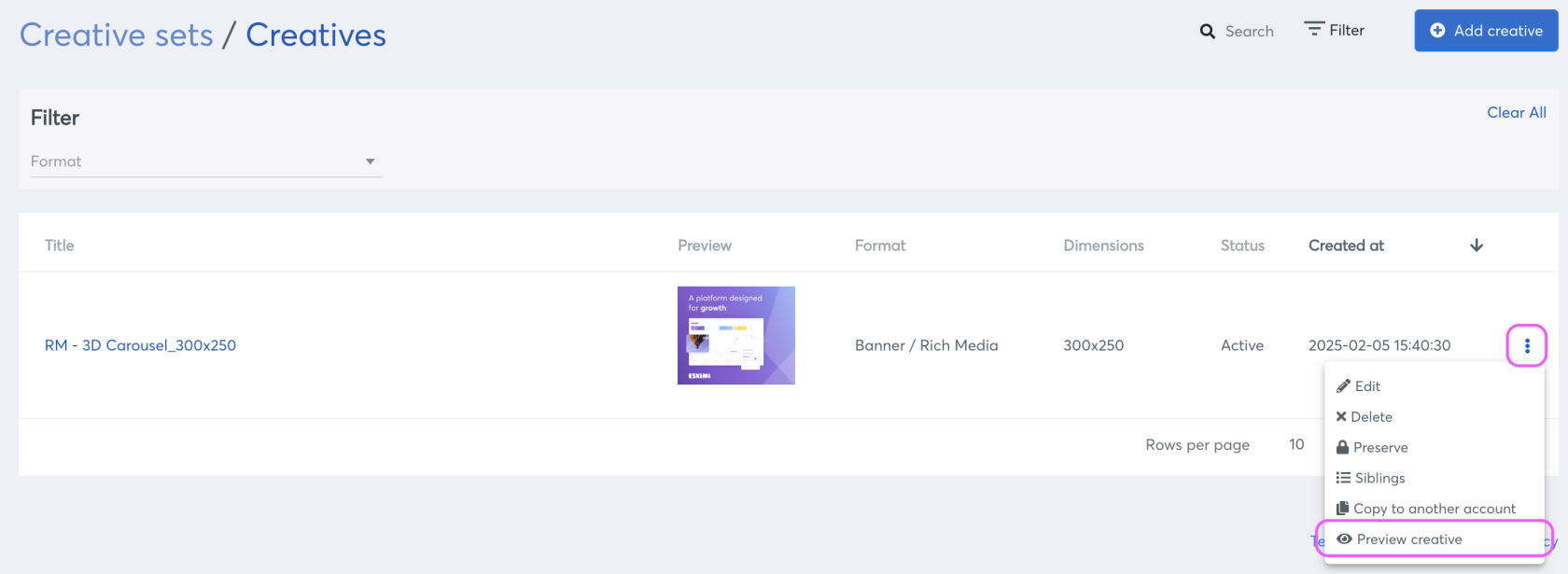
Set up your creative and then navigate to the three dots menu on the right and click on "**Preview creative**".

[![image.png](https://manual.eskimi.com/uploads/images/gallery/2025-02/scaled-1680-/yVZenjRjTY6HYclG-image.png)](https://manual.eskimi.com/uploads/images/gallery/2025-02/yVZenjRjTY6HYclG-image.png)

The versatility of the preview page extends to various ad types, including Banner (file banners, JavaScript, Rich Media), Video (VAST, IBV, remote VAST URI), Audio, Native ads. It is also compatible with whitelabeled accounts.

Moreover, beyond ensuring proper rendering, the preview page serves as a troubleshooting tool by allowing you to verify if click and impression trackers are firing correctly. This functionality proves invaluable in identifying and resolving potential issues before the creative/campaign goes live.

##### **Tips and tricks**

If you are logged into Eskimi DSP (or your white-label page), each "Demo Preview Page" field i.e. "ID:123456" will be an active link. Clicking on it will redirect you to either the Campaign or the Creative Set.

##### **Conclusion**

The preview page should not be mistaken for a tool that shows how ads will be displayed in specific environments, such as in-game scenarios. It does not generate screenshot mockups. Instead, its primary function is to allow advertisers to preview their ads before going live, facilitating troubleshooting of rendering issues, and reviewing all implemented trackers. Moreover, it offers a platform to ensure that the ads align with market standards and guidelines, enhancing the overall effectiveness of advertising campaigns.

# Creative Requirements

<table cellpadding="0" cellspacing="0" class="t1" id="bkmrk-standard-banners-ima"><tbody><tr style="height: 57px;"><td class="td1" style="height: 57px; width: 788px;" valign="top">##### **Static Banner**

</td></tr><tr style="height: 119px;"><td class="td1" style="height: 119px; width: 788px;" valign="top"><div><div><div aria-autocomplete="list" aria-label="B2">**File type:** .png, .jpg/.gif </div></div></div>**Dimensions:** might differ upon the specific country  
Mobile - 320x480, 300x250, 300x600, 250x250, 200x200, 300x100, 468x60, 320x50, 300x50   
Desktop - 300x250, 728x90, 250x250, 300x600, 160x600, 120x600, 336x280, 970x90

**Size:** Recommended up to 150 KB, maximum allowed up to 4.5 MB

</td></tr></tbody></table>

<table cellpadding="0" cellspacing="0" class="t1" id="bkmrk-floating-ads-.psd-fi"><tbody><tr><td class="td1" style="width: 787px;" valign="top">##### **Animated Banner**

</td></tr><tr><td class="td1" style="width: 787px;" valign="top">**File type:** html5 (JavaScript)

**Dimensions:** might differ upon the specific country  
Mobile - 320x480, 300x250, 300x600, 250x250, 200x200, 300x100, 468x60, 320x50, 300x50   
Desktop - 300x250, 728x90, 250x250, 300x600, 160x600, 120x600, 336x280, 970x90

**Size:** Creatives may not exceed a 150 KB initial load, the total download cannot exceed 5 MB

**Duration:** Ads must remain static after 30 seconds  
**Technical:**

- Creative must be fully SSL compliant (all requests from https) — landing page also https.
- RM creative main index.html file has to have campaign landing page URL (click URL)
- RM creative must have ClickTag macros, one of {CLICK\_URL}, {CLICK\_URL\_ENC}, {CLICK\_URL\_ASYNC}
- Click tag has to be inserted in the main RM creative file (if it's HTML5 - index.html file, if it's a JavaScript tag - main JS tag).
- All creatives must open landing page (click URL) in new tab/window.
- The target window for the click-through URL must be set to "\_blank" so the click-through will open in a new window.
- Do not leave the target statement undeclared.
- Rich Media creative code has to be valid and pass validator - [https://validator.w3.org.](https://validator.w3.org.)
- Also no errors in browser console.

</td></tr></tbody></table>

<table cellpadding="0" cellspacing="0" class="t1" id="bkmrk-sticky-ads-file-type" style="font-family: -apple-system, BlinkMacSystemFont, 'Segoe UI', Oxygen, Ubuntu, Roboto, Cantarell, 'Fira Sans', 'Droid Sans', 'Helvetica Neue', sans-serif; font-size: 14px;"><tbody><tr style="height: 57px;"><td class="td1" style="height: 57px; width: 788px;" valign="top">##### **Sticky Ads**

</td></tr><tr style="height: 119px;"><td class="td1" style="height: 119px; width: 788px;" valign="top">**File type:** .png, .jpg/.gif/ HTML5 (JavaScript)

**Dimensions:** 320x50, 300x250, 728x90, 300x50, 320x100, 120x600, 300x100, 250x250, 160x600, 300x600, 336x280, 234x60, 200x200, 160x90, 240x400, 970x250, 320x480, 970x90, 468x60, 728x40

**Size:** Recommended up to 150KB, maximum allowed up to 4.5MB

</td></tr></tbody></table>

<table cellpadding="0" cellspacing="0" class="t1" id="bkmrk-dynamic-ads-api%2C-pro"><tbody><tr style="height: 64px;"><td class="td1" style="width: 788px; height: 64px;" valign="top">##### **Templated Rich Media**

</td></tr><tr style="height: 253px;"><td class="td1" style="width: 788px; height: 253px;" valign="top">**File type:** Assets for Creative Development .png/.jpg or .psd

**Dimensions:** 300x250, 320x480, 300x600, 160x600, 300x50, 300x150, 300x300, 320x50, 320x100, 320x320, 336x280, 728x90, 970x90, 970x250 or Photoshop file (.psd) with all elements in the banner on separate layers and fonts

  
**1 Image:** Glitch, Countdown, Dancing 3D\*, Rotating Billboard\*  
**2 Images:** Shake &amp; Brake, Blinds, Slider, Scratch to Reveal, Page Flip, Parallax\*  
**3 Images:** 3D Rotating, Carousel, Pixel pages, 3D Triangle, Parallax 3D Triangle\*  
**4 Images:** Carousel, Pixel pages, 3D Cubes, 3D Cube vertical, Animated Cubes, Animated 3D Cubes, 3D Cube horizontal, Parallax 3D Cube\*  
**5-6 Images:** Carousel, Pixel pages  
**7-10 Images:** Carousel  
**\*** check specifications or rely on the creative builder on DSP</td></tr></tbody></table>

<table cellpadding="0" cellspacing="0" class="t1" id="bkmrk-native-ads-icon-128x"><tbody><tr><td class="td1" style="width: 794px;" valign="top">##### **Custom Rich Media**

</td></tr><tr><td class="td1" style="width: 794px;" valign="top">**File type:** Photoshop file (.psd) with all elements in the banner on separate layers  
Additionally:

- Brand guidelines, brand book, logos (if available)
- CTA button attached or guidelines given
- Banner flow and logic described in a few sentences
- All banner sizes that will be used in the campaign

</td></tr><tr><td style="width: 803px; height: 197.766px;">****Forced Perspective:**** File type: ad design in Photoshop file format (.psd) with all elements in the banner on separate layers.  
Product 3D model if available, and/or product print sheet in good quality image format.  
3D model file format: .GLTF for web 3D format, .FBX or .OBJ,  
UV wrapped with provided texture image files  
  
Additionally:  
Brand guidelines, brand book, logos (if available)  
CTA button attached or guidelines given  
Banner flow and logic described in a few sentences  
All banner sizes that will be used in the campaign  
</td></tr><tr><td style="width: 803px; height: 130.578px;"><div class="p-workspace__primary_view_body"><div class="p-message_pane p-message_pane--classic-nav p-message_pane--scrollbar-float-adjustment p-message_pane--with-bookmarks-bar" data-qa="message_pane"><div><div role="presentation"><div class="c-virtual_list c-virtual_list--scrollbar c-message_list c-message_list--floating c-message_list--dark c-scrollbar c-scrollbar--fade" role="presentation"><div class="c-scrollbar__hider" data-qa="slack_kit_scrollbar" role="presentation"><div class="c-scrollbar__child" role="presentation"><div aria-label="Viktorija (direct message, active)" class="c-virtual_list__scroll_container" data-qa="slack_kit_list" role="list"><div aria-setsize="-1" class="c-virtual_list__item" data-item-key="1741339691.317659" data-qa="virtual-list-item" id="bkmrk-3d-models%3A-product-3" role="listitem" tabindex="0"><div class="c-message_kit__background c-message_kit__background--labels c-message_kit__background--labels--later p-message_pane_message__message c-message_kit__message p-message_pane_message__message--last" data-qa="message_container" data-qa-label="later" data-qa-placeholder="false" data-qa-unprocessed="false" role="presentation"><div aria-roledescription="message" class="c-message_kit__hover" data-qa-hover="true" role="document"><div class="c-message_kit__actions c-message_kit__actions--default"><div class="p-message_pane_message__message_label c-message_kit__labels c-message_kit__labels--light"><div class="c-message_kit__gutter"><div class="c-message_kit__gutter__right" data-qa="message_content" role="presentation"><div class="c-message_kit__blocks c-message_kit__blocks--rich_text"><div class="c-message__message_blocks c-message__message_blocks--rich_text" data-qa="message-text"><div class="p-block_kit_renderer" data-qa="block-kit-renderer"><div class="p-block_kit_renderer__block_wrapper p-block_kit_renderer__block_wrapper--first"><div class="p-rich_text_block" dir="auto"><div class="p-rich_text_section">**3D Models:**</div><div class="p-rich_text_section">Product 3D model if available, and/or product print sheet in good quality image format.  
3D model file format -.GLTF for web 3D format, .FBX or .OBJ  
UV wrapped with provided texture image files</div><div class="p-rich_text_section">  
</div><div class="p-rich_text_section">Additionally:  
Brand guidelines, brand book, logos (if available)  
CTA button attached or guidelines given  
Banner flow and logic described in a few sentences  
All banner sizes that will be used in the campaign</div></div></div></div></div></div></div></div></div></div></div></div></div></div></div></div></div></div></div></div></div></td></tr></tbody></table>

<table cellpadding="0" cellspacing="0" class="t1" id="bkmrk-high-impact-ads-file" style="font-family: var(--font-body); font-size: 14px;"><tbody><tr style="height: 57px;"><td class="td1" style="height: 57px; width: 788px;" valign="top">##### **High Impact Ads**

</td></tr><tr style="height: 119px;"><td class="td1" style="height: 119px; width: 788px;" valign="top">**File type:** Assets for Creative Development .psd

**Floating ad:** 150x150 .png/.jpg/.psd **Full Page Takeover:** responsive

**Topscroll:** responsive

**Midscroll:** responsive

Responsive means that the format is adjusting to the screen size it is serving.

</td></tr></tbody></table>

<table cellpadding="0" cellspacing="0" class="t1" id="bkmrk-facebook-%26-instagram"><tbody><tr><td class="td1" style="width: 795px;" valign="top">##### **Dynamic Ads**

</td></tr><tr><td class="td1" style="width: 795px;" valign="top">**File type:** Assets for Creative Development  
Product feed - json or xml format.   
Weather ads - city and particular conditions.   
For any other types of dynamic ads, use API.

**Dimensions:**

- Mobile: 320x480, 300x250, 300x600, 250x250, 200x200, 300x100, 468x60, 320x50, 300x50
- Desktop: 300x250, 728x90, 250x250, 300x600, 160x600, 120x600, 336x280, 970x90

</td></tr></tbody></table>

<table cellpadding="0" cellspacing="0" class="t1" id="bkmrk-native-ads-file-type"><tbody><tr><td class="td1" style="width: 795px;" valign="top">##### **Native Ads**

</td></tr><tr><td class="td1" style="width: 795px;" valign="top">**File type:** .png/.jpg and text

**Dimensions:**

- Icon/logo 128x128
- Main image 1200x627 (additional 600x600, 400x400, 1200x1200)
- Title 25 symbols\*
- Description max 90 symbols\*
- CTA max 15 symbols\*
- Advertiser max 25 symbols\*  
    **\*** - including the spaces between letters

Additionally:

- Likes a number between 1 and trillion
- Downloads number between 1 and a trillion
- Price max 50 symbols
- Sale Price max 50 symbols
- Phone max 50 symbols
- Address max 100 symbols
- Star Rating max 4 symbols
- Additional Description max 90 symbols
- Display URL max 1000 symbols

</td></tr></tbody></table>

<table cellpadding="0" cellspacing="0" class="t1" id="bkmrk-in-game-ads-file-typ"><tbody><tr style="height: 57px;"><td class="td1" style="height: 57px; width: 788px;" valign="top">##### **In-Game Ads**

</td></tr><tr style="height: 119px;"><td class="td1" style="height: 119px; width: 788px;" valign="top">**File type:**

- Banner .jpg/gif, html5 and tags
- Video .mp4

**Dimensions:**

- Banner: 480x320, 300x250, 640x360, 336x280, 320x480, 320x50, 640x480   
    Additionally: 768x1024, 1920x1080, 970x250, 728x90, 300x600, 320x320, 160x600, 250x250, 320x100, 360x640 320x180.
- Video: 320x480, 480x320, 1024x768, 768x1024

**Size:** Recommended video file less than 15 MB

**Duration:** Recommended video duration 6-15 seconds

</td></tr></tbody></table>

<table cellpadding="0" cellspacing="0" class="t1" id="bkmrk-ibv-%26-vast-video-for" style="height: 329px;" width="800"><tbody><tr style="height: 35px;"><td class="td1" style="width: 799px; height: 35px;" valign="top">##### **In-Banner Video**

</td></tr><tr style="height: 35px;"><td class="td1" style="width: 799px; height: 35px;" valign="top">**File type:** .mp4

**Dimensions:** 4:3 ratio

**Size:** Maximum up to 5 MB  
**Duration:** Recommended up to 30 seconds  
  
Additionally:

- Description
- CTA
- Companion banner 300x250 in the file .png/.jpg/html5 (JavaScript) (not necessary)

</td></tr></tbody></table>

<table cellpadding="0" cellspacing="0" class="t1" id="bkmrk-youtube-bumper-ad-bu"><tbody><tr><td class="td1" style="width: 798px;" valign="top">##### **VAST Video**

</td></tr><tr><td class="td1" style="width: 798px;" valign="top">**File type:** .mp4

**Dimensions:** 16:9 ratio

**Size:** Maximum up to 5 MB  
**Duration:** Recommended up to 30 seconds. Maximum duration 6 minutes

Additionally:

- Description
- CTA
- Companion banner 300x250 in the file .png/.jpg/html5 (JavaScript) (not necessary)

</td></tr></tbody></table>

<table cellpadding="0" cellspacing="0" class="t1" id="bkmrk-youtube-in-stream-ad" style="height: 248px;"><tbody><tr style="height: 64px;"><td class="td1" style="width: 800px; height: 64px;" valign="top">##### **Rewarded Video**

</td></tr><tr style="height: 221px;"><td class="td1" style="width: 800px; height: 184px;" valign="top">**File type:** .mp4

**Dimensions:**320x480, 480x320

**Size:** Maximum up to 5 MB  
**Duration:** Recommended up to 30 seconds.

Additionally:

- Description
- CTA
- Companion banner 300x250 in the file .png/.jpg/html5 (JavaScript) (not necessary)

</td></tr></tbody></table>

<table cellpadding="0" cellspacing="0" class="t1" id="bkmrk-ctv-ads-file-type%3A-." style="height: 176px; width: 800px;"><tbody><tr style="height: 57px;"><td class="td1" style="height: 57px; width: 800px;" valign="top">##### **CTV Ads**

</td></tr><tr style="height: 119px;"><td class="td1" style="height: 119px; width: 800px;" valign="top">**File type: .**mp4, External VAST URI (without VPAID)  
VPAID/OMID is not supported, therefore viewability is not tracked.

**Dimensions:** 1920x1080

**Size:** Recommended 45 MB. Maximum 100 MB.

**Duration:** Recommended up to 30 seconds. Maximum up to 1 minute.

</td></tr></tbody></table>

<table border="1" id="bkmrk-audio-ads-file-type%3A" style="border-collapse: collapse; width: 98.8889%; height: 58px;"><tbody><tr style="height: 29px;"><td style="width: 100%; height: 29px;">##### **Audio Ads**

</td></tr><tr style="height: 29px;"><td style="width: 100%; height: 29px;">**File type:** MP3, WAV, WMA or OGG

**Bitrate:** at least 128 kbps

**Size:** max 50mb

**Duration:** Recommended 15 to 30 seconds (limited inventory supporting up to 60 seconds)

</td></tr></tbody></table>

<table cellpadding="0" cellspacing="0" class="t1" id="bkmrk-templated-rich-media" style="width: 801px; height: 87px;"><tbody><tr><td class="td1" style="width: 801px;" valign="top">##### **Facebook &amp; Instagram ads (In-feed)**

</td></tr><tr><td class="td1" style="width: 801px;" valign="top">Facebook account integration, set-up (please contact adops for more details). Steps: Business settings &gt; Pages &gt; Choose an exact page &gt; Assign Partners &gt; Business ID &gt; Enter Business ID &gt; Choose Publish content and view earnings insights &gt; Next &gt; Done

</td></tr><tr><td class="td1" style="width: 801px;" valign="top">Icon 128x128px (app/product icon)

Main image 1200x627px; 600x600px (only 20% text allowed)

Title (product or service) 25 symbols\*

Description (advertising text) 90 symbols\*

CTA (described call-to-action for the destination) 15 symbols\*

Advertiser (name of the advertiser) 25 symbols\*

\* - including the spaces between letters

</td></tr></tbody></table>

<table cellpadding="0" cellspacing="0" class="t1" id="bkmrk-custom-rich-media%2C-m" style="height: 121px; width: 802px;"><tbody><tr><td class="td1" style="width: 802px;" valign="top">##### **YouTube bumper ad**

</td></tr><tr><td class="td1" style="width: 802px;" valign="top">Bumper ad: video no longer than 6 sec.   
Uploaded to YouTube account &amp; video link provided

</td></tr></tbody></table>

<table cellpadding="0" cellspacing="0" class="t1" id="bkmrk-templated-rich-media-0" style="height: 382px; width: 803px;" width="808"><tbody><tr><td class="td1" style="width: 803px;" valign="top">##### **YouTube in-stream ad**

</td></tr><tr><td class="td1" style="width: 803px;" valign="top">Video up to 15/20/30 sec (Recommended).   
Uploaded to YouTube account &amp; video link provided

</td></tr></tbody></table>

# Requirements fo Alcohol creatives (update needed)

All creatives related to alcohol has to have:

\- Text: DRINK RESPONSIBLY.

\- This icon set: ![dontdrink2.png](https://dsphelp.eskimi.com/hc/article_attachments/360000709185/dontdrink2.png)

Text and icons size should be adapted by creative size, but it should be visible and readable without zoom.

<span style="color: rgb(224, 62, 45);">Note: Eskimi complies with the Ad Exchanges and countries policy. Therefore, the requirements may differ depending on the targeted country. </span>

# Clicks Heatmap

##### Clicks Heatmap - Demo Page Preview

- Clicks Heatmap on the Demo Page Preview can help to show actual user clicks on the creatives without click on "corners" (close X and similar)
- Heatmap can be activated in the Demo Page Preview by adding " ***?heatmap=1*** " at the end of the URL.

**Few Examples:**

- [https://dsp.eskimi.com/preview/campaign/0Emnrpoq?heatmap=1](https://dsp.eskimi.com/preview/campaign/0Emnrpoq?heatmap=1)
- [https://dsp.eskimi.com/preview/campaign/3Fmnoork?heatmap=1](https://dsp.eskimi.com/preview/campaign/3Fmnoork?heatmap=1)
- [https://dsp.eskimi.com/preview/campaign/3Bmnoorl?heatmap=1](https://dsp.eskimi.com/preview/campaign/3Bmnoorl?heatmap=1)
- [https://dsp.eskimi.com/preview/campaign/68mnorkk?heatmap=1](https://dsp.eskimi.com/preview/campaign/68mnorkk?heatmap=1)
- [https://dsp.eskimi.com/preview/campaign/69mnnkns?heatmap=1](https://dsp.eskimi.com/preview/campaign/69mnnkns?heatmap=1)
- [https://dsp.eskimi.com/preview/campaign/74mnokpq?heatmap=1](https://dsp.eskimi.com/preview/campaign/74mnokpq?heatmap=1)
- [https://dsp.eskimi.com/preview/campaign/7Cmnnskm?heatmap=1](https://dsp.eskimi.com/preview/campaign/7Cmnnskm?heatmap=1)

**How it looks:**

[![2025-07-14_11-42-02.png](https://manual.eskimi.com/uploads/images/gallery/2025-07/scaled-1680-/EK2osm7KuQUY1tIU-2025-07-14-11-42-02.png)](https://manual.eskimi.com/uploads/images/gallery/2025-07/EK2osm7KuQUY1tIU-2025-07-14-11-42-02.png)

---