How to Clear the Cache
A browser cache is a temporary storage mechanism used by web browsers to store files, such as images, scripts, and website data, on your device (laptop or phone). This allows the browser to load websites faster and more efficiently when you visit them again, as it doesn’t need to re-download all the resources from the server.
Sometimes changes on websites cause issues with properly loading the content. This can quickly be solved:
Chrome:
- Open website you are trying to access. In our case, i.e., dsp.eskimi.com
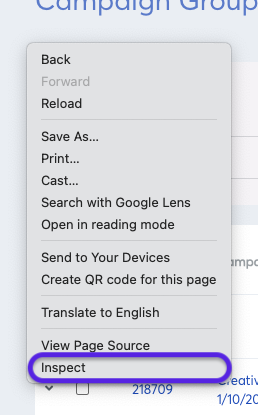
- Click right mouse button and click “Inspect”
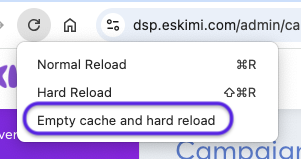
- Then, in the browser, click and hold the “Refresh button” and click “Empty cache and hard reload”
To clear cache and cookies:
- Open website you are trying to access. In our case, i.e. dsp.eskimi.com
- Click right mouse button and click “Inspect”
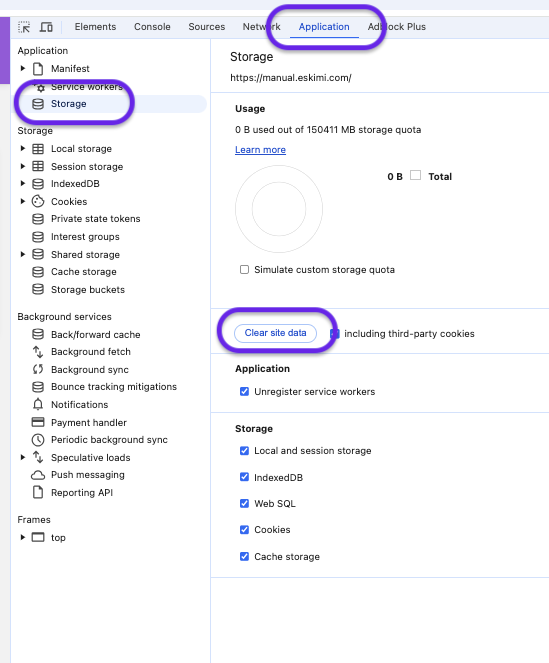
- Then in new form click on "Application" and "Storage" (see in screenshot below)
- And lastly, click on the button - "Clear site data"
For Safari browser:
- Go to Safari > Settings > Privacy.
- Click Manage Website Data.
- Search for the specific website in the search bar dsp.eskimi.com
- Select the website and click Remove.
Alternatively:
1. Enable the "Develop" Menu (if not already enabled):
- Open Safari on your Mac.
- Go to Safari > Settings (or Preferences, depending on your version).
- Click on the Advanced tab.
- At the bottom, check the box for "Show Develop menu in menu bar."
2. Clear Cache for a Specific Website:
- Open Safari and go to the website for which you want to clear the cache.
- In the menu bar, click on Develop.
- Select Empty Caches from the dropdown menu.