# Video + nCard
# Rewarded Video with nCard
#### **Introduction**
This feature allows us to show video ad and display ad together for the same "impression". Our special rewarded video traffic segment allows us to serve video+end card through companion ad attribute. While uploading video MP4 file, using VAST URI, together we will add companion ad - either static or html/js creative tag.
End card gets 5s as default to view so it’s also always viewable element. If user interacts with HTML/JS tag, creative stays open till user decides to close it.
In campaign reporting companion ad will have "Companion impression" and "Companion clicks" metrics under “Event metrics” part. Companion clicks also reflects on main reporting data.
---
#### **Practical implementation**
To create video VAST campaign with end card, you just need to follow standard video VAST + companion ad upload process we [have here >>](https://manual.eskimi.com/books/creatives/page/how-to-upload-video-ads/) just don't forget to add companion banner. Companion banner should be one from most popular sizes: 300x250px, 320x480px, or 480x320px.
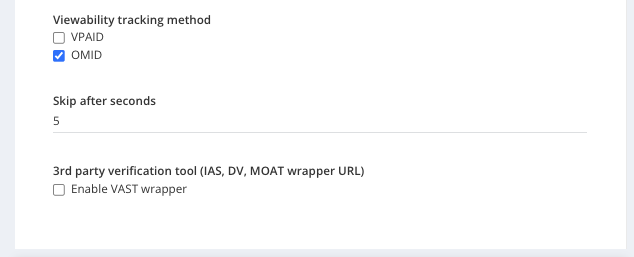
**Remember:** as all inventory will be delivered in-app environment, we need to select only OMID viewability targeting.
[](https://manual.eskimi.com/uploads/images/gallery/2024-01/POsWXsQT6D0owd5z-image-1705420031378.png)
"Skip after seconds" default value can be changed but not recommended to change to 0. Value should be from 5-30s. By adding longer skip value, we are filtering supported bid requests and most common is 5s.
3rd party verification tools can be used only with static and simple HTML/JS creatives (without MRAID library support in html).
---
#### **Preview**
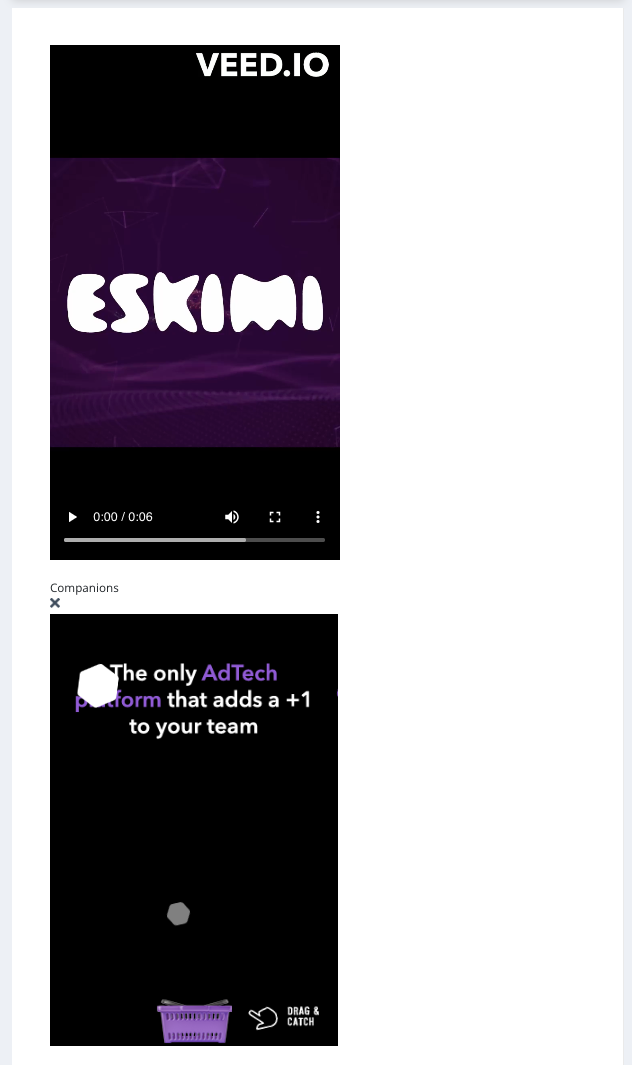
After creating VAST video creative with companion we will get separate assets preview in creative edit form. We can re-upload video for same creative. We can re-upload static companion image, we can edit HTML or just re-upload a new version of HTML zip.
Real creative preview will be showed in campaign preview page, where companion ad will be delivered after video.
[](https://manual.eskimi.com/uploads/images/gallery/2024-01/gnQtG17S4BrkufW4-image-1705420784980.png)
---
#### **Campaign delivery**
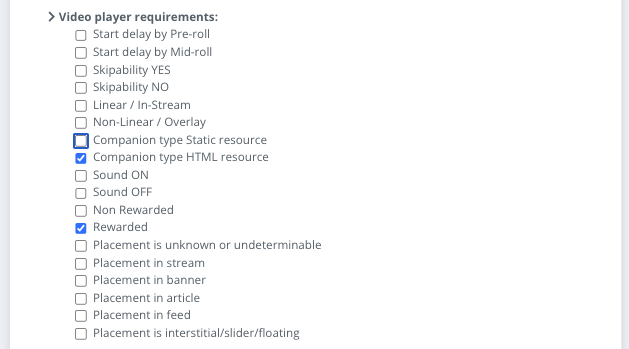
To deliver such campaigns where companion ad needs to be delivered together with the video file we need to select from campaign approve page, under "Video player requirements":
\- Rewarded
and depending on used companion ad type - select
\- Companion type Static or Companion type HTML
[](https://manual.eskimi.com/uploads/images/gallery/2024-01/bP7X9NpXpM8aIbEi-image-1705421095299.png)
Currently such campaigns should be delivered only under these exchanges:
\- Unity
\- Verve
\- Pubmatic
\- Magnite DV+
\- Inmobi exchange
\- Equativ
# Rewarded Video with nCard
#### **Introduction**
This feature allows us to show video ad and display ad together for the same "impression". Our special [rewarded](https://manual.eskimi.com/books/rewarded-video-campaigns/page/rewarded-video) video traffic segment allows us to serve video+end card through companion ad attribute. While uploading video MP4 file, using VAST URI, together we will add companion ad - either static or html/js creative tag.
End card gets 5s as default to view so it’s also always viewable element. If user interacts with HTML/JS tag, creative stays open till user decides to close it.
In campaign reporting companion ad will have "Companion impression" and "Companion clicks" metrics under “Event metrics” part. Companion clicks also reflects on main reporting data.
---
#### **Practical implementation**
To create video VAST campaign with end card, you just need to follow standard video VAST + companion ad upload process we [have here >>](https://manual.eskimi.com/books/creatives/page/how-to-upload-video-ads/) just don't forget to add companion banner. Companion banner should be one from most popular sizes: 300x250px, 320x480px, or 480x320px.
**Remember:** as all inventory will be delivered in-app environment, we need to select only OMID viewability targeting.
[](https://manual.eskimi.com/uploads/images/gallery/2024-01/POsWXsQT6D0owd5z-image-1705420031378.png)
"Skip after seconds" default value can be changed but not recommended to change to 0. Value should be from 5-30s. By adding longer skip value, we are filtering supported bid requests and most common is 5s.
3rd party verification tools can be used only with static and simple HTML/JS creatives (without MRAID library support in html).
---
#### **Preview**
After creating VAST video creative with companion we will get separate assets preview in creative edit form. We can re-upload video for same creative. We can re-upload static companion image, we can edit HTML or just re-upload a new version of HTML zip.
Real creative preview will be showed in campaign preview page, where companion ad will be delivered after video.
[](https://manual.eskimi.com/uploads/images/gallery/2024-01/gnQtG17S4BrkufW4-image-1705420784980.png)
---
#### **Campaign delivery**
To deliver such campaigns where companion ad needs to be delivered together with the video file we need to select from campaign approve page, under "Video player requirements":
\- [Rewarded](https://manual.eskimi.com/books/rewarded-video-campaigns/page/rewarded-video)
and depending on used companion ad type - select
\- Companion type Static or Companion type HTML
[](https://manual.eskimi.com/uploads/images/gallery/2024-01/bP7X9NpXpM8aIbEi-image-1705421095299.png)
Currently such campaigns should be delivered only under specific exchanges. Please check [here](https://manual.eskimi.com/books/creatives/page/rewarded-video-with-ncard) or contact our Adops for more information.