
Contextual Creative
⚡ QUICK ANSWER
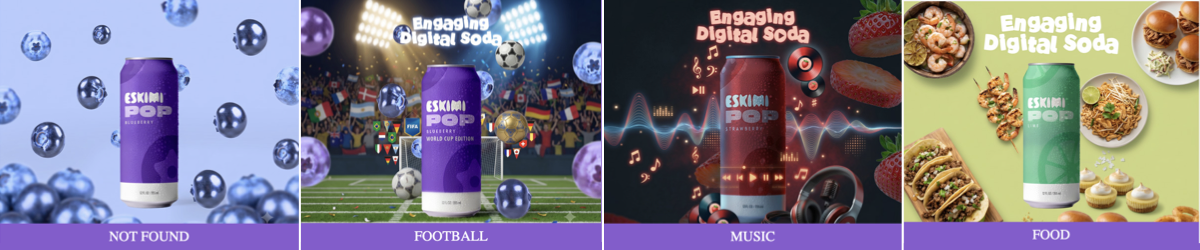
Dynamic Contextual Creative allows one banner to display different creative versions depending on the content of the page where the advert appears.
Instead of showing the same message everywhere, the banner can adapt to relevant topics such as food, football or music.
-
Several pre-built creative versions
-
A list of keywords linked to each version
-
One default version
When the advert is served, Eskimi receives contextual keywords describing the page. The banner compares these with the approved keyword lists and displays the most relevant creative version.
If there is no matching keyword, the default version is shown.
*View the interactive preview here.
One banner automatically selects the creative version most relevant to the page.
💬 SIMPLE CLIENT EXPLANATION
Dynamic Contextual Creative allows one banner to adapt its visual or message according to the topic of the page. We create several approved versions in advance and connect each one to relevant keywords. When contextual keyword data is available, the banner automatically displays the best-matching version. If there is no match, it displays the approved default creative.
Need more detail? Read the explanations below👇
🧠 WHAT DOES “CONTEXTUAL” MEAN?
Contextual advertising uses the subject of the page to determine which advert or creative version to show. For example:
| PAGE CONTENT | CREATIVE SHOWN |
|---|---|
| Recipes, restaurants or food | Food creative |
| Football results or sports news | Football creative |
| Artists, concerts or playlists | Music creative |
| No matching topic | Default creative |
This helps the advert feel more relevant to what the person is currently reading.
*It does not use the person’s identity or require us to know who they are.
⚙️ HOW IT WORKS
1. WE CREATE THE CREATIVE VERSIONS
Creative Studio builds several approved visual versions inside one master banner. For example:
-
Food
-
Football
-
Music
-
Default
These versions must be created and approved before the campaign launches.
2. WE CREATE KEYWORD LISTS
Each creative version is connected to a list of relevant words and phrases. For example:
| CATEGORY | EXAMPLE KEYWORDS |
|---|---|
| Food | Recipe, chicken, vegan, crispy, restaurant |
| Football | FIFA, match, striker, goalkeeper, Premier League |
| Music | Playlist, concert, festival, remix, Afrobeats |
The final keyword lists should reflect the campaign, market, language and content the client wants to target.
3. THE PLATFORM PASSES THE PAGE KEYWORDS
When available, the Eskimi platform passes contextual keywords into the banner using the {contextual_keywords} macro.
A macro is a placeholder that the platform automatically replaces with information when the advert is served.
4. THE BANNER SELECTS THE BEST MATCH
A suitable creative is always available, even when contextual keyword data is not.
🔍 WHAT THIS PRODUCT IS - AND IS NOT
| IT IS | IT IS NOT |
|---|---|
| One master banner containing several approved creative versions | A new banner generated live for every page |
| Based on the topic of the page | Based on the identity of the user |
| Controlled by predefined keyword lists | AI making independent creative decisions |
| Designed to improve contextual relevance | A guarantee that keywords will be available on every impression |
| Supported by a default fallback creative | Dependent on a match for the advert to display |
The banner does not independently scan the page. It uses contextual keywords supplied by the advertising platform when they are available.
🎯 WHAT IS IT GOOD FOR?
Dynamic Contextual Creative is useful when one campaign can connect naturally with several content categories.
It can help advertisers:
-
Make one campaign relevant across different page topics
-
Adapt the visual message without creating separate campaign setups
-
Match products or messages to suitable content environments
-
Reduce the repetition of showing one visual everywhere
-
Test different creative approaches within one campaign
-
Scale a central campaign idea across multiple interests
-
Maintain a relevant fallback when no context matches
💡 POSSIBLE USE CASES
- FMCG: Show different products or serving occasions alongside relevant recipes, food articles or lifestyle content
- SPORTS SPONSORSHIP: Display a sports-themed version on football or tournament content while using a broader brand version elsewhere
- MUSIC AND ENTERTAINMENT: Use different creative versions around artist news, streaming, festivals or entertainment content
- RETAIL: Match product categories with relevant page topics, such as fashion, electronics, homeware or beauty
- TRAVEL: Adapt the creative around destination, food, culture, adventure or family-travel content
- AUTOMOTIVE: Show different messages around performance, technology, family travel or sustainability
✅ WHEN TO RECOMMEND IT
This format works best when:
-
The campaign has one central brand idea
-
The idea can be adapted into at least two meaningful contexts
-
Each context has a clear visual or message
-
The client has enough assets to build the variations
-
Relevant page topics can be described using clear keywords
-
A suitable default creative can be created
-
The campaign will run across enough relevant content to make adaptation valuable
⚠️ WHEN IT MAY NOT BE THE RIGHT FORMAT
It may not add value when:
-
The campaign has only one message and one visual
-
The client cannot provide assets for multiple versions
-
The categories are too similar to create meaningful differences
-
The required context cannot be identified through clear keywords
-
The client expects unique content to be generated in real time
-
The campaign depends on every impression receiving a contextual match
-
The selected inventory does not consistently provide contextual keywords
Speak to Creative Studio before promising the format or the number of contextual versions.
📦 WHAT WE NEED FROM THE CLIENT
CAMPAIGN INFORMATION
-
Campaign objective
-
Target market
-
Campaign language or languages
-
Target audience
-
Planned media investment
-
Campaign dates
-
Required banner sizes
-
Final destination URL
CREATIVE DIRECTION
-
The central campaign idea
-
The required contextual categories
-
The message for each category
-
The default message
-
Final CTA
-
Visual references
-
Any mandatory legal copy
CREATIVE ASSETS
-
Editable, layered source files
-
Brand guidelines
-
Logos
-
Font files
-
Product images
-
Backgrounds or lifestyle imagery
-
Any category-specific assets
*See "What Are Open Files?" for accepted editable file types.
📝 HOW TO PLAN THE CREATIVE VERSIONS
Each contextual version should feel clearly relevant while still belonging to the same campaign. For example:
| ELEMENT | WHAT CAN CHANGE |
|---|---|
| Brand identity | NO |
| Main campaign idea | NO |
| Product | YES |
| Background | YES |
| Supporting images | YES |
| Headline | YES |
| Animation details | YES |
| CTA | YES |
| Legal copy | NO |
The differences should be meaningful. Changing only a small decorative element may not create enough value to justify a dynamic setup.
🛟 THE DEFAULT CREATIVE
The default creative is shown when:
-
Contextual keywords are unavailable
-
None of the keywords match
-
The page topic falls outside the planned categories
The default should therefore be a strong, complete advert that can work in any suitable environment. It must not look like an error message, placeholder or less important version.
🛠️ SETUP PROCESS
STEP 1: CONFIRM THE OPPORTUNITY
STEP 2: AGREE ON THE CATEGORIES
Confirm the creative categories before production begins. For example:
-
Food
-
Football
-
Music
-
Default
Adding new categories later may affect the scope and delivery timeline.
STEP 3: PROVIDE THE ASSETS
Supply all editable files, copy, logos, fonts, product images, category-specific assets and legal requirements.
STEP 4: AGREE ON THE KEYWORDS
Create and review a keyword list for each category. Confirm languages, local terminology and any excluded topics.
STEP 5: BUILD THE CREATIVE
Creative Studio designs the versions and develops the matching logic inside one master banner.
STEP 6: REVIEW EVERY VERSION
The client must review and approve:
-
Each contextual creative
-
The default creative
-
The keyword categories
-
Copy and CTA
-
Legal requirements
-
The overall banner behaviour
STEP 7: LAUNCH
The campaign team confirms that the {contextual_keywords} macro is available and correctly passed into the banner.
Final availability may depend on the selected inventory and whether contextual keyword data is supplied for the impression.
❓ FREQUENTLY ASKED QUESTIONS
- IS THE CREATIVE GENERATED LIVE?
- No; all creative versions are designed, built and approved before launch
- DOES IT USE AI?
- Not to generate the advert at serve time; the banner follows predefined matching rules and approved keyword lists
- WHAT HAPPENS IF NO KEYWORDS ARE AVAILABLE?
- The default creative is displayed
- DO WE NEED A SEPARATE BANNER FOR EVERY CATEGORY?
- We need a separate visual version for each category, but the versions are contained inside one master creative set
- CAN THE COPY CHANGE?
- Yes; copy may change by category if this is agreed, supplied and approved before launch
- CAN WE ADD MORE CATEGORIES AFTER PRODUCTION STARTS?
- Possibly, but this changes the production scope and may affect the timeline
- Possibly, but this changes the production scope and may affect the timeline
- HOW MANY CATEGORIES SHOULD WE USE?
-
Use enough categories to make the campaign meaningfully relevant, but not so many that the assets, keywords and approval process become difficult to manage
-
Creative Studio will confirm a practical scope for each campaign
-