
API Overview
The Eskimi DSP API lets advertisers and agencies do through code what they do in the DSP: create and manage campaigns, creatives, audiences and packages, optimise delivery, and pull reports. It is for teams that want to automate their work or connect the DSP to their own tools.
What You Can Do With the API
| Area | What you can do |
|---|---|
| Campaigns | Create and update banner, native and video campaigns; start, stop and delete them; read their status; change budget pacing (Even or None) without touching any other setting. |
| Optimisation | Read campaign optimisation data, and start or stop delivery by exchange, creative, operating system, browser, operator, site or app, placement or package — the same actions as the Optimisation table in the DSP. Each option must be enabled for the advertiser. |
| Packages | Create, list, rename and delete apps/sites or placement packages, and add or replace their domains (up to 50,000 per request). |
| Creatives | Create, update, list and delete creative sets and creatives; upload banner and native assets. |
| Audiences | Create, update and delete behavioural and DMP audiences; list audience interests. |
| Brand safety | Create and list brand safety keyword sets. |
| Reports | Campaign reports and their splits (sites, exchanges, creatives, operating systems, operators, browsers, placements, age, gender and more), video reports, device ID reports, and period totals including deduplicated reach. |
| Reference data | The IDs that campaign settings use: countries and states, operators, devices, exchanges, sites, ad placements, age groups, genders and private marketplaces. |
| Invoices | Invoice details and the invoice PDF. |
The full list of endpoints, parameters and examples is in the API documentation: https://dsp-api.eskimi.com/docs/api/v1/
How Access Tokens Work
Every API call needs an access token. The token tells the API who is calling and what that account may do.

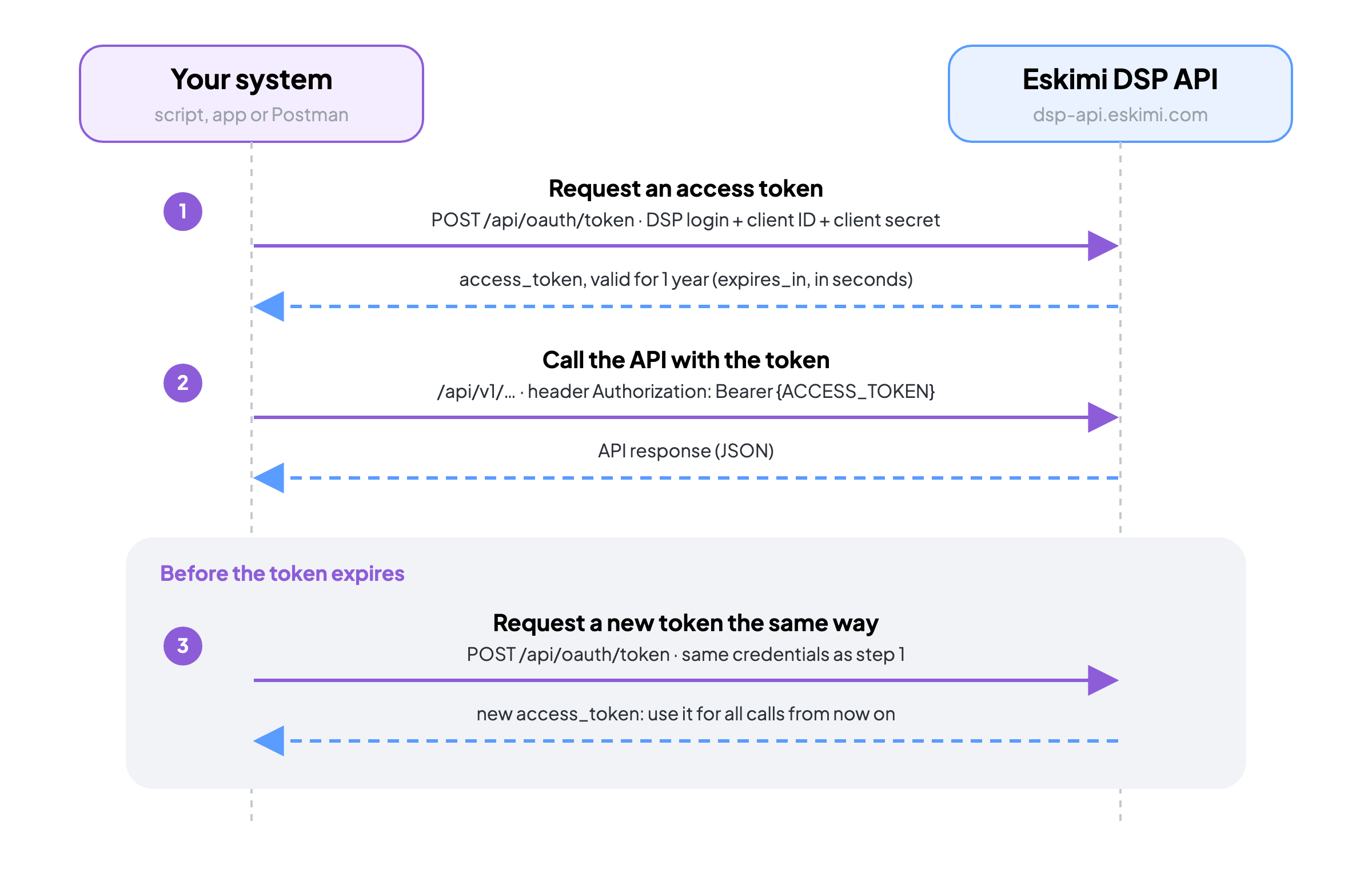
Get an access token: generate it in the DSP, or request it with an HTTP call. Both ways are described in How to Use the API.
Send the token in the
Authorizationheader of every call:Authorization: Bearer {ACCESS_TOKEN}A token is valid for one year. When you request it with an HTTP call, the response states its lifetime in seconds (
expires_in). Before it expires, request a new token the same way and use the new one from then on.
From a parent account, the same token also gives access to the data of its child accounts.
Summary
The API covers campaigns, optimisation, packages, creatives, audiences, brand safety, reports and invoices. Get a token once, send it with every call, and renew it before it expires. For a ready-made set of requests, see API Postman Template.