
How to Use the API
This page shows how to start using the Eskimi DSP API: create an API client, get an access token and make your first call. For what the API can do, see API Overview.
Create an API Client
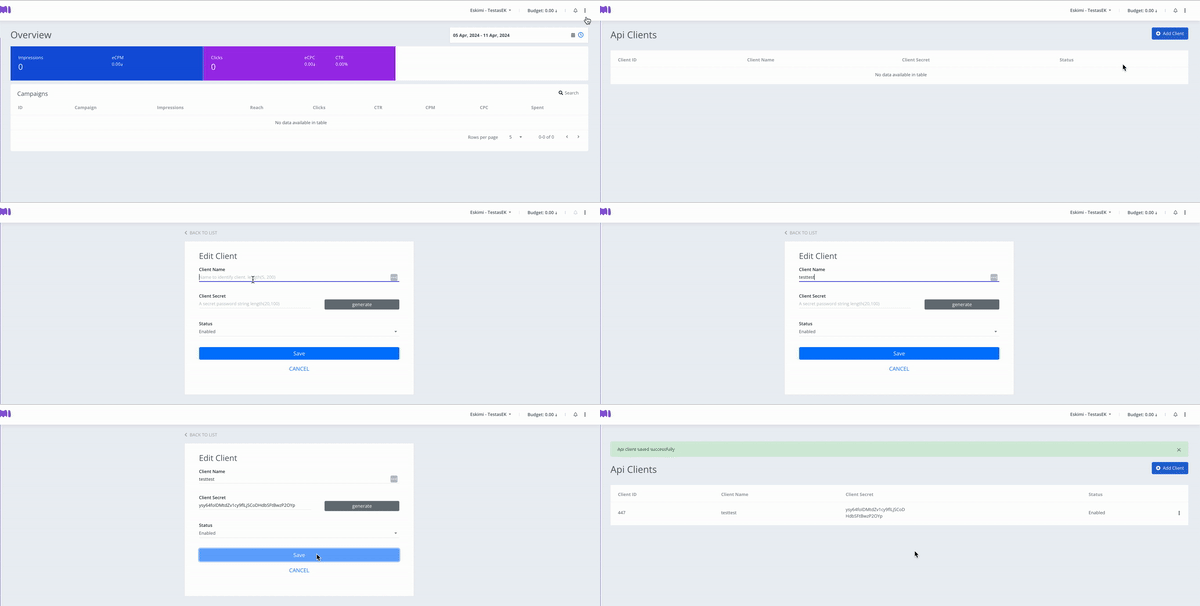
In the DSP, click the three-dot icon in the top right corner.
Click API Clients.
Click Add Client in the top right corner.
Enter a Client name (any name; it is not used in the token) and click Generate next to Client Secret.
Click Save. The client is created, and you can now get an access token for it.
Get an Access Token
There are two ways to get a token. Both give a token that is valid for one year.
a. In the DSP
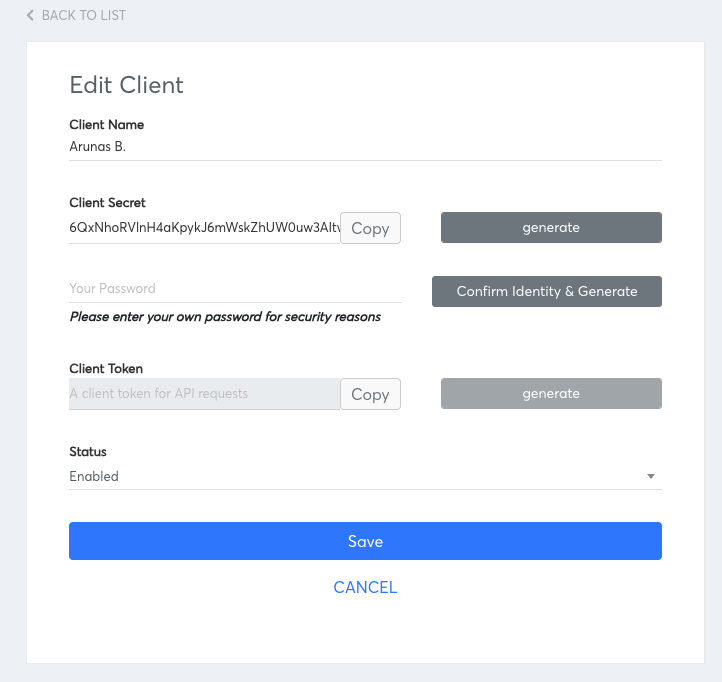
Click the three-dot icon next to your client, then Edit.
Click Generate Client Token.
Enter your account password and click Confirm Identity & Generate.
Click Copy to keep the token, then click Save.
b. With an HTTP Request
Send a POST request to https://dsp-api.eskimi.com/api/oauth/token with this body (documentation: https://dsp-api.eskimi.com/docs/api/auth/):
{
  "grant_type": "eskimi_dsp",
  "username": "your DSP login email",
  "password": "Password",
  "client_id": client_id,
  "client_secret": "client_secret"
}
The response contains the access_token and its lifetime in seconds (expires_in). Request a new token the same way before it expires.
Make Your First Call
Send the token in the Authorization header. For example, a campaign report:
curl 'https://dsp-api.eskimi.com/api/v1/report/campaigns/get?advertiserId=1&byDate=1&byCampaign=1&dateFrom=2026-01-01&dateTo=2026-01-30' \
-H 'authorization: Bearer {ACCESS_TOKEN}'
The token belongs to your user and works for every advertiser your user has access to. Choose the advertiser with the advertiserId parameter in each request.
All endpoints, parameters and examples are in the API documentation: https://dsp-api.eskimi.com/docs/api/v1/. To try them without writing code, import the API Postman Template.
Watch the video for a walk-through:
What the API Can and Cannot Do
Campaigns, packages, creatives, audiences, brand safety sets and optimisation (start or stop by exchange, creative, operating system, browser, operator, site or app, placement or package) can all be managed through the API. See API Overview for the full list.
Video campaigns can be created through the API, but video creatives must first be uploaded in the DSP: the API uploads banner and native assets only.
Not every reporting split in the DSP is available in the API. The available splits are listed here.
Total reach for a period comes from
/report/totalsand matches DSP reporting. Do not add up the dailyreachvalues from the split reports: one user is counted again on every day they were reached.Reports return spend in USD or in the advertiser's local currency, depending on the
spentBasedparameter.
Summary
Create an API client in the DSP, get a token (in the DSP or with an HTTP request), and send it with every call. Renew the token before it expires after one year.