
NEW TOOL: Eskimi Event Checker
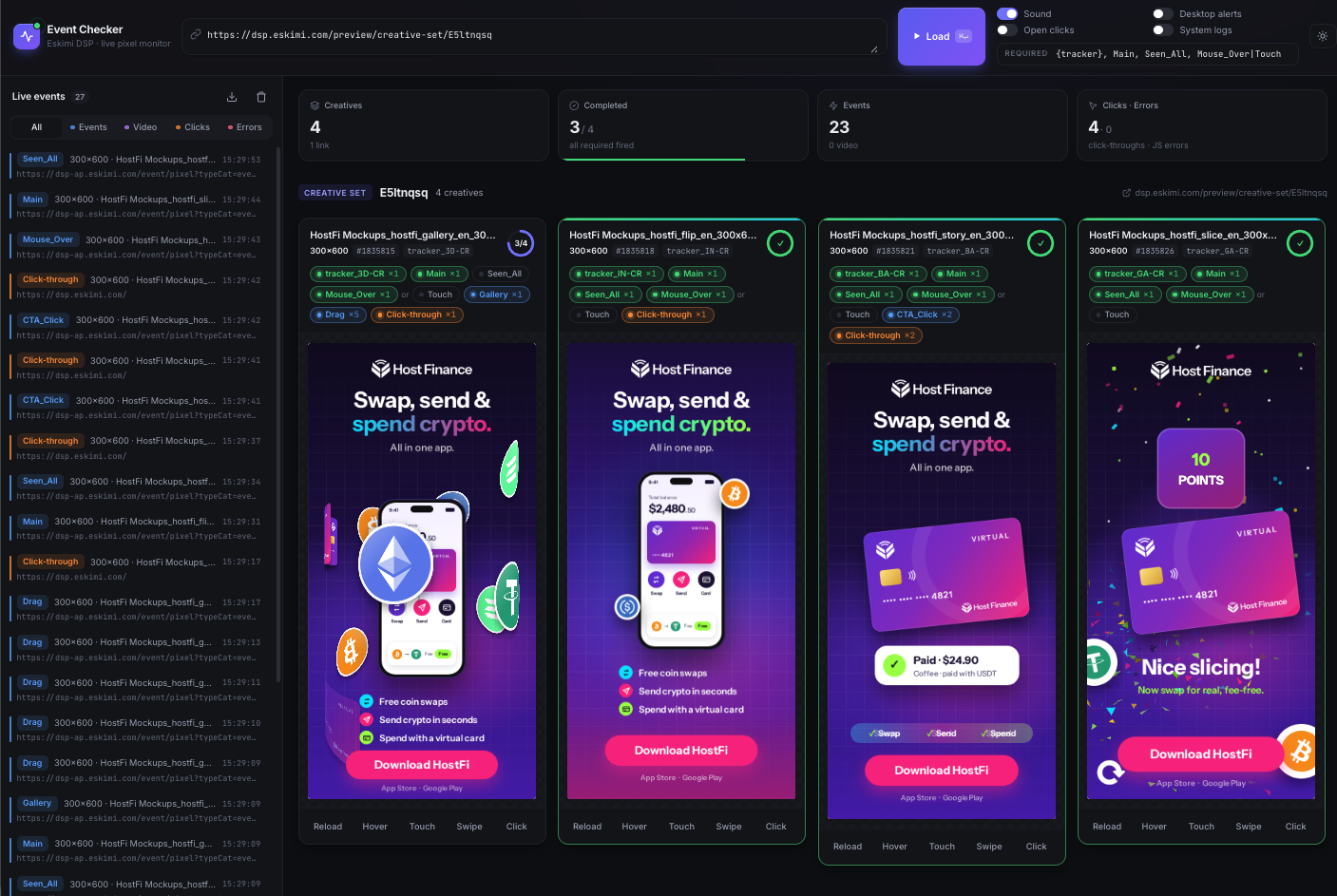
👉 Access the Event Checker 🔗HERE.
👯 WHO IT'S FOR
- Anyone who needs to confirm a rich media banner is reporting correctly:
- Creative Studio
- Ad Ops
- BDMs
🤔 WHAT IT'S FOR
- Every rich media banner fires small signals back to Eskimi when something happens: it loads, someone interacts with it, a video plays, someone clicks.
- These signals are called tracking pixels or events, and they become the numbers in campaign reports.
- If an event is missing or broken, the banner can look perfect and the report will still be wrong.
- Until now, checking this meant digging through the browser’s developer tools, which was slow and may have needed technical knowledge.
Now, the Event Checker shows every event the moment it fires, so anyone can check a banner in a couple of minutes 🙌
🛠️ HOW TO USE IT
- Open the tool link.
- Paste one or more Eskimi preview links into the box. To check several banners side by side, paste one link per line. Supported links:
- Each banner plays live on screen.
- Interact with the banner as a user would: hover, tap, swipe, play the video, click. On a laptop, use the Simulate buttons to mimic mobile actions.
- Every signal pops up as an alert the moment it fires.
- Watch the Required Events Checklist for each banner. The progress ring turns green once every required event has fired:
- tracker (`x-rm-alias`)
- Main
- Seen_All
- Mouse_Over
- Touch
- *The checklist can be edited if a specific format needs different events
- Every event is caught:
- Engagement events
- The tracker
- Video events (start → quartiles → complete)
- Click-throughs
✋ ALSO HANDY
- Error warnings: Flags problems reported by the banner itself (JS errors and "console.error") like a missing ticket ID or tracker ⚡️
- Live alerts: On-screen alerts, a sound, optional desktop notifications, and an unread count in the browser tab 🔔
- Live log: a running list of every event, filterable by Events, Video, Clicks or Errors, with the full pixel URL for each 📊
- CSV export: download the log as a spreadsheet 📄
- Simulate buttons: Hover, Touch, Swipe and Click, so you can test mobile behaviour without a phone 👆
- Mobile friendly: works on phones, and swipe banners also work in Chrome’s mobile preview mode 📱
- Dark mode 🌑
✅ GOOD TO KNOW
- Testing is safe: Pixels fire in test mode (`test=1`), the same as the official preview, so they won’t affect real campaign numbers
- Clicks don’t open the advertiser’s website: They’re logged, but no new tab opens unless you switch on “Open clicks”
- Shortcut link: add
?url=followed by a preview link to the end of the tool link, and it opens with that banner already loaded:- EG: ?url=<preview-link>
- Useful for sending a ready-to-check link to someone else